
言語を選択する

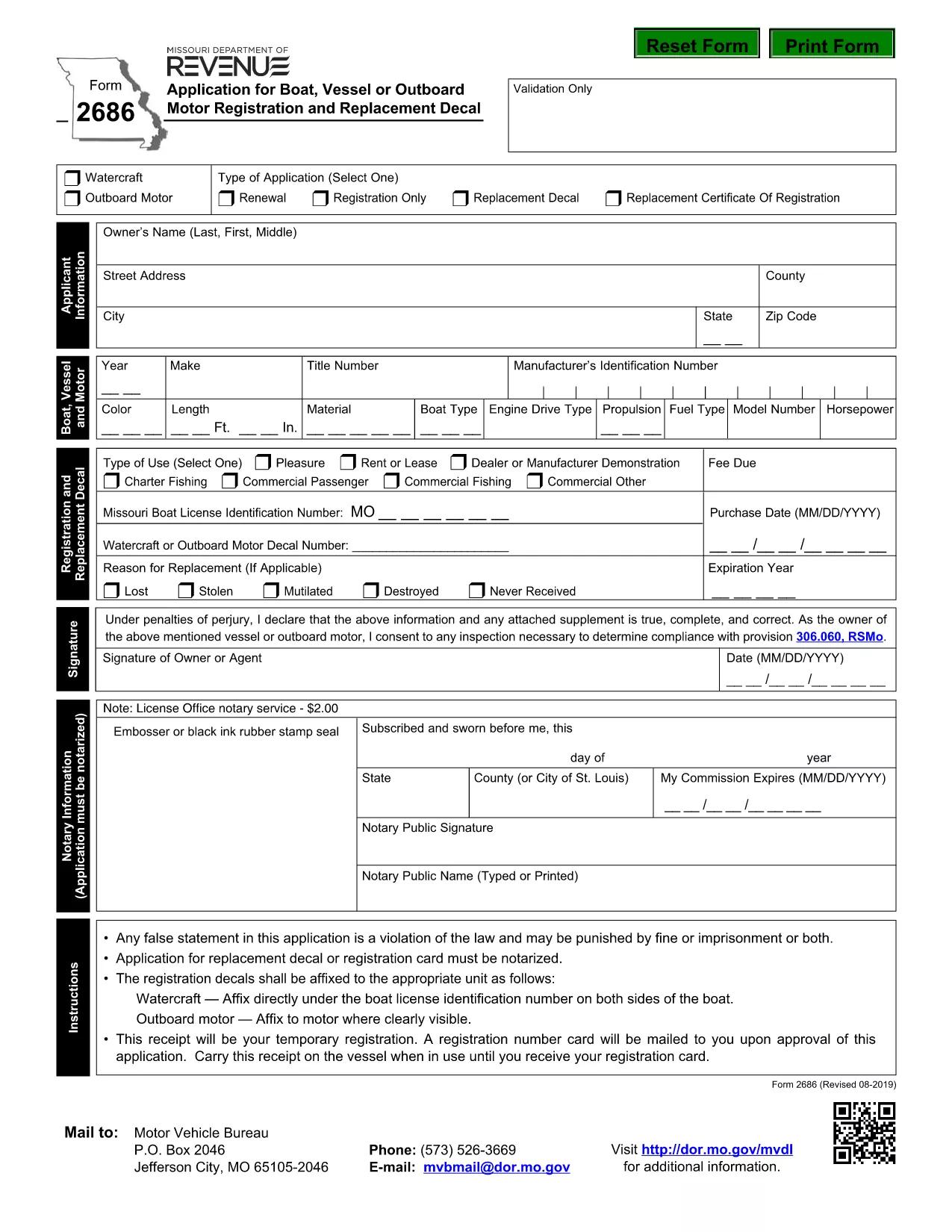
Form 2686 – Boat, Vessel & Outboard Motor Registration

  1. 言語 英語
  2. アメリカ合衆国
  3. アクティビティ 車両登録
  4. ミズーリ
Form 2686 – Boat, Vessel & Outboard Motor Registration

Form 2686 is the official Missouri Department of Revenue application used to register boats, vessels, and outboard motors. Whether you’re a first‑time owner or renewing a decal, this fillable PDF lets you complete the form quickly and accurately.

Key benefits of using Formize’s online PDF filler:

  • Instantly load the PDF in your browser – no software download required.
  • Auto‑save your progress as you type.
  • Validate required fields before you submit.
  • Download a completed copy for your records.

The form collects essential information such as vessel identification, owner details, motor specifications, and the type of registration you need. Providing accurate data helps avoid processing delays and ensures your decal is issued on time.

Below you’ll find step‑by‑step instructions, common pitfalls, and answers to the most frequently asked questions about Form 2686.

よくある質問
  • What is Form 2686 used for?

    Form 2686 is the Missouri Department of Revenue application for registering boats, vessels, and outboard motors, as well as obtaining replacement decals.

  • Do I need a Missouri driver’s license to complete this form?

    No. The form requires proof of ownership and vessel identification, not a driver’s license.

  • Can I submit the form electronically?

    Missouri still requires a printed, signed copy for most registrations. Use the online filler to complete and print the form, then mail it as instructed.

  • How much does the registration cost?

    Fees vary by vessel type and size. Refer to the fee schedule on the Missouri Department of Revenue website for the most up‑to‑date rates.

  • What should I do if I make a mistake after printing?

    Correct minor errors with a single line strike‑through and initial the change. For major errors, complete a new Form 2686.

  • Is there a deadline for renewing my boat registration?

    Yes. Registrations must be renewed annually by the expiration date printed on your decal. Late renewals may incur penalties.

方法

オンラインで 4 回の簡単なステップで Form 2686 を無料で入力する方法:

  1. 1
    Open the Form
    On this page click the **Fill out this form** button. The Formize PDF Filler will load the Form 2686 directly in your browser.
  2. 2
    Enter Required Information
    Type your data into each highlighted field. The filler automatically checks for missing or incorrectly formatted entries.
  3. 3
    Validate and Save
    When all required fields are green, click **Validate**. Then press **Save** to download a completed copy for your records.
  4. 4
    Print or Submit
    Print the filled form with your decal sticker, or follow the submission instructions provided in the PDF to mail it to the Missouri Department of Revenue.
Formize PDF Filler アプリ
だいたい

車両登録フォーム

自動車、トレーラー、またはボートを所有またはリースしている場合は、車両を合法的に登録し、安全に保つという特定の義務を果たさなければなりません。

Form 2686 は、車両登録フォームの 1 つで、自動車を関連する州または地方当局に登録するために使用される書類です。これらのフォームは通常、人が新車または中古車を購入するとき、または車を持って新しい州または州に移動するときに必要です。

車両登録に必要な正確な要件とフォームは場所によって異なる場合がありますが、一般的に、プロセスには車両、所有者、および車両の先取特権に関する情報を提供することが含まれます。

登録フォームと手数料が提出されると、州または地方当局は車両の所有者に登録証明書またはナンバープレートを発行します。この登録により、車両は公道および高速道路で合法的に運転することができます。

特徴

PDFフィラー

オンラインで PDF フォームに記入する最も簡単な方法

  • Form 2686 をすばやく入力してください
    Form 2686 をオンラインですばやく入力する方法をお探しですか?オンラインの無料 PDF フォーム フィラーを使用すると、この PDF ドキュメントを 1 分以内に編集して入力する方法がわかります。
  • 使いやすいオンライン PDF エディター
    再スキャンして返送する前に、編集できるように PDF ファイルを印刷することにうんざりしていませんか? PDFドキュメントをオンラインで無料で編集.当社のオンライン PDF エディターを使用して、時間と紙を節約してください。
  • 優れたツール、すべてのプラットフォーム
    Mac で Form 2686 を入力する方法や、PDF フィラーを無料で使用する方法を知りたいですか?当社のオンライン PDF ツールは、すべてのプラットフォームで動作します。
  • 安全なファイル ストレージ
    完成した「Form 2686」ファイルは、Amazon クラウド ホスティングが管理する安全なデータベースに保存されます。いつでもシステムからファイルを削除できます。いずれにせよ、これらのファイルは 24 時間後に自動的に削除されます。
  • {キーワード} とチャットする
    無料の PDF リーダー アシスタントである Chatize で「Form 2686」とチャットします。質問すると、「Form 2686」から回答が得られます。上の [ドキュメントとチャット] ボタンをクリックするだけです。

フィルセッションを削除

選択したフィルセッションを削除しますか?この場合、フォームへの記入の進捗状況は失われます。

編集セッションを削除する

選択した編集セッションを削除しますか?この場合、フォームの作成および編集の進行状況は失われます。