
言語を選択する

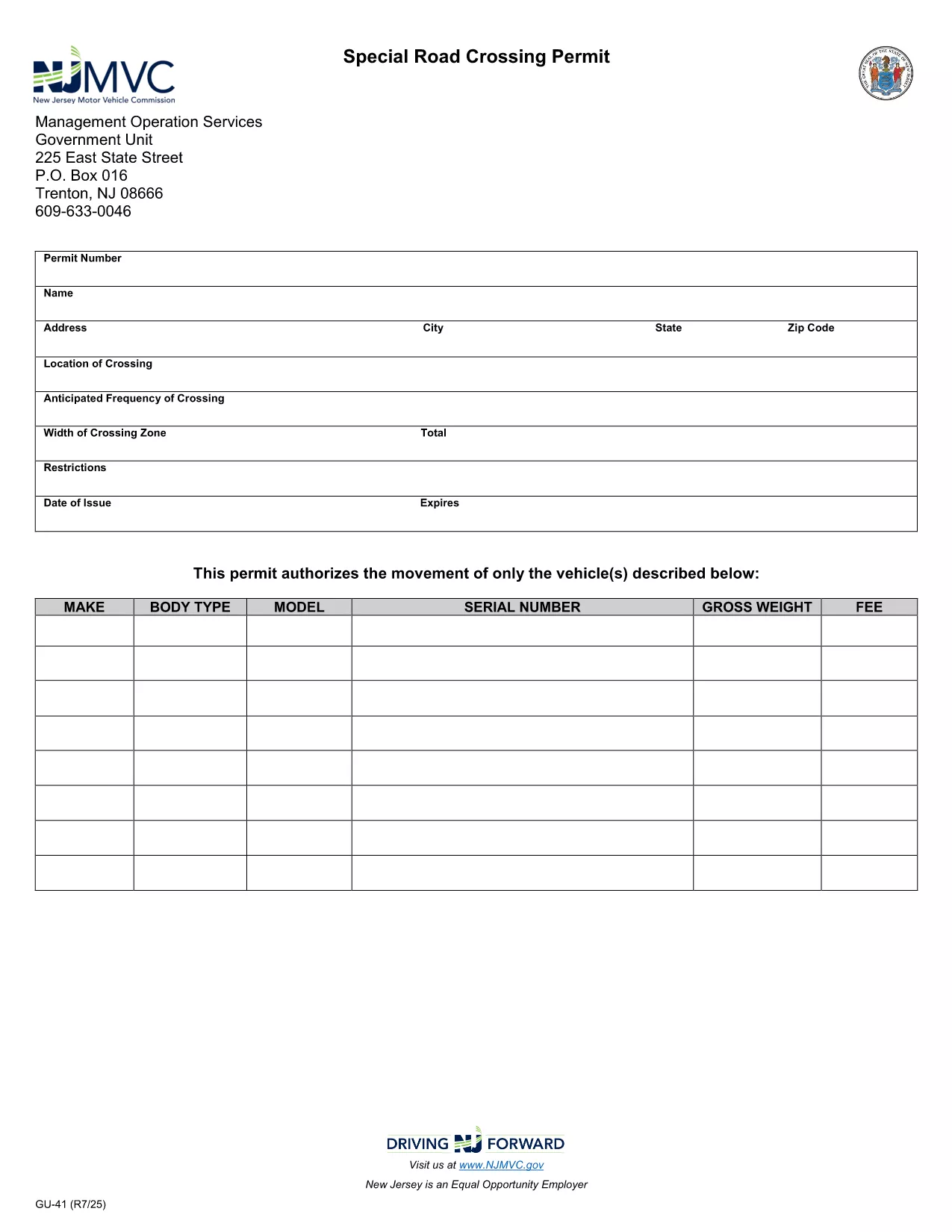
GU-41A Road Crossing Permit – Fillable PDF Download

  1. 言語 英語
  2. アメリカ合衆国
  3. アクティビティ 車両登録
  4. ニュージャージー
GU-41A Road Crossing Permit – Fillable PDF Download

The GU-41A is New Jersey’s official Road Crossing Permit used for temporary vehicle crossings on state highways. Whether you’re transporting oversized equipment, conducting road work, or need a special crossing for a public event, this form authorizes daylight‑only crossings (or night crossings with proper lighting).

What Is the GU-41A Form?

The GU-41A application collects details about the vehicle(s), driver, crossing location, date, and required safety measures. It is issued by the New Jersey Motor Vehicle Commission (NJ MVC) and must be displayed on the vehicle during the crossing.

How to Complete the GU-41A Online

With Formize’s fillable PDF technology you don’t need any extra software. Follow these simple steps:

  1. Click the "Fill out this form" button on this page.
  2. Wait for the Formize PDF Filler app to load in your browser.
  3. Enter all required information – vehicle details, driver license, crossing dates, and lighting requirements.
  4. Review the data for accuracy and click Submit to generate a completed PDF.
  5. Print the form, sign it where indicated, and attach it to your vehicle as instructed.

Common Mistakes to Avoid

  • Leaving the "Vehicle Height" or "Weight" fields blank.
  • Forgetting to specify if the crossing will occur after dark; night crossings require additional lighting.
  • Submitting the form without a valid driver’s license number.
  • Not printing the signed copy – an electronic version alone is not accepted by NJ MVC.

Where to Submit the Completed Form

After printing and signing, deliver the GU-41A to the nearest NJ MVC office or mail it to:

Motor Vehicle Commission
124 Halsey Street, Trenton, NJ 08625
Phone: (609) 292‑6500

Processing typically takes 3‑5 business days. Keep a copy for your records.

Download the Fillable PDF Now

Ready to start? Click the button below to open the fillable GU-41A PDF directly in your browser via Formize.

よくある質問
  • What is the purpose of the GU-41A form?

    The GU-41A authorizes temporary vehicle crossings on New Jersey state highways, ensuring safety and compliance with lighting requirements.

  • Who needs to fill out a GU-41A?

    Any individual or company transporting oversized or special‑purpose vehicles that require a temporary crossing on a state road must complete the GU-41A.

  • Can I submit the GU-41A electronically?

    No. The NJ MVC requires a printed, signed copy of the completed form to be submitted in person or by mail.

  • Is there a fee for the GU-41A permit?

    Yes, a processing fee is assessed by the MVC. The exact amount varies; check the latest fee schedule on the NJ MVC website.

  • How long is the permit valid?

    The permit is valid for the specific dates and times listed on the application, typically up to 30 days for a single crossing.

  • What lighting is required for night crossings?

    Vehicles must have at least two white front lights capable of illuminating objects at 500 feet and two Class‑A amber reflectors on each side.

  • Can I use the same GU-41A for multiple crossings?

    Each crossing requires its own GU-41A application with the specific dates, locations, and vehicle details for that event.

  • How long does it take to process the GU-41A?

    Processing usually takes 3‑5 business days after the signed form is received by the MVC.

  • What should I do if I make a mistake on the form?

    Correct any errors before signing. If you discover a mistake after signing, contact the MVC to obtain a new form.

  • Where can I find the fillable GU-41A PDF?

    Click the "Download the Fillable PDF Now" button on this page to open the official GU-41A PDF hosted by the NJ MVC.

方法

オンラインで 5 回の簡単なステップで GU-41A を無料で入力する方法:

  1. 1
    Open the Fillable Form
    Click the "Fill out this form" button on the page. The Formize PDF Filler will open directly in your browser.
  2. 2
    Enter Required Information
    Complete all fields such as vehicle details, driver license, crossing dates, and lighting requirements.
  3. 3
    Review and Submit
    Double‑check the entered data, then click Submit to generate a completed PDF.
  4. 4
    Print, Sign, and Attach
    Print the filled‑out form, sign where indicated, and attach it to the vehicle as required by NJ MVC.
  5. 5
    Submit to NJ MVC
    Deliver the signed form to your local MVC office or mail it to the address provided on the form.
Formize PDF Filler アプリ
だいたい

車両登録フォーム

GU-41A は車両登録フォームの 1 つで、関連する政府機関 (通常は陸運局 (DMV) または同等の機関) に自動車を登録するために使用される文書です。これらのフォームは、人が新車または中古車を購入する場合、車の所有権を譲渡する場合、または車を持って新しい管轄区域に移動する場合に必要となります。

特定の車両登録フォームは管轄区域によって異なる場合がありますが、通常は次の情報が必要です。

車両情報: これには、メーカー、モデル、年式、車両識別番号 (VIN)、走行距離計の読み取り値などの車両に関する詳細が含まれます。

所有者情報: フォームには、名前、住所、連絡先情報、運転免許証番号など、車両の所有者に関する情報が必要です。

所有権の証明: 状況に応じて、権利証明書、販売請求書、メーカーの製造元証明書 (新車の場合) などの所有権の証明が必要になる場合があります。

保険情報: 通常、有効な車両保険補償の証明が必要です。これには、保険証券番号、補償期間、保険会社の詳細の提供が含まれる場合があります。

料金の支払い: 車両の登録には、登録手数料、税金、場合によっては管轄区域に固有のその他の料金など、さまざまな料金の支払いが伴います。

これらの基本要件に加えて、一部の管轄区域では追加のフォームまたは文書要件がある場合があります。たとえば、特定の地域では、排出ガス試験の結果、安全検査、居住証明が必要になる場合があります。

車両登録フォームに記入して提出すると、政府当局は登録証明書、ナンバープレート、登録ステッカーを発行します。これらの書類は、車両が法的に登録され、公道での走行が許可されていることを示します。

車両の登録要件は管轄区域によって大きく異なる場合があることに注意することが重要です。したがって、お住まいの地域に適用される特定のフォームおよび手順については、地元の DMV または同等の機関に問い合わせることをお勧めします。

特徴

PDFフィラー

オンラインで PDF フォームに記入する最も簡単な方法

  • GU-41A をすばやく入力してください
    GU-41A をオンラインですばやく入力する方法をお探しですか?オンラインの無料 PDF フォーム フィラーを使用すると、この PDF ドキュメントを 1 分以内に編集して入力する方法がわかります。
  • 使いやすいオンライン PDF エディター
    再スキャンして返送する前に、編集できるように PDF ファイルを印刷することにうんざりしていませんか? PDFドキュメントをオンラインで無料で編集.当社のオンライン PDF エディターを使用して、時間と紙を節約してください。
  • 優れたツール、すべてのプラットフォーム
    Mac で GU-41A を入力する方法や、PDF フィラーを無料で使用する方法を知りたいですか?当社のオンライン PDF ツールは、すべてのプラットフォームで動作します。
  • 安全なファイル ストレージ
    完成した「GU-41A」ファイルは、Amazon クラウド ホスティングが管理する安全なデータベースに保存されます。いつでもシステムからファイルを削除できます。いずれにせよ、これらのファイルは 24 時間後に自動的に削除されます。
  • {キーワード} とチャットする
    無料の PDF リーダー アシスタントである Chatize で「GU-41A」とチャットします。質問すると、「GU-41A」から回答が得られます。上の [ドキュメントとチャット] ボタンをクリックするだけです。

フィルセッションを削除

選択したフィルセッションを削除しますか?この場合、フォームへの記入の進捗状況は失われます。

編集セッションを削除する

選択した編集セッションを削除しますか?この場合、フォームの作成および編集の進行状況は失われます。