
言語を選択する

MV-82D Duplicate Title Form – Fill Online for Free

  1. アメリカ合衆国
  2. 言語 英語
  3. アクティビティ 車両登録
  4. ニューヨーク
MV-82D Duplicate Title Form – Fill Online for Free

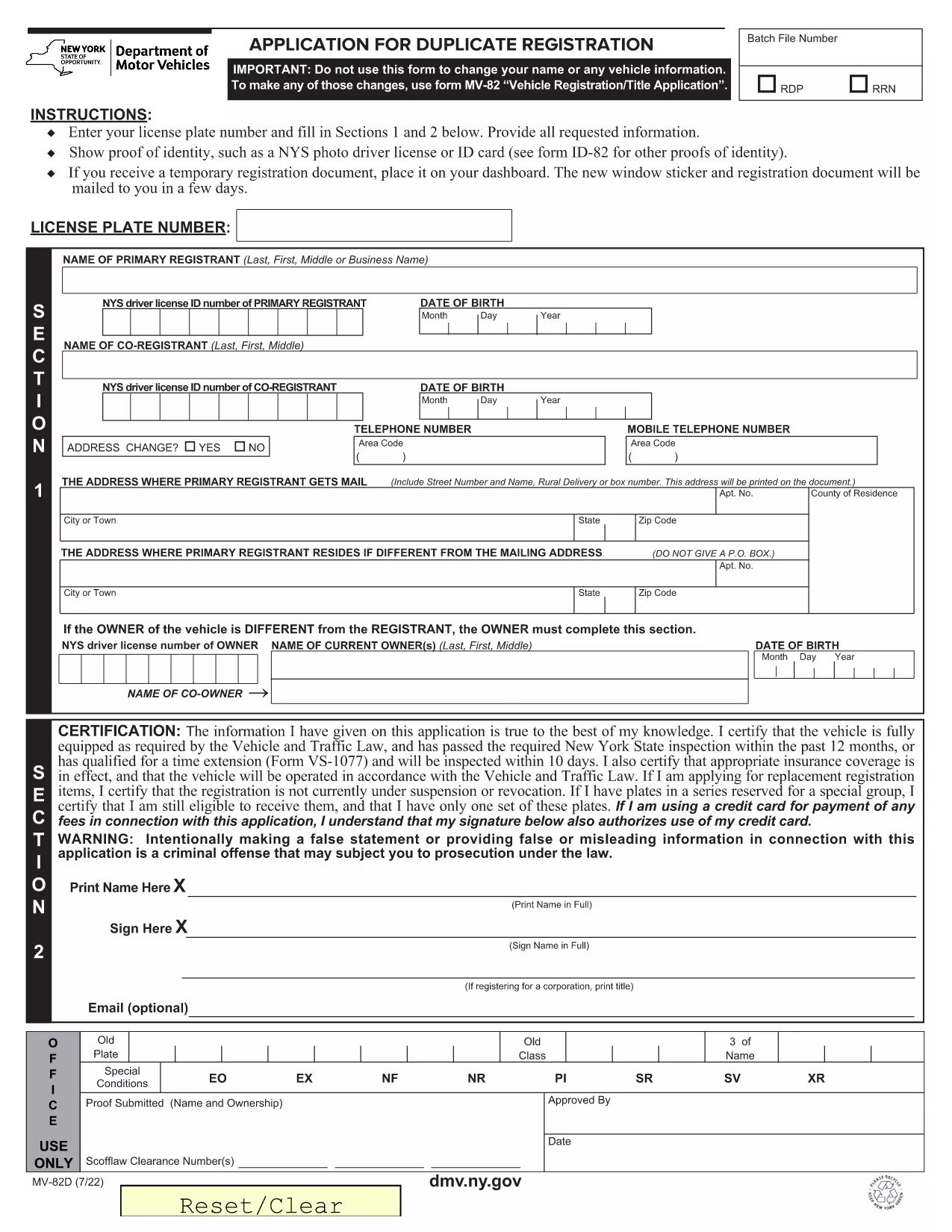
What Is the MV-82D Form?

The MV-82D is the New York State Department of Motor Vehicles (DMV) application used to request a duplicate vehicle title. It is required when the original title is lost, damaged, or stolen. The form captures vehicle information, owner details, and the reason for the duplicate request.

How to Complete the MV-82D Online

With Formize you can fill out the MV-82D directly in your browser—no PDF editor needed. Follow these simple steps:

  1. Click the "Fill out this form" button on this page.
  2. Wait a few seconds while the Formize PDF Filler app loads the fillable version of the MV-82D.
  3. Enter the required information in each field. The form automatically validates dates, VIN numbers, and fee amounts.
  4. Review your answers, then click Submit to download the completed PDF.

After downloading, you can print the document and take it to your local DMV office or mail it with the required payment.

Common Mistakes to Avoid

  • Incorrect VIN: Double‑check the Vehicle Identification Number; a single digit error will cause the DMV to reject the form.
  • Missing Signature: The owner’s signature is mandatory. Use the digital signature tool in Formize or sign after printing.
  • Wrong Fee Amount: The duplicate title fee changes periodically. Verify the current fee on the NY DMV website before submitting.
  • Out‑of‑date Address: Ensure your mailing address matches the one on file with the DMV.

Where to Submit Your Completed Form

Once you have the filled‑out MV-82D PDF, you can:

  • Visit any NY DMV office in person.
  • Mail the form with a check or money order for the duplicate title fee to the address listed on the form.
  • Use the NY DMV online portal (if you have a MyDMV account) to upload the PDF.

Download the Official PDF

If you prefer the original, non‑fillable PDF, you can download it directly from the NY DMV:

Download MV-82D – Duplicate Title Form (PDF)

よくある質問
  • What is the MV-82D used for?

    The MV-82D is the application for obtaining a duplicate vehicle title in New York State when the original title is lost, stolen, or damaged.

  • Can I submit the MV-82D electronically?

    Yes. After filling it out with Formize, you can upload the completed PDF through the NY DMV online portal or email it if your local office accepts electronic submissions.

  • How much does a duplicate title cost?

    The fee varies; check the current duplicate title fee on the NY DMV website before submitting your payment.

  • Do I need a notarized signature on the MV-82D?

    No notarization is required for a duplicate title, but the owner’s signature must be present and legible.

  • What documents should I attach with the MV-82D?

    Include a copy of your driver's license or ID, proof of ownership (if requested), and the payment method (check or money order).

  • Is the Formize filler compatible with mobile devices?

    Yes, Formize works on most modern smartphones and tablets, allowing you to complete the MV-82D on the go.

方法

オンラインで 4 回の簡単なステップで MV-82D を無料で入力する方法:

  1. 1
    Click the Fill‑out Button
    Press the "Fill out this form" button on the page to launch the Formize PDF Filler.
  2. 2
    Wait for the Filler to Load
    The app loads the MV-82D as a fillable document in a few seconds—no download required.
  3. 3
    Enter Your Information
    Complete each field. Formize validates entries in real time, reducing errors.
  4. 4
    Download or Print
    When finished, click "Submit" to download the completed PDF. Print it for DMV submission.
Formize PDF Filler アプリ
だいたい

車両登録フォーム

自動車、トレーラー、またはボートを所有またはリースしている場合は、車両を合法的に登録し、安全に保つという特定の義務を果たさなければなりません。

MV-82D は、車両登録フォームの 1 つで、自動車を関連する州または地方当局に登録するために使用される書類です。これらのフォームは通常、人が新車または中古車を購入するとき、または車を持って新しい州または州に移動するときに必要です。

車両登録に必要な正確な要件とフォームは場所によって異なる場合がありますが、一般的に、プロセスには車両、所有者、および車両の先取特権に関する情報を提供することが含まれます。

登録フォームと手数料が提出されると、州または地方当局は車両の所有者に登録証明書またはナンバープレートを発行します。この登録により、車両は公道および高速道路で合法的に運転することができます。

特徴

PDFフィラー

オンラインで PDF フォームに記入する最も簡単な方法

  • MV-82D をすばやく入力してください
    MV-82D をオンラインですばやく入力する方法をお探しですか?オンラインの無料 PDF フォーム フィラーを使用すると、この PDF ドキュメントを 1 分以内に編集して入力する方法がわかります。
  • 使いやすいオンライン PDF エディター
    再スキャンして返送する前に、編集できるように PDF ファイルを印刷することにうんざりしていませんか? PDFドキュメントをオンラインで無料で編集.当社のオンライン PDF エディターを使用して、時間と紙を節約してください。
  • 優れたツール、すべてのプラットフォーム
    Mac で MV-82D を入力する方法や、PDF フィラーを無料で使用する方法を知りたいですか?当社のオンライン PDF ツールは、すべてのプラットフォームで動作します。
  • 安全なファイル ストレージ
    完成した「MV-82D」ファイルは、Amazon クラウド ホスティングが管理する安全なデータベースに保存されます。いつでもシステムからファイルを削除できます。いずれにせよ、これらのファイルは 24 時間後に自動的に削除されます。
  • {キーワード} とチャットする
    無料の PDF リーダー アシスタントである Chatize で「MV-82D」とチャットします。質問すると、「MV-82D」から回答が得られます。上の [ドキュメントとチャット] ボタンをクリックするだけです。

フィルセッションを削除

選択したフィルセッションを削除しますか?この場合、フォームへの記入の進捗状況は失われます。

編集セッションを削除する

選択した編集セッションを削除しますか?この場合、フォームの作成および編集の進行状況は失われます。