
言語を選択する

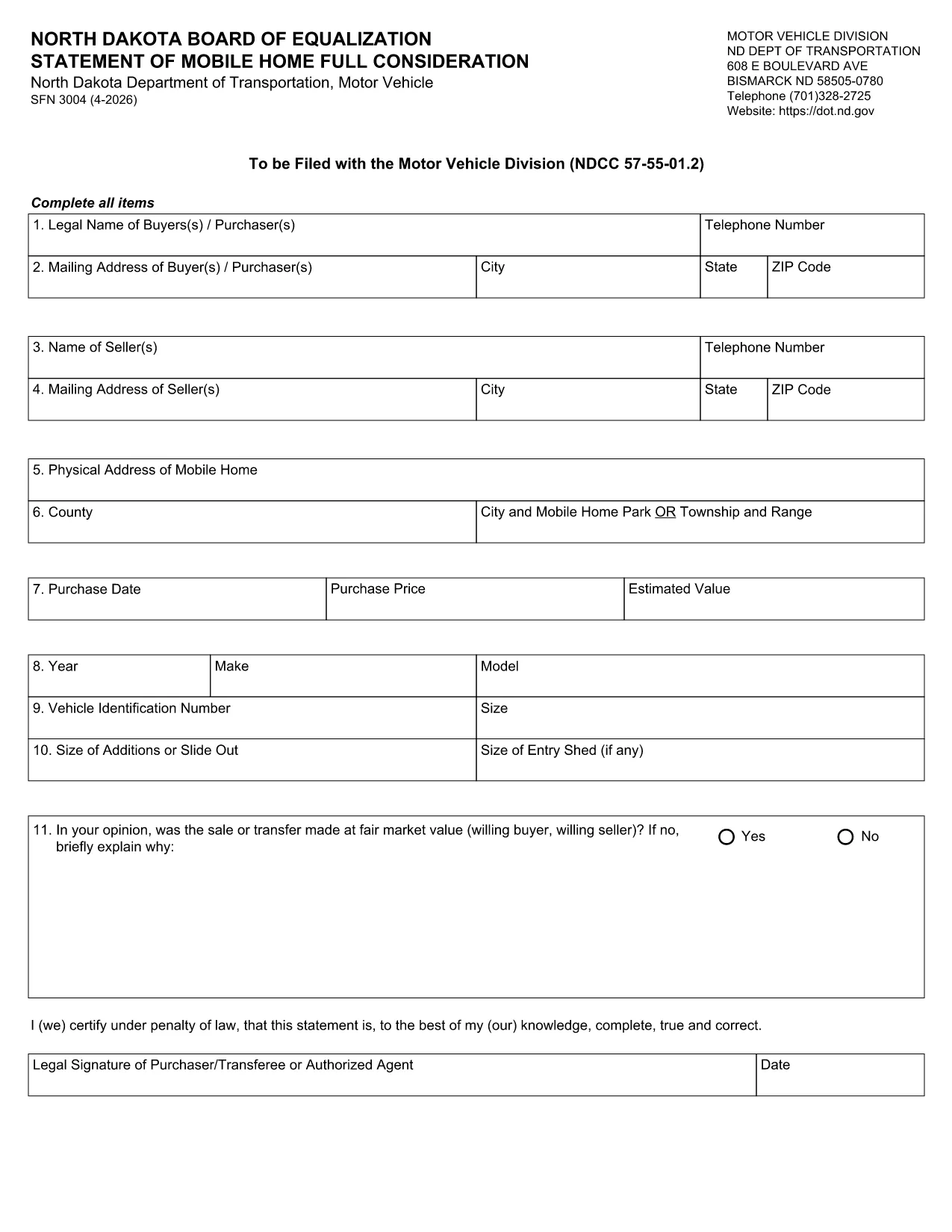
SFN 3004 Fillable PDF – North Dakota Statement of Mobile Home

  1. 言語 英語
  2. アメリカ合衆国
  3. アクティビティ 車両登録
  4. ノースダコタ
SFN 3004 Fillable PDF – North Dakota Statement of Mobile Home

The SFN 3004 is the North Dakota Department of Transportation’s official Statement of Mobile Home used for registration, title transfer, and full consideration of a mobile home. This fillable PDF lets you complete the form quickly, save a digital copy, and print only when you’re ready to submit.

What is the SFN 3004 Form?

The SFN 3004 collects essential information about the mobile home, its owner, and any liens or encumbrances. It is required for:

  • Initial registration of a new mobile home in North Dakota.
  • Title transfer when the home is sold or inherited.
  • Updating ownership details or correcting errors on an existing title.

How to Fill Out the SFN 3004 Online

Instead of downloading the PDF and opening it in a separate editor, simply click the "Fill out this form" button on this page. The Formize PDF Filler app will load in your browser, letting you type directly into each field, add checkmarks, and save your progress.

Common Mistakes to Avoid

  • Leaving required fields blank: The form will not submit if any mandatory field is empty.
  • Mismatching VIN numbers: Double‑check the Vehicle Identification Number on the mobile home’s title.
  • Incorrect spelling of names: Errors can delay processing and may require a new submission.

Where to Submit the Completed Form

After you finish and save the PDF, print a hard copy and mail it to the North Dakota Department of Transportation, Motor Vehicle Division, or deliver it in person to any local registration office. Include any required supporting documents such as proof of ownership or lien releases.

Need more help? Review the FAQs below or contact your local Motor Vehicle Division office.

よくある質問
  • Do I need a PDF reader to fill out SFN 3004?

    No. The Formize PDF Filler works completely in the browser, so you don’t need Adobe Acrobat or any other software.

  • Can I save my progress and finish later?

    Yes. Click the "Save" button at any time to download a partially completed PDF, then reopen it later in the Formize filler to continue.

  • What is the filing deadline for the SFN 3004?

    The form should be submitted within 30 days of any ownership change or title update to avoid penalties.

  • Is there a filing fee?

    Yes. The North Dakota Department of Transportation charges a standard processing fee; check the latest fee schedule on their website.

  • Can I submit the form electronically?

    Currently the ND Department of Transportation requires a printed, signed copy. Electronic submission is not accepted.

  • What supporting documents are required?

    Typically you need the current title, proof of ownership (bill of sale), and any lien release documents.

  • Who can I contact for help with the form?

    Call the ND Motor Vehicle Division at 1‑800‑555‑1234 or visit a local registration office for in‑person assistance.

方法

オンラインで 4 回の簡単なステップで SFN 3004 を無料で入力する方法:

  1. 1
    Open the Fillable Form
    Click the "Fill out this form" button on the page. The Formize PDF Filler loads instantly in your browser.
  2. 2
    Enter Your Information
    Type directly into each field, select checkboxes, and use the tab key to move quickly between sections.
  3. 3
    Save and Review
    When you finish, click "Save" to download a copy of the completed PDF. Review all entries for accuracy.
  4. 4
    Print and Submit
    Print the saved PDF and mail or deliver it to the North Dakota Department of Transportation with any required attachments.
Formize PDF Filler アプリ
だいたい

車両登録フォーム

自動車、トレーラー、またはボートを所有またはリースしている場合は、車両を合法的に登録し、安全に保つという特定の義務を果たさなければなりません。

SFN 3004 は、車両登録フォームの 1 つで、自動車を関連する州または地方当局に登録するために使用される書類です。これらのフォームは通常、人が新車または中古車を購入するとき、または車を持って新しい州または州に移動するときに必要です。

車両登録に必要な正確な要件とフォームは場所によって異なる場合がありますが、一般的に、プロセスには車両、所有者、および車両の先取特権に関する情報を提供することが含まれます。

登録フォームと手数料が提出されると、州または地方当局は車両の所有者に登録証明書またはナンバープレートを発行します。この登録により、車両は公道および高速道路で合法的に運転することができます。

特徴

PDFフィラー

オンラインで PDF フォームに記入する最も簡単な方法

  • SFN 3004 をすばやく入力してください
    SFN 3004 をオンラインですばやく入力する方法をお探しですか?オンラインの無料 PDF フォーム フィラーを使用すると、この PDF ドキュメントを 1 分以内に編集して入力する方法がわかります。
  • 使いやすいオンライン PDF エディター
    再スキャンして返送する前に、編集できるように PDF ファイルを印刷することにうんざりしていませんか? PDFドキュメントをオンラインで無料で編集.当社のオンライン PDF エディターを使用して、時間と紙を節約してください。
  • 優れたツール、すべてのプラットフォーム
    Mac で SFN 3004 を入力する方法や、PDF フィラーを無料で使用する方法を知りたいですか?当社のオンライン PDF ツールは、すべてのプラットフォームで動作します。
  • 安全なファイル ストレージ
    完成した「SFN 3004」ファイルは、Amazon クラウド ホスティングが管理する安全なデータベースに保存されます。いつでもシステムからファイルを削除できます。いずれにせよ、これらのファイルは 24 時間後に自動的に削除されます。
  • {キーワード} とチャットする
    無料の PDF リーダー アシスタントである Chatize で「SFN 3004」とチャットします。質問すると、「SFN 3004」から回答が得られます。上の [ドキュメントとチャット] ボタンをクリックするだけです。

フィルセッションを削除

選択したフィルセッションを削除しますか?この場合、フォームへの記入の進捗状況は失われます。

編集セッションを削除する

選択した編集セッションを削除しますか?この場合、フォームの作成および編集の進行状況は失われます。