
言語を選択する

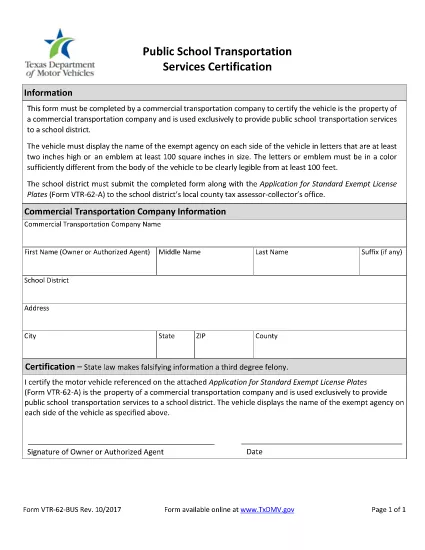
VTR-62-BUS Fillable PDF – School Transportation Services Certification

  1. 言語 英語
  2. アメリカ合衆国
  3. アクティビティ 車両登録
  4. テキサス州
VTR-62-BUS Fillable PDF – School Transportation Services Certification

The VTR-62-BUS is the Texas Department of Motor Vehicles (TxDMV) form used by public schools and private contractors to certify that they provide transportation services for school children. This form must be completed for every vehicle that transports students and is required for registration, licensing, and compliance with Texas Transportation Code §501.155.

What Is the VTR-62-BUS Form?

The VTR-62-BUS collects essential information about the service provider, vehicle details, driver qualifications, and insurance coverage. Submitting accurate data helps TxDMV verify that transportation services meet safety standards and prevents fraudulent claims.

How to Fill Out the VTR-62-BUS Online

Instead of downloading the PDF, simply click the "Fill out this form" button on this page. The Formize PDF Filler app will load the fillable PDF directly in your browser. Follow the on‑screen prompts and the form will save automatically.

  • Step 1: Click the button to open the fillable PDF.
  • Step 2: Enter the school or contractor name, address, and Texas Tax ID.
  • Step 3: Provide vehicle information – make, model, VIN, and license plate.
  • Step 4: Fill driver details and confirm valid commercial driver’s license (CDL) status.
  • Step 5: Upload proof of insurance and sign electronically.

Common Mistakes to Avoid

  • Leaving any required field blank – the form will not submit.
  • Using an outdated insurance policy number.
  • Mismatching the VIN with the license plate number.
  • Falsifying information – this is a third‑degree felony under Texas law.

Where to Submit Your Completed Form

After you finish, click Submit inside the Formize app. Your completed VTR-62-BUS will be securely sent to TxDMV’s online portal. You will receive a confirmation email with a reference number for future inquiries.

Need a hard copy? You can still download the PDF using the link below and mail it to the address listed on the confirmation page.

よくある質問
  • Is the VTR-62-BUS form required for every school bus?

    Yes. Any vehicle that transports students for a public or private school must file a VTR-62-BUS for each registration period.

  • Can I submit the form on a mobile device?

    Absolutely. The Formize PDF Filler works on smartphones and tablets as long as the browser supports PDF rendering.

  • What happens if I make a mistake after submitting?

    Contact TxDMV with your confirmation number. You may be asked to submit an amended VTR-62-BUS using the same online portal.

  • Do I need to attach supporting documents?

    Yes. Insurance proof, driver’s license copies, and vehicle registration must be uploaded before final submission.

  • Is there a filing fee?

    TxDMV does not charge a separate fee for the VTR-62-BUS, but standard vehicle registration fees still apply.

  • How long does the approval process take?

    Typically 3‑5 business days after successful electronic submission, provided all information is correct.

方法

オンラインで 4 回の簡単なステップで VTR-62-BUS を無料で入力する方法:

  1. 1
    Open the Fillable Form
    Click the "Fill out this form" button on the page. The Formize PDF Filler loads the VTR-62-BUS directly in your browser.
  2. 2
    Enter Required Information
    Complete each section—entity details, vehicle data, driver credentials, and insurance—using the on‑screen fields.
  3. 3
    Review and Sign
    Double‑check all entries for accuracy, then use the electronic signature field to sign the form.
  4. 4
    Submit Electronically
    Press the Submit button. A confirmation email with a reference number will be sent to you instantly.
Formize PDF Filler アプリ
だいたい

車両登録フォーム

VTR-62-BUS は DMV フォームの 1 つであり、自動車省フォームとしても知られており、自動車に関連するさまざまな取引やプロセスで使用される文書です。 DMV は、運転免許証、車両登録、自動車法の執行を担当する政府機関です。利用可能な具体的な DMV フォームは管轄区域によって異なりますが、一般的な例をいくつか示します。

運転免許証フォーム: これらのフォームは、運転免許証の申請、または変更または更新のリクエストに使用されます。通常、個人情報や身元証明が必要で、医療情報や運転履歴のセクションが含まれる場合もあります。

車両登録フォーム: これらのフォームは、DMV に自動車を登録するために使用されます。車両情報、所有権の詳細、保険証が必要です。

所有権譲渡フォーム: 車両の売買の際、これらのフォームは所有権を一方の当事者から別の当事者に譲渡するために使用されます。購入者、販売者、車両の詳細に関する情報が必要で、請求書が含まれる場合もあります。

車両責任放棄フォーム: 車両の所有権を売却または譲渡する場合、これらのフォームは、販売者が車両に対して責任を負わないことを DMV に通知します。これは、販売後の車両に関連する事故や事件の責任から売主を保護するのに役立ちます。

ライセンス プレートおよび登録更新フォーム: これらのフォームは、車両の登録を更新したり、新しいナンバー プレートをリクエストしたりするために使用されます。通常、登録所有者、現在の登録の詳細、および該当する料金の支払いに関する情報が必要です。

運転記録リクエスト フォーム: このフォームを使用すると、個人は DMV に自分の運転記録をリクエストできます。これにより、運転違反、免許証のステータス、その他の関連詳細に関する情報が提供されます。

特殊または特殊なナンバー プレート フォーム: これらのフォームは、個人が特定の文字やデザインでナンバー プレートをカスタマイズできるようにする、特殊または特殊なナンバー プレートの申請に使用されます。

これらは、DMV を通じて利用できる多くのフォームのほんの一例です。特定のフォームと要件は管轄区域によって異なる場合があるため、地元の DMV Web サイトを参照するか、DMV オフィスを訪問して、特定のニーズに合った正しいフォームを入手することが重要です。

特徴

PDFフィラー

オンラインで PDF フォームに記入する最も簡単な方法

  • VTR-62-BUS をすばやく入力してください
    VTR-62-BUS をオンラインですばやく入力する方法をお探しですか?オンラインの無料 PDF フォーム フィラーを使用すると、この PDF ドキュメントを 1 分以内に編集して入力する方法がわかります。
  • 使いやすいオンライン PDF エディター
    再スキャンして返送する前に、編集できるように PDF ファイルを印刷することにうんざりしていませんか? PDFドキュメントをオンラインで無料で編集.当社のオンライン PDF エディターを使用して、時間と紙を節約してください。
  • 優れたツール、すべてのプラットフォーム
    Mac で VTR-62-BUS を入力する方法や、PDF フィラーを無料で使用する方法を知りたいですか?当社のオンライン PDF ツールは、すべてのプラットフォームで動作します。
  • 安全なファイル ストレージ
    完成した「VTR-62-BUS」ファイルは、Amazon クラウド ホスティングが管理する安全なデータベースに保存されます。いつでもシステムからファイルを削除できます。いずれにせよ、これらのファイルは 24 時間後に自動的に削除されます。
  • {キーワード} とチャットする
    無料の PDF リーダー アシスタントである Chatize で「VTR-62-BUS」とチャットします。質問すると、「VTR-62-BUS」から回答が得られます。上の [ドキュメントとチャット] ボタンをクリックするだけです。

フィルセッションを削除

選択したフィルセッションを削除しますか?この場合、フォームへの記入の進捗状況は失われます。

編集セッションを削除する

選択した編集セッションを削除しますか?この場合、フォームの作成および編集の進行状況は失われます。