
言語を選択する

Texas VTR-904 License Plate Transfer Form (Fillable PDF)

  1. 言語 英語
  2. アメリカ合衆国
  3. アクティビティ 車両登録
  4. テキサス州
Texas VTR-904 License Plate Transfer Form (Fillable PDF)

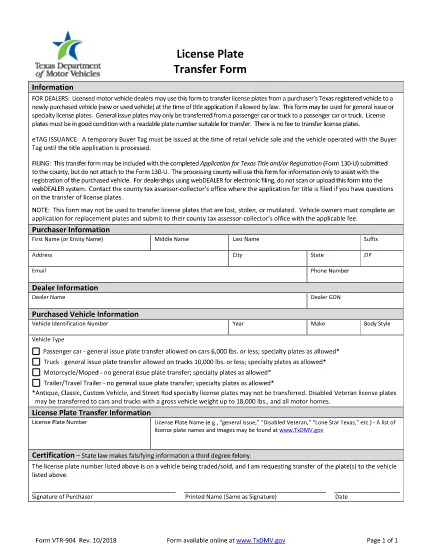
The VTR-904 is the Texas Department of Motor Vehicles (TxDMV) form used to transfer existing license plates from one vehicle to another. With Formize’s online PDF filler, you can complete this form instantly without printing or scanning.

What Is the VTR-904 Form?

Form VTR-904 authorizes the transfer of a set of Texas license plates when a vehicle is sold, traded, or replaced. The form captures plate numbers, vehicle details, and the owner’s signature.

When and Who Can Use VTR-904

Any Texas vehicle owner can request a plate transfer as long as the plates are in good condition and the vehicle weight limits are met (passenger cars ≤ 6,000 lbs, trucks ≤ 10,000 lbs). Dealerships often use this form during a trade‑in.

How to Complete the VTR-904 Online

Follow these simple steps:

  1. Click the "Fill out this form" button on the page.
  2. Wait for the Formize PDF Filler app to load.
  3. Enter the required information in each field – the tool validates entries in real time.
  4. Save the completed PDF to your device or download a copy for your records.
  5. Include the filled VTR-904 with your Application for Texas Title and/or Registration (Form 130‑U) when you visit the county tax assessor‑collector.

Common Mistakes to Avoid

  • Submitting plates that are cracked, faded, or missing a plate number.
  • Leaving the "set of plates" field blank when two matching plates are required.
  • Attaching the VTR-904 physically to Form 130‑U – the county only needs the information.
  • Using the form for specialty plates that are not eligible for transfer.

Where to Submit the Completed Form

Take the printed or electronic copy of the completed VTR-904 to your local county tax assessor‑collector’s office together with the title/registration paperwork. The form is for informational purposes only and is not filed electronically through webDEALER.

Need help? Review the form details on the official TxDMV page or contact your county office for specific questions.

よくある質問
  • What is the purpose of Form VTR-904?

    It authorizes the transfer of a set of Texas license plates from one vehicle to another when the owner sells, trades, or replaces the vehicle.

  • Who is eligible to use the VTR-904?

    Any Texas vehicle owner with plates in good condition. Dealerships also use it for customer plate transfers during sales.

  • Can I submit the VTR-904 electronically?

    The form itself is not filed electronically. You fill it online, then print or save the PDF and submit it with your title/registration paperwork at the county office.

  • How many license plates can be transferred at once?

    Typically a matching set of two plates (same number) can be transferred, unless the vehicle is a trailer, motorcycle, or moped, which may require only one plate.

  • What condition must the plates be in?

    Plates must be in good condition, legible, and not cracked or faded. Specialty plates with eligibility restrictions may not be transferable.

  • Do I need to attach the VTR-904 to Form 130‑U?

    No. The county uses the VTR-904 for information only; do not physically attach it to Form 130‑U.

  • How long is the online fillable version valid?

    The Formize fillable version remains valid as long as the official PDF is not updated. Always check the TxDMV site for the latest revision.

方法

オンラインで 5 回の簡単なステップで VTR-904 を無料で入力する方法:

  1. 1
    Open the Fillable Form
    Click the "Fill out this form" button on the page to launch the Formize PDF Filler.
  2. 2
    Load the Form
    Wait a few seconds while the fillable PDF loads in the browser.
  3. 3
    Enter Your Information
    Complete each field – the tool checks for required data and proper formats.
  4. 4
    Save or Download
    When finished, click "Save" to store the form in your account or "Download" to get a copy on your device.
  5. 5
    Submit with Your Registration
    Bring the completed VTR-904 to your county tax assessor‑collector office with Form 130‑U.
Formize PDF Filler アプリ
だいたい

車両登録フォーム

VTR-904 は DMV フォームの 1 つであり、自動車省フォームとしても知られており、自動車に関連するさまざまな取引やプロセスで使用される文書です。 DMV は、運転免許証、車両登録、自動車法の執行を担当する政府機関です。利用可能な具体的な DMV フォームは管轄区域によって異なりますが、一般的な例をいくつか示します。

運転免許証フォーム: これらのフォームは、運転免許証の申請、または変更または更新のリクエストに使用されます。通常、個人情報や身元証明が必要で、医療情報や運転履歴のセクションが含まれる場合もあります。

車両登録フォーム: これらのフォームは、DMV に自動車を登録するために使用されます。車両情報、所有権の詳細、保険証が必要です。

所有権譲渡フォーム: 車両の売買の際、これらのフォームは所有権を一方の当事者から別の当事者に譲渡するために使用されます。購入者、販売者、車両の詳細に関する情報が必要で、請求書が含まれる場合もあります。

車両責任放棄フォーム: 車両の所有権を売却または譲渡する場合、これらのフォームは、販売者が車両に対して責任を負わないことを DMV に通知します。これは、販売後の車両に関連する事故や事件の責任から売主を保護するのに役立ちます。

ライセンス プレートおよび登録更新フォーム: これらのフォームは、車両の登録を更新したり、新しいナンバー プレートをリクエストしたりするために使用されます。通常、登録所有者、現在の登録の詳細、および該当する料金の支払いに関する情報が必要です。

運転記録リクエスト フォーム: このフォームを使用すると、個人は DMV に自分の運転記録をリクエストできます。これにより、運転違反、免許証のステータス、その他の関連詳細に関する情報が提供されます。

特殊または特殊なナンバー プレート フォーム: これらのフォームは、個人が特定の文字やデザインでナンバー プレートをカスタマイズできるようにする、特殊または特殊なナンバー プレートの申請に使用されます。

これらは、DMV を通じて利用できる多くのフォームのほんの一例です。特定のフォームと要件は管轄区域によって異なる場合があるため、地元の DMV Web サイトを参照するか、DMV オフィスを訪問して、特定のニーズに合った正しいフォームを入手することが重要です。

特徴

PDFフィラー

オンラインで PDF フォームに記入する最も簡単な方法

  • VTR-904 をすばやく入力してください
    VTR-904 をオンラインですばやく入力する方法をお探しですか?オンラインの無料 PDF フォーム フィラーを使用すると、この PDF ドキュメントを 1 分以内に編集して入力する方法がわかります。
  • 使いやすいオンライン PDF エディター
    再スキャンして返送する前に、編集できるように PDF ファイルを印刷することにうんざりしていませんか? PDFドキュメントをオンラインで無料で編集.当社のオンライン PDF エディターを使用して、時間と紙を節約してください。
  • 優れたツール、すべてのプラットフォーム
    Mac で VTR-904 を入力する方法や、PDF フィラーを無料で使用する方法を知りたいですか?当社のオンライン PDF ツールは、すべてのプラットフォームで動作します。
  • 安全なファイル ストレージ
    完成した「VTR-904」ファイルは、Amazon クラウド ホスティングが管理する安全なデータベースに保存されます。いつでもシステムからファイルを削除できます。いずれにせよ、これらのファイルは 24 時間後に自動的に削除されます。
  • {キーワード} とチャットする
    無料の PDF リーダー アシスタントである Chatize で「VTR-904」とチャットします。質問すると、「VTR-904」から回答が得られます。上の [ドキュメントとチャット] ボタンをクリックするだけです。

フィルセッションを削除

選択したフィルセッションを削除しますか?この場合、フォームへの記入の進捗状況は失われます。

編集セッションを削除する

選択した編集セッションを削除しますか?この場合、フォームの作成および編集の進行状況は失われます。