hamburger-menu icon
Აირჩიეთ ენა

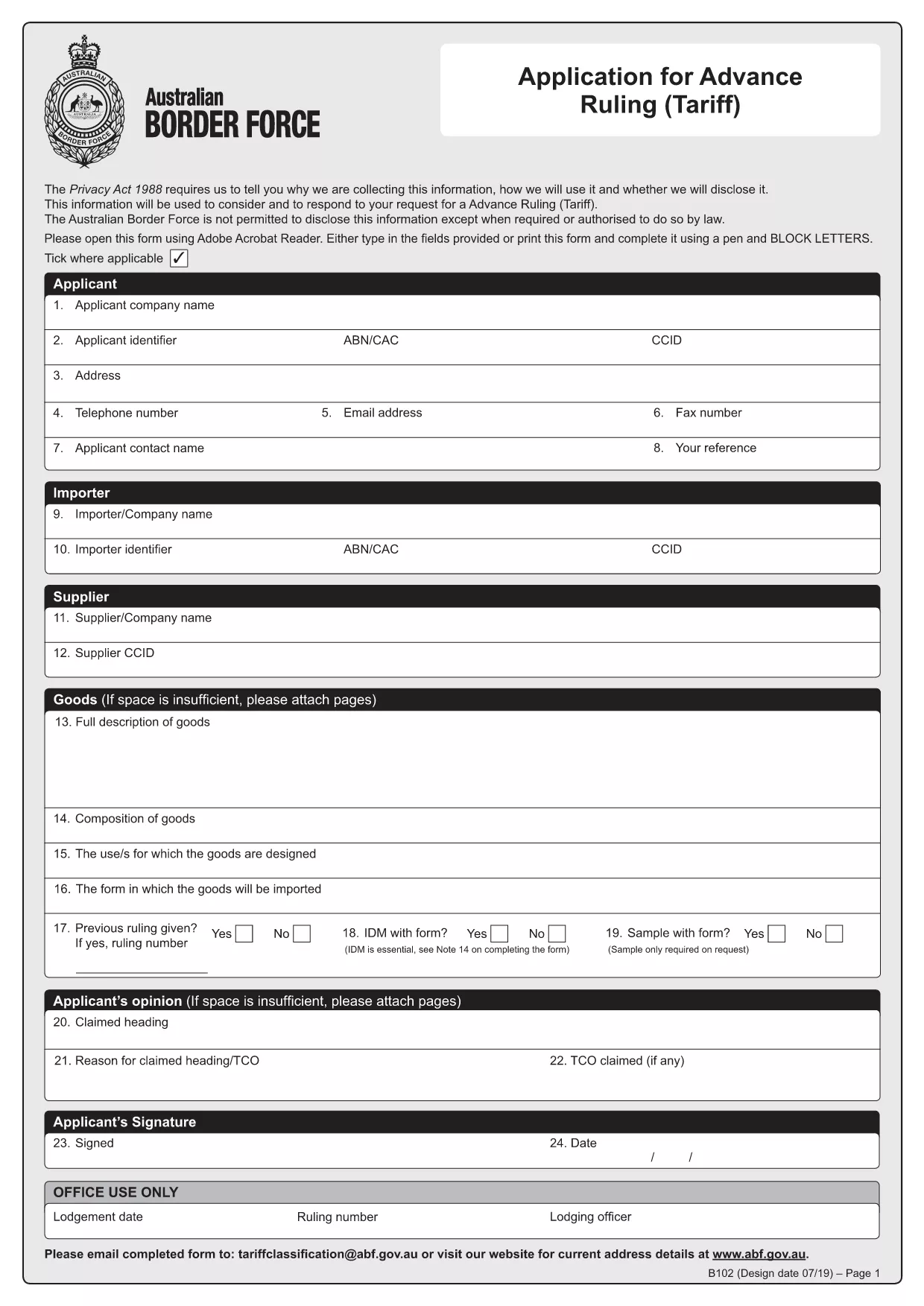
HSN Code Application Form (B102) – Fillable PDF

  1. Ენა ინგლისური
  2. ქვეყანა ავსტრალია
  3. აქტივობა Customs Classification
  4. დეპარტამენტი Australian Border Force
HSN Code Application Form (B102) – Fillable PDF

What is the HSN Code Application Form?

The HSN (Harmonized System Nomenclature) code is the international standard for classifying goods in customs. In Australia, the Form B102 – Application for Advance Ruling (Tariff) is used to request an official classification (HSN code) before importing goods. This ensures you know the correct duty rates and compliance requirements.

Why Use the Fillable B102 Form Online?

Formize turns the static PDF into a fillable, interactive form that can be completed in any browser. Benefits include:

  • Instant validation of required fields
  • Auto‑save so you never lose data
  • Direct PDF download after you finish
  • No need for Adobe Acrobat or other editors

Step‑by‑Step Guide to Complete the Form

Follow these simple steps to get your HSN code application ready for submission.

Common Mistakes to Avoid

Even experienced importers can miss details. Avoid these pitfalls:

  • Leaving the "Manufacturer Details" section blank.
  • Providing an incomplete product description.
  • Submitting the form without supporting technical specifications.

Where to Submit Your Completed Form

After you finish, download the completed PDF and email it to tariffclassification@abf.gov.au within 5 days of the request, or mail it to the National Trade Advice Centre, GPO Box 2809, Melbourne VIC 3001.

FAQ
  • What is an HSN code?

    An HSN (Harmonized System Nomenclature) code is a globally recognized six‑digit number used to classify goods for customs duties, taxes, and trade statistics.

  • Do I need a B102 form for every import?

    No. You only need to submit a B102 form when you want an advance ruling on the classification of a specific product before importing it.

  • Can I edit the form after I download it?

    Yes, but the easiest method is to complete the form online with Formize, then download the final PDF. Editing a static PDF later can cause formatting issues.

  • How long does the Australian Border Force take to issue a ruling?

    The standard service time is 30 days, though it can be longer during periods of high demand.

  • Is there a fee for submitting the B102 application?

    The service is free of charge when you submit directly to the Australian Border Force. Brokers may charge their own fees for assistance.

  • What supporting documents should I attach?

    Include product data sheets, technical specifications, photographs, and any prior classification decisions that relate to the goods.

  • What if I make a mistake on the form?

    You can withdraw the request and submit a new B102 application. Ensure all fields are correct before submission to avoid delays.

ᲠᲝᲒᲝᲠ

როგორ შეავსოთ HSN code application form უფასოდ, ონლაინ 4 მარტივი ნაბიჯებით:

  1. 1
    Open the Fillable Form
    Click the **Fill out this form** button on the page. The Formize PDF Filler app loads instantly in your browser.
  2. 2
    Enter Your Information
    Complete each section—importer details, product description, and supporting documents. The app highlights any missing required fields.
  3. 3
    Validate & Save
    Use the built‑in validator to check for errors, then click **Save**. Your data is stored securely online.
  4. 4
    Download the Completed PDF
    When all fields are filled, click **Download PDF**. The file is ready for submission to the Australian Border Force.
PDF შემავსებლის აპლიკაციის ფორმირება
ᲨᲔᲡᲐᲮᲔᲑ

HSN code application form შაბლონი

PDF დოკუმენტის სანახავად და შევსების ფუნქციების ტრადიციული ნაკრებით, ვებ აპლიკაციის უპირატესობებთან და საპასუხო განლაგებასთან ერთად, შეგიძლიათ შეავსოთ HSN code application form წუთებში.

ᲛᲐᲮᲐᲡᲘᲐᲗᲔᲑᲚᲔᲑᲘ

PDF შემავსებელი

ონლაინ HSN code application form-ის შევსების უმარტივესი გზა

  • სწრაფად შეავსეთ HSN code application form
    ეძებთ გზას სწრაფად შეავსოთ HSN code application form ონლაინ? ჩვენი ონლაინ უფასო PDF ფორმის შემავსებლით, თქვენ გეცოდინებათ როგორ შეცვალოთ და შეავსოთ ეს pdf დოკუმენტი ერთ წუთზე ნაკლებ დროში.
  • მარტივი გამოსაყენებელი ონლაინ PDF რედაქტორი
    მოგბეზრდათ PDF ფაილების დაბეჭდვა, რათა მათი რედაქტირება შეძლოთ, ხელახლა სკანირებამდე და უკან გაგზავნამდე? შეცვალეთ PDF დოკუმენტები უფასოდ ონლაინ. გამოიყენეთ ჩვენი ონლაინ pdf რედაქტორი დროისა და ქაღალდის დაზოგვისთვის.
  • შესანიშნავი ხელსაწყოები, ყველა პლატფორმა
    გაინტერესებთ როგორ შეავსოთ HSN code application form Mac-ზე, ან იქნებ როგორ გამოიყენოთ PDF შემავსებელი უფასოდ? ჩვენი ონლაინ PDF ინსტრუმენტები მუშაობს ყველა პლატფორმაზე.
  • ფაილების უსაფრთხო შენახვა
    დასრულებული „HSN code application form“ ფაილები ინახება დაცულ მონაცემთა ბაზაში, რომელსაც მართავს Amazon Cloud ჰოსტინგი. თქვენ შეგიძლიათ წაშალოთ თქვენი ფაილები ჩვენი სისტემიდან ნებისმიერ დროს. ნებისმიერ შემთხვევაში, ეს ფაილები ავტომატურად იშლება 24 საათის შემდეგ.
  • ჩატი HSN code application form-ით
    ესაუბრეთ „HSN code application form“-ს Chatize-ზე, რომელიც არის PDF წამკითხველის უფასო ასისტენტი. დასვით კითხვები და მიიღეთ პასუხები „HSN code application form“-დან. უბრალოდ დააწკაპუნეთ ღილაკზე ჩატი დოკუმენტთან ზემოთ.

შევსების სესიის წაშლა

წაშალოთ არჩეული შევსების სესია? ამ შემთხვევაში, თქვენი პროგრესი ფორმის შევსებაში დაიკარგება.

რედაქტირების სესიის წაშლა

წაშალოთ არჩეული რედაქტირების სესია? ამ შემთხვევაში, თქვენი პროგრესი ფორმის შექმნასა და რედაქტირებაში დაიკარგება.