
hamburger-menu icon
Აირჩიეთ ენა

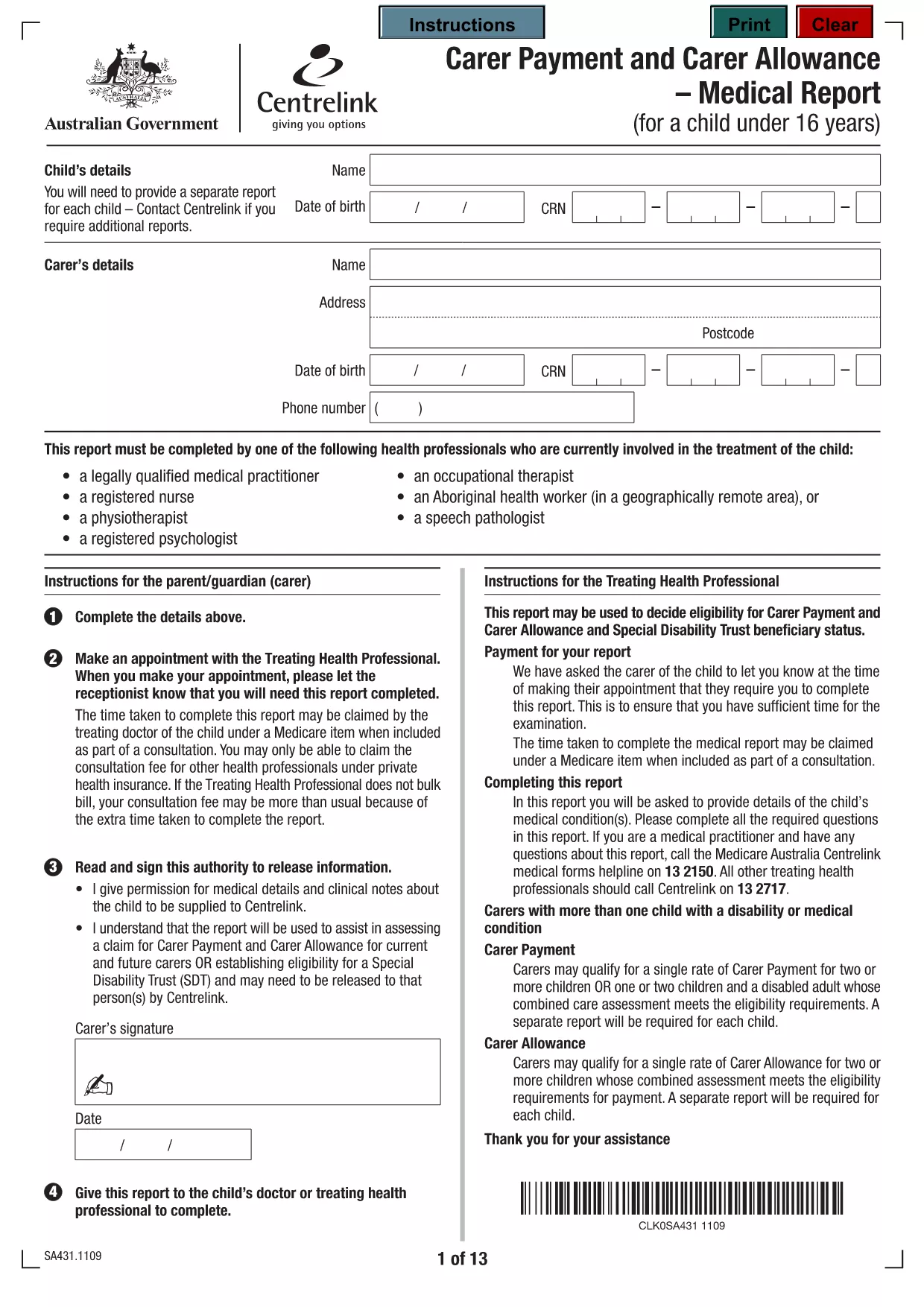
Carer Allowance Application Form – Fillable PDF

  1. Ენა ინგლისური
  2. ქვეყანა ავსტრალია
  3. დეპარტამენტი Centrelink
  4. აქტივობა Სოციალური უსაფრთხოება
Carer Allowance Application Form – Fillable PDF

Looking for the official Carer Allowance application form in a convenient, fillable PDF format? You’re in the right place. This page provides a direct download, step‑by‑step guidance, and tips to ensure your submission to Centrelink is error‑free.

What is the Carer Allowance?

The Carer Allowance is a fortnightly payment from the Australian Government to people who provide daily care or support to someone with a disability, medical condition, or who is frail. It helps cover the extra costs of caring, such as transport, meals, and equipment.

Who Is Eligible for the Carer Allowance?

  • You must be 16 years or older.
  • You provide regular, ongoing care for at least 20 hours per week.
  • The person you care for must be a recognised Australian resident.
  • You cannot be receiving the Carer Payment (a separate income‑tested benefit).

How to Complete the Application Form

Our fillable PDF makes the process simple. Follow the steps below or click the “Fill out this form” button on this page – Formize will load the PDF directly in your browser.

  1. Open the fillable PDF (or click the Formize button).
  2. Enter your personal details exactly as they appear on your identification documents.
  3. Provide information about the person you care for, including their name, date of birth, and the nature of their condition.
  4. Detail the type of care you provide and the average weekly hours.
  5. Attach any required supporting documents (medical certificates, proof of residence, etc.).
  6. Review all entries, sign electronically, and submit.

Common Mistakes to Avoid

  • Leaving fields blank: Even optional sections should be marked “N/A” if not applicable.
  • Mismatched personal details: Ensure names, dates of birth, and addresses match your official IDs.
  • Incorrect hour calculations: Count all care activities and round to the nearest hour.
  • Missing supporting documents: Incomplete applications are returned, delaying payment.

Submit Your Form Securely with Formize

When you click the “Fill out this form” button, the Formize PDF Filler app loads instantly in your browser. No download, no extra software – just a secure, online editor that saves your progress and lets you submit the completed form directly to Centrelink.

Ready to start? Fill out this form now and get your Carer Allowance claim moving forward.

FAQ
  • Who can apply for the Carer Allowance?

    Anyone 16 years or older who provides at least 20 hours of regular care per week to an Australian resident with a disability, medical condition, or who is frail.

  • How long does it take to process the application?

    Centrelink typically processes Carer Allowance applications within 14 days, provided all required information and supporting documents are included.

  • Can I save my progress and return later?

    Yes. When you use the Formize PDF Filler, you can save a draft locally and continue editing before final submission.

  • Do I need to submit the form by mail?

    No. With the online Formize filler you can submit the completed PDF directly to Centrelink electronically.

  • What supporting documents are required?

    You’ll need a medical certificate for the person you care for, proof of residence, and any relevant disability or health reports.

  • Is there a fee to use the fillable PDF?

    The Formize PDF Filler is free to use for this Carer Allowance form.

  • What if I make a mistake after submitting?

    Contact Centrelink as soon as possible. You can request a correction or submit a new application if necessary.

  • Can I apply for Carer Allowance if I already receive Carer Payment?

    No. The Carer Allowance is a separate, non‑means‑tested benefit and cannot be received alongside the Carer Payment.

ᲠᲝᲒᲝᲠ

როგორ შეავსოთ carer allowance application form უფასოდ, ონლაინ 5 მარტივი ნაბიჯებით:

  1. 1
    Open the Fillable Form
    Click the “Fill out this form” button on this page. Formize will load the PDF directly in your browser—no download needed.
  2. 2
    Enter Your Personal Details
    Type your name, address, date of birth, and contact information exactly as they appear on your ID.
  3. 3
    Provide Care Information
    Describe the person you care for, their condition, and the average weekly care hours you provide.
  4. 4
    Attach Supporting Documents
    Upload medical certificates, proof of residence, and any other required documents using the attachment fields.
  5. 5
    Review and Submit
    Double‑check all entries, sign electronically, and click “Submit”. Your application will be securely sent to Centrelink.
PDF შემავსებლის აპლიკაციის ფორმირება
ᲨᲔᲡᲐᲮᲔᲑ

სოციალური დაცვის ფორმები

carer allowance application form არის სოციალური დაცვის ერთ-ერთი ფორმა, რომელიც წარმოადგენს დოკუმენტებს, რომლებიც გამოიყენება შეერთებული შტატების სოციალური დაცვის ადმინისტრაციის (SSA) მიერ მოწოდებული სხვადასხვა შეღავათებისა და სერვისებისთვის. SSA არის ფედერალური სააგენტო, რომელიც მართავს პროგრამებს, რომლებიც შექმნილია ფინანსური დახმარების უზრუნველსაყოფად უფლებამოსილი პირებისთვის და ოჯახებისთვის, მათ შორის საპენსიო შეღავათები, ინვალიდობის შეღავათები, გადარჩენის შეღავათები და დამატებითი უსაფრთხოების შემოსავალი (SSI).

სოციალური დაცვის ზოგიერთი საერთო ფორმა მოიცავს:

სოციალური უზრუნველყოფის საპენსიო შეღავათების განაცხადი: ეს ფორმა გამოიყენება საპენსიო შეღავათებისთვის განაცხადის მისაღებად, ინდივიდუალური სამუშაო ისტორიისა და მოგების საფუძველზე.

სოციალური უზრუნველყოფის ინვალიდობის შეღავათების განაცხადი: ეს ფორმა გამოიყენება ინვალიდობის შეღავათებისთვის განაცხადისთვის, თუ ინდივიდს აქვს ფიზიკური ან ფსიქიკური მდგომარეობა, რომელიც ხელს უშლის მას მუშაობაში.

სოციალური უზრუნველყოფის გადარჩენის შეღავათების განაცხადი: ეს ფორმა გამოიყენება გადარჩენის შეღავათებისთვის განაცხადის მისაღებად, თუ ინდივიდის მეუღლე ან მშობელი გარდაიცვალა და მათ შეუძლიათ მიიღონ გადარჩენის შეღავათები.

Medicare-ში ჩარიცხვის განაცხადი: ეს ფორმა გამოიყენება 65 წელზე უფროსი ასაკის პირთათვის და გარკვეული შეზღუდული შესაძლებლობის მქონე პირთათვის და ჯანმრთელობის დაზღვევის ფედერალურ პროგრამაში მედიქერში ჩასაწერად.

მისამართის ფორმის შეცვლა: ეს ფორმა გამოიყენება პირის მისამართის SSA-ით განახლებისთვის.

შემოსავლების ჩანაწერის მოთხოვნის ფორმა: ეს ფორმა გამოიყენება ინდივიდის მოგების ჩანაწერის ასლის მოთხოვნით, რომელიც გამოიყენება სოციალური უზრუნველყოფის სარგებლის გამოსათვლელად.

ეს ფორმები შეიძლება შეავსოთ ონლაინ, ფოსტით ან პირადად სოციალური დაცვის ადგილობრივ ოფისში. მნიშვნელოვანია, რომ ყურადღებით განიხილოს და შეავსოს ყველა საჭირო ფორმა, რათა უზრუნველყოს სოციალური უზრუნველყოფის შეღავათების დროული და ზუსტი დამუშავება.

ᲛᲐᲮᲐᲡᲘᲐᲗᲔᲑᲚᲔᲑᲘ

PDF შემავსებელი

ონლაინ carer allowance application form-ის შევსების უმარტივესი გზა

  • სწრაფად შეავსეთ carer allowance application form
    ეძებთ გზას სწრაფად შეავსოთ carer allowance application form ონლაინ? ჩვენი ონლაინ უფასო PDF ფორმის შემავსებლით, თქვენ გეცოდინებათ როგორ შეცვალოთ და შეავსოთ ეს pdf დოკუმენტი ერთ წუთზე ნაკლებ დროში.
  • მარტივი გამოსაყენებელი ონლაინ PDF რედაქტორი
    მოგბეზრდათ PDF ფაილების დაბეჭდვა, რათა მათი რედაქტირება შეძლოთ, ხელახლა სკანირებამდე და უკან გაგზავნამდე? შეცვალეთ PDF დოკუმენტები უფასოდ ონლაინ. გამოიყენეთ ჩვენი ონლაინ pdf რედაქტორი დროისა და ქაღალდის დაზოგვისთვის.
  • შესანიშნავი ხელსაწყოები, ყველა პლატფორმა
    გაინტერესებთ როგორ შეავსოთ carer allowance application form Mac-ზე, ან იქნებ როგორ გამოიყენოთ PDF შემავსებელი უფასოდ? ჩვენი ონლაინ PDF ინსტრუმენტები მუშაობს ყველა პლატფორმაზე.
  • ფაილების უსაფრთხო შენახვა
    დასრულებული „carer allowance application form“ ფაილები ინახება დაცულ მონაცემთა ბაზაში, რომელსაც მართავს Amazon Cloud ჰოსტინგი. თქვენ შეგიძლიათ წაშალოთ თქვენი ფაილები ჩვენი სისტემიდან ნებისმიერ დროს. ნებისმიერ შემთხვევაში, ეს ფაილები ავტომატურად იშლება 24 საათის შემდეგ.
  • ჩატი carer allowance application form-ით
    ესაუბრეთ „carer allowance application form“-ს Chatize-ზე, რომელიც არის PDF წამკითხველის უფასო ასისტენტი. დასვით კითხვები და მიიღეთ პასუხები „carer allowance application form“-დან. უბრალოდ დააწკაპუნეთ ღილაკზე ჩატი დოკუმენტთან ზემოთ.

შევსების სესიის წაშლა

წაშალოთ არჩეული შევსების სესია? ამ შემთხვევაში, თქვენი პროგრესი ფორმის შევსებაში დაიკარგება.

რედაქტირების სესიის წაშლა

წაშალოთ არჩეული რედაქტირების სესია? ამ შემთხვევაში, თქვენი პროგრესი ფორმის შექმნასა და რედაქტირებაში დაიკარგება.