
hamburger-menu icon
Აირჩიეთ ენა

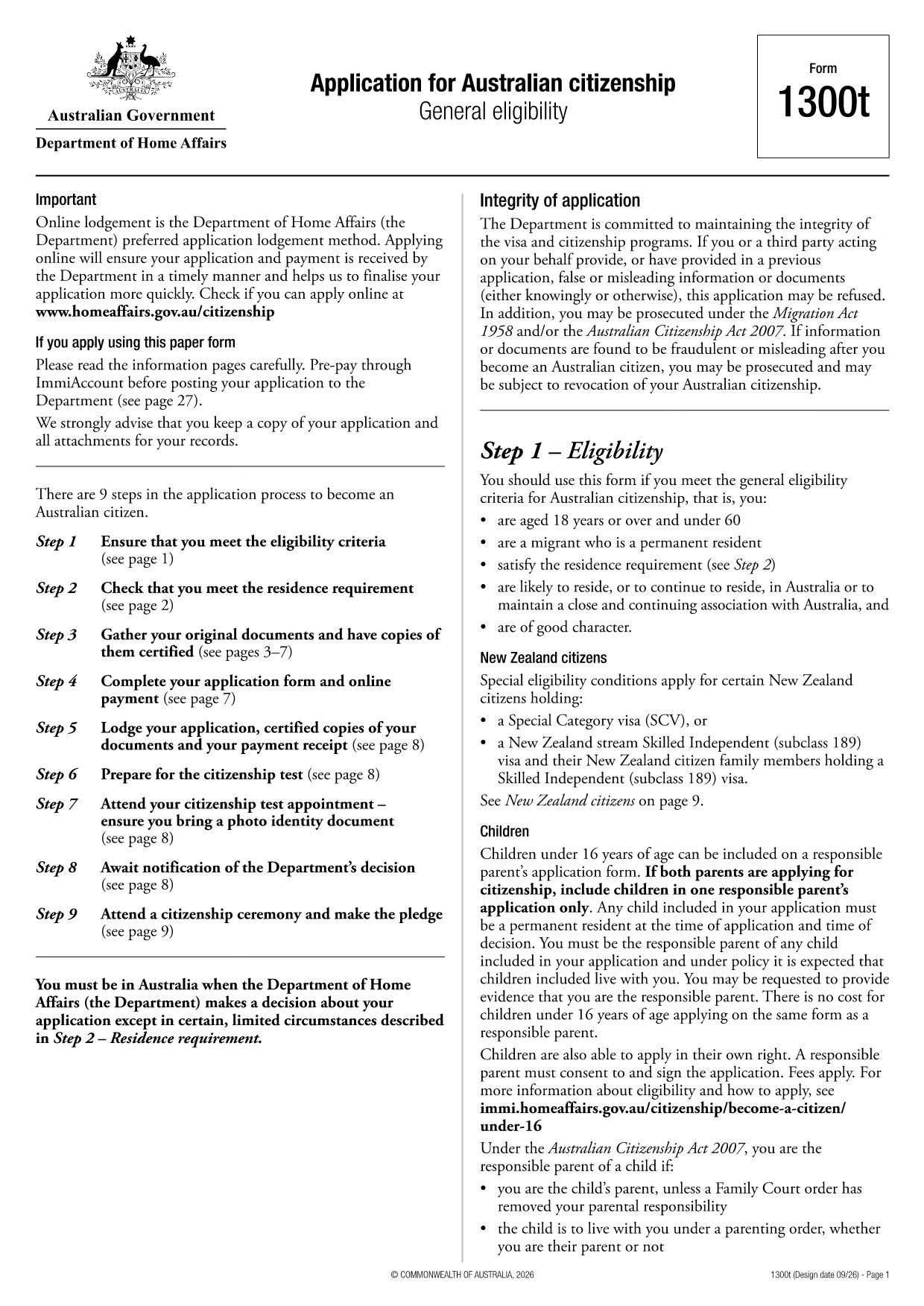
Australian Citizenship Application Form (Form 1300t) – Fillable PDF

  1. Ენა ინგლისური
  2. ქვეყანა ავსტრალია
  3. აქტივობა მოქალაქეობა
  4. დეპარტამენტი Home Affairs
Australian Citizenship Application Form (Form 1300t) – Fillable PDF

Form 1300t is the official Application for Australian citizenship used by permanent residents who meet the general eligibility requirements. The form is available as a fillable PDF, and with Formize you can complete it directly in your browser – no extra software needed.

What Is Form 1300t?

Form 1300t collects personal details, residency history, character information, and your intent to become an Australian citizen. It must be submitted with the required supporting documents and the citizenship application fee.

How to Complete the Form Online with Formize

Instead of downloading the PDF and opening a separate editor, simply click the "Fill out this form" button on this page. The Formize PDF Filler will load automatically, letting you type, check boxes, and sign the form in a few clicks.

Common Mistakes & Tips for a Successful Application

  • Do not leave any required field blank. If a question does not apply, write “N/A”.
  • Use the exact dates as they appear on your passport or travel records.
  • Double‑check the spelling of names and addresses. Inconsistent information can delay processing.
  • Attach all required documents before submitting. Missing paperwork is the top reason for refusals.

Required Supporting Documents

When you submit Form 1300t, include the following:

  • Certified copies of your passport and visa pages
  • Proof of residence (utility bills, rental agreements)
  • Police checks or character certificates if requested
  • Evidence of the citizenship application fee payment

Once you have filled the form, you can download the completed PDF, print it, and mail it to the Department of Home Affairs, or submit it electronically if you have an ImmiAccount.

FAQ
  • Do I need a PDF editor to fill Form 1300t?

    No. With Formize you can fill the form directly in your web browser – no extra software required.

  • Can I save my progress and finish later?

    Yes. The Formize filler allows you to save a draft on your device and reopen it later to continue editing.

  • What if I make a mistake after downloading?

    You can reopen the saved PDF in Formize, correct the error, and download a new version before submitting.

  • Is the online filler secure?

    Formize uses SSL encryption, and all data stays on your device; nothing is stored on external servers.

  • Do I still need to print the form after filling it online?

    The Department of Home Affairs currently requires a hard‑copy submission, so you must print the completed form and mail it with your documents.

  • How long does it take to process the citizenship application?

    Processing times vary, but most applications are decided within 12‑24 months after receipt of a complete form and supporting documents.

  • Can I submit Form 1300t electronically?

    If you have an ImmiAccount, you can upload the completed PDF through the online portal instead of mailing a paper copy.

  • What should I do if I’m unsure about a question?

    Refer to the information guide attached to the form or contact the Department of Home Affairs for clarification.

ᲠᲝᲒᲝᲠ

როგორ შეავსოთ Australian citizenship application form უფასოდ, ონლაინ 5 მარტივი ნაბიჯებით:

  1. 1
    Open the Fillable Form
    Click the "Fill out this form" button on the page. The Formize PDF Filler loads in your browser.
  2. 2
    Enter Your Information
    Type directly into each field, select check‑boxes, and use the date picker for all date entries.
  3. 3
    Add Your Signature
    Use the signature tool to draw or upload your signature. The signature is saved securely in the PDF.
  4. 4
    Review & Download
    Check all entries for accuracy, then click "Download" to save the completed PDF to your device.
  5. 5
    Submit to Home Affairs
    Print the downloaded form, attach your supporting documents, and mail it to the Department of Home Affairs, or upload via ImmiAccount.
PDF შემავსებლის აპლიკაციის ფორმირება
ᲨᲔᲡᲐᲮᲔᲑ

მოქალაქეობის ფორმები

Australian citizenship application form არის მოქალაქეობის ერთ-ერთი ფორმა, რომელიც არის დოკუმენტები, რომლებიც გამოიყენება ქვეყნის მოქალაქეობის მისაღებად. მოქალაქეობის ზუსტი ფორმები და მოთხოვნები განსხვავდება ქვეყნების მიხედვით, მაგრამ ზოგადად, პროცესი მოიცავს პერსონალური ინფორმაციისა და მოქალაქეობის უფლებამოსილების მტკიცებულების მიწოდებას.

შეერთებულ შტატებში, მოქალაქეობის ყველაზე გავრცელებული ფორმაა N-400 განაცხადი ნატურალიზაციისთვის. ამ ფორმას იყენებენ კანონიერი მუდმივი რეზიდენტები (მწვანე ბარათის მფლობელები) აშშ-ს მოქალაქეობის მისაღებად. ფორმა ითხოვს პერსონალურ ინფორმაციას, როგორიცაა სახელი, დაბადების თარიღი და საკონტაქტო ინფორმაცია, ასევე ინფორმაცია განმცხადებლის საიმიგრაციო სტატუსის, კრიმინალური ისტორიისა და სხვა მოთხოვნების შესახებ.

სხვა ქვეყნებს შეიძლება ჰქონდეთ განსხვავებული ფორმები და მოთხოვნები მოქალაქეობისთვის, მაგრამ ძირითადი პროცესი, როგორც წესი, მოიცავს ინფორმაციის მიწოდებას განმცხადებლის წარმომავლობის შესახებ და გარკვეული დასაშვებობის კრიტერიუმების დაკმაყოფილებას. ეს შეიძლება მოიცავდეს მოქალაქეობის გამოცდის ჩაბარებას, ქვეყნის ისტორიისა და მთავრობის ცოდნის დემონსტრირებას და ქვეყნის ენის ცოდნის დემონსტრირებას.

მნიშვნელოვანია აღინიშნოს, რომ მოქალაქეობის მიღების პროცესი შეიძლება იყოს რთული და შრომატევადი. რეკომენდირებულია მოქალაქეობის მსურველმა პირებმა გაიარონ კონსულტაცია საიმიგრაციო ადვოკატთან ან სხვა კვალიფიციურ პროფესიონალთან, რათა დაეხმარონ პროცესის ნავიგაციაში და უზრუნველყონ ყველა საჭირო ფორმისა და მოთხოვნების დაკმაყოფილება.

ᲛᲐᲮᲐᲡᲘᲐᲗᲔᲑᲚᲔᲑᲘ

PDF შემავსებელი

ონლაინ Australian citizenship application form-ის შევსების უმარტივესი გზა

  • სწრაფად შეავსეთ Australian citizenship application form
    ეძებთ გზას სწრაფად შეავსოთ Australian citizenship application form ონლაინ? ჩვენი ონლაინ უფასო PDF ფორმის შემავსებლით, თქვენ გეცოდინებათ როგორ შეცვალოთ და შეავსოთ ეს pdf დოკუმენტი ერთ წუთზე ნაკლებ დროში.
  • მარტივი გამოსაყენებელი ონლაინ PDF რედაქტორი
    მოგბეზრდათ PDF ფაილების დაბეჭდვა, რათა მათი რედაქტირება შეძლოთ, ხელახლა სკანირებამდე და უკან გაგზავნამდე? შეცვალეთ PDF დოკუმენტები უფასოდ ონლაინ. გამოიყენეთ ჩვენი ონლაინ pdf რედაქტორი დროისა და ქაღალდის დაზოგვისთვის.
  • შესანიშნავი ხელსაწყოები, ყველა პლატფორმა
    გაინტერესებთ როგორ შეავსოთ Australian citizenship application form Mac-ზე, ან იქნებ როგორ გამოიყენოთ PDF შემავსებელი უფასოდ? ჩვენი ონლაინ PDF ინსტრუმენტები მუშაობს ყველა პლატფორმაზე.
  • ფაილების უსაფრთხო შენახვა
    დასრულებული „Australian citizenship application form“ ფაილები ინახება დაცულ მონაცემთა ბაზაში, რომელსაც მართავს Amazon Cloud ჰოსტინგი. თქვენ შეგიძლიათ წაშალოთ თქვენი ფაილები ჩვენი სისტემიდან ნებისმიერ დროს. ნებისმიერ შემთხვევაში, ეს ფაილები ავტომატურად იშლება 24 საათის შემდეგ.
  • ჩატი Australian citizenship application form-ით
    ესაუბრეთ „Australian citizenship application form“-ს Chatize-ზე, რომელიც არის PDF წამკითხველის უფასო ასისტენტი. დასვით კითხვები და მიიღეთ პასუხები „Australian citizenship application form“-დან. უბრალოდ დააწკაპუნეთ ღილაკზე ჩატი დოკუმენტთან ზემოთ.

შევსების სესიის წაშლა

წაშალოთ არჩეული შევსების სესია? ამ შემთხვევაში, თქვენი პროგრესი ფორმის შევსებაში დაიკარგება.

რედაქტირების სესიის წაშლა

წაშალოთ არჩეული რედაქტირების სესია? ამ შემთხვევაში, თქვენი პროგრესი ფორმის შექმნასა და რედაქტირებაში დაიკარგება.