
hamburger-menu icon
Აირჩიეთ ენა

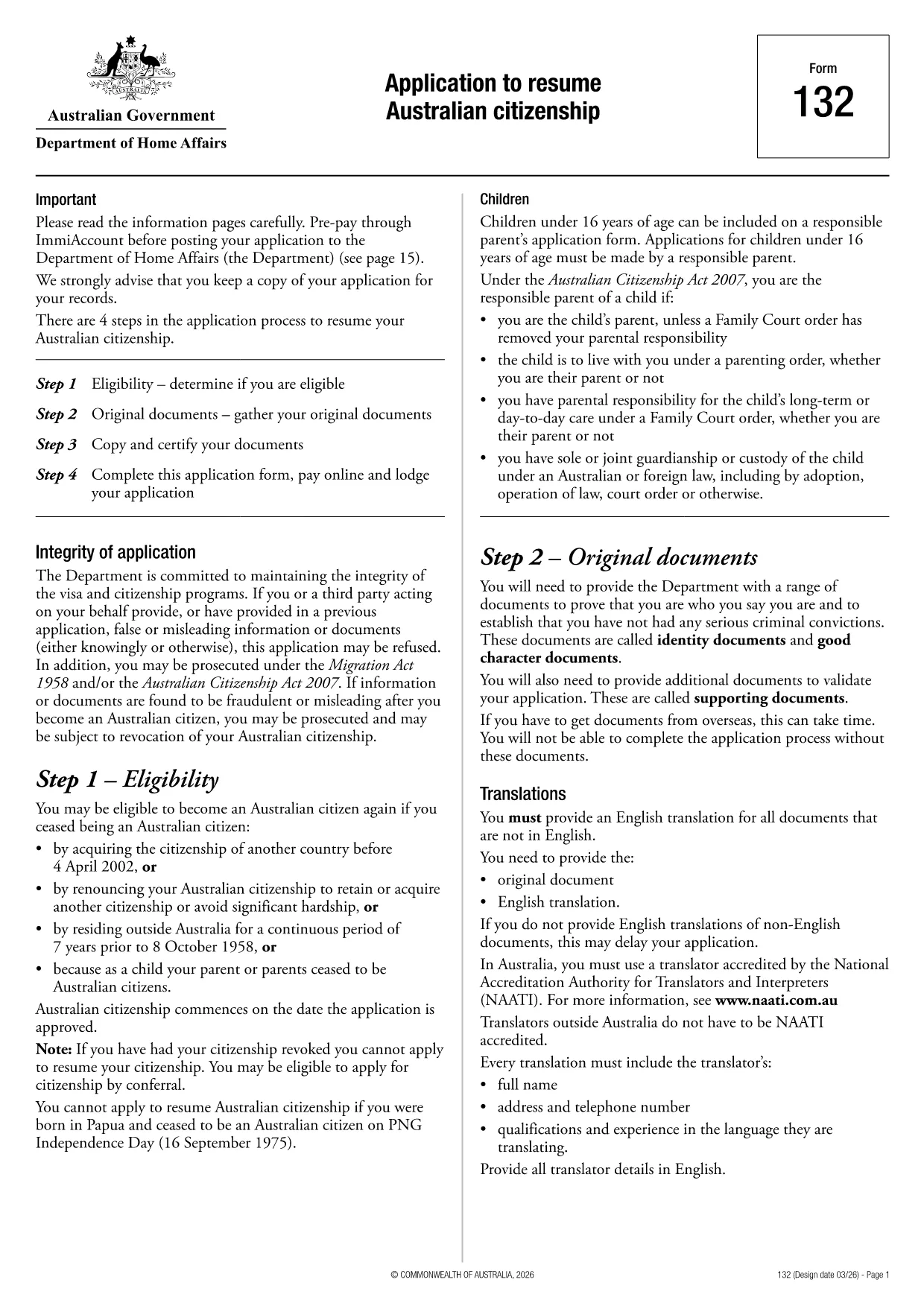
Application to Resume Australian Citizenship (Form 132) – Fill Online

  1. Ენა ინგლისური
  2. ქვეყანა ავსტრალია
  3. აქტივობა მოქალაქეობა
  4. დეპარტამენტი Home Affairs
Application to Resume Australian Citizenship (Form 132) – Fill Online

If you need to resume your Australian citizenship, you’ll use Form 132 – Application to Resume Australian Citizenship. This official PDF can now be completed entirely online with the Formize PDF Filler, so you never have to print, scan, or manually edit the document.

Why Use the Online Formize PDF Filler?

The Formize filler loads the exact PDF you need, preserving the government‑approved layout while letting you type directly into each field. Benefits include:

  • Instant validation of required fields
  • Automatic saving – you can pause and return later
  • Secure, browser‑based processing – no software install
  • One‑click download of the completed PDF for submission

Step‑by‑Step Guide to Completing Form 132

Follow these simple steps to fill out the application correctly:

  1. Click the “Fill out this form” button below.
  2. Wait for the Formize PDF Filler app to load the PDF.
  3. Enter your personal details, citizenship history, and reasons for resumption.
  4. Attach any required supporting documents (e.g., passport copy, proof of residence).
  5. Review the completed form for accuracy.
  6. Download the finished PDF and submit it to the Department of Home Affairs.

Common Mistakes to Avoid

Even with an easy online tool, mistakes happen. Avoid these pitfalls:

  • Leaving mandatory fields blank – the filler will highlight them.
  • Uploading files in the wrong format (use PDF, JPG, or PNG only).
  • Using an outdated version of the form – the link below always points to the latest Form 132.

Eligibility & Supporting Documents

Before you start, make sure you meet the eligibility criteria:

  • You previously held Australian citizenship.
  • You have been outside Australia for a period that requires resumption.
  • You can provide proof of identity and residency.

Typical supporting documents include a current passport, a statutory declaration, and any relevant court orders.

Where to Submit Your Application

After downloading the completed PDF, submit it through the Department of Home Affairs portal or mail it to the address listed on the form. Keep a copy for your records.

Ready to get started? Click the button below and let Formize handle the rest.

FAQ
  • Do I need to download any software to fill Form 132?

    No. Formize’s PDF filler works entirely in your web browser, so there’s nothing to install.

  • Can I save my progress and return later?

    Yes. The filler automatically saves your entries locally, allowing you to close the browser and continue later.

  • What file formats are accepted for supporting documents?

    PDF, JPG, and PNG are accepted. Make sure each file is under 5 MB for smooth uploading.

  • Is the online filler secure?

    All data is processed locally in your browser and never stored on our servers. Your information remains private.

  • Can I print the completed form directly from the filler?

    After you finish, click the “Download” button to save the completed PDF, then print it using any PDF viewer.

  • What if I make a mistake after downloading?

    You can reopen the downloaded PDF in Formize’s filler, correct the error, and download a new version.

  • Where do I send the finished Form 132?

    Submit the PDF through the Department of Home Affairs online portal or mail it to the address listed on the form.

ᲠᲝᲒᲝᲠ

როგორ შეავსოთ Australian citizenship resume form უფასოდ, ონლაინ 4 მარტივი ნაბიჯებით:

  1. 1
    Open the Form
    Click the “Fill out this form” button on this page. The Formize PDF Filler will launch in your browser.
  2. 2
    Enter Your Details
    Type directly into each highlighted field – the filler automatically saves your progress.
  3. 3
    Upload Supporting Documents
    Use the “Attach File” option to add passport scans, statutory declarations, or other required PDFs.
  4. 4
    Review and Submit
    Check every section for completeness, then download the finished PDF and send it to the Department of Home Affairs.
PDF შემავსებლის აპლიკაციის ფორმირება
ᲨᲔᲡᲐᲮᲔᲑ

მოქალაქეობის ფორმები

Australian citizenship resume form არის მოქალაქეობის ერთ-ერთი ფორმა, რომელიც არის დოკუმენტები, რომლებიც გამოიყენება ქვეყნის მოქალაქეობის მისაღებად. მოქალაქეობის ზუსტი ფორმები და მოთხოვნები განსხვავდება ქვეყნების მიხედვით, მაგრამ ზოგადად, პროცესი მოიცავს პერსონალური ინფორმაციისა და მოქალაქეობის უფლებამოსილების მტკიცებულების მიწოდებას.

შეერთებულ შტატებში, მოქალაქეობის ყველაზე გავრცელებული ფორმაა N-400 განაცხადი ნატურალიზაციისთვის. ამ ფორმას იყენებენ კანონიერი მუდმივი რეზიდენტები (მწვანე ბარათის მფლობელები) აშშ-ს მოქალაქეობის მისაღებად. ფორმა ითხოვს პერსონალურ ინფორმაციას, როგორიცაა სახელი, დაბადების თარიღი და საკონტაქტო ინფორმაცია, ასევე ინფორმაცია განმცხადებლის საიმიგრაციო სტატუსის, კრიმინალური ისტორიისა და სხვა მოთხოვნების შესახებ.

სხვა ქვეყნებს შეიძლება ჰქონდეთ განსხვავებული ფორმები და მოთხოვნები მოქალაქეობისთვის, მაგრამ ძირითადი პროცესი, როგორც წესი, მოიცავს ინფორმაციის მიწოდებას განმცხადებლის წარმომავლობის შესახებ და გარკვეული დასაშვებობის კრიტერიუმების დაკმაყოფილებას. ეს შეიძლება მოიცავდეს მოქალაქეობის გამოცდის ჩაბარებას, ქვეყნის ისტორიისა და მთავრობის ცოდნის დემონსტრირებას და ქვეყნის ენის ცოდნის დემონსტრირებას.

მნიშვნელოვანია აღინიშნოს, რომ მოქალაქეობის მიღების პროცესი შეიძლება იყოს რთული და შრომატევადი. რეკომენდირებულია მოქალაქეობის მსურველმა პირებმა გაიარონ კონსულტაცია საიმიგრაციო ადვოკატთან ან სხვა კვალიფიციურ პროფესიონალთან, რათა დაეხმარონ პროცესის ნავიგაციაში და უზრუნველყონ ყველა საჭირო ფორმისა და მოთხოვნების დაკმაყოფილება.

ᲛᲐᲮᲐᲡᲘᲐᲗᲔᲑᲚᲔᲑᲘ

PDF შემავსებელი

ონლაინ Australian citizenship resume form-ის შევსების უმარტივესი გზა

  • სწრაფად შეავსეთ Australian citizenship resume form
    ეძებთ გზას სწრაფად შეავსოთ Australian citizenship resume form ონლაინ? ჩვენი ონლაინ უფასო PDF ფორმის შემავსებლით, თქვენ გეცოდინებათ როგორ შეცვალოთ და შეავსოთ ეს pdf დოკუმენტი ერთ წუთზე ნაკლებ დროში.
  • მარტივი გამოსაყენებელი ონლაინ PDF რედაქტორი
    მოგბეზრდათ PDF ფაილების დაბეჭდვა, რათა მათი რედაქტირება შეძლოთ, ხელახლა სკანირებამდე და უკან გაგზავნამდე? შეცვალეთ PDF დოკუმენტები უფასოდ ონლაინ. გამოიყენეთ ჩვენი ონლაინ pdf რედაქტორი დროისა და ქაღალდის დაზოგვისთვის.
  • შესანიშნავი ხელსაწყოები, ყველა პლატფორმა
    გაინტერესებთ როგორ შეავსოთ Australian citizenship resume form Mac-ზე, ან იქნებ როგორ გამოიყენოთ PDF შემავსებელი უფასოდ? ჩვენი ონლაინ PDF ინსტრუმენტები მუშაობს ყველა პლატფორმაზე.
  • ფაილების უსაფრთხო შენახვა
    დასრულებული „Australian citizenship resume form“ ფაილები ინახება დაცულ მონაცემთა ბაზაში, რომელსაც მართავს Amazon Cloud ჰოსტინგი. თქვენ შეგიძლიათ წაშალოთ თქვენი ფაილები ჩვენი სისტემიდან ნებისმიერ დროს. ნებისმიერ შემთხვევაში, ეს ფაილები ავტომატურად იშლება 24 საათის შემდეგ.
  • ჩატი Australian citizenship resume form-ით
    ესაუბრეთ „Australian citizenship resume form“-ს Chatize-ზე, რომელიც არის PDF წამკითხველის უფასო ასისტენტი. დასვით კითხვები და მიიღეთ პასუხები „Australian citizenship resume form“-დან. უბრალოდ დააწკაპუნეთ ღილაკზე ჩატი დოკუმენტთან ზემოთ.

შევსების სესიის წაშლა

წაშალოთ არჩეული შევსების სესია? ამ შემთხვევაში, თქვენი პროგრესი ფორმის შევსებაში დაიკარგება.

რედაქტირების სესიის წაშლა

წაშალოთ არჩეული რედაქტირების სესია? ამ შემთხვევაში, თქვენი პროგრესი ფორმის შექმნასა და რედაქტირებაში დაიკარგება.