hamburger-menu icon
Აირჩიეთ ენა

APS Application Form – Fillable PDF

  1. Ენა ინგლისური
  2. ქვეყანა ავსტრალია
  3. აქტივობა Employment
  4. დეპარტამენტი Infrastructure
APS Application Form – Fillable PDF

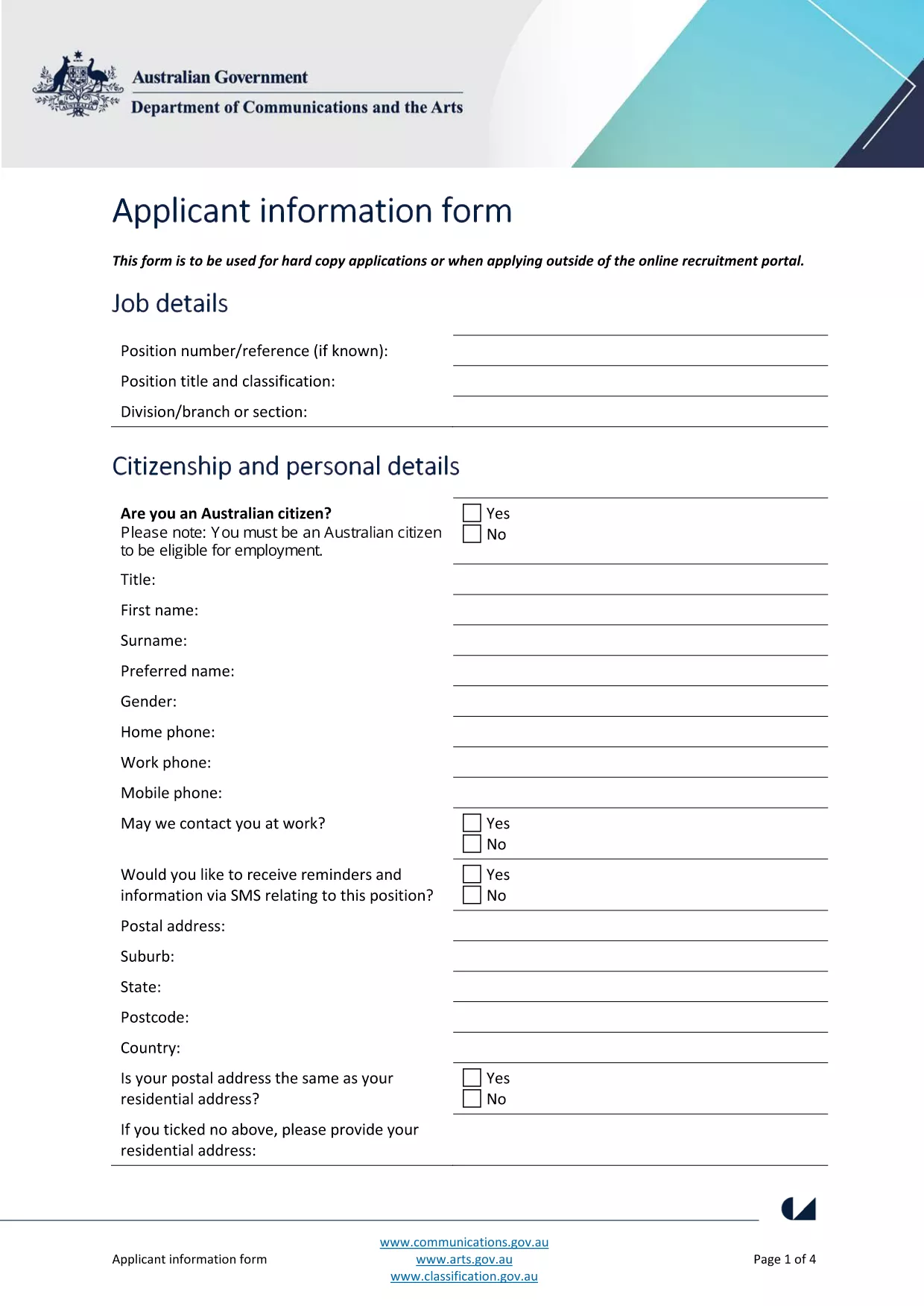
The Australian Public Service (APS) uses a standard Application Form for most entry‑level and graduate roles. This fillable PDF lets you enter your personal details, work experience, and qualifications directly on the page, then submit the completed file to the hiring agency.

What Is the APS Application Form?

The form is a government‑issued document that collects the information required to assess your suitability for APS positions. It includes sections for:

  • Personal details (name, contact, residency)
  • Education and qualifications
  • Employment history and achievements
  • Skills, competencies and security declarations

How to Complete the Form with Formize

Instead of downloading the PDF and opening a separate editor, simply click the "Fill out this form" button on this page. The Formize PDF Filler app loads in your browser, letting you:

  1. Enter data in each field with keyboard or drop‑down menus.
  2. Save a copy to your computer at any time.
  3. Validate required fields before submitting.

When you’re done, click **Submit** to download the completed PDF or email it directly to the recruiting agency.

Common Mistakes & Tips for a Perfect Submission

  • Missing required fields: The Formize filler highlights empty mandatory sections in red.
  • Incorrect date formats: Use DD/MM/YYYY as shown in the example fields.
  • Spelling errors: Run the built‑in spell‑check before saving.
  • Oversized files: Keep attachments (e.g., resumes) under 2 MB to avoid upload errors.

Where to Send Your Completed Application

After saving the filled PDF, follow the specific job posting instructions. Most APS vacancies request the file as an attachment in the online recruitment portal, or via a designated government email address.

Need more guidance? Review the official applicant information guide for detailed eligibility criteria.

FAQ
  • Do I need Adobe Acrobat to fill the APS form?

    No. Formize’s online PDF filler works in any modern browser, so you don’t need Acrobat or any extra software.

  • Can I edit the form after I’ve saved it?

    Yes. Open the saved PDF again with Formize, make changes, and re‑save. All data remains editable.

  • Is my personal data safe when I use Formize?

    Formize processes the PDF locally in your browser; no data is stored on external servers, ensuring privacy and security.

  • What if the PDF won’t load?

    Refresh the page and click the "Fill out this form" button again. If the problem persists, clear your browser cache or try a different browser.

  • Can I print a hard‑copy after filling the form?

    Absolutely. After saving, open the PDF in any viewer and print it like any standard document.

  • Do I need to sign the PDF digitally?

    The APS form accepts a scanned signature or a typed name in the signature field. Upload a scanned signature if required.

ᲠᲝᲒᲝᲠ

როგორ შეავსოთ APS application form უფასოდ, ონლაინ 4 მარტივი ნაბიჯებით:

  1. 1
    Open the Fillable Form
    Click the "Fill out this form" button on the page. The Formize PDF Filler loads instantly in your browser.
  2. 2
    Enter Your Information
    Type directly into each highlighted field. Use drop‑down menus for dates, states, and yes/no answers.
  3. 3
    Validate and Save
    The filler checks required fields automatically. When all sections are green, click "Save" to download the completed PDF.
  4. 4
    Submit Your Application
    Attach the saved PDF to the APS vacancy posting or email it to the address listed in the job advert.
PDF შემავსებლის აპლიკაციის ფორმირება
ᲨᲔᲡᲐᲮᲔᲑ

APS application form შაბლონი

PDF დოკუმენტის სანახავად და შევსების ფუნქციების ტრადიციული ნაკრებით, ვებ აპლიკაციის უპირატესობებთან და საპასუხო განლაგებასთან ერთად, შეგიძლიათ შეავსოთ APS application form წუთებში.

ᲛᲐᲮᲐᲡᲘᲐᲗᲔᲑᲚᲔᲑᲘ

PDF შემავსებელი

ონლაინ APS application form-ის შევსების უმარტივესი გზა

  • სწრაფად შეავსეთ APS application form
    ეძებთ გზას სწრაფად შეავსოთ APS application form ონლაინ? ჩვენი ონლაინ უფასო PDF ფორმის შემავსებლით, თქვენ გეცოდინებათ როგორ შეცვალოთ და შეავსოთ ეს pdf დოკუმენტი ერთ წუთზე ნაკლებ დროში.
  • მარტივი გამოსაყენებელი ონლაინ PDF რედაქტორი
    მოგბეზრდათ PDF ფაილების დაბეჭდვა, რათა მათი რედაქტირება შეძლოთ, ხელახლა სკანირებამდე და უკან გაგზავნამდე? შეცვალეთ PDF დოკუმენტები უფასოდ ონლაინ. გამოიყენეთ ჩვენი ონლაინ pdf რედაქტორი დროისა და ქაღალდის დაზოგვისთვის.
  • შესანიშნავი ხელსაწყოები, ყველა პლატფორმა
    გაინტერესებთ როგორ შეავსოთ APS application form Mac-ზე, ან იქნებ როგორ გამოიყენოთ PDF შემავსებელი უფასოდ? ჩვენი ონლაინ PDF ინსტრუმენტები მუშაობს ყველა პლატფორმაზე.
  • ფაილების უსაფრთხო შენახვა
    დასრულებული „APS application form“ ფაილები ინახება დაცულ მონაცემთა ბაზაში, რომელსაც მართავს Amazon Cloud ჰოსტინგი. თქვენ შეგიძლიათ წაშალოთ თქვენი ფაილები ჩვენი სისტემიდან ნებისმიერ დროს. ნებისმიერ შემთხვევაში, ეს ფაილები ავტომატურად იშლება 24 საათის შემდეგ.
  • ჩატი APS application form-ით
    ესაუბრეთ „APS application form“-ს Chatize-ზე, რომელიც არის PDF წამკითხველის უფასო ასისტენტი. დასვით კითხვები და მიიღეთ პასუხები „APS application form“-დან. უბრალოდ დააწკაპუნეთ ღილაკზე ჩატი დოკუმენტთან ზემოთ.

შევსების სესიის წაშლა

წაშალოთ არჩეული შევსების სესია? ამ შემთხვევაში, თქვენი პროგრესი ფორმის შევსებაში დაიკარგება.

რედაქტირების სესიის წაშლა

წაშალოთ არჩეული რედაქტირების სესია? ამ შემთხვევაში, თქვენი პროგრესი ფორმის შექმნასა და რედაქტირებაში დაიკარგება.