
hamburger-menu icon
Აირჩიეთ ენა

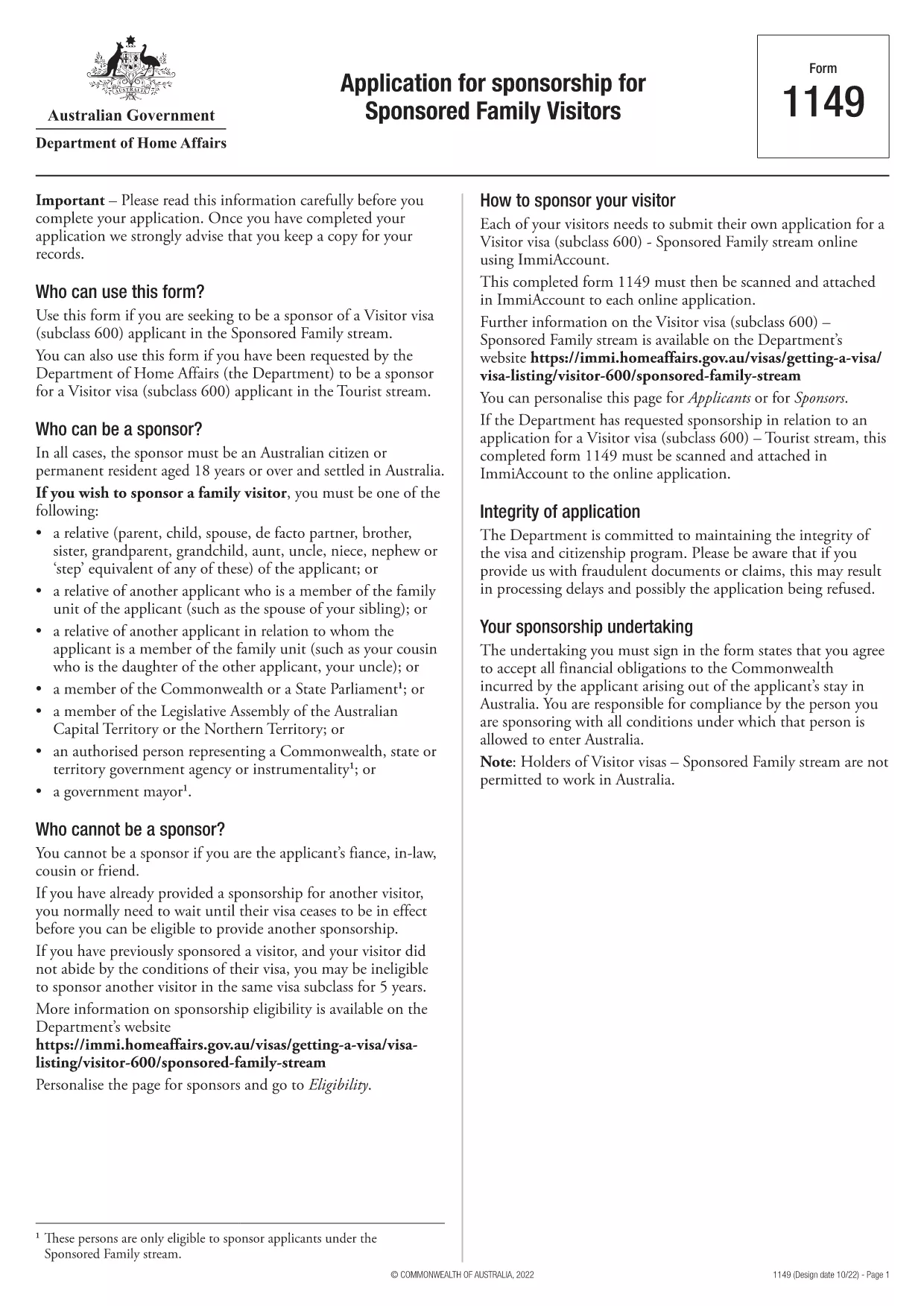
Form 1149 – Application for Sponsorship of a Family Visitor (Visitor Visa 600)

  1. ქვეყანა ავსტრალია
  2. Ენა ინგლისური
  3. აქტივობა შეუერთდი ან მოიყვანე ოჯახი
Form 1149 – Application for Sponsorship of a Family Visitor (Visitor Visa 600)

Form 1149 is the official Application for Sponsorship for Sponsored Family Visitors used by Australian citizens or permanent residents who wish to sponsor a relative, a member of the Commonwealth, or a state parliamentarian for a Visitor visa (subclass 600). The form outlines the sponsor’s obligations, eligibility criteria, and any security bond requirements.

Traditionally the form is a static PDF that must be printed, handwritten, and mailed. With Formize you can complete the same form entirely online – just click Fill out this form and let our secure PDF filler do the work.

What Is Form 1149?

Form 1149 collects detailed information about the sponsor (name, address, citizenship status), the invited visitor (relationship, passport details, travel dates), and the financial support the sponsor will provide. It also asks about any previous sponsorships and the sponsor’s ability to meet the visa conditions.

Who Needs to Complete This Form?

  • Australian citizens or permanent residents sponsoring a family member for a Visitor visa (subclass 600).
  • Members of the Commonwealth or state parliament who are inviting a guest for official duties.
  • Anyone required to provide a security bond for the visitor’s stay.

How to Fill Form 1149 Online with Formize

Follow these simple steps to complete the form without printing:

  1. Click the Fill out this form button on this page.
  2. Wait a few seconds while the Formize PDF Filler loads the fillable version of Form 1149.
  3. Enter all required details in the highlighted fields. The filler validates dates, passport numbers, and numeric entries in real‑time.
  4. Review the summary page, correct any highlighted errors, and click Submit to download the completed PDF.
  5. Print the signed PDF (if a physical signature is required) and attach it to your visa application package.

Common Mistakes to Avoid

  • Incorrect passport numbers: Double‑check each digit; a single typo can delay processing.
  • Missing sponsor’s financial details: Provide clear evidence of income or savings to satisfy the bond requirement.
  • Leaving optional fields blank: If a field asks for “previous sponsorships”, answer “None” rather than leaving it empty.
  • Using an outdated version: Always use the latest PDF – the link on this page points to the current 2024 version.

Where to Submit the Completed Form

After filling and printing the form, include it with the Visitor visa (subclass 600) application packet and submit to the Department of Home Affairs either online via ImmiAccount or by post to the address indicated in the visa instructions.

Using Formize’s online filler saves time, reduces errors, and ensures you are working with the most up‑to‑date version of Form 1149.

FAQ
  • Who can act as a sponsor on Form 1149?

    Only Australian citizens or permanent residents may sponsor a family visitor for a subclass 600 visa. Commonwealth or state parliament members may also sponsor for official visits.

  • Do I need to provide a security bond?

    A bond is required if the sponsor cannot demonstrate sufficient financial capacity. The amount is determined by the Department of Home Affairs based on the visitor’s length of stay and circumstances.

  • Can I submit the form electronically?

    Yes. Fill the form online with Formize, download the completed PDF, and attach it to your ImmiAccount submission. Some cases may still require a printed, signed copy.

  • How long is Form 1149 valid?

    The form does not have an expiry date, but you should use the latest version available on the Department of Home Affairs website.

  • What common errors cause delays?

    Incorrect passport numbers, missing financial information, and leaving optional fields blank are the most frequent reasons for processing delays.

  • Is there a fee to use Formize’s PDF filler?

    Formize offers a free basic filler for most government forms, including Form 1149. Premium features are optional and not required for this form.

  • Do I need to sign the PDF digitally?

    A digital signature is accepted for most online submissions. If you submit a paper application, print the PDF and sign it with a pen.

ᲠᲝᲒᲝᲠ

როგორ შეავსოთ Form 1149 უფასოდ, ონლაინ 5 მარტივი ნაბიჯებით:

  1. 1
    Open the Fillable Form
    Click the "Fill out this form" button on this page. The Formize PDF Filler will open in a new tab.
  2. 2
    Enter Your Details
    Fill each highlighted field with accurate information. The tool validates entries in real time.
  3. 3
    Review and Correct Errors
    Check the summary page for any highlighted errors, correct them, and confirm the data.
  4. 4
    Download the Completed PDF
    Click "Submit" to download the fully completed PDF. Print and sign if a physical signature is required.
  5. 5
    Attach to Your Visa Application
    Include the signed PDF with your Visitor visa (subclass 600) application and submit to the Department of Home Affairs.
PDF შემავსებლის აპლიკაციის ფორმირება
ᲨᲔᲡᲐᲮᲔᲑ

შეუერთდით ან შემოიტანეთ საოჯახო ფორმები

Form 1149 არის განაცხადის ერთ-ერთი ფორმა, რომელსაც ინდივიდები იყენებენ სხვა ქვეყანაში მათი ოჯახის წევრების იმიგრაციის ან გაერთიანების დასაფინანსებლად და გასაადვილებლად. ეს ფორმები ხშირად ასოცირდება ოჯახზე დაფუძნებულ საიმიგრაციო პროგრამებთან ან პოლიტიკასთან, რომელიც საშუალებას აძლევს პირებს, რომლებიც უკვე ცხოვრობენ კონკრეტულ ქვეყანაში, შემოიერთონ თავიანთი უახლოესი ოჯახის წევრები. კონკრეტული ფორმები შეიძლება განსხვავდებოდეს ქვეყნიდან და მისი საიმიგრაციო სისტემის მიხედვით, მაგრამ აქ არის რამდენიმე გავრცელებული მაგალითი:

ოჯახის სპონსორობის განაცხადის ფორმა: ეს არის ძირითადი ფორმა, რომელსაც იყენებენ ადამიანები, რომლებსაც სურთ თავიანთი ოჯახის წევრების სპონსორობა იმიგრაციისთვის. ის აგროვებს ინფორმაციას სპონსორის (პირი, რომელიც უკვე ცხოვრობს ქვეყანაში) და ოჯახის წევრების შესახებ, რომლებსაც სპონსორობენ, მათ შორის ურთიერთობას, პერსონალურ დეტალებს და დამხმარე დოკუმენტაციას.

დამოკიდებული სავიზო განაცხადის ფორმა: ზოგიერთ საიმიგრაციო სისტემაში, პირებს, რომლებიც უკვე ცხოვრობენ ქვეყანაში, შეუძლიათ მიმართონ დამოკიდებულ ვიზებს, რათა ჩამოიყვანონ თავიანთი უახლოესი ოჯახის წევრები, როგორიცაა მეუღლეები, შვილები ან მშობლები. დამოკიდებული ვიზის განაცხადის ფორმა აგროვებს ინფორმაციას სპონსორის, დამოკიდებული ოჯახის წევრების, მათი ურთიერთობისა და დამხმარე დოკუმენტაციის შესახებ.

მხარდაჭერის დადასტურება: გარკვეულ ქვეყნებში სპონსორებს შეიძლება მოეთხოვონ მხარდაჭერის მტკიცების წარდგენა, რომელიც არის იურიდიული დოკუმენტი, რომელიც ადასტურებს მათ ფინანსურ პასუხისმგებლობას სპონსორებული ოჯახის წევრებისთვის. ეს დოკუმენტი ხშირად შეიცავს დეტალებს სპონსორის შემოსავლის, აქტივებისა და ოჯახის წევრების ფინანსური მხარდაჭერის შესაძლებლობის შესახებ.

სამედიცინო გამოკვლევის ფორმები: ოჯახის წევრებს, რომლებსაც სპონსორობენ იმიგრაციისთვის, შესაძლოა მოეთხოვოთ სამედიცინო შემოწმების გავლა, რათა დარწმუნდნენ, რომ ისინი აკმაყოფილებენ დანიშნულების ქვეყნის ჯანმრთელობის მოთხოვნებს. სამედიცინო გამოკვლევის ფორმები აგროვებს ჯანმრთელობის აუცილებელ ინფორმაციას და ტესტის შედეგებს.

ურთიერთობის დოკუმენტაციის ფორმები: სპონსორსა და დაფინანსებულ ოჯახის წევრებს შორის ოჯახური ურთიერთობის დასადასტურებლად შეიძლება საჭირო გახდეს სხვადასხვა დოკუმენტი. ეს შეიძლება შეიცავდეს დაბადების მოწმობებს, ქორწინების მოწმობებს, შვილად აყვანის დოკუმენტებს ან ოჯახური ურთიერთობის დამადასტურებელ სხვა მტკიცებულებებს.

მნიშვნელოვანია აღინიშნოს, რომ კონკრეტული ფორმები და მოთხოვნები შეიძლება მნიშვნელოვნად განსხვავდებოდეს ქვეყნის და მისი საიმიგრაციო კანონებისა და პოლიტიკის მიხედვით. მიზანშეწონილია გაიაროთ კონსულტაცია საიმიგრაციო ორგანოს ოფიციალურ ვებსაიტზე ან მოიძიოთ იურიდიული რჩევა, რათა მიიღოთ ზუსტი და უახლესი ინფორმაცია სპონსორობის ან ოჯახის წევრების კონკრეტულ ქვეყანაში ჩამოყვანის აუცილებელ ფორმებსა და პროცესებთან დაკავშირებით.

ᲛᲐᲮᲐᲡᲘᲐᲗᲔᲑᲚᲔᲑᲘ

PDF შემავსებელი

ონლაინ Form 1149-ის შევსების უმარტივესი გზა

  • სწრაფად შეავსეთ Form 1149
    ეძებთ გზას სწრაფად შეავსოთ Form 1149 ონლაინ? ჩვენი ონლაინ უფასო PDF ფორმის შემავსებლით, თქვენ გეცოდინებათ როგორ შეცვალოთ და შეავსოთ ეს pdf დოკუმენტი ერთ წუთზე ნაკლებ დროში.
  • მარტივი გამოსაყენებელი ონლაინ PDF რედაქტორი
    მოგბეზრდათ PDF ფაილების დაბეჭდვა, რათა მათი რედაქტირება შეძლოთ, ხელახლა სკანირებამდე და უკან გაგზავნამდე? შეცვალეთ PDF დოკუმენტები უფასოდ ონლაინ. გამოიყენეთ ჩვენი ონლაინ pdf რედაქტორი დროისა და ქაღალდის დაზოგვისთვის.
  • შესანიშნავი ხელსაწყოები, ყველა პლატფორმა
    გაინტერესებთ როგორ შეავსოთ Form 1149 Mac-ზე, ან იქნებ როგორ გამოიყენოთ PDF შემავსებელი უფასოდ? ჩვენი ონლაინ PDF ინსტრუმენტები მუშაობს ყველა პლატფორმაზე.
  • ფაილების უსაფრთხო შენახვა
    დასრულებული „Form 1149“ ფაილები ინახება დაცულ მონაცემთა ბაზაში, რომელსაც მართავს Amazon Cloud ჰოსტინგი. თქვენ შეგიძლიათ წაშალოთ თქვენი ფაილები ჩვენი სისტემიდან ნებისმიერ დროს. ნებისმიერ შემთხვევაში, ეს ფაილები ავტომატურად იშლება 24 საათის შემდეგ.
  • ჩატი Form 1149-ით
    ესაუბრეთ „Form 1149“-ს Chatize-ზე, რომელიც არის PDF წამკითხველის უფასო ასისტენტი. დასვით კითხვები და მიიღეთ პასუხები „Form 1149“-დან. უბრალოდ დააწკაპუნეთ ღილაკზე ჩატი დოკუმენტთან ზემოთ.

შევსების სესიის წაშლა

წაშალოთ არჩეული შევსების სესია? ამ შემთხვევაში, თქვენი პროგრესი ფორმის შევსებაში დაიკარგება.

რედაქტირების სესიის წაშლა

წაშალოთ არჩეული რედაქტირების სესია? ამ შემთხვევაში, თქვენი პროგრესი ფორმის შექმნასა და რედაქტირებაში დაიკარგება.