hamburger-menu icon
Აირჩიეთ ენა

Form 1194 – Certification of Immigration Status (Fillable PDF)

  1. Ენა ინგლისური
  2. ქვეყანა ავსტრალია
  3. აქტივობა ავსტრალიის დატოვება
Form 1194 – Certification of Immigration Status (Fillable PDF)

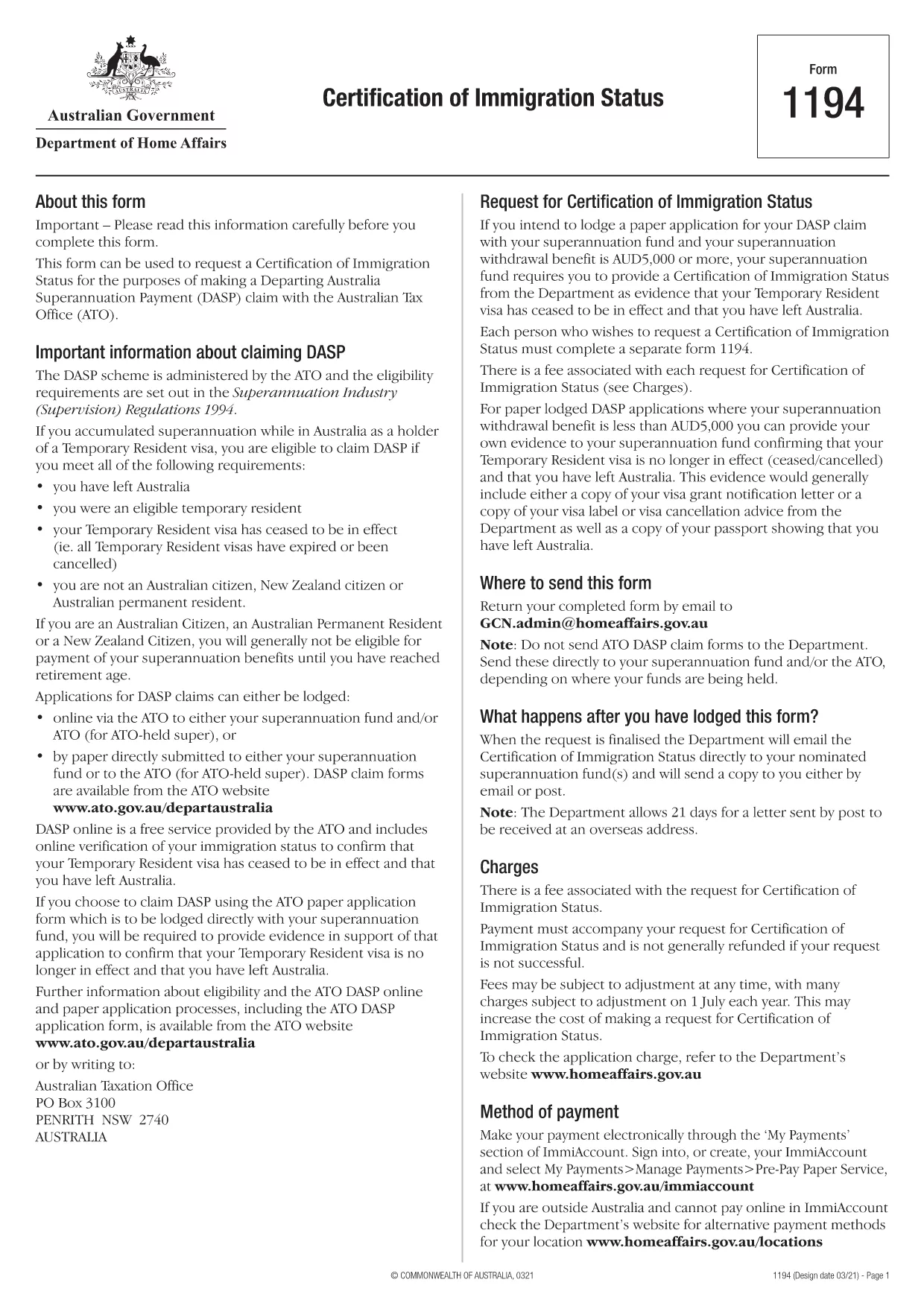
Form 1194 is the official Australian Certification of Immigration Status used when you need to prove your visa status for a Departing Australia Superannuation Payment (DASP) claim, bank verification, or any other official purpose. The form is required for former temporary residents who have left Australia and no longer hold citizenship or permanent residency.

What is Form 1194 and when do you need it?

The Department of Home Affairs issues Form 1194 to certify whether you are a former temporary resident, a New Zealand citizen, or an Australian permanent resident. You will need this certification if you are:

  • Applying for a DASP claim with your superannuation fund.
  • Providing proof of immigration status to a financial institution.
  • Requesting the cancellation of a Temporary Resident visa.

Key sections of Form 1194 explained

Form 1194 contains four main parts:

  1. Applicant details – name, date of birth, passport number, and contact information.
  2. Visa information – visa subclass, grant date, and expiry date.
  3. Certification request – choose whether you need a certification of status or a visa cancellation.
  4. Signature & declaration – sign and date the form to confirm the information is correct.

How to complete Form 1194 online with Formize

Instead of downloading, printing, and scanning, you can fill the form directly in your browser using Formize’s secure PDF filler. Follow these simple steps:

Common mistakes to avoid

  • Leaving the passport number blank – the form will be rejected.
  • Using an outdated visa subclass number.
  • Forgetting to sign the declaration page.
  • Submitting the form to the wrong department (it must go to the Department of Home Affairs).

Where to submit the completed form

Once you have filled and signed Form 1194, you can submit it by:

  • Mailing it to the address printed on the form.
  • Uploading a scanned copy via the Department of Home Affairs online portal.

Make sure to keep a copy of the signed PDF for your records.

FAQ
  • Do I need to print Form 1194 after filling it online?

    No. The Formize filler creates a fully signed PDF that you can download and submit electronically or print if you prefer.

  • Can I use Form 1194 if I am still a permanent resident?

    Form 1194 is intended for former temporary residents or New Zealand citizens. Permanent residents should use the appropriate Australian citizenship or residency certification form.

  • How long does it take for the Department to process the certification?

    Processing times vary, but most certifications are issued within 10‑15 business days after receipt of the complete form.

  • Is there a fee to submit Form 1194?

    There is no fee for the certification itself, but some superannuation funds may charge a small administrative fee for DASP processing.

  • What should I do if I make a mistake after submitting?

    Contact the Department of Home Affairs immediately. You may need to submit a corrected form with a brief explanation of the error.

  • Can I submit Form 1194 via email?

    Yes, you can email the signed PDF to the address provided on the form, but ensure the file is not password‑protected.

  • Is the Formize filler secure?

    Formize uses end‑to‑end encryption and complies with Australian privacy standards, keeping your personal data safe.

ᲠᲝᲒᲝᲠ

როგორ შეავსოთ Form 1194 უფასოდ, ონლაინ 4 მარტივი ნაბიჯებით:

  1. 1
    Open the fillable form
    Click the **Fill out this form** button on this page. The Formize PDF Filler app will load the PDF directly in your browser.
  2. 2
    Enter your information
    Type your details into each field – the form automatically saves your entries as you go.
  3. 3
    Add your signature
    Use the built‑in e‑signature tool to sign the declaration section. No printer needed.
  4. 4
    Download or share
    When you’re finished, click **Download PDF** to save a copy or **Share Link** to email it directly to the Department of Home Affairs.
PDF შემავსებლის აპლიკაციის ფორმირება
ᲨᲔᲡᲐᲮᲔᲑ

Form 1194 შაბლონი

PDF დოკუმენტის სანახავად და შევსების ფუნქციების ტრადიციული ნაკრებით, ვებ აპლიკაციის უპირატესობებთან და საპასუხო განლაგებასთან ერთად, შეგიძლიათ შეავსოთ Form 1194 წუთებში.

ᲛᲐᲮᲐᲡᲘᲐᲗᲔᲑᲚᲔᲑᲘ

PDF შემავსებელი

ონლაინ Form 1194-ის შევსების უმარტივესი გზა

  • სწრაფად შეავსეთ Form 1194
    ეძებთ გზას სწრაფად შეავსოთ Form 1194 ონლაინ? ჩვენი ონლაინ უფასო PDF ფორმის შემავსებლით, თქვენ გეცოდინებათ როგორ შეცვალოთ და შეავსოთ ეს pdf დოკუმენტი ერთ წუთზე ნაკლებ დროში.
  • მარტივი გამოსაყენებელი ონლაინ PDF რედაქტორი
    მოგბეზრდათ PDF ფაილების დაბეჭდვა, რათა მათი რედაქტირება შეძლოთ, ხელახლა სკანირებამდე და უკან გაგზავნამდე? შეცვალეთ PDF დოკუმენტები უფასოდ ონლაინ. გამოიყენეთ ჩვენი ონლაინ pdf რედაქტორი დროისა და ქაღალდის დაზოგვისთვის.
  • შესანიშნავი ხელსაწყოები, ყველა პლატფორმა
    გაინტერესებთ როგორ შეავსოთ Form 1194 Mac-ზე, ან იქნებ როგორ გამოიყენოთ PDF შემავსებელი უფასოდ? ჩვენი ონლაინ PDF ინსტრუმენტები მუშაობს ყველა პლატფორმაზე.
  • ფაილების უსაფრთხო შენახვა
    დასრულებული „Form 1194“ ფაილები ინახება დაცულ მონაცემთა ბაზაში, რომელსაც მართავს Amazon Cloud ჰოსტინგი. თქვენ შეგიძლიათ წაშალოთ თქვენი ფაილები ჩვენი სისტემიდან ნებისმიერ დროს. ნებისმიერ შემთხვევაში, ეს ფაილები ავტომატურად იშლება 24 საათის შემდეგ.
  • ჩატი Form 1194-ით
    ესაუბრეთ „Form 1194“-ს Chatize-ზე, რომელიც არის PDF წამკითხველის უფასო ასისტენტი. დასვით კითხვები და მიიღეთ პასუხები „Form 1194“-დან. უბრალოდ დააწკაპუნეთ ღილაკზე ჩატი დოკუმენტთან ზემოთ.

შევსების სესიის წაშლა

წაშალოთ არჩეული შევსების სესია? ამ შემთხვევაში, თქვენი პროგრესი ფორმის შევსებაში დაიკარგება.

რედაქტირების სესიის წაშლა

წაშალოთ არჩეული რედაქტირების სესია? ამ შემთხვევაში, თქვენი პროგრესი ფორმის შექმნასა და რედაქტირებაში დაიკარგება.