hamburger-menu icon
Აირჩიეთ ენა

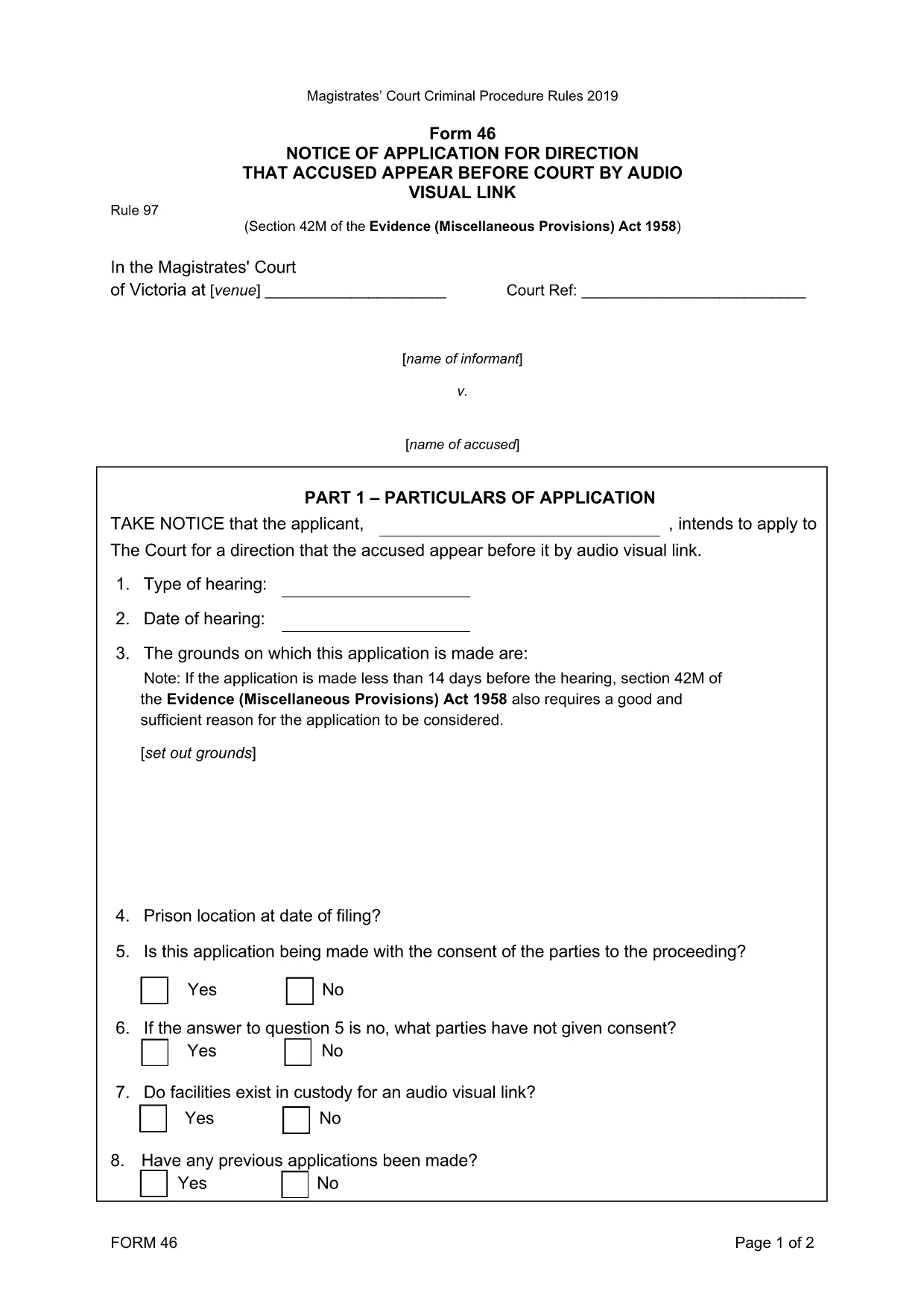
Form 46‑0414: Application for Appearance by Audio‑Visual Link

  1. Ენა ინგლისური
  2. ქვეყანა ავსტრალია
  3. აქტივობა Legal Forms
  4. დეპარტამენტი Magistrates' Court
Form 46‑0414: Application for Appearance by Audio‑Visual Link

Form 46‑0414 is the official application used in the Magistrates' Court of Victoria when a defendant or a witness needs to appear in court via an audio‑visual link (AVL). This form streamlines the request, ensuring the court has all required details to grant an AVL appearance.

What is Form 46‑0414?

The form captures essential information such as the case number, parties involved, reason for the AVL request, and any supporting documentation. It is a mandatory filing whenever a physical appearance is impractical due to health, distance, or other valid reasons.

How to Fill Form 46‑0414 Online

Instead of downloading the PDF and editing it manually, simply click the "Fill out this form" button on this page. The Formize PDF Filler app will load instantly, letting you type directly into each field, add signatures, and save your progress.

  • Step 1: Click the blue "Fill out this form" button.
  • Step 2: The Formize filler loads – the PDF appears with editable fields.
  • Step 3: Complete each section, attaching any required documents.
  • Step 4: Review, then click "Save & Download" to get the finished PDF.

Common Mistakes to Avoid

  • Leaving the "Reason for AVL" section blank – the court needs a clear justification.
  • Using an outdated case number – verify the number on your court notice.
  • Forgetting to attach supporting medical or travel documents.
  • Signing the form with a typed name only – use the electronic signature tool in Formize.

Where to Submit the Completed Form

After saving the filled PDF, you can:

  • Email it to the court registry (check the address on your notice).
  • Upload it via the Magistrates' Court online portal.
  • Deliver a printed copy in person to the court clerk.

Download the Fillable PDF

If you prefer to work offline, you can download the original fillable PDF directly from the court’s website. The file is fully searchable and compatible with most PDF editors.

FAQ
  • Who can use Form 46‑0414?

    Any defendant, accused person, or witness who has been ordered to appear in person but needs an audio‑visual link due to health, distance, or other valid reasons.

  • Is the form available in a printable version?

    Yes. You can download the original fillable PDF from the court’s website and print it if you prefer a paper submission.

  • What supporting documents are required?

    Typically a medical certificate, travel restriction notice, or any other proof that explains why a physical appearance is not possible.

  • How long does the court take to approve an AVL request?

    Approval time varies, but most courts aim to respond within 5‑7 business days after receiving a complete application.

  • Can I submit the form electronically?

    Yes. After completing the form with Formize, you can email the PDF or upload it through the Magistrates' Court online portal.

  • What happens if I forget to sign the form?

    The court will reject the application. Use the electronic signature tool in Formize to add a valid signature before submitting.

  • Do I need a lawyer to fill out Form 46‑0414?

    A lawyer is not required, but legal advice can help ensure all details are accurate and improve the chance of approval.

ᲠᲝᲒᲝᲠ

როგორ შეავსოთ Form 46‑0414 უფასოდ, ონლაინ 4 მარტივი ნაბიჯებით:

  1. 1
    Open the Fillable Form
    Click the "Fill out this form" button on the page. The Formize PDF Filler will open in a new window.
  2. 2
    Enter Your Information
    Type directly into each highlighted field – case number, parties, reason for AVL, and any supporting details.
  3. 3
    Add Attachments
    Use the paperclip icon to upload medical certificates or travel documents required by the court.
  4. 4
    Save and Download
    When finished, click "Save & Download". The completed PDF is ready to email or upload to the court.
PDF შემავსებლის აპლიკაციის ფორმირება
ᲨᲔᲡᲐᲮᲔᲑ

Form 46‑0414 შაბლონი

PDF დოკუმენტის სანახავად და შევსების ფუნქციების ტრადიციული ნაკრებით, ვებ აპლიკაციის უპირატესობებთან და საპასუხო განლაგებასთან ერთად, შეგიძლიათ შეავსოთ Form 46‑0414 წუთებში.

ᲛᲐᲮᲐᲡᲘᲐᲗᲔᲑᲚᲔᲑᲘ

PDF შემავსებელი

ონლაინ Form 46‑0414-ის შევსების უმარტივესი გზა

  • სწრაფად შეავსეთ Form 46‑0414
    ეძებთ გზას სწრაფად შეავსოთ Form 46‑0414 ონლაინ? ჩვენი ონლაინ უფასო PDF ფორმის შემავსებლით, თქვენ გეცოდინებათ როგორ შეცვალოთ და შეავსოთ ეს pdf დოკუმენტი ერთ წუთზე ნაკლებ დროში.
  • მარტივი გამოსაყენებელი ონლაინ PDF რედაქტორი
    მოგბეზრდათ PDF ფაილების დაბეჭდვა, რათა მათი რედაქტირება შეძლოთ, ხელახლა სკანირებამდე და უკან გაგზავნამდე? შეცვალეთ PDF დოკუმენტები უფასოდ ონლაინ. გამოიყენეთ ჩვენი ონლაინ pdf რედაქტორი დროისა და ქაღალდის დაზოგვისთვის.
  • შესანიშნავი ხელსაწყოები, ყველა პლატფორმა
    გაინტერესებთ როგორ შეავსოთ Form 46‑0414 Mac-ზე, ან იქნებ როგორ გამოიყენოთ PDF შემავსებელი უფასოდ? ჩვენი ონლაინ PDF ინსტრუმენტები მუშაობს ყველა პლატფორმაზე.
  • ფაილების უსაფრთხო შენახვა
    დასრულებული „Form 46‑0414“ ფაილები ინახება დაცულ მონაცემთა ბაზაში, რომელსაც მართავს Amazon Cloud ჰოსტინგი. თქვენ შეგიძლიათ წაშალოთ თქვენი ფაილები ჩვენი სისტემიდან ნებისმიერ დროს. ნებისმიერ შემთხვევაში, ეს ფაილები ავტომატურად იშლება 24 საათის შემდეგ.
  • ჩატი Form 46‑0414-ით
    ესაუბრეთ „Form 46‑0414“-ს Chatize-ზე, რომელიც არის PDF წამკითხველის უფასო ასისტენტი. დასვით კითხვები და მიიღეთ პასუხები „Form 46‑0414“-დან. უბრალოდ დააწკაპუნეთ ღილაკზე ჩატი დოკუმენტთან ზემოთ.

შევსების სესიის წაშლა

წაშალოთ არჩეული შევსების სესია? ამ შემთხვევაში, თქვენი პროგრესი ფორმის შევსებაში დაიკარგება.

რედაქტირების სესიის წაშლა

წაშალოთ არჩეული რედაქტირების სესია? ამ შემთხვევაში, თქვენი პროგრესი ფორმის შექმნასა და რედაქტირებაში დაიკარგება.