

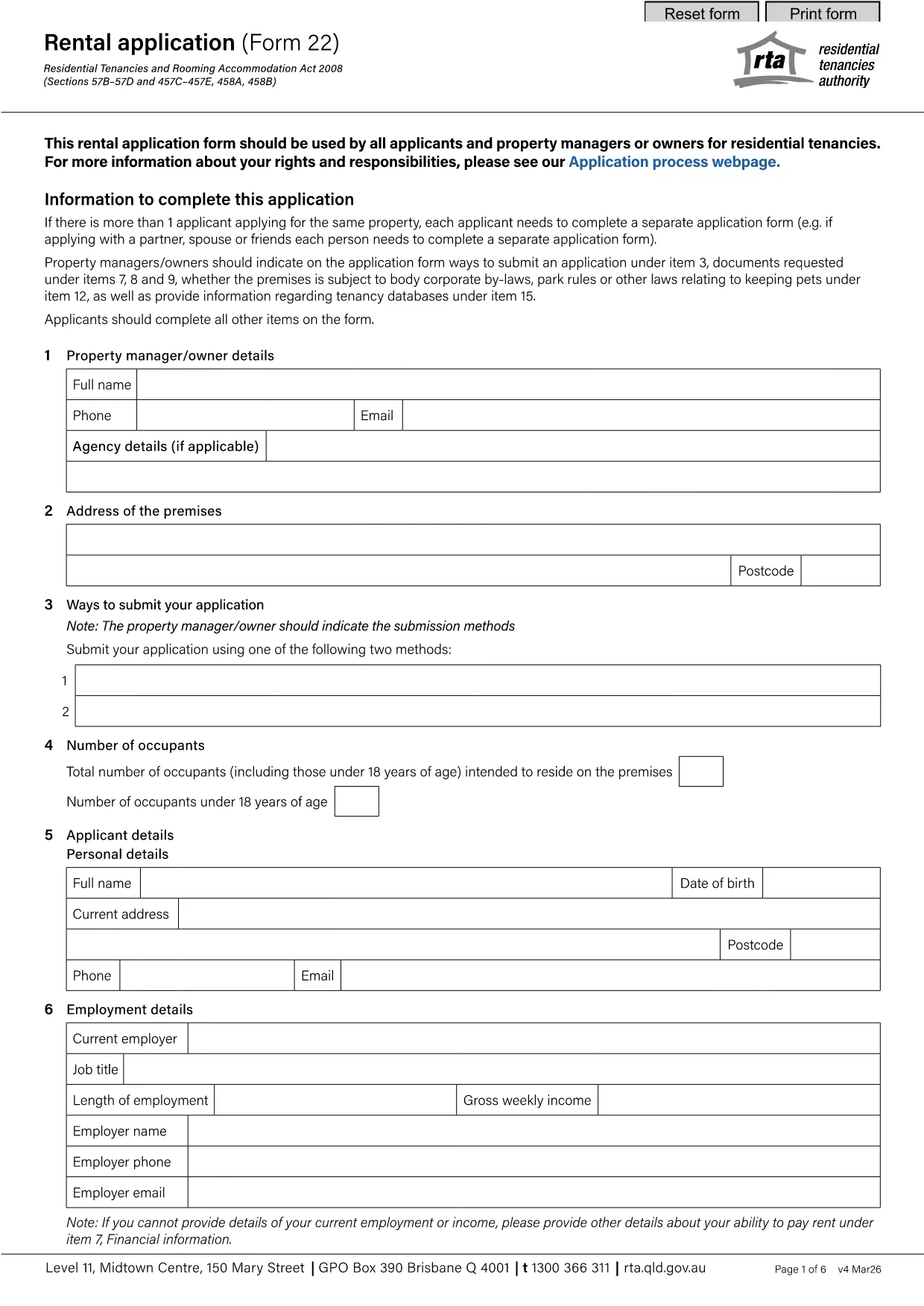

ფორმები მემამულეებისთვის და/ან მოიჯარეებისთვის, რათა შესთავაზონ ქირავნობის ხელშეკრულებებთან დაკავშირებული ქმედება.
rental application pdf არის ერთ-ერთი დოკუმენტი, რომელიც გამოიყენება ქონების დაქირავების ან იჯარით გაცემის პროცესში. ეს ფორმები ადგენს სამართლებრივ შეთანხმებას ქონების მფლობელს (გამქირავებელს) და მოიჯარეს შორის, რომელიც ასახავს ქირავნობის მოწყობის პირობებს. აქ არის გაქირავების ან იჯარის რამდენიმე გავრცელებული ფორმა:
გაქირავების განაცხადი: ამ ფორმას, როგორც წესი, ავსებენ პოტენციური მოიჯარეები, რომლებიც დაინტერესებულნი არიან ქონების დაქირავებით. ის აგროვებს პერსონალურ ინფორმაციას განმცხადებლის შესახებ, როგორიცაა მათი სახელი, საკონტაქტო ინფორმაცია, დასაქმების დეტალები, გაქირავების ისტორია და მითითებები. ქირავნობის განაცხადი ეხმარება მემამულეებს შეაფასონ მოიჯარეების ვარგისიანობა და მიიღონ ინფორმირებული გადაწყვეტილებები.
იჯარის ხელშეკრულება: იჯარის ხელშეკრულება არის იურიდიულად სავალდებულო ხელშეკრულება, რომელიც ასახავს როგორც გამქირავებელს, ასევე მოიჯარეს უფლებებსა და მოვალეობებს. ის მოიცავს მნიშვნელოვან დეტალებს, როგორიცაა იჯარის ხანგრძლივობა, ქირავნობის თანხა, გარანტიის დეპოზიტი, დაგვიანებული გადახდის საფასური, შინაური ცხოველების პოლიტიკა, მოვლა-პატრონობის პასუხისმგებლობა და საიჯარო ქონებისთვის დამახასიათებელი სხვა პირობები. იჯარის ხელშეკრულებები შეიძლება განსხვავდებოდეს ხანგრძლივობითა და სირთულით, რაც დამოკიდებულია გაქირავების ბაზრისა და ადგილობრივი კანონმდებლობის მიხედვით.
იჯარის ხელშეკრულება: იჯარის ხელშეკრულების მსგავსად, ქირავნობის ხელშეკრულება არის ხელშეკრულება, რომელიც არეგულირებს ქონების გაქირავებას. თუმცა, ქირავნობის ხელშეკრულებები, როგორც წესი, გამოიყენება უფრო მოკლევადიანი გაქირავებისთვის, როგორიცაა თვიდან თვემდე შეთანხმებები. ქირავნობის ხელშეკრულებებს, როგორც წესი, უფრო მეტი მოქნილობა აქვს და შეიძლება შეწყდეს ან შეიცვალოს ხანმოკლე გაფრთხილების ვადით გრძელვადიან იჯარებთან შედარებით.
შესვლის/გადატანის ინსპექტირების ფორმები: ეს ფორმები გამოიყენება საიჯარო ქონების მდგომარეობის დასაბუთებისთვის ქირავნობის დასაწყისში და ბოლოს. ისინი დეტალურად აღწერენ თითოეული ოთახის მდგომარეობას და არსებულ ნებისმიერ ზიანს, რაც უზრუნველყოფს, რომ ორივე მხარეს ჰქონდეს ჩანაწერი ქონების მდგომარეობის შესახებ უსაფრთხოების დეპოზიტებთან ან ზიანის მოთხოვნებთან დაკავშირებით დავების გადასაჭრელად.
შეტყობინება გათავისუფლების შესახებ: ამ ფორმას იყენებს გამქირავებელი ან მოიჯარე, რათა მიაწოდოს შეტყობინება ქირავნობის შეწყვეტის განზრახვის შესახებ. საჭირო შეტყობინების პერიოდი შეიძლება განსხვავდებოდეს ადგილობრივი კანონმდებლობისა და იჯარის ხელშეკრულების ან ქირავნობის ხელშეკრულების პირობების მიხედვით.
მნიშვნელოვანია აღინიშნოს, რომ ქირავნობის ან იჯარის ფორმები შეიძლება განსხვავდებოდეს მესაკუთრის ან ქონების მართვის კომპანიის იურისდიქციისა და კონკრეტული მოთხოვნების მიხედვით. რეკომენდირებულია გაიაროთ კონსულტაცია ადგილობრივ კანონმდებლობასთან და მოიძიოთ პროფესიონალური რჩევები მოქმედი რეგულაციების შესაბამისობის უზრუნველსაყოფად და შესაბამისი ფორმების გამოყენება კონკრეტული ქირავნობის ან იჯარის ტრანზაქციისთვის.