hamburger-menu icon
Აირჩიეთ ენა

Application Form – Proof of Age Card (Victoria)

  1. ქვეყანა ავსტრალია
  2. Ენა ინგლისური
  3. დეპარტამენტი Victoria Police
  4. აქტივობა Identification Documents
Application Form – Proof of Age Card (Victoria)

The Proof of Age Card is the most widely accepted form of identification for residents of Victoria who need to prove they are over 18. Whether you’re buying alcohol, entering a licensed venue, or simply need a reliable photo ID, the age card is quick to obtain when you use the correct application form.

Formize makes the process completely digital – no printing, scanning, or faxing required. Just click the Fill out this form button, let the Formize PDF Filler load, and complete the fields directly in your browser.

Why You Need a Proof of Age Card in Victoria

  • Accepted by all licensed premises, clubs, and gambling venues.
  • Convenient alternative to a driver’s licence or passport.
  • Valid for ten years and can be re‑issued online.

How to Fill the Victoria Age Card Application Online

Follow the simple steps in the How‑to section below. The Formize PDF Filler automatically validates your entries, so you’ll know instantly if something is missing.

Required Identification Documents

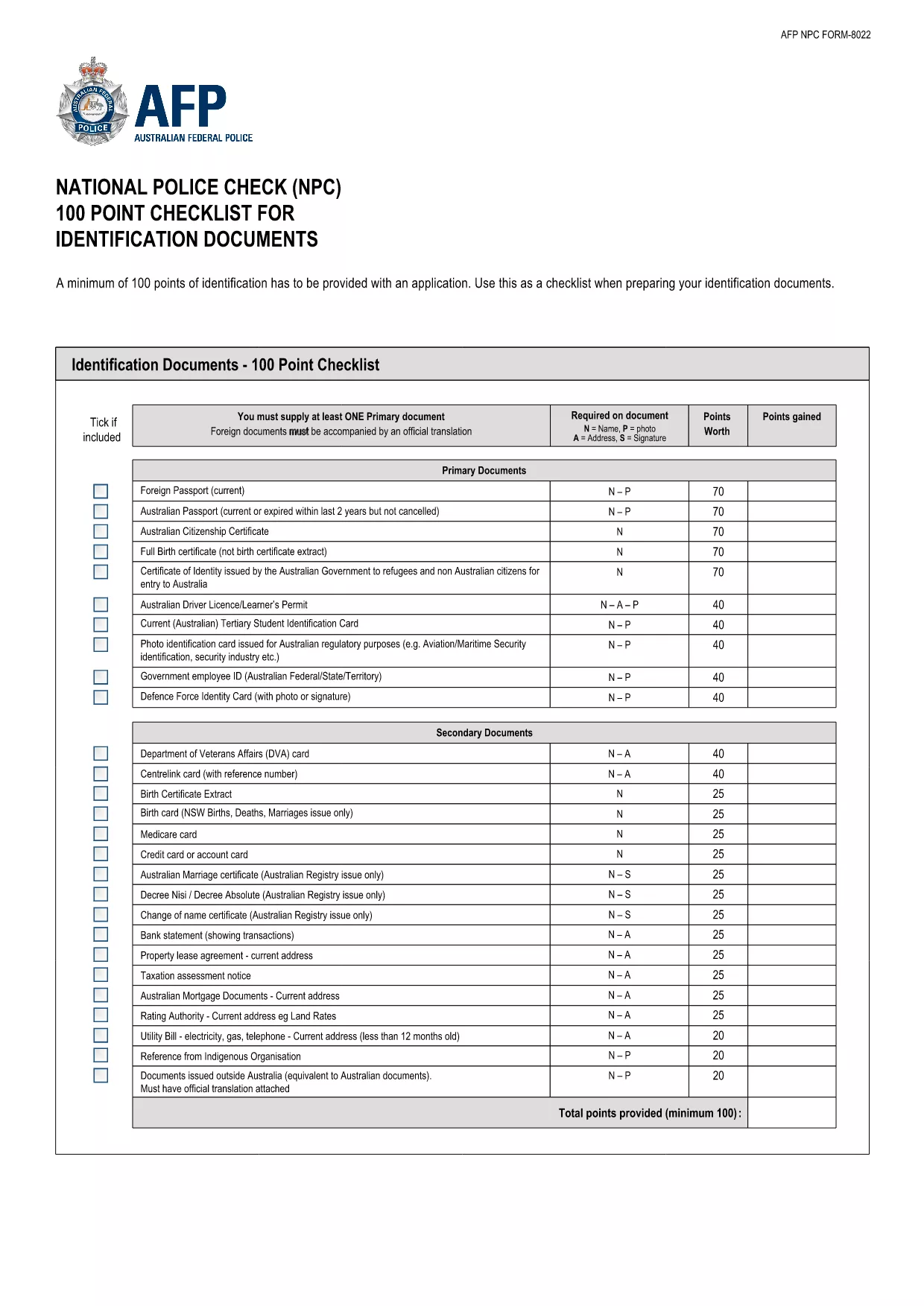
To prove your identity you must provide a minimum of 100 points of identification. Our downloadable 100‑Point Checklist outlines every acceptable document – from birth certificates to utility bills.

Common Mistakes to Avoid

  • Leaving the “Signature” field blank – the system will reject the form.
  • Uploading an expired ID document – ensure all documents are current.
  • Entering a mismatched address – the address on your proof of residence must match the one on your ID.

Download the Official 100‑Point ID Checklist (PDF)

The checklist below is the official guide from the Australian Federal Police. Keep it handy while you gather your documents.

Download the 100‑Point Checklist (PDF)

FAQ
  • What is a Proof of Age Card?

    It is a government‑issued photo identification card that confirms the holder is 18 years or older. It is accepted across Victoria for age‑restricted purchases and entry.

  • Do I need a driver’s licence to apply?

    No. The age card is an alternative to a driver’s licence or passport. You only need to meet the 100‑point ID requirement.

  • How long does the application take?

    If all documents are correct, the online portion takes about 10‑15 minutes. Processing by Service Victoria typically takes 7‑10 business days.

  • Can I apply if I’m a non‑resident of Victoria?

    You must provide proof of Victorian residence (e.g., utility bill, rental agreement) to be eligible for the card.

  • Is there a fee for the proof of age card?

    Yes, the standard fee is AU$35. You can pay online during the submission process.

  • What documents count toward the 100‑point ID total?

    A full list is in the downloadable 100‑Point Checklist PDF. Common items include birth certificates, Medicare cards, utility bills, and bank statements.

  • What if my application is rejected?

    You will receive an email detailing the missing or incorrect information. Correct the issue and resubmit using the same Formize link.

  • Can I renew my age card online?

    Yes, renewals can be completed through the same online form once your card is within six months of expiry.

ᲠᲝᲒᲝᲠ

როგორ შეავსოთ proof of age card victoria უფასოდ, ონლაინ 5 მარტივი ნაბიჯებით:

  1. 1
    Click the Fill Out This Form Button
    On the page, locate the bright “Fill out this form” button and click it. This launches the Formize PDF Filler in a new window.
  2. 2
    Wait for the Formize PDF Filler to Load
    The filler loads the fillable PDF automatically. A loading spinner will appear for a few seconds – this is normal.
  3. 3
    Complete Each Field
    Enter your personal details, address, and upload scanned copies of your identification documents. The filler checks for required fields in real time.
  4. 4
    Review and Submit
    Double‑check all entries, then click “Submit”. The system will generate a PDF receipt that you can save or print.
  5. 5
    Save or Print Confirmation
    Download the completed application and the confirmation receipt. You’ll need to present these when you visit a Service Victoria centre.
PDF შემავსებლის აპლიკაციის ფორმირება
ᲨᲔᲡᲐᲮᲔᲑ

proof of age card victoria შაბლონი

PDF დოკუმენტის სანახავად და შევსების ფუნქციების ტრადიციული ნაკრებით, ვებ აპლიკაციის უპირატესობებთან და საპასუხო განლაგებასთან ერთად, შეგიძლიათ შეავსოთ proof of age card victoria წუთებში.

ᲛᲐᲮᲐᲡᲘᲐᲗᲔᲑᲚᲔᲑᲘ

PDF შემავსებელი

ონლაინ proof of age card victoria-ის შევსების უმარტივესი გზა

  • სწრაფად შეავსეთ proof of age card victoria
    ეძებთ გზას სწრაფად შეავსოთ proof of age card victoria ონლაინ? ჩვენი ონლაინ უფასო PDF ფორმის შემავსებლით, თქვენ გეცოდინებათ როგორ შეცვალოთ და შეავსოთ ეს pdf დოკუმენტი ერთ წუთზე ნაკლებ დროში.
  • მარტივი გამოსაყენებელი ონლაინ PDF რედაქტორი
    მოგბეზრდათ PDF ფაილების დაბეჭდვა, რათა მათი რედაქტირება შეძლოთ, ხელახლა სკანირებამდე და უკან გაგზავნამდე? შეცვალეთ PDF დოკუმენტები უფასოდ ონლაინ. გამოიყენეთ ჩვენი ონლაინ pdf რედაქტორი დროისა და ქაღალდის დაზოგვისთვის.
  • შესანიშნავი ხელსაწყოები, ყველა პლატფორმა
    გაინტერესებთ როგორ შეავსოთ proof of age card victoria Mac-ზე, ან იქნებ როგორ გამოიყენოთ PDF შემავსებელი უფასოდ? ჩვენი ონლაინ PDF ინსტრუმენტები მუშაობს ყველა პლატფორმაზე.
  • ფაილების უსაფრთხო შენახვა
    დასრულებული „proof of age card victoria“ ფაილები ინახება დაცულ მონაცემთა ბაზაში, რომელსაც მართავს Amazon Cloud ჰოსტინგი. თქვენ შეგიძლიათ წაშალოთ თქვენი ფაილები ჩვენი სისტემიდან ნებისმიერ დროს. ნებისმიერ შემთხვევაში, ეს ფაილები ავტომატურად იშლება 24 საათის შემდეგ.
  • ჩატი proof of age card victoria-ით
    ესაუბრეთ „proof of age card victoria“-ს Chatize-ზე, რომელიც არის PDF წამკითხველის უფასო ასისტენტი. დასვით კითხვები და მიიღეთ პასუხები „proof of age card victoria“-დან. უბრალოდ დააწკაპუნეთ ღილაკზე ჩატი დოკუმენტთან ზემოთ.

შევსების სესიის წაშლა

წაშალოთ არჩეული შევსების სესია? ამ შემთხვევაში, თქვენი პროგრესი ფორმის შევსებაში დაიკარგება.

რედაქტირების სესიის წაშლა

წაშალოთ არჩეული რედაქტირების სესია? ამ შემთხვევაში, თქვენი პროგრესი ფორმის შექმნასა და რედაქტირებაში დაიკარგება.