
hamburger-menu icon
Აირჩიეთ ენა

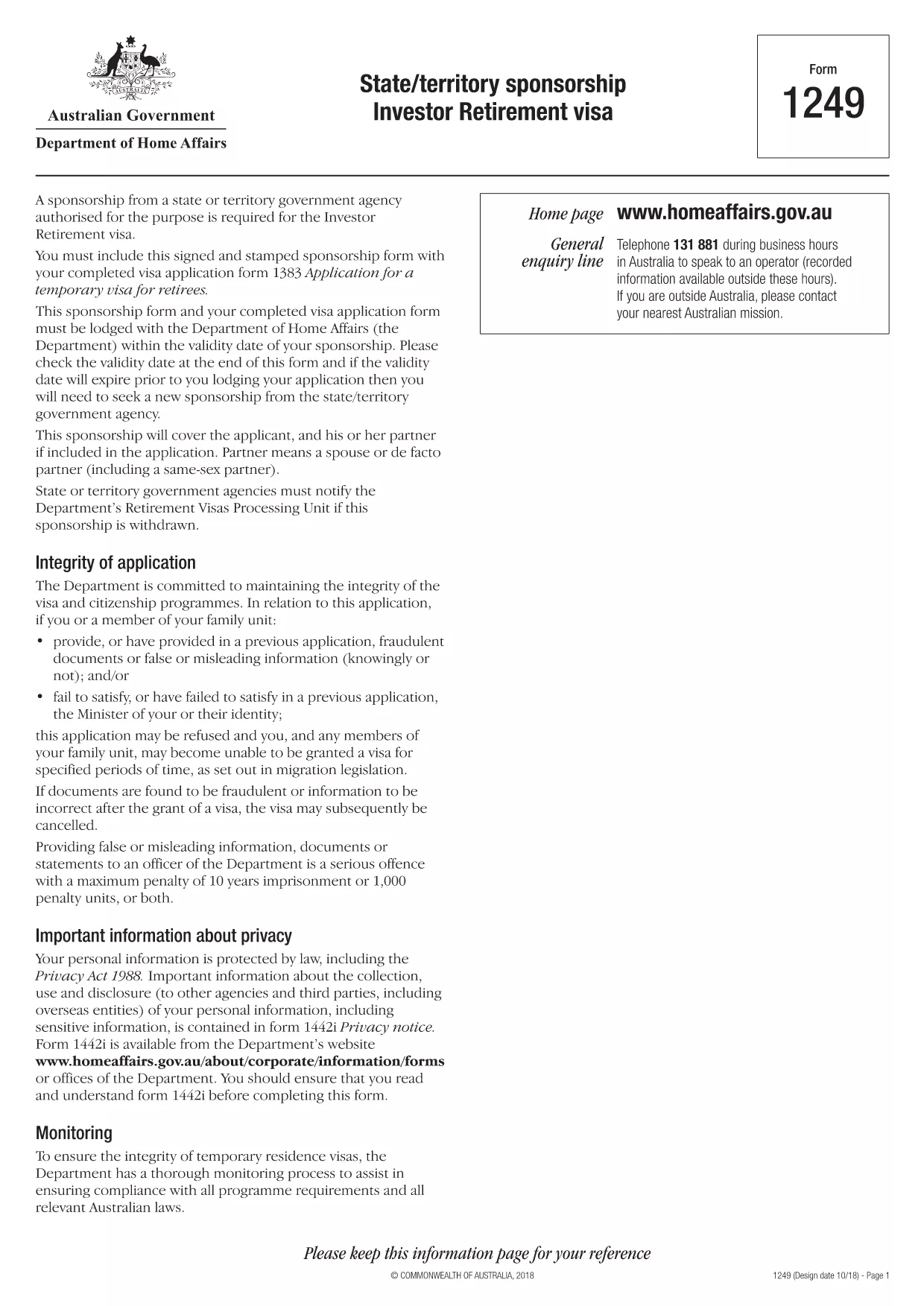
Form 1249 – State/Territory Sponsorship for the Investor Retirement Visa

  1. Ენა ინგლისური
  2. ქვეყანა ავსტრალია
  3. აქტივობა ვიზები
Form 1249 – State/Territory Sponsorship for the Investor Retirement Visa

Form 1249 is the official State/Territory Sponsorship document required for the Australian Investor Retirement Visa (subclass 188‑IR). The sponsoring state or territory government must approve the applicant’s investment plan before the Department of Home Affairs processes the visa.

This landing page lets you view, fill, and download the fillable PDF directly in your browser – no extra software needed. Just click the “Fill out this form” button and the Formize PDF Filler will load the form for you.

What Is Form 1249 and Who Needs It?

The form captures details about the applicant’s proposed investment, the sponsoring government’s commitment, and the validity period of the sponsorship. It is required for:

  • Applicants of the Investor Retirement visa (subclass 188‑IR)
  • State or territory agencies that are sponsoring the applicant
  • Legal representatives preparing a visa package

How to Complete Form 1249 Online with Formize

Follow these simple steps to fill the form without downloading any software:

  1. Click the “Fill out this form” button on this page.
  2. Wait a few seconds while the Formize PDF Filler loads the fillable PDF.
  3. Enter all required information in the highlighted fields. The filler validates dates and numeric entries automatically.
  4. When you finish, click **Save & Download** to get a completed PDF ready for submission.

Common Mistakes & Tips for a Successful Submission

  • Validity date – Double‑check the sponsorship validity at the bottom of the form. If it expires before you lodge your visa, you’ll need a new sponsorship.
  • Signature fields – Use the built‑in signature tool in Formize or print, sign, and scan the final PDF.
  • Investment details – Provide exact figures and currency; rounding errors cause delays.
  • Supporting documents – Attach the required business plan, proof of funds, and any state‑specific endorsement letters.

Where to Submit the Completed Sponsorship Form

After saving the filled PDF, include it with your visa application package and lodge it through the Department of Home Affairs portal. The sponsoring state/territory must also retain a copy for their records.

Need a printable version? Use the direct download link below.

FAQ
  • What is the purpose of Form 1249?

    Form 1249 records the sponsorship commitment from an Australian state or territory for an Investor Retirement visa applicant.

  • Can I fill Form 1249 on a mobile device?

    Yes. The Formize PDF Filler works on modern smartphones and tablets as long as the browser supports PDF rendering.

  • Do I need to print the form to sign it?

    You can sign electronically using the Formize signature tool, or print, sign, and scan the final PDF before submission.

  • How long is the sponsorship validity?

    The validity period is printed on the last page of the form. It must remain active until the visa is granted; otherwise a new sponsorship is required.

  • What happens if I make a mistake after downloading?

    Open the saved PDF again with Formize, edit the incorrect fields, and re‑download the corrected version.

  • Is there a fee to use Formize’s filler?

    No, the Formize PDF Filler is free for all users on this page.

  • Where do I send the completed Form 1249?

    Include the completed form with your visa application package and lodge it through the Department of Home Affairs online portal.

  • Do I need a separate form for each state or territory?

    Form 1249 is the same nationwide, but the sponsoring agency (state or territory) must complete the sponsorship section.

ᲠᲝᲒᲝᲠ

როგორ შეავსოთ Form 1249 უფასოდ, ონლაინ 4 მარტივი ნაბიჯებით:

  1. 1
    Open the Fillable Form
    Click the “Fill out this form” button on the page. The Formize PDF Filler will open the fillable Form 1249 in your browser.
  2. 2
    Enter Your Information
    Complete each highlighted field. The filler checks dates, numbers and required formats automatically.
  3. 3
    Save and Download
    When all sections are filled, press “Save & Download” to get a completed PDF ready for submission to the Department of Home Affairs.
  4. 4
    Submit with Your Visa Application
    Attach the saved PDF to your Investor Retirement visa (subclass 188‑IR) application through the Home Affairs online portal.
PDF შემავსებლის აპლიკაციის ფორმირება
ᲨᲔᲡᲐᲮᲔᲑ

სავიზო ფორმები

Form 1249 არის ვიზის ერთ-ერთი ფორმა, რომელიც წარმოადგენს დოკუმენტებს, რომლებიც გამოიყენება ვიზაზე უცხო ქვეყანაში შესვლისთვის. ვიზა არის დოკუმენტი, რომელიც საშუალებას აძლევს უცხო მოქალაქეს შევიდეს, დარჩეს და ზოგჯერ იმუშაოს უცხო ქვეყანაში განსაზღვრული დროის განმავლობაში. ვიზის მისაღებად ზუსტი ფორმები და მოთხოვნები განსხვავდება ქვეყნისა და ვიზის ტიპის მიხედვით.

სავიზო ფორმები, როგორც წესი, მოითხოვს პერსონალურ ინფორმაციას, როგორიცაა სახელი, დაბადების თარიღი და პასპორტის ინფორმაცია, ასევე ინფორმაცია მოგზაურობის მიზნისა და ხანგრძლივობის, დანიშნულების ადგილის შესახებ და ადრე უარყო თუ არა განმცხადებელს ვიზაზე უარი ან გააძევეს ქვეყნიდან. ფორმებს შეიძლება ასევე დასჭირდეს დამხმარე დოკუმენტები, როგორიცაა პასპორტი, ფოტოები და ფინანსური მხარდაჭერის დამადასტურებელი საბუთი.

შეერთებულ შტატებში ვიზის ყველაზე გავრცელებული ფორმებია DS-160 და DS-260. DS-160 ფორმა გამოიყენება არასაიმიგრაციო ვიზაზე განაცხადისთვის, ხოლო DS-260 ფორმა გამოიყენება საიმიგრაციო ვიზის მისაღებად. ეს ფორმები მოითხოვს დეტალურ ინფორმაციას განმცხადებლის პირადი და მოგზაურობის ისტორიის შესახებ, ისევე როგორც დამხმარე დოკუმენტაცია, როგორიცაა პასპორტი, მოგზაურობის მარშრუტი და ფინანსური ჩანაწერები.

სხვა ქვეყნებს შეიძლება ჰქონდეთ განსხვავებული სავიზო ფორმები და მოთხოვნები, მაგრამ ძირითადი პროცესი, როგორც წესი, მოიცავს სავიზო განაცხადის შევსებას, დამხმარე დოკუმენტაციის მიწოდებას და საკონსულოს ოფიცერთან გასაუბრებას აშშ-ს საელჩოში ან საკონსულოში. მნიშვნელოვანია აღინიშნოს, რომ სავიზო განაცხადის პროცესი შეიძლება იყოს რთული და შრომატევადი, და რეკომენდირებულია, რომ ვიზის მსურველმა პირებმა გაიარონ კონსულტაცია საიმიგრაციო ადვოკატთან ან სხვა კვალიფიციურ პროფესიონალთან, რათა უზრუნველყონ ყველა საჭირო ფორმისა და მოთხოვნების დაკმაყოფილება.

ᲛᲐᲮᲐᲡᲘᲐᲗᲔᲑᲚᲔᲑᲘ

PDF შემავსებელი

ონლაინ Form 1249-ის შევსების უმარტივესი გზა

  • სწრაფად შეავსეთ Form 1249
    ეძებთ გზას სწრაფად შეავსოთ Form 1249 ონლაინ? ჩვენი ონლაინ უფასო PDF ფორმის შემავსებლით, თქვენ გეცოდინებათ როგორ შეცვალოთ და შეავსოთ ეს pdf დოკუმენტი ერთ წუთზე ნაკლებ დროში.
  • მარტივი გამოსაყენებელი ონლაინ PDF რედაქტორი
    მოგბეზრდათ PDF ფაილების დაბეჭდვა, რათა მათი რედაქტირება შეძლოთ, ხელახლა სკანირებამდე და უკან გაგზავნამდე? შეცვალეთ PDF დოკუმენტები უფასოდ ონლაინ. გამოიყენეთ ჩვენი ონლაინ pdf რედაქტორი დროისა და ქაღალდის დაზოგვისთვის.
  • შესანიშნავი ხელსაწყოები, ყველა პლატფორმა
    გაინტერესებთ როგორ შეავსოთ Form 1249 Mac-ზე, ან იქნებ როგორ გამოიყენოთ PDF შემავსებელი უფასოდ? ჩვენი ონლაინ PDF ინსტრუმენტები მუშაობს ყველა პლატფორმაზე.
  • ფაილების უსაფრთხო შენახვა
    დასრულებული „Form 1249“ ფაილები ინახება დაცულ მონაცემთა ბაზაში, რომელსაც მართავს Amazon Cloud ჰოსტინგი. თქვენ შეგიძლიათ წაშალოთ თქვენი ფაილები ჩვენი სისტემიდან ნებისმიერ დროს. ნებისმიერ შემთხვევაში, ეს ფაილები ავტომატურად იშლება 24 საათის შემდეგ.
  • ჩატი Form 1249-ით
    ესაუბრეთ „Form 1249“-ს Chatize-ზე, რომელიც არის PDF წამკითხველის უფასო ასისტენტი. დასვით კითხვები და მიიღეთ პასუხები „Form 1249“-დან. უბრალოდ დააწკაპუნეთ ღილაკზე ჩატი დოკუმენტთან ზემოთ.

შევსების სესიის წაშლა

წაშალოთ არჩეული შევსების სესია? ამ შემთხვევაში, თქვენი პროგრესი ფორმის შევსებაში დაიკარგება.

რედაქტირების სესიის წაშლა

წაშალოთ არჩეული რედაქტირების სესია? ამ შემთხვევაში, თქვენი პროგრესი ფორმის შექმნასა და რედაქტირებაში დაიკარგება.