hamburger-menu icon
Აირჩიეთ ენა

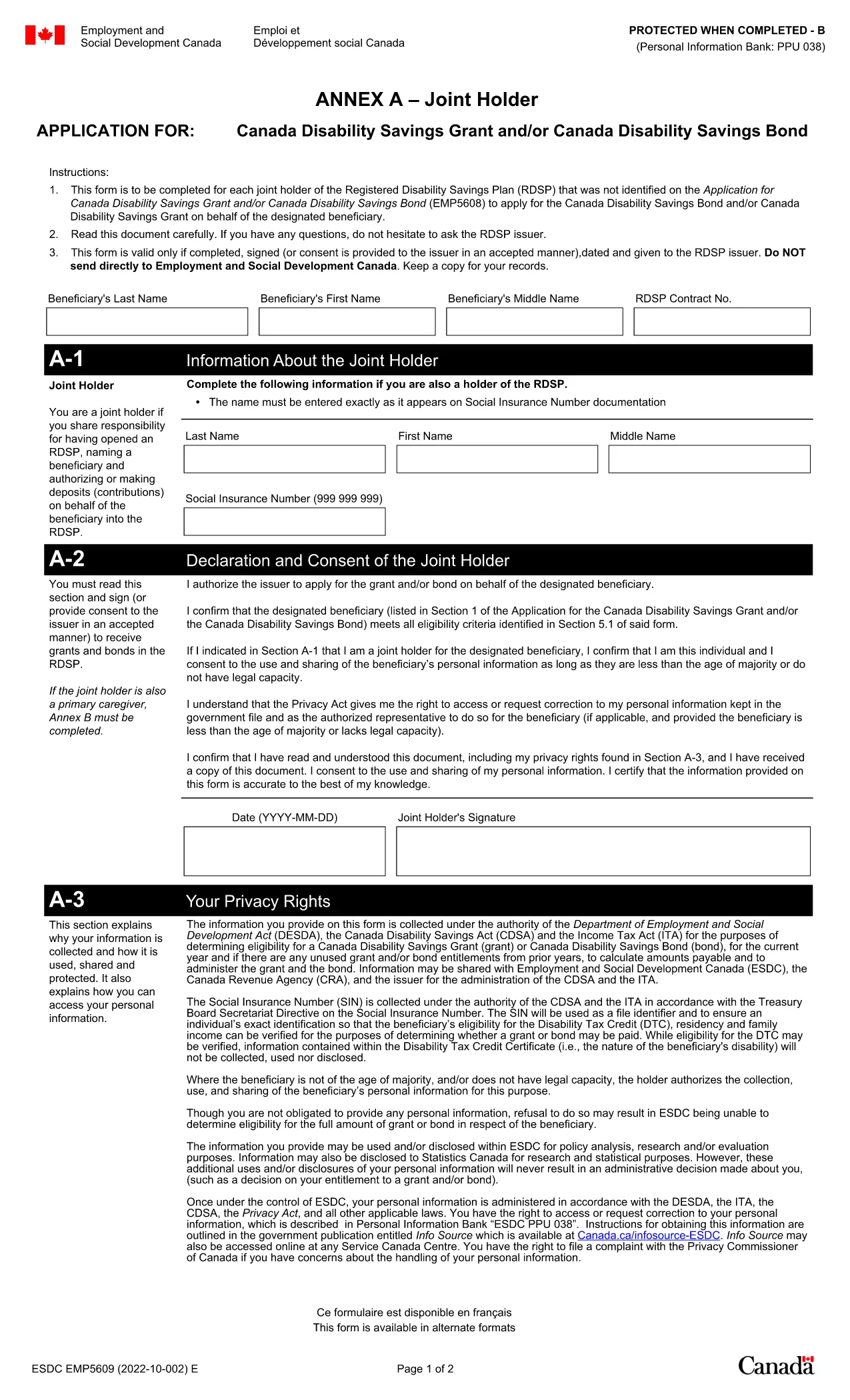
Application Form Annex A – Fillable PDF

  1. Ენა ინგლისური
  2. ქვეყანა კანადა
  3. დეპარტამენტი Employment and Social Development Canada
  4. აქტივობა Benefits
Application Form Annex A – Fillable PDF

The Application Form Annex A is a government‑issued document used to provide additional personal or financial information when applying for certain Canadian benefits. This fillable PDF version lets you complete the form directly in your browser, eliminate printing hassles, and reduce errors.

What Is Annex A?

Annex A is an attachment to the main benefit application (e.g., Canada Disability Savings Grant or Bond). It collects detailed data such as income, residency status, and joint‑holder information. The form is required by Employment and Social Development Canada to verify eligibility.

How to Fill the Annex A Form Online

With Formize’s PDF Filler, you can fill out the Annex A form in just a few clicks:

  • Click the "Fill out this form" button below.
  • Wait a few seconds while the Formize PDF Filler app loads.
  • Enter your information in the highlighted fields.
  • Use the navigation pane to jump between sections quickly.
  • When finished, click Save & Download to get a completed PDF you can upload with your benefit application.

Common Mistakes to Avoid

  • Leaving required fields blank: The form will highlight missing information before you can save.
  • Using the wrong date format: Stick to the YYYY‑MM‑DD format as shown in the examples.
  • Submitting outdated signatures: Use the electronic signature tool within Formize for a valid, auditable signature.
  • Uploading the original PDF instead of the filled version: Always download the completed file after saving.

Where to Submit the Completed Form

Once you have saved the filled Annex A PDF, upload it through your online benefit portal or attach it to your paper application package. If you need to mail it, print the completed PDF on plain white paper and send it to the address listed on your benefit approval letter.

Need help? Review the official PDF guide for detailed instructions from Service Canada.

FAQ
  • Is the Annex A form free to download?

    Yes. The fillable PDF is provided at no cost by Service Canada and can be accessed through Formize.

  • Can I edit the form after I have saved it?

    You can reopen the saved PDF in Formize at any time to make changes before the final submission.

  • Do I need Adobe Acrobat to fill this form?

    No. Formize’s online PDF Filler works in any modern browser without installing additional software.

  • What if I make a mistake while filling the form?

    Use the "Clear" button on any field to erase its content, or click the undo arrow in the toolbar to revert recent changes.

  • How do I know the form is accepted by Service Canada?

    Formize validates required fields and format before you can save, ensuring the PDF meets Service Canada’s standards.

  • Can I submit the form directly from Formize?

    Formize provides a downloadable PDF. You must upload the completed file through the official Service Canada portal or attach it to your paper application.

  • Is my personal information safe?

    All data entered in Formize is processed locally in your browser and never stored on our servers, keeping your information private.

ᲠᲝᲒᲝᲠ

როგორ შეავსოთ application form annex a უფასოდ, ონლაინ 5 მარტივი ნაბიჯებით:

  1. 1
    Click the Fill button
    Press the "Fill out this form" button on the page to launch Formize’s PDF Filler.
  2. 2
    Wait for the app to load
    A few seconds later the fillable form will appear in a secure viewer.
  3. 3
    Enter your information
    Complete each highlighted field, using the on‑screen prompts for format guidance.
  4. 4
    Review and sign
    Check all entries, then use the built‑in e‑signature tool to sign the form.
  5. 5
    Save and download
    Click "Save & Download" to get your finished PDF, ready for upload or mailing.
PDF შემავსებლის აპლიკაციის ფორმირება
ᲨᲔᲡᲐᲮᲔᲑ

application form annex a შაბლონი

PDF დოკუმენტის სანახავად და შევსების ფუნქციების ტრადიციული ნაკრებით, ვებ აპლიკაციის უპირატესობებთან და საპასუხო განლაგებასთან ერთად, შეგიძლიათ შეავსოთ application form annex a წუთებში.

ᲛᲐᲮᲐᲡᲘᲐᲗᲔᲑᲚᲔᲑᲘ

PDF შემავსებელი

ონლაინ application form annex a-ის შევსების უმარტივესი გზა

  • სწრაფად შეავსეთ application form annex a
    ეძებთ გზას სწრაფად შეავსოთ application form annex a ონლაინ? ჩვენი ონლაინ უფასო PDF ფორმის შემავსებლით, თქვენ გეცოდინებათ როგორ შეცვალოთ და შეავსოთ ეს pdf დოკუმენტი ერთ წუთზე ნაკლებ დროში.
  • მარტივი გამოსაყენებელი ონლაინ PDF რედაქტორი
    მოგბეზრდათ PDF ფაილების დაბეჭდვა, რათა მათი რედაქტირება შეძლოთ, ხელახლა სკანირებამდე და უკან გაგზავნამდე? შეცვალეთ PDF დოკუმენტები უფასოდ ონლაინ. გამოიყენეთ ჩვენი ონლაინ pdf რედაქტორი დროისა და ქაღალდის დაზოგვისთვის.
  • შესანიშნავი ხელსაწყოები, ყველა პლატფორმა
    გაინტერესებთ როგორ შეავსოთ application form annex a Mac-ზე, ან იქნებ როგორ გამოიყენოთ PDF შემავსებელი უფასოდ? ჩვენი ონლაინ PDF ინსტრუმენტები მუშაობს ყველა პლატფორმაზე.
  • ფაილების უსაფრთხო შენახვა
    დასრულებული „application form annex a“ ფაილები ინახება დაცულ მონაცემთა ბაზაში, რომელსაც მართავს Amazon Cloud ჰოსტინგი. თქვენ შეგიძლიათ წაშალოთ თქვენი ფაილები ჩვენი სისტემიდან ნებისმიერ დროს. ნებისმიერ შემთხვევაში, ეს ფაილები ავტომატურად იშლება 24 საათის შემდეგ.
  • ჩატი application form annex a-ით
    ესაუბრეთ „application form annex a“-ს Chatize-ზე, რომელიც არის PDF წამკითხველის უფასო ასისტენტი. დასვით კითხვები და მიიღეთ პასუხები „application form annex a“-დან. უბრალოდ დააწკაპუნეთ ღილაკზე ჩატი დოკუმენტთან ზემოთ.

შევსების სესიის წაშლა

წაშალოთ არჩეული შევსების სესია? ამ შემთხვევაში, თქვენი პროგრესი ფორმის შევსებაში დაიკარგება.

რედაქტირების სესიის წაშლა

წაშალოთ არჩეული რედაქტირების სესია? ამ შემთხვევაში, თქვენი პროგრესი ფორმის შექმნასა და რედაქტირებაში დაიკარგება.