hamburger-menu icon
Აირჩიეთ ენა

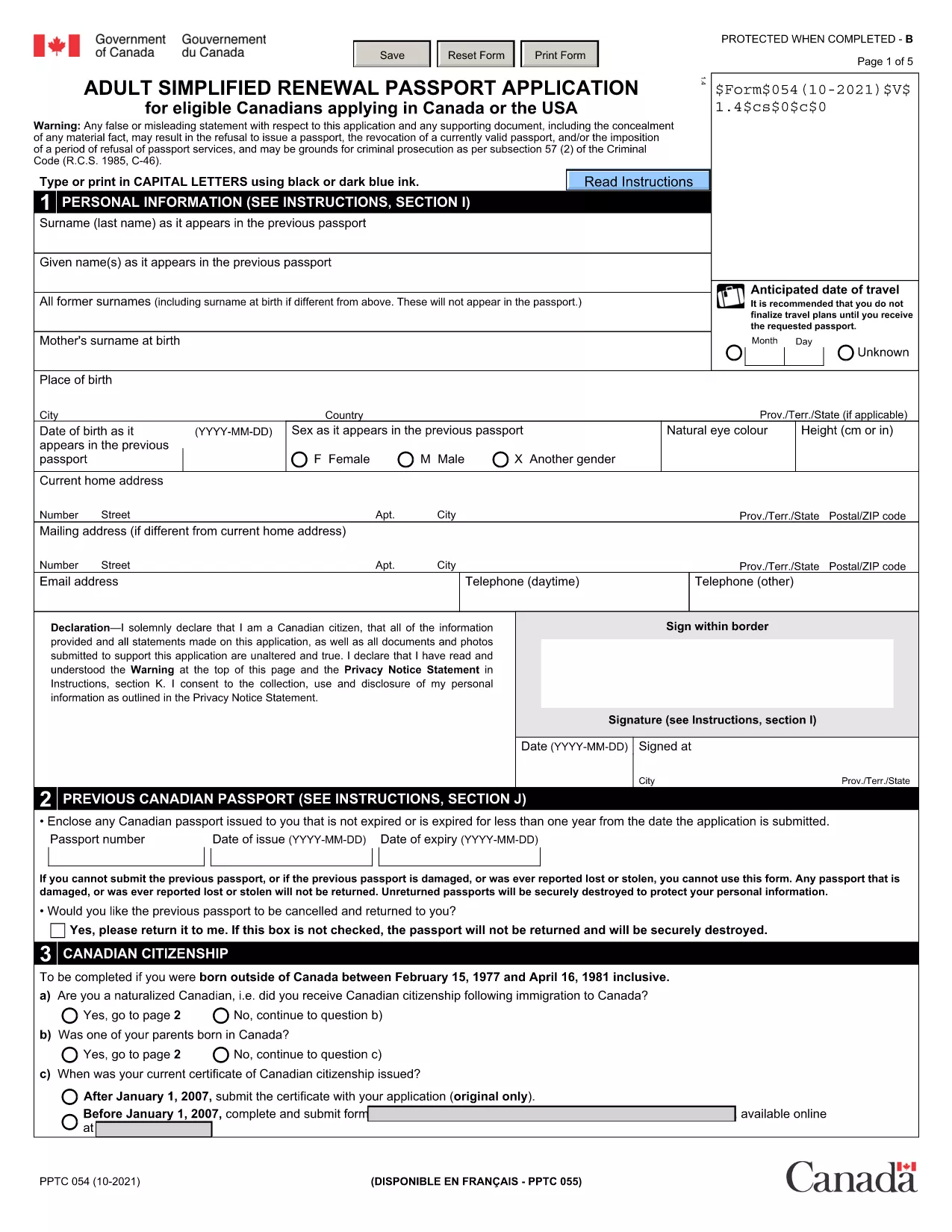
Fillable Canadian Passport Renewal Form (PPTC‑054)

  1. Ენა ინგლისური
  2. ქვეყანა კანადა
  3. დეპარტამენტი Immigration, Refugees and Citizenship Canada
  4. აქტივობა Passport Renewal
Fillable Canadian Passport Renewal Form (PPTC‑054)

Need to renew your Canadian passport quickly? The Adult Simplified Renewal Passport Application (form PPTC‑054) is the official, government‑approved document for eligible Canadians. With Formize you can open the fillable PDF directly in your browser, complete it, and download a signed copy—no extra software required.

What Is the PPTC‑054 Renewal Form?

PPTC‑054 is the streamlined renewal form used by Canadian citizens whose passports have expired or are about to expire. It collects personal details, travel history, and a guarantor’s signature, then forwards the information to Immigration, Refugees and Citizenship Canada (IRCC) for processing.

Who Can Use This Simplified Application?

  • Canadian adults (18 years or older) with a previously issued passport.
  • Applicants whose most recent passport is still valid or has expired within the last 12 months.
  • Those who meet the eligibility criteria listed on the form (no name change, no lost passport, etc.).

How to Complete the Form Online with Formize

Follow these three easy steps and you’ll have a completed, printable PDF in minutes:

  1. Click the "Fill out this form" button on this page.
  2. Wait a few seconds while the Formize PDF Filler app loads the fillable version of PPTC‑054.
  3. Enter your information, add a digital signature, and click Download to save the finished form.

Common Mistakes to Avoid

  • Leaving required fields blank – the form will not submit if any mandatory section is empty.
  • Using an invalid guarantor – the guarantor must meet the IRCC criteria (Canadian citizen, 18 + years old, known for at least 2 years).
  • Incorrect passport number format – double‑check the series of letters and numbers on your current passport.

Where to Submit Your Completed Application

After downloading the filled PDF, include it with your passport photos, payment receipt, and any supporting documents, then mail or deliver the package to the nearest Passport Canada Office or a participating Service Canada centre. For detailed mailing addresses, visit the IRCC website.

Ready to start? Click the button below and let Formize handle the heavy lifting.

FAQ
  • Do I need to print the form before filling it out?

    No. With Formize you fill the PDF directly in your browser and download the completed version.

  • Can I use this form if my passport was lost or stolen?

    No. PPTC‑054 is only for standard renewals. Lost or stolen passports require a different application (PPTC 040).

  • How long does the renewal process take after I submit?

    Processing typically takes 10‑20 business days for standard service; express service may be faster for an additional fee.

  • What payment methods are accepted for the passport fee?

    Accepted methods include credit/debit cards, money orders, and certified checks. Check the IRCC website for the most current list.

  • Is the digital signature legally valid?

    Yes. Formize creates a compliant electronic signature that meets Canadian e‑signing standards for passport applications.

  • Can I save my progress and finish later?

    The Formize app allows you to download a partially completed PDF, which you can reopen later to finish.

  • Do I need a guarantor for this renewal?

    A guarantor is required unless you qualify for the “no‑guarantor” option listed on the form (e.g., certain diplomatic applicants).

  • Where can I find passport photos that meet IRCC standards?

    Use a professional photo studio that follows IRCC guidelines, or follow the online photo specifications on the IRCC website.

ᲠᲝᲒᲝᲠ

როგორ შეავსოთ Canadian passport renewal form უფასოდ, ონლაინ 3 მარტივი ნაბიჯებით:

  1. 1
    Click the Fill‑out Button
    Press the “Fill out this form” button on the page to launch the Formize PDF Filler.
  2. 2
    Wait for the Filler to Load
    The fillable version of PPTC‑054 loads in a few seconds—no download required.
  3. 3
    Enter Your Details and Sign
    Complete each field, add your digital signature, then click Download to save the finished PDF.
PDF შემავსებლის აპლიკაციის ფორმირება
ᲨᲔᲡᲐᲮᲔᲑ

Canadian passport renewal form შაბლონი

PDF დოკუმენტის სანახავად და შევსების ფუნქციების ტრადიციული ნაკრებით, ვებ აპლიკაციის უპირატესობებთან და საპასუხო განლაგებასთან ერთად, შეგიძლიათ შეავსოთ Canadian passport renewal form წუთებში.

ᲛᲐᲮᲐᲡᲘᲐᲗᲔᲑᲚᲔᲑᲘ

PDF შემავსებელი

ონლაინ Canadian passport renewal form-ის შევსების უმარტივესი გზა

  • სწრაფად შეავსეთ Canadian passport renewal form
    ეძებთ გზას სწრაფად შეავსოთ Canadian passport renewal form ონლაინ? ჩვენი ონლაინ უფასო PDF ფორმის შემავსებლით, თქვენ გეცოდინებათ როგორ შეცვალოთ და შეავსოთ ეს pdf დოკუმენტი ერთ წუთზე ნაკლებ დროში.
  • მარტივი გამოსაყენებელი ონლაინ PDF რედაქტორი
    მოგბეზრდათ PDF ფაილების დაბეჭდვა, რათა მათი რედაქტირება შეძლოთ, ხელახლა სკანირებამდე და უკან გაგზავნამდე? შეცვალეთ PDF დოკუმენტები უფასოდ ონლაინ. გამოიყენეთ ჩვენი ონლაინ pdf რედაქტორი დროისა და ქაღალდის დაზოგვისთვის.
  • შესანიშნავი ხელსაწყოები, ყველა პლატფორმა
    გაინტერესებთ როგორ შეავსოთ Canadian passport renewal form Mac-ზე, ან იქნებ როგორ გამოიყენოთ PDF შემავსებელი უფასოდ? ჩვენი ონლაინ PDF ინსტრუმენტები მუშაობს ყველა პლატფორმაზე.
  • ფაილების უსაფრთხო შენახვა
    დასრულებული „Canadian passport renewal form“ ფაილები ინახება დაცულ მონაცემთა ბაზაში, რომელსაც მართავს Amazon Cloud ჰოსტინგი. თქვენ შეგიძლიათ წაშალოთ თქვენი ფაილები ჩვენი სისტემიდან ნებისმიერ დროს. ნებისმიერ შემთხვევაში, ეს ფაილები ავტომატურად იშლება 24 საათის შემდეგ.
  • ჩატი Canadian passport renewal form-ით
    ესაუბრეთ „Canadian passport renewal form“-ს Chatize-ზე, რომელიც არის PDF წამკითხველის უფასო ასისტენტი. დასვით კითხვები და მიიღეთ პასუხები „Canadian passport renewal form“-დან. უბრალოდ დააწკაპუნეთ ღილაკზე ჩატი დოკუმენტთან ზემოთ.

შევსების სესიის წაშლა

წაშალოთ არჩეული შევსების სესია? ამ შემთხვევაში, თქვენი პროგრესი ფორმის შევსებაში დაიკარგება.

რედაქტირების სესიის წაშლა

წაშალოთ არჩეული რედაქტირების სესია? ამ შემთხვევაში, თქვენი პროგრესი ფორმის შექმნასა და რედაქტირებაში დაიკარგება.