hamburger-menu icon
Აირჩიეთ ენა

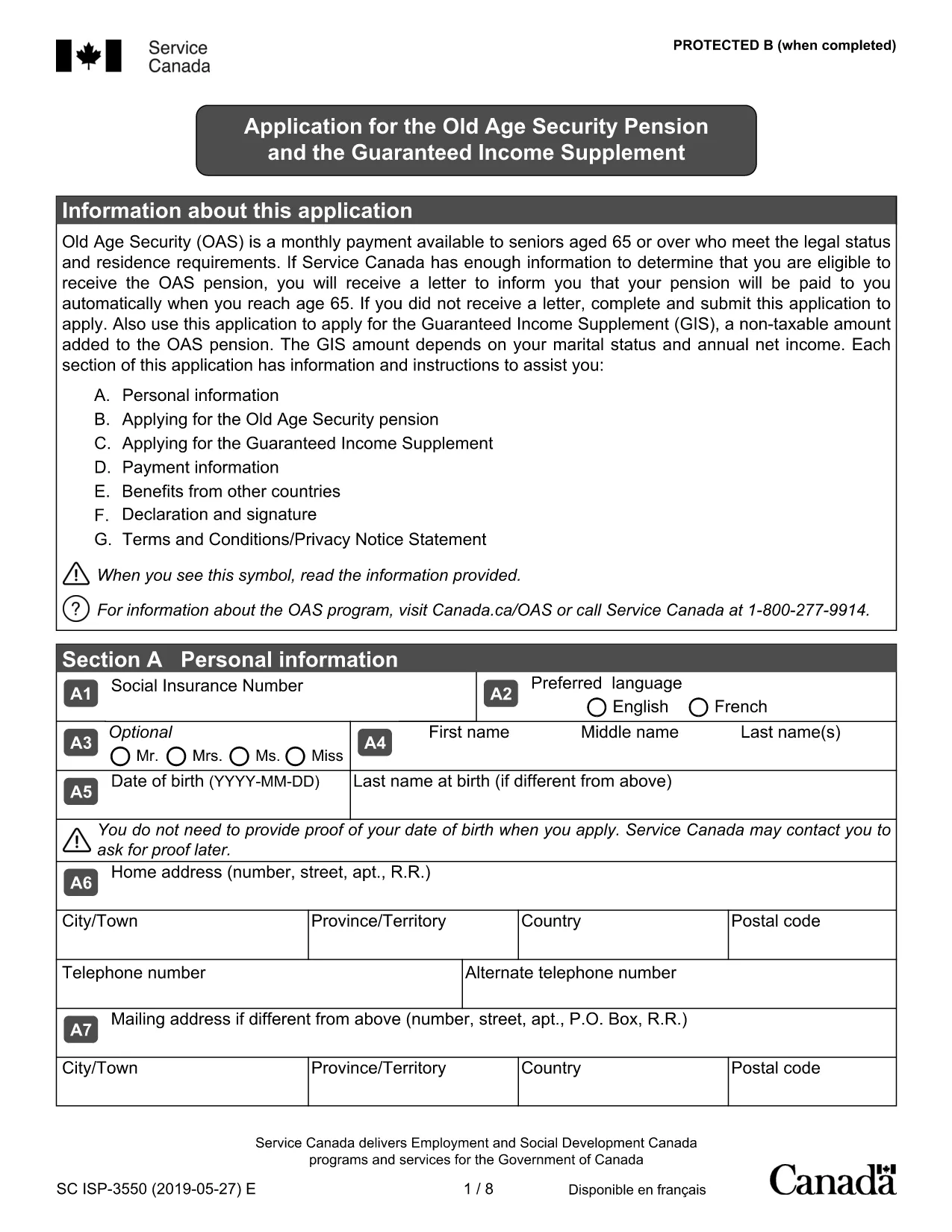
Old Age Pension Application Form (Fillable PDF)

  1. ქვეყანა კანადა
  2. Ენა ინგლისური
  3. აქტივობა Pensions
  4. დეპარტამენტი Service Canada
Old Age Pension Application Form (Fillable PDF)

Applying for the Old Age Pension (Old Age Security) can feel overwhelming, but with our fillable PDF you can complete the entire application online, save time, and reduce errors. The form is fully compatible with the Formize PDF Filler – just click the button, fill the fields, and submit.

Why Choose a Fillable PDF for Your Old Age Pension

  • Instant editing: No need to print, write, scan, or fax.
  • Auto‑save: Your progress is saved automatically, so you can return later.
  • Guided validation: The filler highlights required fields and alerts you to missing information.
  • Secure submission: Export a clean PDF that meets Service Canada’s requirements.

How to Complete the Old Age Pension Application

Follow the simple steps below to fill out the application correctly. Each step corresponds to a section of the PDF.

  1. Open the form: Click the Fill out this form button on this page. The Formize PDF Filler will load the document.
  2. Enter personal details: Provide your full name, date of birth, Social Insurance Number (SIN), and current address.
  3. Residency information: Indicate your citizenship status and the number of years you have lived in Canada.
  4. Financial information: List any income, savings, or property you own. This helps Service Canada assess eligibility.
  5. Partner details (if applicable): Even if your partner is not applying, their information is required for the means test.
  6. Review & submit: Use the built‑in review tool, then download the completed PDF and send it to Service Canada.

Common Mistakes to Avoid

  • Leaving required fields blank – the filler will flag them before you can submit.
  • Using an outdated address – ensure the mailing address matches your myGov profile.
  • Incorrect SIN format – double‑check the nine‑digit number.
  • Omitting partner information – this can delay processing.
  • Submitting an unsigned form – the PDF filler adds an electronic signature option.

Eligibility Checklist

Before you start, make sure you meet the basic criteria:

  • Age 65 or older
  • Canadian citizen or legal resident
  • Minimum 10 years of residence in Canada after age 18
  • Income and assets within the program’s limits

Download & Fill the Form

Ready to begin? Click the button below, let Formize load the PDF, and complete your Old Age Pension application in minutes.

Fill out this form

FAQ
  • Do I need to print the Old Age Pension form?

    No. The fillable PDF can be completed entirely online using the Formize PDF Filler, then saved as a digital file for submission.

  • What documents do I need to have handy?

    You’ll need your Social Insurance Number (SIN), proof of residency (e.g., driver’s licence), recent bank statements, and details of any assets or income.

  • Can I save my progress and finish later?

    Yes. The Formize filler automatically saves your entries in the browser, so you can close the window and return at any time.

  • Is an electronic signature accepted?

    Service Canada accepts a digitally signed PDF. The Formize filler includes an e‑signature field that meets their requirements.

  • How long does the application process take?

    After submission, Service Canada typically processes an OAS application within 4‑6 weeks, provided all information is complete.

  • What if I make a mistake after I submit?

    Contact Service Canada immediately. You can submit a corrected PDF or provide additional information through your myGov account.

  • Is there a fee to use the fillable PDF?

    No. The PDF and the Formize filler are completely free to use.

ᲠᲝᲒᲝᲠ

როგორ შეავსოთ old age pension application უფასოდ, ონლაინ 5 მარტივი ნაბიჯებით:

  1. 1
    Open the Fillable Form
    Click the “Fill out this form” button on the page. The Formize PDF Filler loads the Old Age Pension application automatically.
  2. 2
    Enter Your Information
    Type your personal, residency, and financial details into the highlighted fields. Required fields are marked with an asterisk.
  3. 3
    Validate & Review
    The filler checks for missing or incorrectly formatted data. Fix any alerts, then use the built‑in preview to ensure everything looks correct.
  4. 4
    Save or Export
    When you’re satisfied, click “Save” to store a copy in your browser or “Export” to download a clean PDF ready for submission.
  5. 5
    Submit to Service Canada
    Mail or upload the completed PDF to Service Canada according to their instructions. Keep a copy for your records.
PDF შემავსებლის აპლიკაციის ფორმირება
ᲨᲔᲡᲐᲮᲔᲑ

old age pension application შაბლონი

PDF დოკუმენტის სანახავად და შევსების ფუნქციების ტრადიციული ნაკრებით, ვებ აპლიკაციის უპირატესობებთან და საპასუხო განლაგებასთან ერთად, შეგიძლიათ შეავსოთ old age pension application წუთებში.

ᲛᲐᲮᲐᲡᲘᲐᲗᲔᲑᲚᲔᲑᲘ

PDF შემავსებელი

ონლაინ old age pension application-ის შევსების უმარტივესი გზა

  • სწრაფად შეავსეთ old age pension application
    ეძებთ გზას სწრაფად შეავსოთ old age pension application ონლაინ? ჩვენი ონლაინ უფასო PDF ფორმის შემავსებლით, თქვენ გეცოდინებათ როგორ შეცვალოთ და შეავსოთ ეს pdf დოკუმენტი ერთ წუთზე ნაკლებ დროში.
  • მარტივი გამოსაყენებელი ონლაინ PDF რედაქტორი
    მოგბეზრდათ PDF ფაილების დაბეჭდვა, რათა მათი რედაქტირება შეძლოთ, ხელახლა სკანირებამდე და უკან გაგზავნამდე? შეცვალეთ PDF დოკუმენტები უფასოდ ონლაინ. გამოიყენეთ ჩვენი ონლაინ pdf რედაქტორი დროისა და ქაღალდის დაზოგვისთვის.
  • შესანიშნავი ხელსაწყოები, ყველა პლატფორმა
    გაინტერესებთ როგორ შეავსოთ old age pension application Mac-ზე, ან იქნებ როგორ გამოიყენოთ PDF შემავსებელი უფასოდ? ჩვენი ონლაინ PDF ინსტრუმენტები მუშაობს ყველა პლატფორმაზე.
  • ფაილების უსაფრთხო შენახვა
    დასრულებული „old age pension application“ ფაილები ინახება დაცულ მონაცემთა ბაზაში, რომელსაც მართავს Amazon Cloud ჰოსტინგი. თქვენ შეგიძლიათ წაშალოთ თქვენი ფაილები ჩვენი სისტემიდან ნებისმიერ დროს. ნებისმიერ შემთხვევაში, ეს ფაილები ავტომატურად იშლება 24 საათის შემდეგ.
  • ჩატი old age pension application-ით
    ესაუბრეთ „old age pension application“-ს Chatize-ზე, რომელიც არის PDF წამკითხველის უფასო ასისტენტი. დასვით კითხვები და მიიღეთ პასუხები „old age pension application“-დან. უბრალოდ დააწკაპუნეთ ღილაკზე ჩატი დოკუმენტთან ზემოთ.

შევსების სესიის წაშლა

წაშალოთ არჩეული შევსების სესია? ამ შემთხვევაში, თქვენი პროგრესი ფორმის შევსებაში დაიკარგება.

რედაქტირების სესიის წაშლა

წაშალოთ არჩეული რედაქტირების სესია? ამ შემთხვევაში, თქვენი პროგრესი ფორმის შექმნასა და რედაქტირებაში დაიკარგება.