
hamburger-menu icon
Აირჩიეთ ენა

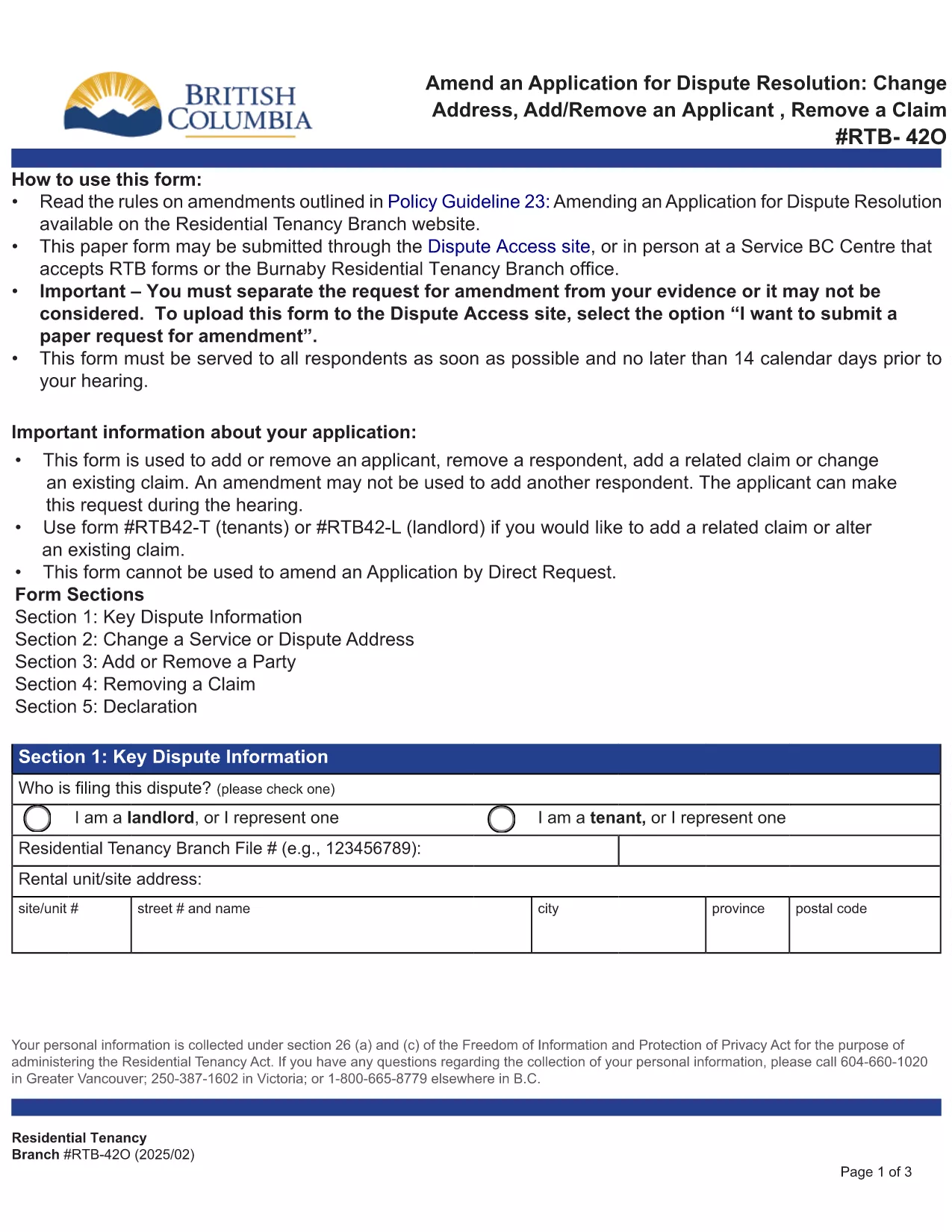
RTB‑42O – Amend an Application for Dispute Resolution (Fillable PDF)

  1. Ენა ინგლისური
  2. ქვეყანა კანადა
  3. აქტივობა ქირავნობა
  4. სახელმწიფო ბრიტანეთის კოლუმბია
RTB‑42O – Amend an Application for Dispute Resolution (Fillable PDF)

What is the RTB‑42O Form?

The RTB‑42O is the official Residential Tenancy Branch (RTB) form used in British Columbia to request an amendment to an existing dispute‑resolution application. It allows tenants or landlords to change claims, add parties, or correct information after the original filing.

When and Who Should Use RTB‑42O?

  • Tenants or landlords who need to add, delete, or modify a claim.
  • Parties who must change an address, add a co‑tenant, or correct a mistake.
  • Anyone who has already submitted an RTB‑59 or RTB‑42T application and needs to update it before the hearing.

How to Complete the RTB‑42O Online

Instead of downloading and editing the PDF manually, simply click the "Fill out this form" button below. The Formize PDF Filler app will load the fillable version instantly.

  1. Click Fill out this form on the page.
  2. Wait a few seconds while the Formize PDF Filler loads.
  3. Enter your information in each highlighted field. Required fields are marked with an asterisk (*).
  4. Review the entered data for accuracy.
  5. Click Save & Download to get a completed PDF you can email to the RTB.

Common Mistakes to Avoid

  • Leaving required fields blank – the form will not submit.
  • Using an old case number; always copy the number from your original application.
  • Submitting the form after the RTB deadline – check the Rules of Procedure for timing.

Submit and Save Your Completed Form

After you have filled the form, download the PDF, attach it to an email addressed to rtb@gov.bc.ca, and include your original application reference number. Keep a copy for your records.

FAQ
  • What is the purpose of the RTB‑42O form?

    The RTB‑42O allows tenants or landlords to amend an existing dispute‑resolution application – adding or removing claims, parties, or correcting details.

  • Can I fill out RTB‑42O on a mobile device?

    Yes. The Formize PDF Filler works on smartphones, tablets and desktop browsers, providing a responsive fillable experience.

  • Do I need to pay a fee to submit an amendment?

    No additional fee is required to submit an RTB‑42O amendment, but the original application fee (usually $100) still applies.

  • How long do I have to submit an amendment after filing the original application?

    Amendments must be filed before the hearing date or within the time limits set out in RTB Rule 4.0.1. Check the latest Rules of Procedure for exact deadlines.

  • What happens if I make a mistake on the RTB‑42O?

    If required fields are left blank or information is incorrect, the RTB will return the form for correction. Use the fillable version to avoid common errors.

  • Do I need a lawyer to complete the RTB‑42O?

    No. The form is designed for self‑representation. However, you may seek legal advice if the amendment is complex.

ᲠᲝᲒᲝᲠ

როგორ შეავსოთ RTB-42O უფასოდ, ონლაინ 5 მარტივი ნაბიჯებით:

  1. 1
    Open the Fillable Form
    Click the “Fill out this form” button on the page. The Formize PDF Filler loads the RTB‑42O automatically.
  2. 2
    Enter Your Details
    Fill every highlighted field, especially those marked with *. Use the original application number for reference.
  3. 3
    Review & Validate
    Check all entries for accuracy. The filler will highlight any missing required information.
  4. 4
    Download the Completed PDF
    When you’re satisfied, click “Save & Download”. The PDF is ready to email to the Residential Tenancy Branch.
  5. 5
    Submit to the RTB
    Attach the completed PDF to an email addressed to rt​b@gov.bc.ca, include your original case number, and keep a copy for your records.
PDF შემავსებლის აპლიკაციის ფორმირება
ᲨᲔᲡᲐᲮᲔᲑ

ფორმები მემამულეებისთვის და/ან მოიჯარეებისთვის, რათა შესთავაზონ ქირავნობის ხელშეკრულებებთან დაკავშირებული ქმედება.

RTB-42O არის საცხოვრებლის ქირავნობის ხელშეკრულებების ტიპი, რომელსაც იყენებენ კერძო მესაკუთრეთა და საბინაო ასოციაციების უმეტესობა.

არსებობს მთელი რიგი საკითხები, რომლებზეც მემამულეებმა ან მოიჯარეებმა უნდა დაიცვან რეგლამენტით გათვალისწინებული გარკვეული წესები. ზოგიერთ შემთხვევაში შეიძლება საჭირო გახდეს მათთვის ფორმის შევსება, სახელწოდებით „დადგენილი ფორმა“, რომელიც გვთავაზობს ქმედებას, რომელიც შეიძლება გავლენა იქონიოს ქირავნობის ხელშეკრულების მეორე მხარეს.

ფორმებს უწოდებენ დადგენილ ფორმებს, რადგან მათში არსებული ფორმულირება საგულდაგულოდ არის შემუშავებული, რათა უზრუნველყოფილი იყოს, რომ პირმა, ვინც ავსებს ფორმას და პირს, რომელსაც იგი ემსახურება, გაიგოს რა არის შემოთავაზებული და რა შეიძლება გააკეთოს მათ საპასუხოდ. სწორი ფორმის მიწოდების შეუსრულებლობამ შეიძლება გააუქმოს შეთავაზებული მოქმედება.

თქვენ არ შეგიძლიათ შეცვალოთ ფორმულირება ამ ფორმებში, თუ ფორმა არ ამბობს, რომ შეგიძლიათ ამის გაკეთება. თუ შეცვლით ფორმულირებას, ფორმა შეიძლება გაუქმდეს. თქვენ ასევე უნდა შეასრულოთ ფორმაში მითითებული ნებისმიერი შეტყობინების პერიოდი.

ᲛᲐᲮᲐᲡᲘᲐᲗᲔᲑᲚᲔᲑᲘ

PDF შემავსებელი

ონლაინ RTB-42O-ის შევსების უმარტივესი გზა

  • სწრაფად შეავსეთ RTB-42O
    ეძებთ გზას სწრაფად შეავსოთ RTB-42O ონლაინ? ჩვენი ონლაინ უფასო PDF ფორმის შემავსებლით, თქვენ გეცოდინებათ როგორ შეცვალოთ და შეავსოთ ეს pdf დოკუმენტი ერთ წუთზე ნაკლებ დროში.
  • მარტივი გამოსაყენებელი ონლაინ PDF რედაქტორი
    მოგბეზრდათ PDF ფაილების დაბეჭდვა, რათა მათი რედაქტირება შეძლოთ, ხელახლა სკანირებამდე და უკან გაგზავნამდე? შეცვალეთ PDF დოკუმენტები უფასოდ ონლაინ. გამოიყენეთ ჩვენი ონლაინ pdf რედაქტორი დროისა და ქაღალდის დაზოგვისთვის.
  • შესანიშნავი ხელსაწყოები, ყველა პლატფორმა
    გაინტერესებთ როგორ შეავსოთ RTB-42O Mac-ზე, ან იქნებ როგორ გამოიყენოთ PDF შემავსებელი უფასოდ? ჩვენი ონლაინ PDF ინსტრუმენტები მუშაობს ყველა პლატფორმაზე.
  • ფაილების უსაფრთხო შენახვა
    დასრულებული „RTB-42O“ ფაილები ინახება დაცულ მონაცემთა ბაზაში, რომელსაც მართავს Amazon Cloud ჰოსტინგი. თქვენ შეგიძლიათ წაშალოთ თქვენი ფაილები ჩვენი სისტემიდან ნებისმიერ დროს. ნებისმიერ შემთხვევაში, ეს ფაილები ავტომატურად იშლება 24 საათის შემდეგ.
  • ჩატი RTB-42O-ით
    ესაუბრეთ „RTB-42O“-ს Chatize-ზე, რომელიც არის PDF წამკითხველის უფასო ასისტენტი. დასვით კითხვები და მიიღეთ პასუხები „RTB-42O“-დან. უბრალოდ დააწკაპუნეთ ღილაკზე ჩატი დოკუმენტთან ზემოთ.

შევსების სესიის წაშლა

წაშალოთ არჩეული შევსების სესია? ამ შემთხვევაში, თქვენი პროგრესი ფორმის შევსებაში დაიკარგება.

რედაქტირების სესიის წაშლა

წაშალოთ არჩეული რედაქტირების სესია? ამ შემთხვევაში, თქვენი პროგრესი ფორმის შექმნასა და რედაქტირებაში დაიკარგება.