hamburger-menu icon
Აირჩიეთ ენა

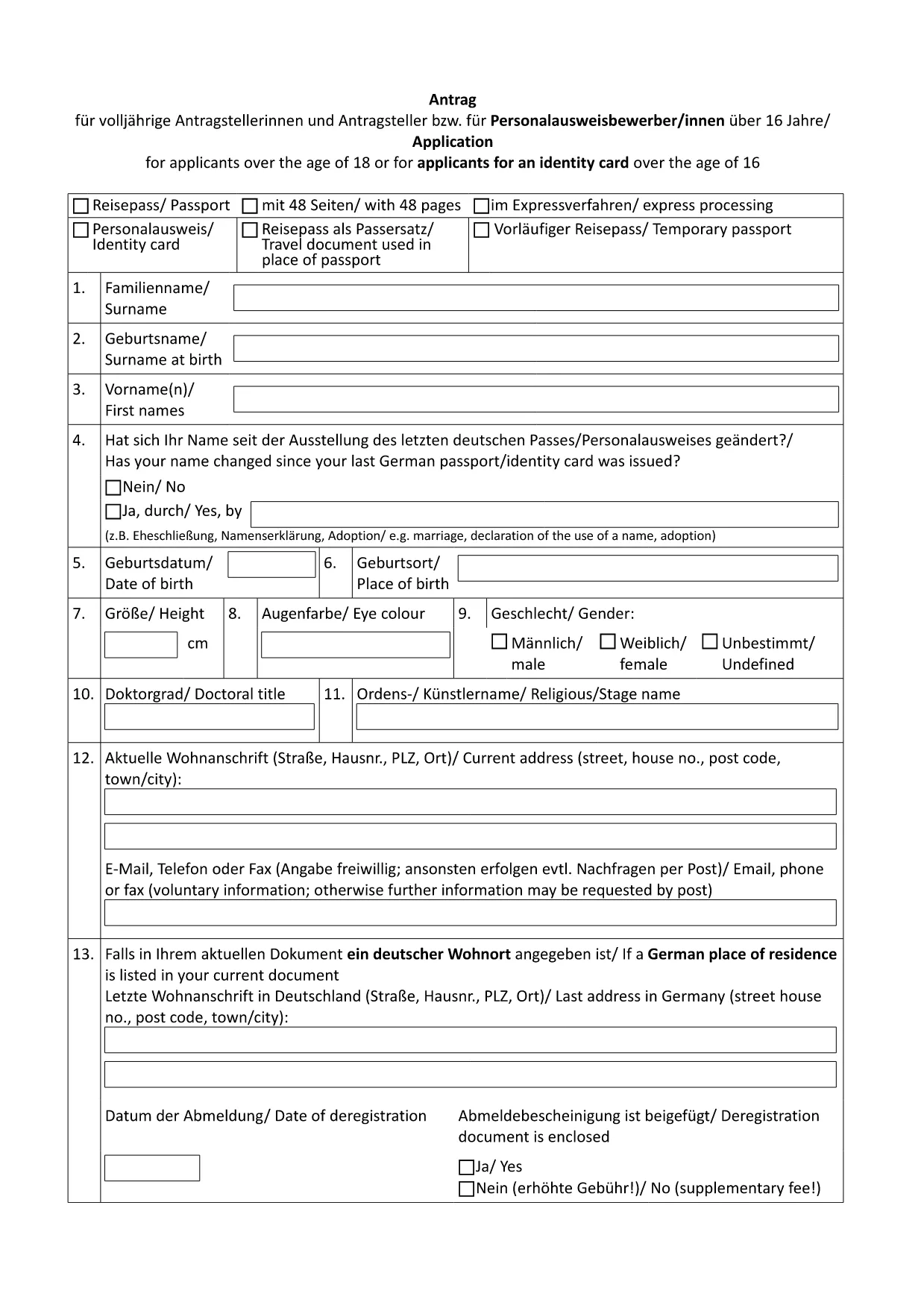
German Passport Application Form (Fillable PDF)

  1. ქვეყანა გერმანია
  2. Ენა ინგლისური
  3. დეპარტამენტი Federal Foreign Office
  4. აქტივობა Passports
German Passport Application Form (Fillable PDF)

Applying for a German passport can feel overwhelming, especially when you need to gather the right paperwork and fill out a lengthy application. With Formize’s fillable PDF solution, you can complete the official German passport application form directly in your browser, avoid transcription errors, and save a printable copy for your embassy appointment.

Why Use a Fillable PDF for Your German Passport?

  • Accuracy: Fields are validated in real time, reducing the risk of missing or incorrect information.
  • Speed: No more printing, writing, and re‑typing. Fill, save, and download instantly.
  • Secure storage: Your data stays within the Formize app until you choose to export it.
  • Eco‑friendly: Reduce paper waste by printing only the final, completed form.

How to Complete the German Passport Application Online

Follow these simple steps (see the How‑To section below for a detailed guide):

  1. Click the "Fill out this form" button on this page.
  2. Wait for the Formize PDF Filler to load.
  3. Enter your personal data, passport details, and supporting information.
  4. Review the form for completeness and correctness.
  5. Save the PDF and print a hard copy for your appointment.

Required Documents and Common Mistakes

Before you start, gather the following original documents:

  • Completed application form (the PDF you will fill out).
  • Two recent biometric passport photos.
  • Birth certificate or proof of German citizenship.
  • Current passport or ID card.
  • Proof of residence (e.g., utility bill, driver’s license).
  • Marriage or divorce certificates if applicable.

Common pitfalls to avoid:

  • Leaving any mandatory field blank.
  • Using photos that are not biometric or are cropped incorrectly.
  • Submitting outdated or non‑original documents.
  • Forgetting a name declaration when your current surname differs from the one in your previous passport.

Download & Print the Official Form

The PDF linked below is the exact form used by German embassies and consulates worldwide. Click the button, fill it online, then print a single copy for your scheduled appointment.

Download German Passport Application Form (PDF)

FAQ – German Passport Application

Find quick answers to the most common questions below. If you need further assistance, contact your local German mission.

FAQ
  • Do I need to print the form after filling it online?

    Yes. German embassies require a printed, signed copy of the completed application together with original supporting documents.

  • Can I submit the application by mail?

    No. Since November 2007, all German passport applications must be submitted in person at an embassy, consulate, or honorary consul.

  • What biometric photo specifications are required?

    Two identical, recent biometric photos (35 mm × 45 mm), with a plain background and no glasses. The Formize filler does not embed photos; attach them separately.

  • How long does processing take?

    Typical processing time is six to eight weeks. If a name declaration is needed, it may take longer.

  • Is the form available in English?

    The official form is in German. However, you can fill it out using Formize and refer to the English guidance on this page.

  • What if I make a mistake after saving the PDF?

    Open the saved PDF again in the Formize filler, correct the error, and re‑save. Do not hand‑write changes on the printed form.

  • Do I need to bring my old passport?

    Yes. Bring the data page of your current or most recent passport, even if it is expired.

  • Are there fees for the application?

    Passport fees vary by age and type. Check the fee schedule on the website of the German mission where you will apply.

ᲠᲝᲒᲝᲠ

როგორ შეავსოთ German passport application უფასოდ, ონლაინ 5 მარტივი ნაბიჯებით:

  1. 1
    Click the Fill‑out Button
    On this page, click the "Fill out this form" button to launch the Formize PDF Filler.
  2. 2
    Wait for the Formizer to Load
    The online filler will open in a new tab. Allow a few seconds for all fields to become interactive.
  3. 3
    Enter Your Information
    Complete each section – personal data, passport details, and supporting information – using the keyboard or drop‑down menus.
  4. 4
    Validate and Save
    Use the built‑in validation to check for missing fields, then click "Save" to download the completed PDF to your device.
  5. 5
    Print for Your Appointment
    Print a single copy of the filled form and bring it, along with the required documents, to your embassy or consulate appointment.
PDF შემავსებლის აპლიკაციის ფორმირება
ᲨᲔᲡᲐᲮᲔᲑ

German passport application შაბლონი

PDF დოკუმენტის სანახავად და შევსების ფუნქციების ტრადიციული ნაკრებით, ვებ აპლიკაციის უპირატესობებთან და საპასუხო განლაგებასთან ერთად, შეგიძლიათ შეავსოთ German passport application წუთებში.

ᲛᲐᲮᲐᲡᲘᲐᲗᲔᲑᲚᲔᲑᲘ

PDF შემავსებელი

ონლაინ German passport application-ის შევსების უმარტივესი გზა

  • სწრაფად შეავსეთ German passport application
    ეძებთ გზას სწრაფად შეავსოთ German passport application ონლაინ? ჩვენი ონლაინ უფასო PDF ფორმის შემავსებლით, თქვენ გეცოდინებათ როგორ შეცვალოთ და შეავსოთ ეს pdf დოკუმენტი ერთ წუთზე ნაკლებ დროში.
  • მარტივი გამოსაყენებელი ონლაინ PDF რედაქტორი
    მოგბეზრდათ PDF ფაილების დაბეჭდვა, რათა მათი რედაქტირება შეძლოთ, ხელახლა სკანირებამდე და უკან გაგზავნამდე? შეცვალეთ PDF დოკუმენტები უფასოდ ონლაინ. გამოიყენეთ ჩვენი ონლაინ pdf რედაქტორი დროისა და ქაღალდის დაზოგვისთვის.
  • შესანიშნავი ხელსაწყოები, ყველა პლატფორმა
    გაინტერესებთ როგორ შეავსოთ German passport application Mac-ზე, ან იქნებ როგორ გამოიყენოთ PDF შემავსებელი უფასოდ? ჩვენი ონლაინ PDF ინსტრუმენტები მუშაობს ყველა პლატფორმაზე.
  • ფაილების უსაფრთხო შენახვა
    დასრულებული „German passport application“ ფაილები ინახება დაცულ მონაცემთა ბაზაში, რომელსაც მართავს Amazon Cloud ჰოსტინგი. თქვენ შეგიძლიათ წაშალოთ თქვენი ფაილები ჩვენი სისტემიდან ნებისმიერ დროს. ნებისმიერ შემთხვევაში, ეს ფაილები ავტომატურად იშლება 24 საათის შემდეგ.
  • ჩატი German passport application-ით
    ესაუბრეთ „German passport application“-ს Chatize-ზე, რომელიც არის PDF წამკითხველის უფასო ასისტენტი. დასვით კითხვები და მიიღეთ პასუხები „German passport application“-დან. უბრალოდ დააწკაპუნეთ ღილაკზე ჩატი დოკუმენტთან ზემოთ.

შევსების სესიის წაშლა

წაშალოთ არჩეული შევსების სესია? ამ შემთხვევაში, თქვენი პროგრესი ფორმის შევსებაში დაიკარგება.

რედაქტირების სესიის წაშლა

წაშალოთ არჩეული რედაქტირების სესია? ამ შემთხვევაში, თქვენი პროგრესი ფორმის შექმნასა და რედაქტირებაში დაიკარგება.