
hamburger-menu icon
Აირჩიეთ ენა

SB-101 India Fillable PDF – Claim Protected Savings

  1. Ენა ინგლისური
  2. ქვეყანა ინდოეთი
  3. დეპარტამენტი პოსტების დეპარტამენტი
SB-101 India Fillable PDF – Claim Protected Savings

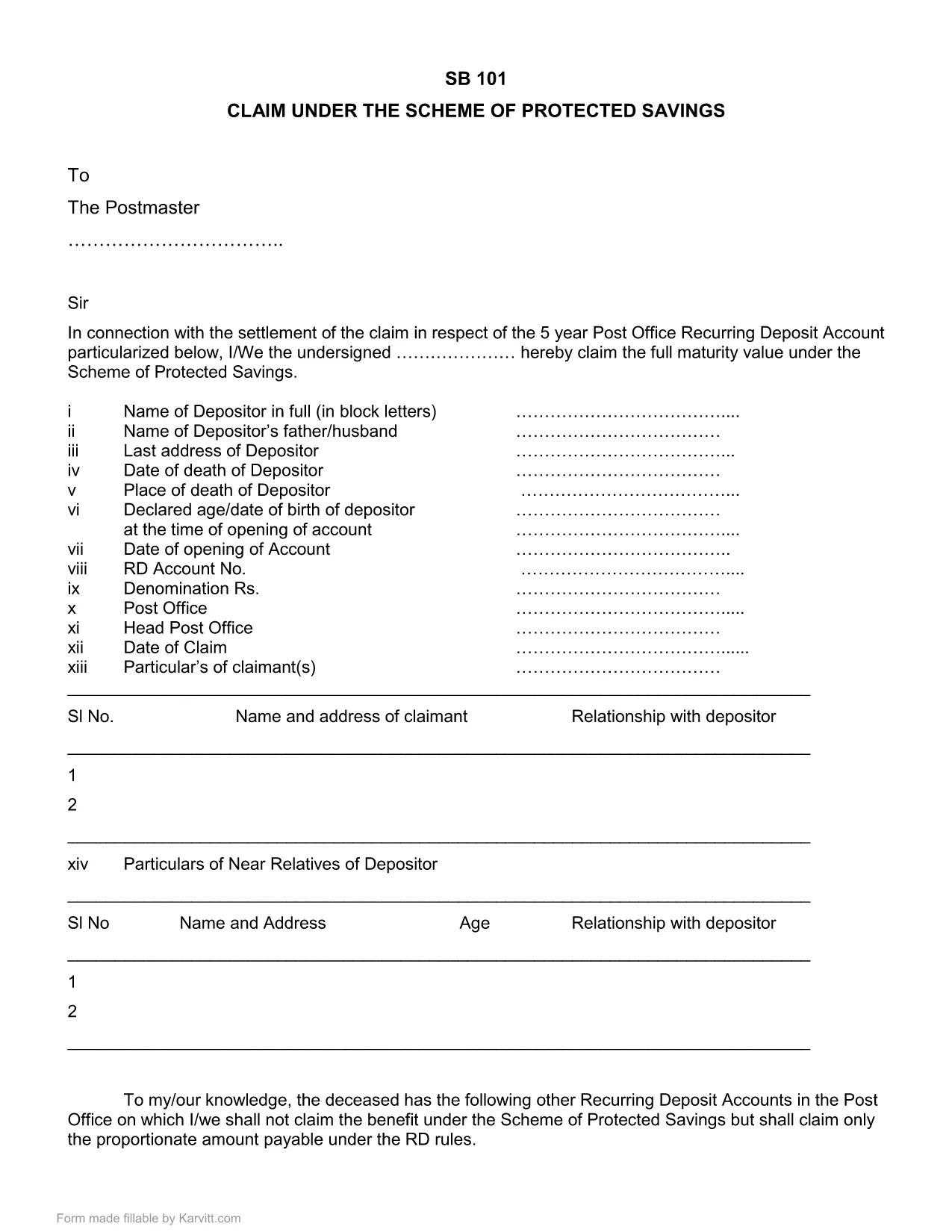
The SB-101 form is the official Post Office document used in India to claim benefits under the Scheme of Protected Savings. Whether you are a first‑time claimant or need to submit a renewal, a fillable PDF version saves you time and reduces errors.

What is Form SB-101?

SB-101 is issued by the Indian Post Office and is required to:

  • Validate your protected savings account.
  • Apply for interest benefits and withdrawals.
  • Update personal details linked to your savings scheme.

The form is recognized nationwide and must be completed in the exact format prescribed by the Post Office.

How to Fill SB-101 Online with Formize

Instead of downloading, printing, and scanning, use the Formize PDF Filler for a seamless experience:

  1. Click the "Fill out this form" button on this page.
  2. The Formize PDF Filler loads directly in your browser – no extra software needed.
  3. Enter your information in each highlighted field. The interface guides you through mandatory sections.
  4. When you finish, review the summary screen for any missing or incorrect entries.
  5. Save the completed form to your device or submit it electronically to your nearest Post Office.

Common Mistakes to Avoid When Completing SB-101

  • Incorrect Account Number: Double‑check the 12‑digit number printed on your passbook.
  • Missing Signature: The form is invalid without a clear, legible signature.
  • Outdated Address: Ensure the address matches the one on record with the Post Office.
  • Skipping Optional Fields: Even optional fields can help speed up verification if filled correctly.

Download & Save the Official SB-101 PDF

If you prefer a traditional approach, you can still download the official fillable PDF version below. The file retains the original layout and can be opened with any modern PDF reader.

Download SB-101 Fillable PDF (India)

Remember, using the Formize PDF Filler ensures your data is captured accurately and saves you a trip to the printer.

FAQ
  • What is the purpose of SB-101?

    SB-101 is used to claim benefits, update personal details, and manage withdrawals under the Scheme of Protected Savings offered by the Indian Post Office.

  • Can I fill SB-101 on a mobile device?

    Yes. The Formize PDF Filler works on all modern browsers, including mobile phones and tablets.

  • Do I need Adobe Acrobat to use the fillable PDF?

    No. While the PDF can be opened with Adobe Reader, the Formize online filler lets you complete the form without any additional software.

  • Is the downloaded PDF version still valid?

    Absolutely. The PDF retains the official layout and is accepted by all Post Office branches, provided it is fully completed and signed.

  • What should I do if I make a mistake?

    Use the Formize filler's reset option to clear fields, or download a fresh copy of the PDF and start over.

  • How long does it take to process SB-101 after submission?

    Processing time varies by branch, but most offices complete verification within 7‑10 business days.

ᲠᲝᲒᲝᲠ

როგორ შეავსოთ SB-101 India უფასოდ, ონლაინ 5 მარტივი ნაბიჯებით:

  1. 1
    Click the Fill Out Button
    Press the "Fill out this form" button on the page to launch the Formize PDF Filler.
  2. 2
    Load the Formize PDF Filler
    The web‑based filler loads instantly in your browser—no downloads required.
  3. 3
    Enter Your Details
    Complete each highlighted field with accurate information. The filler highlights required sections.
  4. 4
    Review & Validate
    Check the summary view for any missing or incorrect entries before finalizing.
  5. 5
    Save or Submit
    Download the finished PDF to your device or submit it electronically to your local Post Office.
PDF შემავსებლის აპლიკაციის ფორმირება
ᲨᲔᲡᲐᲮᲔᲑ

პოსტების დეპარტამენტის განაცხადის ფორმები

SB-101 India არის ინდოეთის ფოსტის დეპარტამენტის ერთ-ერთი ოფიციალური ფორმა, რომელიც გთავაზობთ სხვადასხვა განაცხადის ფორმებს სხვადასხვა სერვისებისთვის. ზოგიერთი გავრცელებული განაცხადის ფორმა მოიცავს:

საფოსტო სიცოცხლის დაზღვევა: ეს ფორმა გამოიყენება საფოსტო სამსახურის დაზღვევის პოლისებზე განაცხადისთვის, რომელსაც გთავაზობთ ფოსტის დეპარტამენტი.

შემნახველი ბანკის ანგარიში: ეს ფორმა გამოიყენება შემნახველი ბანკის ანგარიშის გასახსნელად ფოსტაში.

ფულის ორდერი: ეს ფორმა გამოიყენება ფულადი გზავნილების გაგზავნისთვის საფოსტო სერვისის მეშვეობით.

რეგისტრირებული ფოსტა: ეს ფორმა გამოიყენება რეგისტრირებული წერილების და ამანათების გაგზავნისთვის საფოსტო სამსახურის მეშვეობით.

Speed ​​Post: ეს ფორმა გამოიყენება ამანათებისა და დოკუმენტების გასაგზავნად სწრაფი საფოსტო სამსახურის მეშვეობით.

ფოსტის თვიური შემოსავლის სქემა: ეს ფორმა გამოიყენება ფოსტაში ყოველთვიური შემოსავლის სქემის ანგარიშის გასახსნელად.

ᲛᲐᲮᲐᲡᲘᲐᲗᲔᲑᲚᲔᲑᲘ

PDF შემავსებელი

ონლაინ SB-101 India-ის შევსების უმარტივესი გზა

  • სწრაფად შეავსეთ SB-101 India
    ეძებთ გზას სწრაფად შეავსოთ SB-101 India ონლაინ? ჩვენი ონლაინ უფასო PDF ფორმის შემავსებლით, თქვენ გეცოდინებათ როგორ შეცვალოთ და შეავსოთ ეს pdf დოკუმენტი ერთ წუთზე ნაკლებ დროში.
  • მარტივი გამოსაყენებელი ონლაინ PDF რედაქტორი
    მოგბეზრდათ PDF ფაილების დაბეჭდვა, რათა მათი რედაქტირება შეძლოთ, ხელახლა სკანირებამდე და უკან გაგზავნამდე? შეცვალეთ PDF დოკუმენტები უფასოდ ონლაინ. გამოიყენეთ ჩვენი ონლაინ pdf რედაქტორი დროისა და ქაღალდის დაზოგვისთვის.
  • შესანიშნავი ხელსაწყოები, ყველა პლატფორმა
    გაინტერესებთ როგორ შეავსოთ SB-101 India Mac-ზე, ან იქნებ როგორ გამოიყენოთ PDF შემავსებელი უფასოდ? ჩვენი ონლაინ PDF ინსტრუმენტები მუშაობს ყველა პლატფორმაზე.
  • ფაილების უსაფრთხო შენახვა
    დასრულებული „SB-101 India“ ფაილები ინახება დაცულ მონაცემთა ბაზაში, რომელსაც მართავს Amazon Cloud ჰოსტინგი. თქვენ შეგიძლიათ წაშალოთ თქვენი ფაილები ჩვენი სისტემიდან ნებისმიერ დროს. ნებისმიერ შემთხვევაში, ეს ფაილები ავტომატურად იშლება 24 საათის შემდეგ.
  • ჩატი SB-101 India-ით
    ესაუბრეთ „SB-101 India“-ს Chatize-ზე, რომელიც არის PDF წამკითხველის უფასო ასისტენტი. დასვით კითხვები და მიიღეთ პასუხები „SB-101 India“-დან. უბრალოდ დააწკაპუნეთ ღილაკზე ჩატი დოკუმენტთან ზემოთ.

შევსების სესიის წაშლა

წაშალოთ არჩეული შევსების სესია? ამ შემთხვევაში, თქვენი პროგრესი ფორმის შევსებაში დაიკარგება.

რედაქტირების სესიის წაშლა

წაშალოთ არჩეული რედაქტირების სესია? ამ შემთხვევაში, თქვენი პროგრესი ფორმის შექმნასა და რედაქტირებაში დაიკარგება.