
hamburger-menu icon
Აირჩიეთ ენა

Form 1120-F Schedule V – Fillable PDF

  1. ქვეყანა აშშ
  2. Ენა ინგლისური
  3. აქტივობა Გადასახადები
  4. დეპარტამენტი შიდა შემოსავლების სამსახური
Form 1120-F Schedule V – Fillable PDF

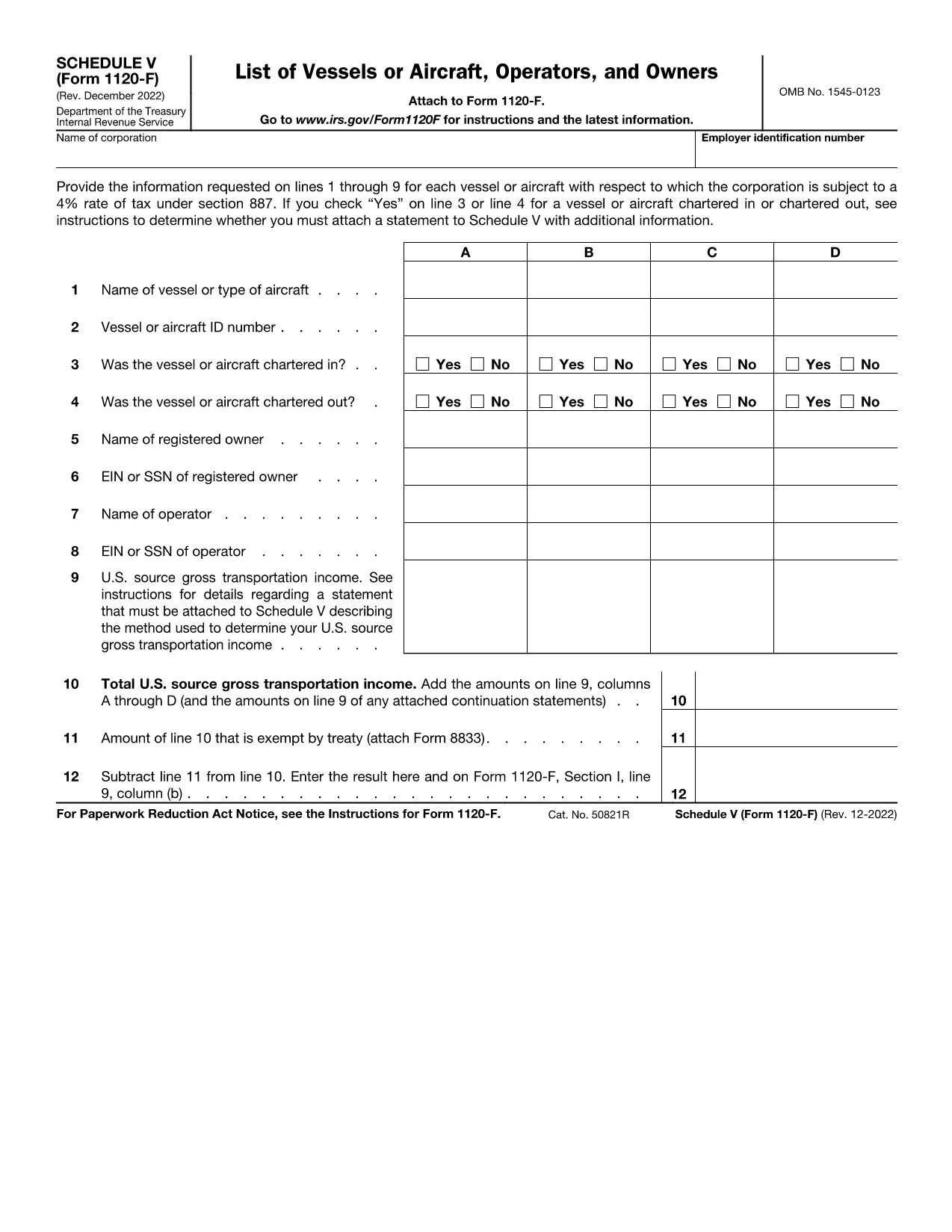
Schedule V (Form 1120-F) is the supplemental schedule used by foreign corporations to report vessel or aircraft activities that are subject to the 4% tax rate under IRC §887. If your corporation owns, charters, or operates any qualifying vessel or aircraft, you must fill out lines 1‑9 for each asset.

What Is Schedule V?

Schedule V captures detailed information about each vessel or aircraft, including identification numbers, charter status, and the amount of tax owed. The IRS requires this schedule to be attached to Form 1120-F when the 4% tax applies.

How to Complete Schedule V Online

With Formize’s fillable PDF, you can complete Schedule V directly in your browser—no download‑edit‑upload cycle needed. Simply click the "Fill out this form" button, wait for the Formize PDF Filler app to load, and start entering your data.

  • Enter the vessel or aircraft name and identification number.
  • Indicate whether the asset was chartered in, chartered out, or both.
  • Provide the tax‑calculating figures for each line as instructed.
  • Review the completed schedule and use the built‑in validation to catch common errors.

Common Mistakes to Avoid

Even experienced filers slip up. Keep an eye on these frequent errors:

  • Leaving line 3 or line 4 blank when a charter exists.
  • Entering the wrong vessel identification number (e.g., IMO vs. registration).
  • Mis‑calculating the 4% tax amount—use the Formize calculator for accuracy.
  • Forgetting to attach an additional statement when the schedule requires it.

Where to Submit Your Completed Form

After you’ve saved the filled Schedule V, attach it to your Form 1120-F filing. Submit the combined package to the IRS address listed in the Form 1120-F instructions or upload it through the IRS e‑file system if you’re filing electronically.

Need a printable copy? The fillable PDF also offers a Download button so you can keep a hard copy for your records.

ინსტრუქციები

FAQ
  • What is the purpose of Schedule V on Form 1120-F?

    Schedule V reports vessel or aircraft activities that trigger the 4% foreign corporation tax under IRC §887. It must be attached to Form 1120‑F when applicable.

  • Can I fill out Schedule V directly in my browser?

    Yes. Using Formize’s fillable PDF, you can complete Schedule V online without downloading any software.

  • Do I need to attach a separate statement if I answer “Yes” on line 3 or 4?

    If you answer “Yes” to chartering in or out, the IRS instructions require an additional statement with more details. The Formize app provides a template you can fill and attach.

  • Is the fillable PDF version the same as the IRS paper form?

    The fillable PDF is an exact replica of the IRS Schedule V (Form 1120‑F) with interactive fields, ensuring compliance with the official format.

  • How do I submit the completed Schedule V with my Form 1120-F?

    Attach the saved PDF to your Form 1120‑F filing and submit it either by mail to the IRS address in the instructions or electronically through the IRS e‑file system.

  • What if I make a mistake after submitting?

    You can file an amended Form 1120‑F with a corrected Schedule V. Keep a copy of the original filing for reference.

ᲠᲝᲒᲝᲠ

როგორ შეავსოთ Form 1120-F Schedule V უფასოდ, ონლაინ 4 მარტივი ნაბიჯებით:

  1. 1
    Open the Fillable Form
    Click the “Fill out this form” button on the page. The Formize PDF Filler app will load in your browser.
  2. 2
    Enter Vessel or Aircraft Details
    Fill in each line (1‑9) with the required information, such as identification numbers and charter status.
  3. 3
    Validate and Review
    Use the built‑in validation to check for missing fields or calculation errors. Correct any issues before saving.
  4. 4
    Save or Download
    When finished, click “Save” to store the completed Schedule V in your Formize account, or click “Download” to get a PDF copy for printing or offline filing.
PDF შემავსებლის აპლიკაციის ფორმირება
ᲨᲔᲡᲐᲮᲔᲑ

საგადასახადო ფორმები

Form 1120-F Schedule V არის ერთ-ერთი საგადასახადო ფორმა, რომელიც წარმოადგენს დოკუმენტებს, რომლებიც გამოიყენება გადასახადებთან დაკავშირებული ინფორმაციის შესაბამის საგადასახადო ორგანოში მოსახსენებლად. არსებობს სხვადასხვა სახის საგადასახადო ფორმები, მათ შორის ფედერალური, სახელმწიფო და ადგილობრივი საგადასახადო ფორმები, რომლებიც შეიძლება განსხვავდებოდეს გადასახადის გადამხდელის გარემოებებისა და ადგილმდებარეობის მიხედვით.

ᲛᲐᲮᲐᲡᲘᲐᲗᲔᲑᲚᲔᲑᲘ

PDF შემავსებელი

ონლაინ Form 1120-F Schedule V-ის შევსების უმარტივესი გზა

  • სწრაფად შეავსეთ Form 1120-F Schedule V
    ეძებთ გზას სწრაფად შეავსოთ Form 1120-F Schedule V ონლაინ? ჩვენი ონლაინ უფასო PDF ფორმის შემავსებლით, თქვენ გეცოდინებათ როგორ შეცვალოთ და შეავსოთ ეს pdf დოკუმენტი ერთ წუთზე ნაკლებ დროში.
  • მარტივი გამოსაყენებელი ონლაინ PDF რედაქტორი
    მოგბეზრდათ PDF ფაილების დაბეჭდვა, რათა მათი რედაქტირება შეძლოთ, ხელახლა სკანირებამდე და უკან გაგზავნამდე? შეცვალეთ PDF დოკუმენტები უფასოდ ონლაინ. გამოიყენეთ ჩვენი ონლაინ pdf რედაქტორი დროისა და ქაღალდის დაზოგვისთვის.
  • შესანიშნავი ხელსაწყოები, ყველა პლატფორმა
    გაინტერესებთ როგორ შეავსოთ Form 1120-F Schedule V Mac-ზე, ან იქნებ როგორ გამოიყენოთ PDF შემავსებელი უფასოდ? ჩვენი ონლაინ PDF ინსტრუმენტები მუშაობს ყველა პლატფორმაზე.
  • ფაილების უსაფრთხო შენახვა
    დასრულებული „Form 1120-F Schedule V“ ფაილები ინახება დაცულ მონაცემთა ბაზაში, რომელსაც მართავს Amazon Cloud ჰოსტინგი. თქვენ შეგიძლიათ წაშალოთ თქვენი ფაილები ჩვენი სისტემიდან ნებისმიერ დროს. ნებისმიერ შემთხვევაში, ეს ფაილები ავტომატურად იშლება 24 საათის შემდეგ.
  • ჩატი Form 1120-F Schedule V-ით
    ესაუბრეთ „Form 1120-F Schedule V“-ს Chatize-ზე, რომელიც არის PDF წამკითხველის უფასო ასისტენტი. დასვით კითხვები და მიიღეთ პასუხები „Form 1120-F Schedule V“-დან. უბრალოდ დააწკაპუნეთ ღილაკზე ჩატი დოკუმენტთან ზემოთ.

შევსების სესიის წაშლა

წაშალოთ არჩეული შევსების სესია? ამ შემთხვევაში, თქვენი პროგრესი ფორმის შევსებაში დაიკარგება.

რედაქტირების სესიის წაშლა

წაშალოთ არჩეული რედაქტირების სესია? ამ შემთხვევაში, თქვენი პროგრესი ფორმის შექმნასა და რედაქტირებაში დაიკარგება.