

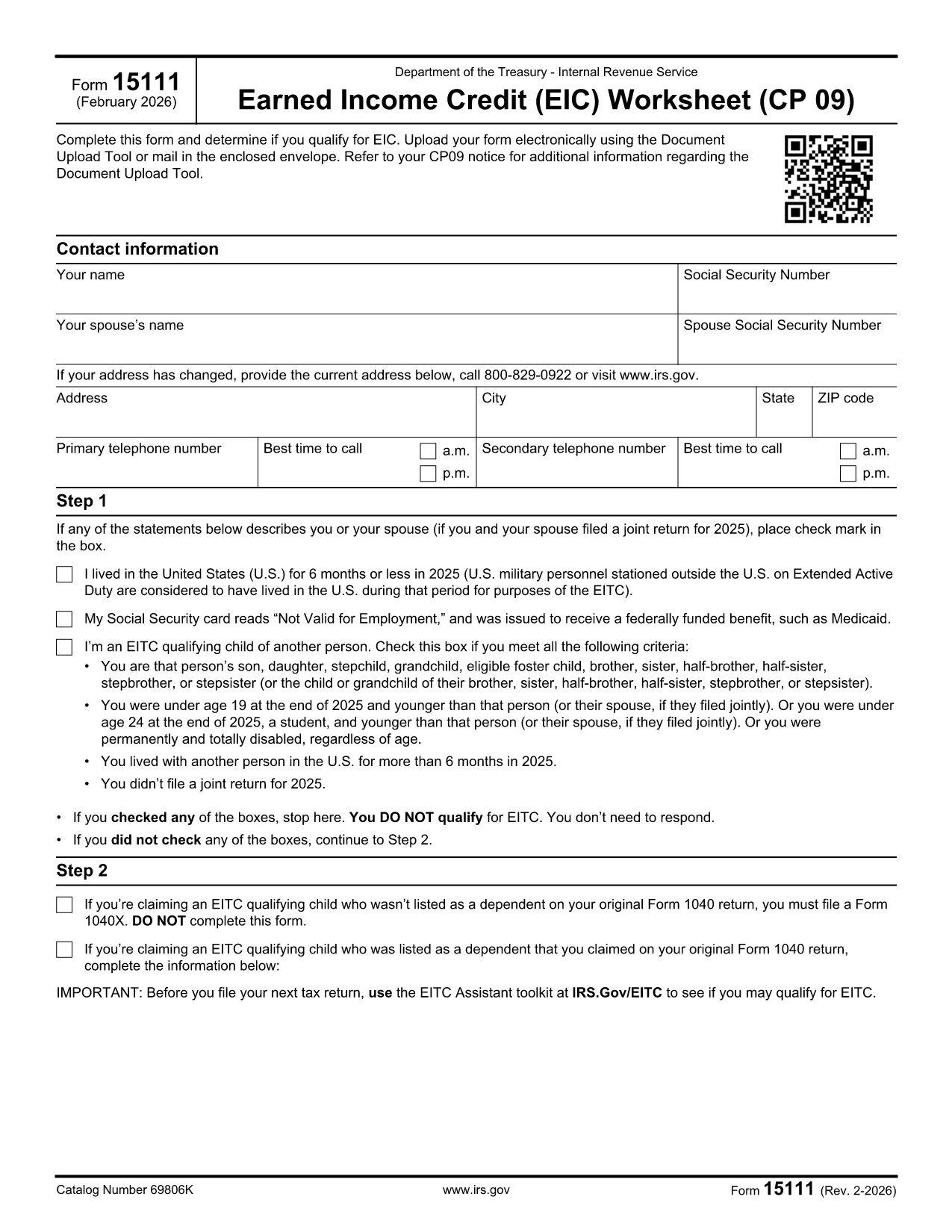

შიდა შემოსავლების სამსახურის (IRS) ფორმები
Form 15111 არის ერთ-ერთი ოფიციალური საგადასახადო ფორმა, რომელიც გამოიყენება შეერთებულ შტატებში შემოსავლის ანგარიშგების, გამოქვითვებისა და კრედიტების მოთხოვნის, საგადასახადო ვალდებულების გამოსათვლელად და სხვა გადასახადებთან დაკავშირებული ვალდებულებების შესასრულებლად. IRS არის ფედერალური სააგენტო, რომელიც პასუხისმგებელია შეერთებულ შტატებში შიდა შემოსავლების კანონების ადმინისტრირებასა და აღსრულებაზე.
აქ მოცემულია შიდა შემოსავლების სამსახურის ფორმების რამდენიმე მაგალითი:
ფორმა 1040: ეს არის პირველადი ინდივიდუალური საშემოსავლო გადასახადის დეკლარაციის ფორმა, რომელსაც იყენებენ გადასახადის გადამხდელთა უმეტესობა. იგი გამოიყენება სხვადასხვა სახის შემოსავლის დასაფიქსირებლად, გამოქვითვებისა და კრედიტების მოთხოვნით, საგადასახადო ვალდებულების გამოსათვლელად და იმის დასადგენად, აქვს თუ არა გადასახადის გადამხდელს დამატებითი გადასახადის ვალდებულება თუ აქვს დაბრუნების უფლება.
ფორმა 1099: არსებობს 1099 ფორმის სხვადასხვა ვარიაციები, როგორიცაა 1099-MISC, 1099-INT, 1099-DIV და ა.შ. ეს ფორმები გამოიყენება ფიზიკური პირების ან ბიზნესის მიერ მიღებული შემოსავლის საანგარიშოდ სხვადასხვა წყაროდან, გარდა დასაქმებიდან, როგორიცაა თვითდასაქმება. შემოსავალი, საპროცენტო შემოსავალი, დივიდენდის შემოსავალი და იჯარის შემოსავალი.
ფორმა W-2: ამ ფორმას იყენებენ დამსაქმებლები თანამშრომლებისთვის გადახდილი ხელფასისა და გადასახადების შესახებ დაკავებული მათი ანაზღაურებიდან. თანამშრომლები იყენებენ ფორმა W-2-ის ინფორმაციას ინდივიდუალური საგადასახადო დეკლარაციის შესავსებად.
ფორმა 941: დამსაქმებლები იყენებენ ამ ფორმას თავიანთი თანამშრომლებისთვის დასაქმების გადასახადების, მათ შორის ფედერალური საშემოსავლო გადასახადის, სოციალური დაცვის გადასახადისა და მკურნალი გადასახადის შესატყობინებლად.
ფორმა 1065: ამ ფორმას იყენებენ პარტნიორები თავიანთი შემოსავლის, გამოქვითვებისა და საგადასახადო ვალდებულების დასაფიქსირებლად. თავად ამხანაგობები არ იხდიან საშემოსავლო გადასახადს; სამაგიეროდ, პარტნიორები თავიანთ ინდივიდუალურ საგადასახადო დეკლარაციაში აცხადებენ პარტნიორობის შემოსავლის წილს.
ფორმა 1120: ეს არის კორპორატიული საშემოსავლო გადასახადის დეკლარაციის ფორმა, რომელსაც იყენებენ C კორპორაციები თავიანთი შემოსავლის დასაფიქსირებლად, გამოქვითვები და საგადასახადო ვალდებულება.
ფორმა 990: ამ ფორმას იყენებენ გადასახადებისგან გათავისუფლებული ორგანიზაციები, როგორიცაა არაკომერციული და საქველმოქმედო ორგანიზაციები. აცნობონ მათ ფინანსურ ინფორმაციას, საქმიანობას და შესაბამისობას საგადასახადო კანონებთან.
ფორმა 8862: ამ ფორმას იყენებენ გადასახადის გადამხდელები, რომლებმაც ადრე მოითხოვეს მიღებული საშემოსავლო გადასახადის კრედიტი (EITC) მაგრამ ეს აკრძალული იყო და ახლა მინდა კიდევ ერთხელ მოვითხოვო.
ეს არის მხოლოდ რამდენიმე მაგალითი მრავალი IRS ფორმისა, რომელიც არსებობს სხვადასხვა საგადასახადო ვალდებულებების შესასრულებლად. ინდივიდუალური ან ბიზნესისთვის საჭირო კონკრეტული ფორმები დამოკიდებულია მათ უნიკალურ გარემოებებზე, შემოსავლის წყაროებსა და გამოქვითვებზე. მიზანშეწონილია მიმართოთ შიდა შემოსავლების სამსახურის ოფიციალურ ვებსაიტს (www.irs.gov) ან მოიძიოთ პროფესიული საგადასახადო რჩევა კონკრეტული IRS-ის შესახებ ზუსტი და განახლებული ინფორმაციის მისაღებად. თქვენი საგადასახადო მდგომარეობის შესაბამისი ფორმები.