
hamburger-menu icon
Აირჩიეთ ენა

ფორმა 2848

  1. ქვეყანა აშშ
  2. Ენა ინგლისური
  3. აქტივობა Გადასახადები
  4. დეპარტამენტი შიდა შემოსავლების სამსახური
ფორმა 2848

ფორმა 2848 (რედ. 2021 წლის იანვარი)

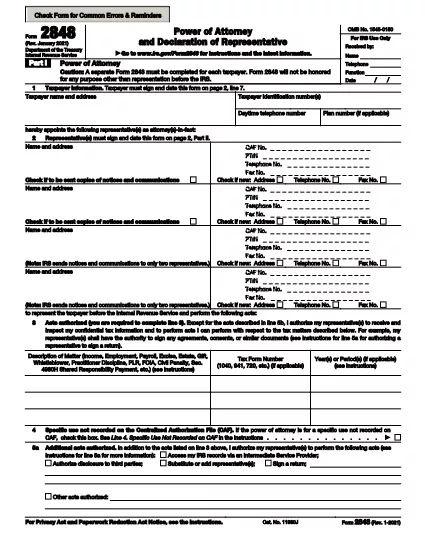
უფლებამოსილება და წარმომადგენლის დეკლარაცია

Form 2848 is a Power of Attorney and Declaration of Representative used in the United States tax system. It grants authorized individuals the power to act on behalf of a taxpayer in dealing with the Internal Revenue Service.

ინსტრუქციები

მოძებნეთ ტეგები

FAQ
  • Who can sign Form 2848?

    The taxpayer or the person with a valid power of attorney from the taxpayer must sign and enter their title. Representatives, such as attorneys, certified public accountants, enrolled agents, officers, full-time employees, family members, and enrolled actuaries, must also sign and provide their licensing information.

  • What is Form 2848 used for?

    Form 2848, Power of Attorney and Declaration of Representative, is used by taxpayers to grant someone they trust the authority to act on their behalf before the Internal Revenue Service (IRS) in matters related to federal taxes.

  • What powers does a designated representative have?

    A designated representative has the authority to represent the taxpayer before the IRS in all matters related to their account. This includes audits, examinations, and other official interactions. However, the extent of the representative's authority may be limited by the specific power of attorney granted by the taxpayer.

  • What is the time frame for submitting Form 2848?

    There is no specific time frame for submitting Form 2848. However, it is recommended that taxpayers submit the form as soon as possible to ensure that their designated representative has the necessary authority to act on their behalf.

  • What information is required in Form 2848?

    Form 2848 requires the taxpayer's identifying number, such as their social security number or employer identification number, and information about the designated representative. This includes the representative's name, business address, telephone number, and a declaration of representation.

  • Which individuals can be designated as representatives?

    Any individual can be designated as a representative for a taxpayer. This includes attorneys, certified public accountants (CPAs), enrolled agents, registered tax return preparers, and other individuals with the necessary knowledge and experience to act on behalf of a taxpayer.

  • What is Form 2848?

    Form 2848, Power of Attorney and Declaration of Representation, is a form used to authorize an individual or entity to represent a taxpayer before the Internal Revenue Service (IRS). The form allows taxpayers to designate a representative to act on their behalf in all matters with the IRS, including audits, examinations, and other official interactions.

  • What is Part II of Form 2848 for?

    Part II of Form 2848 is for the representative(s) to sign and enter their designation and licensing information. This information helps the IRS identify and validate the representative's authority.

  • How long does it take for a Power of Attorney to take effect on the CAF?

    A power of attorney takes effect upon filing with the Centralized Authorizing Facility (CAF). However, each separate IRS office or department may have its own policies regarding when they will recognize and act upon the power of attorney. It is recommended that taxpayers contact the specific IRS office or department to confirm their acceptance of the power of attorney.

  • Is Form 2848 required for all tax matters?

    No, not all tax matters require a power of attorney. However, if you want someone else to act on your behalf in a complex or sensitive tax matter, it is recommended that you file Form 2848 to ensure that the IRS recognizes and respects their authority.

  • What are the benefits of using Form 2848?

    The main benefit of using Form 2848 is that it provides a standardized way for taxpayers to designate a representative to act on their behalf before the IRS. This ensures that the designated representative has the necessary authority and knowledge to handle all matters related to the taxpayer's account.

  • What is the purpose of Form 2848?

    The purpose of Form 2848 is to provide a standardized way for taxpayers to designate a representative to act on their behalf before the IRS. This form ensures that the designated representative has the necessary authority and knowledge to handle all matters related to the taxpayer's account.

  • Can a non-US citizen be designated as a representative?

    Yes, any individual can represent an individual or entity before personnel of the IRS when such representation occurs outside the United States. However, only certain individuals, such as enrolled agents and certified public accountants (CPAs), are authorized to represent taxpayers before the IRS in the United States.

  • What information does the IRS collect from Form 2848?

    The IRS collects identifying information, such as the taxpayer's name, SSN, and address, as well as the representative's name, SSN or ITIN, and their licensing information. This information helps the IRS properly identify both parties and determine the extent of the representative's authority.

ᲠᲝᲒᲝᲠ

როგორ შეავსოთ ფორმა 2848 უფასოდ, ონლაინ 3 მარტივ ნაბიჯში:

  1. 1
    გახსენით ფორმის შაბლონი რედაქტორში
    დააწკაპუნეთ ღილაკზე „ამ შაბლონის მიღება“.
  2. 2
    შეავსეთ ფორმა 2848
    დაელოდეთ ცოტა ხანს და თქვენ გადამისამართდებით ჩვენს ონლაინ PDF Filler აპლიკაციაში.
  3. 3
    Გადმოწერეთ ფაილი
    ჩამოტვირთეთ თქვენი დასრულებული ფორმა 2848 უფასოდ. თქვენ ასევე შეგიძლიათ შეინახოთ იგი ღრუბლოვან საცავში.
PDF შემავსებლის აპლიკაციის ფორმირება
ᲨᲔᲡᲐᲮᲔᲑ

შიდა შემოსავლების სამსახურის (IRS) ფორმები

ფორმა 2848 არის ერთ-ერთი ოფიციალური საგადასახადო ფორმა, რომელიც გამოიყენება შეერთებულ შტატებში შემოსავლის ანგარიშგების, გამოქვითვებისა და კრედიტების მოთხოვნის, საგადასახადო ვალდებულების გამოსათვლელად და სხვა გადასახადებთან დაკავშირებული ვალდებულებების შესასრულებლად. IRS არის ფედერალური სააგენტო, რომელიც პასუხისმგებელია შეერთებულ შტატებში შიდა შემოსავლების კანონების ადმინისტრირებასა და აღსრულებაზე.

აქ მოცემულია შიდა შემოსავლების სამსახურის ფორმების რამდენიმე მაგალითი:

ფორმა 1040: ეს არის პირველადი ინდივიდუალური საშემოსავლო გადასახადის დეკლარაციის ფორმა, რომელსაც იყენებენ გადასახადის გადამხდელთა უმეტესობა. იგი გამოიყენება სხვადასხვა სახის შემოსავლის დასაფიქსირებლად, გამოქვითვებისა და კრედიტების მოთხოვნით, საგადასახადო ვალდებულების გამოსათვლელად და იმის დასადგენად, აქვს თუ არა გადასახადის გადამხდელს დამატებითი გადასახადის ვალდებულება თუ აქვს დაბრუნების უფლება.

ფორმა 1099: არსებობს 1099 ფორმის სხვადასხვა ვარიაციები, როგორიცაა 1099-MISC, 1099-INT, 1099-DIV და ა.შ. ეს ფორმები გამოიყენება ფიზიკური პირების ან ბიზნესის მიერ მიღებული შემოსავლის საანგარიშოდ სხვადასხვა წყაროდან, გარდა დასაქმებიდან, როგორიცაა თვითდასაქმება. შემოსავალი, საპროცენტო შემოსავალი, დივიდენდის შემოსავალი და იჯარის შემოსავალი.

ფორმა W-2: ამ ფორმას იყენებენ დამსაქმებლები თანამშრომლებისთვის გადახდილი ხელფასისა და გადასახადების შესახებ დაკავებული მათი ანაზღაურებიდან. თანამშრომლები იყენებენ ფორმა W-2-ის ინფორმაციას ინდივიდუალური საგადასახადო დეკლარაციის შესავსებად.

ფორმა 941: დამსაქმებლები იყენებენ ამ ფორმას თავიანთი თანამშრომლებისთვის დასაქმების გადასახადების, მათ შორის ფედერალური საშემოსავლო გადასახადის, სოციალური დაცვის გადასახადისა და მკურნალი გადასახადის შესატყობინებლად.

ფორმა 1065: ამ ფორმას იყენებენ პარტნიორები თავიანთი შემოსავლის, გამოქვითვებისა და საგადასახადო ვალდებულების დასაფიქსირებლად. თავად ამხანაგობები არ იხდიან საშემოსავლო გადასახადს; სამაგიეროდ, პარტნიორები თავიანთ ინდივიდუალურ საგადასახადო დეკლარაციაში აცხადებენ პარტნიორობის შემოსავლის წილს.

ფორმა 1120: ეს არის კორპორატიული საშემოსავლო გადასახადის დეკლარაციის ფორმა, რომელსაც იყენებენ C კორპორაციები თავიანთი შემოსავლის დასაფიქსირებლად, გამოქვითვები და საგადასახადო ვალდებულება.

ფორმა 990: ამ ფორმას იყენებენ გადასახადებისგან გათავისუფლებული ორგანიზაციები, როგორიცაა არაკომერციული და საქველმოქმედო ორგანიზაციები. აცნობონ მათ ფინანსურ ინფორმაციას, საქმიანობას და შესაბამისობას საგადასახადო კანონებთან.

ფორმა 8862: ამ ფორმას იყენებენ გადასახადის გადამხდელები, რომლებმაც ადრე მოითხოვეს მიღებული საშემოსავლო გადასახადის კრედიტი (EITC) მაგრამ ეს აკრძალული იყო და ახლა მინდა კიდევ ერთხელ მოვითხოვო.

ეს არის მხოლოდ რამდენიმე მაგალითი მრავალი IRS ფორმისა, რომელიც არსებობს სხვადასხვა საგადასახადო ვალდებულებების შესასრულებლად. ინდივიდუალური ან ბიზნესისთვის საჭირო კონკრეტული ფორმები დამოკიდებულია მათ უნიკალურ გარემოებებზე, შემოსავლის წყაროებსა და გამოქვითვებზე. მიზანშეწონილია მიმართოთ შიდა შემოსავლების სამსახურის ოფიციალურ ვებსაიტს (www.irs.gov) ან მოიძიოთ პროფესიული საგადასახადო რჩევა კონკრეტული IRS-ის შესახებ ზუსტი და განახლებული ინფორმაციის მისაღებად. თქვენი საგადასახადო მდგომარეობის შესაბამისი ფორმები.

ᲛᲐᲮᲐᲡᲘᲐᲗᲔᲑᲚᲔᲑᲘ

PDF შემავსებელი

ონლაინ ფორმა 2848-ის შევსების უმარტივესი გზა

  • სწრაფად შეავსეთ ფორმა 2848
    ეძებთ გზას სწრაფად შეავსოთ ფორმა 2848 ონლაინ? ჩვენი ონლაინ უფასო PDF ფორმის შემავსებლით, თქვენ გეცოდინებათ როგორ შეცვალოთ და შეავსოთ ეს pdf დოკუმენტი ერთ წუთზე ნაკლებ დროში.
  • მარტივი გამოსაყენებელი ონლაინ PDF რედაქტორი
    მოგბეზრდათ PDF ფაილების დაბეჭდვა, რათა მათი რედაქტირება შეძლოთ, ხელახლა სკანირებამდე და უკან გაგზავნამდე? შეცვალეთ PDF დოკუმენტები უფასოდ ონლაინ. გამოიყენეთ ჩვენი ონლაინ pdf რედაქტორი დროისა და ქაღალდის დაზოგვისთვის.
  • შესანიშნავი ხელსაწყოები, ყველა პლატფორმა
    გაინტერესებთ როგორ შეავსოთ ფორმა 2848 Mac-ზე, ან იქნებ როგორ გამოიყენოთ PDF შემავსებელი უფასოდ? ჩვენი ონლაინ PDF ინსტრუმენტები მუშაობს ყველა პლატფორმაზე.
  • ფაილების უსაფრთხო შენახვა
    დასრულებული „ფორმა 2848“ ფაილები ინახება დაცულ მონაცემთა ბაზაში, რომელსაც მართავს Amazon Cloud ჰოსტინგი. თქვენ შეგიძლიათ წაშალოთ თქვენი ფაილები ჩვენი სისტემიდან ნებისმიერ დროს. ნებისმიერ შემთხვევაში, ეს ფაილები ავტომატურად იშლება 24 საათის შემდეგ.
  • ჩატი ფორმა 2848-ით
    ესაუბრეთ „ფორმა 2848“-ს Chatize-ზე, რომელიც არის PDF წამკითხველის უფასო ასისტენტი. დასვით კითხვები და მიიღეთ პასუხები „ფორმა 2848“-დან. უბრალოდ დააწკაპუნეთ ღილაკზე ჩატი დოკუმენტთან ზემოთ.

შევსების სესიის წაშლა

წაშალოთ არჩეული შევსების სესია? ამ შემთხვევაში, თქვენი პროგრესი ფორმის შევსებაში დაიკარგება.

რედაქტირების სესიის წაშლა

წაშალოთ არჩეული რედაქტირების სესია? ამ შემთხვევაში, თქვენი პროგრესი ფორმის შექმნასა და რედაქტირებაში დაიკარგება.