
hamburger-menu icon
Აირჩიეთ ენა

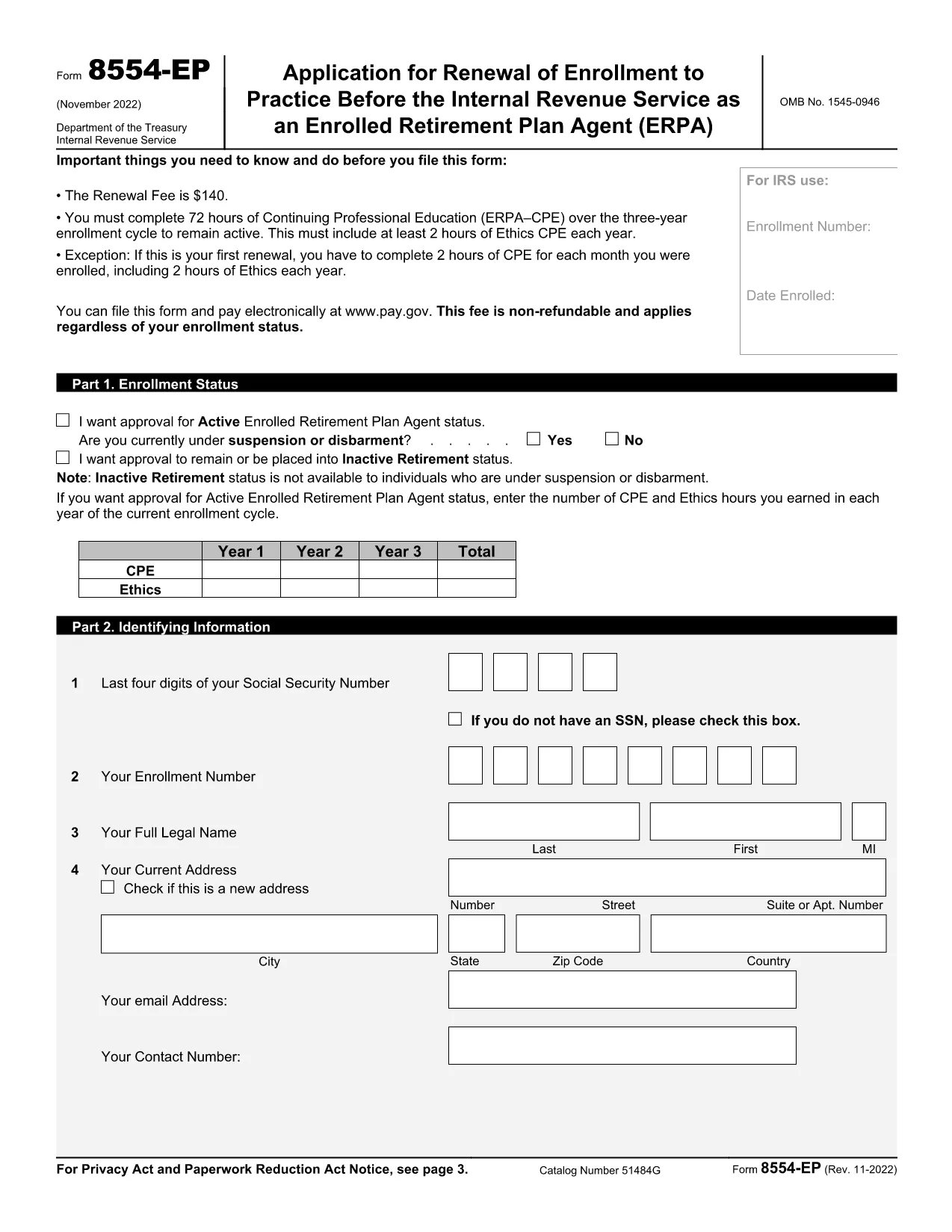
Form 8554‑EP – Enrolled Retirement Plan Agent Renewal (Fillable PDF)

  1. ქვეყანა აშშ
  2. Ენა ინგლისური
  3. აქტივობა Გადასახადები
  4. დეპარტამენტი შიდა შემოსავლების სამსახური
Form 8554‑EP – Enrolled Retirement Plan Agent Renewal (Fillable PDF)

The Form 8554‑EP is the official IRS renewal application for Enrolled Retirement Plan Agents (ERPA). Every three years, ERPA‑qualified tax professionals must submit this form to maintain their ability to practice before the IRS on retirement plan matters.

What Is Form 8554‑EP?

Form 8554‑EP (Rev. 11‑2022) collects information about your credentials, continuing professional education (CPE) credits, and any changes to your practice. The form ensures you remain in good standing with the IRS.

Who Must File This Form?

  • Individuals who are currently enrolled as Retirement Plan Agents.
  • Those whose enrollment expired or will expire within the next three years.
  • Tax professionals seeking to reactivate an inactive ERPA status.

How to Complete the Fillable PDF

Our online Formize PDF Filler loads the official IRS PDF directly in your browser. No extra software is required.

Common Mistakes to Avoid

  • Leaving any required field blank – the IRS will reject incomplete submissions.
  • Failing to attach proof of CPE credits when required.
  • Signing the form with an unauthorized signature.

Submission & Deadlines

Submit the completed form to the IRS address listed on the last page of the PDF. Keep a copy for your records. The renewal deadline is the last day of the three‑year enrollment cycle.

Ready to start? Click the button below to launch the fillable version instantly.

FAQ
  • How often do I need to renew my ERPA enrollment?

    Renewal is required every three (3) years. The IRS will notify you when your current enrollment is approaching expiration.

  • Can I submit Form 8554‑EP electronically?

    The IRS currently accepts only paper submissions for Form 8554‑EP. Use the fillable PDF to ensure accuracy, then mail the printed form.

  • What CPE documentation must I attach?

    Attach copies of certificates or transcripts that verify you have completed the required 15 CPE hours in retirement plan practice for the enrollment cycle.

  • What happens if I miss the renewal deadline?

    Your ERPA status becomes inactive, and you cannot represent clients before the IRS on retirement‑plan matters until you re‑apply and receive approval.

  • Do I need a signature on the form?

    Yes. The form must be signed by the applicant or an authorized representative. Electronic signatures are not accepted; a handwritten signature is required.

  • Is there a fee to renew my ERPA status?

    No fee is required for the renewal of Form 8554‑EP. The IRS may assess penalties only if the form is incomplete or submitted late.

  • Where can I find the official instructions for Form 8554‑EP?

    The instructions are included in the PDF itself, beginning on page 3. Additional guidance is available on the IRS website under the Retirement Plan Community section.

ᲠᲝᲒᲝᲠ

როგორ შეავსოთ Form 8554-EP უფასოდ, ონლაინ 5 მარტივი ნაბიჯებით:

  1. 1
    Click the Fillable Form Button
    On this page, click the bright “Fill out this form” button. The Formize PDF Filler app will open the official Form 8554‑EP in your browser.
  2. 2
    Wait for the PDF Filler to Load
    A loading screen appears while the PDF is prepared. This only takes a few seconds.
  3. 3
    Enter Your Information
    Navigate through each field, entering your personal data, CPE credits, and any changes to your practice. Required fields are highlighted.
  4. 4
    Validate and Correct Errors
    The filler automatically checks for missing or incorrectly formatted entries. Fix any highlighted issues before proceeding.
  5. 5
    Save, Download, and Submit
    When all fields are complete, click “Save & Download.” Keep the saved copy for your records and mail the printed form to the IRS address shown on page 2.
PDF შემავსებლის აპლიკაციის ფორმირება
ᲨᲔᲡᲐᲮᲔᲑ

საგადასახადო ფორმები

Form 8554-EP არის ერთ-ერთი საგადასახადო ფორმა, რომელიც წარმოადგენს დოკუმენტებს, რომლებიც გამოიყენება გადასახადებთან დაკავშირებული ინფორმაციის შესაბამის საგადასახადო ორგანოში მოსახსენებლად. არსებობს სხვადასხვა სახის საგადასახადო ფორმები, მათ შორის ფედერალური, სახელმწიფო და ადგილობრივი საგადასახადო ფორმები, რომლებიც შეიძლება განსხვავდებოდეს გადასახადის გადამხდელის გარემოებებისა და ადგილმდებარეობის მიხედვით.

ᲛᲐᲮᲐᲡᲘᲐᲗᲔᲑᲚᲔᲑᲘ

PDF შემავსებელი

ონლაინ Form 8554-EP-ის შევსების უმარტივესი გზა

  • სწრაფად შეავსეთ Form 8554-EP
    ეძებთ გზას სწრაფად შეავსოთ Form 8554-EP ონლაინ? ჩვენი ონლაინ უფასო PDF ფორმის შემავსებლით, თქვენ გეცოდინებათ როგორ შეცვალოთ და შეავსოთ ეს pdf დოკუმენტი ერთ წუთზე ნაკლებ დროში.
  • მარტივი გამოსაყენებელი ონლაინ PDF რედაქტორი
    მოგბეზრდათ PDF ფაილების დაბეჭდვა, რათა მათი რედაქტირება შეძლოთ, ხელახლა სკანირებამდე და უკან გაგზავნამდე? შეცვალეთ PDF დოკუმენტები უფასოდ ონლაინ. გამოიყენეთ ჩვენი ონლაინ pdf რედაქტორი დროისა და ქაღალდის დაზოგვისთვის.
  • შესანიშნავი ხელსაწყოები, ყველა პლატფორმა
    გაინტერესებთ როგორ შეავსოთ Form 8554-EP Mac-ზე, ან იქნებ როგორ გამოიყენოთ PDF შემავსებელი უფასოდ? ჩვენი ონლაინ PDF ინსტრუმენტები მუშაობს ყველა პლატფორმაზე.
  • ფაილების უსაფრთხო შენახვა
    დასრულებული „Form 8554-EP“ ფაილები ინახება დაცულ მონაცემთა ბაზაში, რომელსაც მართავს Amazon Cloud ჰოსტინგი. თქვენ შეგიძლიათ წაშალოთ თქვენი ფაილები ჩვენი სისტემიდან ნებისმიერ დროს. ნებისმიერ შემთხვევაში, ეს ფაილები ავტომატურად იშლება 24 საათის შემდეგ.
  • ჩატი Form 8554-EP-ით
    ესაუბრეთ „Form 8554-EP“-ს Chatize-ზე, რომელიც არის PDF წამკითხველის უფასო ასისტენტი. დასვით კითხვები და მიიღეთ პასუხები „Form 8554-EP“-დან. უბრალოდ დააწკაპუნეთ ღილაკზე ჩატი დოკუმენტთან ზემოთ.

შევსების სესიის წაშლა

წაშალოთ არჩეული შევსების სესია? ამ შემთხვევაში, თქვენი პროგრესი ფორმის შევსებაში დაიკარგება.

რედაქტირების სესიის წაშლა

წაშალოთ არჩეული რედაქტირების სესია? ამ შემთხვევაში, თქვენი პროგრესი ფორმის შექმნასა და რედაქტირებაში დაიკარგება.