
hamburger-menu icon
Აირჩიეთ ენა

Fillable Form 8879-C – Electronic Signature for Corporate Tax Returns

  1. ქვეყანა აშშ
  2. Ენა ინგლისური
  3. აქტივობა Გადასახადები
  4. დეპარტამენტი შიდა შემოსავლების სამსახური
Fillable Form 8879-C – Electronic Signature for Corporate Tax Returns

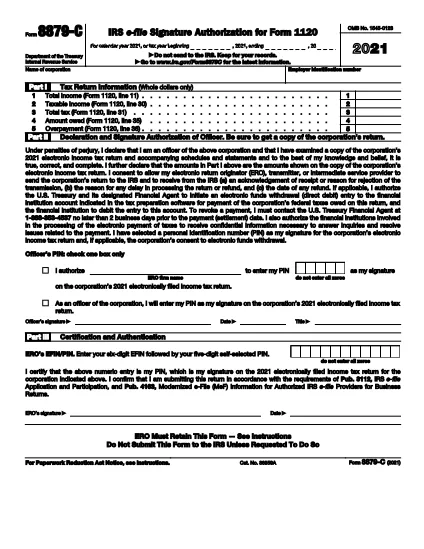
Form 8879-C is the IRS’s official authorization form that lets a corporate officer use a Personal Identification Number (PIN) to electronically sign a corporation’s income‑tax return. It’s required when you want to e‑file a corporate return (Form 1120, 1120‑S, etc.) and, if applicable, consent to electronic funds withdrawal.

What Is Form 8879-C?

This fillable PDF serves as the electronic signature agreement between the corporate officer and the Electronic Return Originator (ERO). By completing Form 8879-C you confirm that the information on the tax return is accurate and that you authorize the IRS to accept the electronic filing.

Key Fields & How to Complete the Form

When you open the form, focus on these sections:

  • Corporation’s name and EIN – Must match the return.
  • Officer’s name, title, and signature PIN – The PIN is your secure electronic signature.
  • ERO’s name and PTIN – Filled by the tax preparer.
  • Consent to electronic funds withdrawal – Check if you want the IRS to pull any balance due.

All fields are interactive in the fillable PDF, and Formize’s online filler will guide you through each step.

Common Mistakes to Avoid

  • Entering an incorrect EIN – the IRS will reject the filing.
  • Using a PIN that has been previously assigned to another corporation.
  • Leaving the “Consent to electronic funds withdrawal” box unchecked when a payment is due.
  • Signing the PDF in a desktop editor and then re‑uploading – this can corrupt the fillable fields.

How to Submit Your Signed Form

After you finish the Form 8879‑C in Formize, click the **Submit** button. The signed PDF is securely transmitted to the ERO, who attaches it to the corporate return and completes the e‑file.

Why Use Formize’s Online PDF Filler?

Formize loads the official IRS fillable PDF directly in your browser, so you never need to download, install, or edit the file manually. Your data stays encrypted, and the app automatically validates required fields before you submit.

FAQ
  • Who can sign Form 8879‑C?

    A corporate officer (e.g., President, Treasurer) who is authorized to sign the corporation’s tax return may sign using a PIN.

  • Do I need a separate PIN for each filing?

    Yes. The IRS requires a unique PIN for each tax year and each corporation to ensure security.

  • Can I use Form 8879‑C for an amended return?

    Form 8879‑C is used for the original corporate return. For an amended return, you must file Form 8879‑A (or the appropriate amendment authorization).

  • What if I make a mistake after submitting?

    Contact your ERO immediately. They can withdraw the e‑file before the IRS processes it and advise on filing a corrected return.

  • Is there a fee to use Formize’s online filler?

    Formize offers a free basic fillable PDF experience. Advanced e‑file integration may require a subscription, depending on your provider.

  • Do I need to print the form after filling it online?

    No. The electronic signature is valid for IRS processing, and you can keep the digital copy for your records.

ᲠᲝᲒᲝᲠ

როგორ შეავსოთ Form 8879-C უფასოდ, ონლაინ 5 მარტივი ნაბიჯებით:

  1. 1
    Open the Fillable Form
    Click the **Fill out this form** button on the page. The Formize PDF Filler app will load the official Form 8879‑C directly in your browser.
  2. 2
    Enter Required Information
    Follow the on‑screen prompts to input the corporation’s name, EIN, officer’s details, and your PIN. All fields are validated in real time.
  3. 3
    Review & Confirm
    Use the **Review** step to double‑check every entry. The app highlights any missing or mismatched data before you can proceed.
  4. 4
    Submit the Signed Form
    When everything looks correct, click **Submit**. Formize securely sends the completed PDF to your Electronic Return Originator for e‑filing.
  5. 5
    Save a Copy
    After submission, download a copy of the signed Form 8879‑C for your records. The PDF includes a timestamp and a digital signature receipt.
PDF შემავსებლის აპლიკაციის ფორმირება
ᲨᲔᲡᲐᲮᲔᲑ

ფედერალური საგადასახადო ფორმები

Form 8879-C არის ერთ-ერთი ფედერალური საგადასახადო ფორმა, რომელიც წარმოადგენს დოკუმენტებს, რომლებიც გამოიყენება ფედერალური საშემოსავლო გადასახადის შესახებ ანგარიშგებისა და შესატანად აშშ-ს შიდა შემოსავლების სამსახურში (IRS). ამ ფორმებს იყენებენ ფიზიკური პირები, ბიზნესები და ორგანიზაციები თავიანთი შემოსავლის, გამოქვითვების და სხვა შესაბამისი ინფორმაციის მოსახსენებლად, რომელიც აუცილებელია მათი ფედერალური საგადასახადო ვალდებულების გამოსათვლელად.

ყველაზე ხშირად გამოყენებული ფედერალური საგადასახადო ფორმა არის ფორმა 1040, რომელიც გამოიყენება ინდივიდუალური გადასახადის გადამხდელების მიერ პირადი საშემოსავლო გადასახადის დასაფიქსირებლად. სხვა ხშირად გამოყენებული ფორმები მოიცავს ფორმა 1065 პარტნიორობისთვის, ფორმა 1120 კორპორაციებისთვის და ფორმა 990 გადასახადებისგან გათავისუფლებული ორგანიზაციებისთვის.

ფედერალური საგადასახადო ფორმები, როგორც წესი, მოითხოვს გადასახადის გადამხდელებს აცნობონ შემოსავლის სხვადასხვა წყაროს, როგორიცაა ხელფასები, ხელფასები და რჩევები, ასევე შემოსავალი ინვესტიციებიდან, ქონების გაქირავებით და სხვა წყაროებიდან. ფორმები ასევე საშუალებას აძლევს გადასახადის გადამხდელებს მოითხოვონ გამოქვითვები და კრედიტები სხვადასხვა ხარჯებისთვის, როგორიცაა საქველმოქმედო შენატანები, იპოთეკური პროცენტი და ჯანდაცვის ხარჯები.

მნიშვნელოვანია ფედერალური საგადასახადო ფორმების ზუსტად და დროულად წარდგენა, რადგან ამის შეუსრულებლობამ შეიძლება გამოიწვიოს ჯარიმები და საპროცენტო გადასახადი IRS-ისგან.

ᲛᲐᲮᲐᲡᲘᲐᲗᲔᲑᲚᲔᲑᲘ

PDF შემავსებელი

ონლაინ Form 8879-C-ის შევსების უმარტივესი გზა

  • სწრაფად შეავსეთ Form 8879-C
    ეძებთ გზას სწრაფად შეავსოთ Form 8879-C ონლაინ? ჩვენი ონლაინ უფასო PDF ფორმის შემავსებლით, თქვენ გეცოდინებათ როგორ შეცვალოთ და შეავსოთ ეს pdf დოკუმენტი ერთ წუთზე ნაკლებ დროში.
  • მარტივი გამოსაყენებელი ონლაინ PDF რედაქტორი
    მოგბეზრდათ PDF ფაილების დაბეჭდვა, რათა მათი რედაქტირება შეძლოთ, ხელახლა სკანირებამდე და უკან გაგზავნამდე? შეცვალეთ PDF დოკუმენტები უფასოდ ონლაინ. გამოიყენეთ ჩვენი ონლაინ pdf რედაქტორი დროისა და ქაღალდის დაზოგვისთვის.
  • შესანიშნავი ხელსაწყოები, ყველა პლატფორმა
    გაინტერესებთ როგორ შეავსოთ Form 8879-C Mac-ზე, ან იქნებ როგორ გამოიყენოთ PDF შემავსებელი უფასოდ? ჩვენი ონლაინ PDF ინსტრუმენტები მუშაობს ყველა პლატფორმაზე.
  • ფაილების უსაფრთხო შენახვა
    დასრულებული „Form 8879-C“ ფაილები ინახება დაცულ მონაცემთა ბაზაში, რომელსაც მართავს Amazon Cloud ჰოსტინგი. თქვენ შეგიძლიათ წაშალოთ თქვენი ფაილები ჩვენი სისტემიდან ნებისმიერ დროს. ნებისმიერ შემთხვევაში, ეს ფაილები ავტომატურად იშლება 24 საათის შემდეგ.
  • ჩატი Form 8879-C-ით
    ესაუბრეთ „Form 8879-C“-ს Chatize-ზე, რომელიც არის PDF წამკითხველის უფასო ასისტენტი. დასვით კითხვები და მიიღეთ პასუხები „Form 8879-C“-დან. უბრალოდ დააწკაპუნეთ ღილაკზე ჩატი დოკუმენტთან ზემოთ.

შევსების სესიის წაშლა

წაშალოთ არჩეული შევსების სესია? ამ შემთხვევაში, თქვენი პროგრესი ფორმის შევსებაში დაიკარგება.

რედაქტირების სესიის წაშლა

წაშალოთ არჩეული რედაქტირების სესია? ამ შემთხვევაში, თქვენი პროგრესი ფორმის შექმნასა და რედაქტირებაში დაიკარგება.