
hamburger-menu icon
Აირჩიეთ ენა

Fillable Form W‑7 – Application for IRS ITIN

  1. ქვეყანა აშშ
  2. Ენა ინგლისური
  3. აქტივობა Გადასახადები
  4. დეპარტამენტი შიდა შემოსავლების სამსახური
Fillable Form W‑7 – Application for IRS ITIN

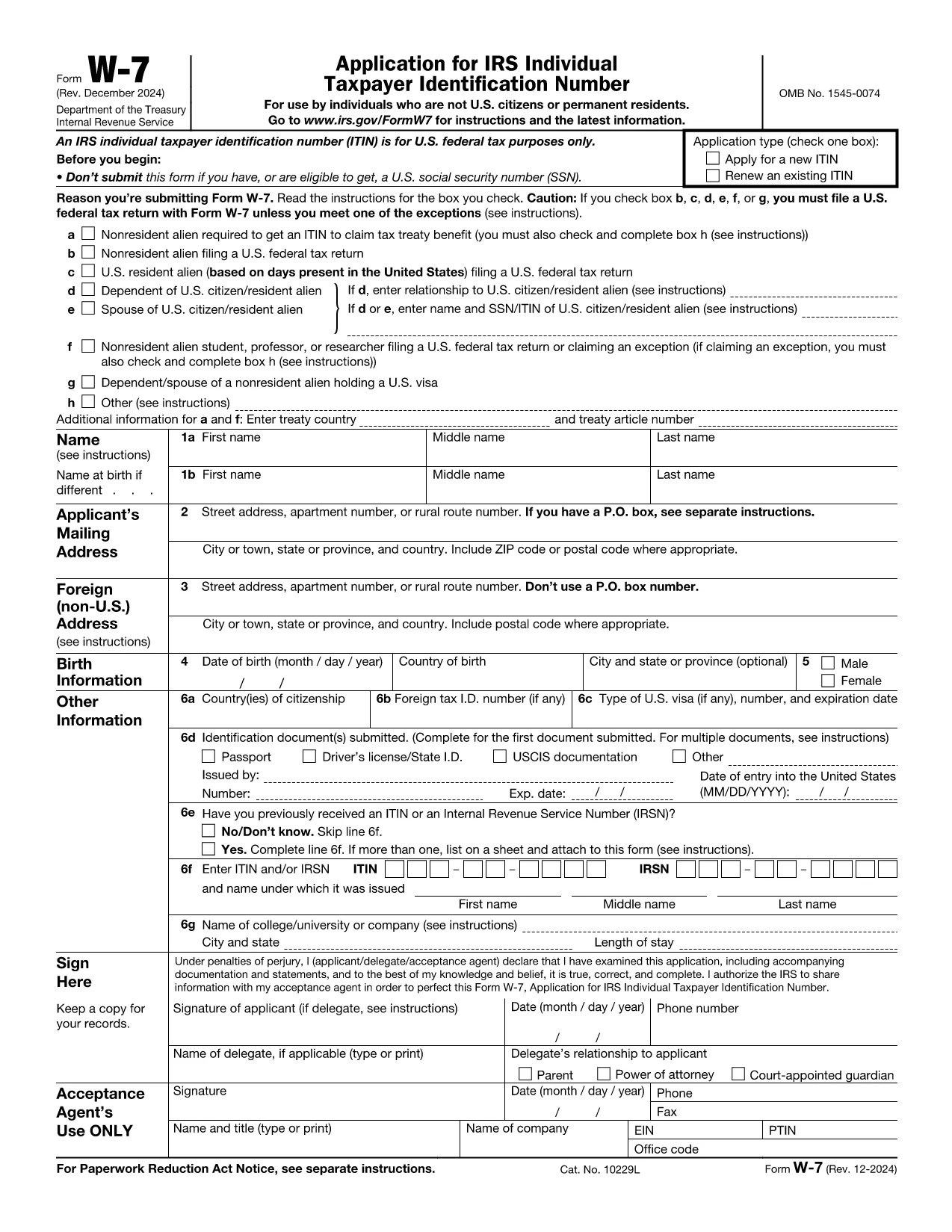
Form W‑7 is the IRS application used to obtain an Individual Taxpayer Identification Number (ITIN) for individuals who are not eligible for a Social Security Number. With Formize you can fill out the official IRS PDF online, save time, and avoid printing errors.

What is Form W‑7?

The Form W‑7 (Application for IRS Individual Taxpayer Identification Number) allows non‑resident aliens, foreign students, dependents, and spouses of U.S. taxpayers to comply with U.S. tax reporting requirements.

Key Requirements & Documents

  • Valid passport (or other accepted ID)
  • Proof of foreign status (visa, birth certificate, etc.)
  • A federal income tax return, unless you qualify for an exception
  • Completed Form W‑7 attached to your return

How to Complete the Form Online

Instead of downloading the PDF, simply click the Fill out this form button on this page. The Formize PDF Filler loads instantly, letting you type directly into each field.

Common Mistakes to Avoid

  • Leaving the “SSN” box checked when you do not have a Social Security Number.
  • Submitting an incomplete list of supporting documents.
  • Using an outdated version of the form (always use the latest PDF from the IRS).
  • Failing to sign and date the form.

Where to Submit Your Application

After you finish the online form, download the completed PDF and mail it with your supporting documents to:

IRS ITIN Operations
P.O. Box 149342
Austin, TX 78714‑9342
United States

You may also use an IRS‑approved Certified Acceptance Agent.

ინსტრუქციები

FAQ
  • Who needs to file Form W‑7?

    Anyone who is not eligible for a Social Security Number but must file a U.S. federal tax return, claim a tax treaty benefit, or be listed as a dependent/spouse on a U.S. return.

  • Can I submit Form W‑7 electronically?

    The IRS currently accepts only mailed paper submissions, but you can complete the form online with Formize and then print or email the final PDF for mailing.

  • What identification documents are accepted?

    A valid passport is the most common document. Other accepted IDs include national ID cards, foreign driver’s licenses, or a combination of birth certificate and government photo ID.

  • Do I need to attach a tax return with Form W‑7?

    Yes, in most cases you must attach the federal tax return you are filing. Exceptions exist for treaty benefits and certain students; see the form instructions for details.

  • How long does it take to receive an ITIN?

    The IRS typically processes ITIN applications within 7 weeks. If you are applying from a foreign address, allow up to 9 weeks.

  • Is there a fee to file Form W‑7?

    There is no filing fee for the form itself, but you may incur costs for certified copies of documents or for using a Certified Acceptance Agent.

ᲠᲝᲒᲝᲠ

როგორ შეავსოთ Form W‑7 უფასოდ, ონლაინ 5 მარტივი ნაბიჯებით:

  1. 1
    Click the Fill out this form button
    On the Formize page, press the blue “Fill out this form” button to launch the PDF filler.
  2. 2
    Wait for the Formize PDF Filler to load
    The web app loads the official IRS Form W‑7 in a secure viewer. No software download is required.
  3. 3
    Enter your information
    Type directly into each field, using the instructions provided on the form. Use the tab key to move quickly between fields.
  4. 4
    Review and sign
    Double‑check every entry, then add your electronic signature using the built‑in signature tool.
  5. 5
    Save or email the completed form
    When you’re done, click “Download PDF” or “Email to me” and attach the file to your ITIN submission package.
PDF შემავსებლის აპლიკაციის ფორმირება
ᲨᲔᲡᲐᲮᲔᲑ

ფედერალური საგადასახადო ფორმები

Form W‑7 არის ერთ-ერთი ფედერალური საგადასახადო ფორმა, რომელიც წარმოადგენს დოკუმენტებს, რომლებიც გამოიყენება ფედერალური საშემოსავლო გადასახადის შესახებ ანგარიშგებისა და შესატანად აშშ-ს შიდა შემოსავლების სამსახურში (IRS). ამ ფორმებს იყენებენ ფიზიკური პირები, ბიზნესები და ორგანიზაციები თავიანთი შემოსავლის, გამოქვითვების და სხვა შესაბამისი ინფორმაციის მოსახსენებლად, რომელიც აუცილებელია მათი ფედერალური საგადასახადო ვალდებულების გამოსათვლელად.

ყველაზე ხშირად გამოყენებული ფედერალური საგადასახადო ფორმა არის ფორმა 1040, რომელიც გამოიყენება ინდივიდუალური გადასახადის გადამხდელების მიერ პირადი საშემოსავლო გადასახადის დასაფიქსირებლად. სხვა ხშირად გამოყენებული ფორმები მოიცავს ფორმა 1065 პარტნიორობისთვის, ფორმა 1120 კორპორაციებისთვის და ფორმა 990 გადასახადებისგან გათავისუფლებული ორგანიზაციებისთვის.

ფედერალური საგადასახადო ფორმები, როგორც წესი, მოითხოვს გადასახადის გადამხდელებს აცნობონ შემოსავლის სხვადასხვა წყაროს, როგორიცაა ხელფასები, ხელფასები და რჩევები, ასევე შემოსავალი ინვესტიციებიდან, ქონების გაქირავებით და სხვა წყაროებიდან. ფორმები ასევე საშუალებას აძლევს გადასახადის გადამხდელებს მოითხოვონ გამოქვითვები და კრედიტები სხვადასხვა ხარჯებისთვის, როგორიცაა საქველმოქმედო შენატანები, იპოთეკური პროცენტი და ჯანდაცვის ხარჯები.

მნიშვნელოვანია ფედერალური საგადასახადო ფორმების ზუსტად და დროულად წარდგენა, რადგან ამის შეუსრულებლობამ შეიძლება გამოიწვიოს ჯარიმები და საპროცენტო გადასახადი IRS-ისგან.

ᲛᲐᲮᲐᲡᲘᲐᲗᲔᲑᲚᲔᲑᲘ

PDF შემავსებელი

ონლაინ Form W‑7-ის შევსების უმარტივესი გზა

  • სწრაფად შეავსეთ Form W‑7
    ეძებთ გზას სწრაფად შეავსოთ Form W‑7 ონლაინ? ჩვენი ონლაინ უფასო PDF ფორმის შემავსებლით, თქვენ გეცოდინებათ როგორ შეცვალოთ და შეავსოთ ეს pdf დოკუმენტი ერთ წუთზე ნაკლებ დროში.
  • მარტივი გამოსაყენებელი ონლაინ PDF რედაქტორი
    მოგბეზრდათ PDF ფაილების დაბეჭდვა, რათა მათი რედაქტირება შეძლოთ, ხელახლა სკანირებამდე და უკან გაგზავნამდე? შეცვალეთ PDF დოკუმენტები უფასოდ ონლაინ. გამოიყენეთ ჩვენი ონლაინ pdf რედაქტორი დროისა და ქაღალდის დაზოგვისთვის.
  • შესანიშნავი ხელსაწყოები, ყველა პლატფორმა
    გაინტერესებთ როგორ შეავსოთ Form W‑7 Mac-ზე, ან იქნებ როგორ გამოიყენოთ PDF შემავსებელი უფასოდ? ჩვენი ონლაინ PDF ინსტრუმენტები მუშაობს ყველა პლატფორმაზე.
  • ფაილების უსაფრთხო შენახვა
    დასრულებული „Form W‑7“ ფაილები ინახება დაცულ მონაცემთა ბაზაში, რომელსაც მართავს Amazon Cloud ჰოსტინგი. თქვენ შეგიძლიათ წაშალოთ თქვენი ფაილები ჩვენი სისტემიდან ნებისმიერ დროს. ნებისმიერ შემთხვევაში, ეს ფაილები ავტომატურად იშლება 24 საათის შემდეგ.
  • ჩატი Form W‑7-ით
    ესაუბრეთ „Form W‑7“-ს Chatize-ზე, რომელიც არის PDF წამკითხველის უფასო ასისტენტი. დასვით კითხვები და მიიღეთ პასუხები „Form W‑7“-დან. უბრალოდ დააწკაპუნეთ ღილაკზე ჩატი დოკუმენტთან ზემოთ.

შევსების სესიის წაშლა

წაშალოთ არჩეული შევსების სესია? ამ შემთხვევაში, თქვენი პროგრესი ფორმის შევსებაში დაიკარგება.

რედაქტირების სესიის წაშლა

წაშალოთ არჩეული რედაქტირების სესია? ამ შემთხვევაში, თქვენი პროგრესი ფორმის შექმნასა და რედაქტირებაში დაიკარგება.