
hamburger-menu icon
Აირჩიეთ ენა

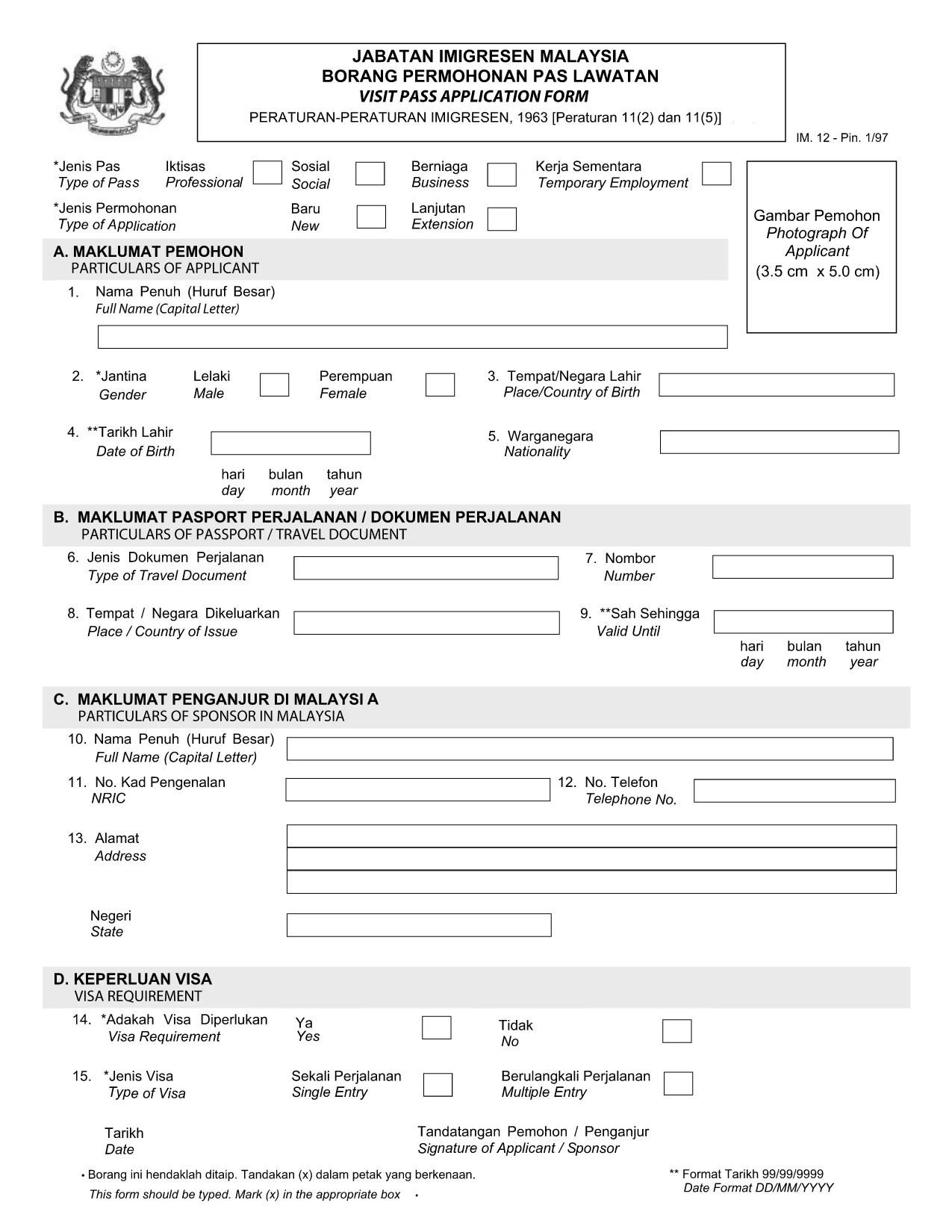
Visit Pass Application Form – Malay Version (Online Fillable)

  1. Ენა ინგლისური
  2. ქვეყანა Malaysia
  3. აქტივობა ვიზები
  4. დეპარტამენტი MOTAC
Visit Pass Application Form – Malay Version (Online Fillable)

Looking for the official Visit Pass application form in Malay? You’ve come to the right place. Formize.com hosts a secure, fillable PDF that lets you complete the MOTAC Visit Pass (IMM.12) form directly in your browser—no extra software required.

Our step‑by‑step guide walks you through every field, highlights common pitfalls, and provides quick answers to the most asked questions. Whether you’re applying for a short‑term visit or a long‑stay pass, the online filler saves you time and ensures your submission meets the Ministry of Tourism, Arts and Culture (MOTAC) requirements.

Why Use the Online Fillable Visit Pass Form

  • Instant access: Click “Fill out this form” and the Formize PDF Filler loads automatically.
  • Save paper: Complete and submit digitally, reducing the need for printed copies.
  • Auto‑validation: The filler checks mandatory fields and format, reducing rejections.
  • Secure storage: Your data stays encrypted on our platform until you download the completed PDF.

How to Complete the Form in Minutes

  1. Click the Fill out this form button below.
  2. Wait a few seconds while the Formize PDF Filler loads the official IMM.12 PDF.
  3. Enter your details exactly as they appear on your passport and supporting documents.
  4. Use the built‑in navigation to jump between sections (Personal Details, Travel History, etc.).
  5. When finished, click Download Completed PDF and submit it to MOTAC as instructed.

Common Mistakes to Avoid

  • Leaving mandatory fields blank – the filler will highlight them in red.
  • Using abbreviations that do not match official IDs (e.g., “MY” instead of “Malaysia”).
  • Uploading an outdated passport photo – ensure the image meets size requirements.
  • Mismatched dates – travel dates must fall within the validity period of your pass.

Download the Official PDF (Malay)

If you prefer to work offline, you can download the original MOTAC Visit Pass form (Malay version) directly from the Ministry’s website. The link below points to the official PDF used by the online filler.

Download Visit Pass Application Form (IMM.12) – PDF

Frequently Asked Questions

Find quick answers to the most common queries about the Visit Pass application process.

FAQ
  • Is the Visit Pass form available in Malay?

    Yes. The official MOTAC form is published in both English and Malay. The fillable version on Formize includes the Malay labels.

  • Do I need any special software to use the online filler?

    No. The Formize PDF Filler works in all modern browsers – Chrome, Firefox, Edge, and Safari.

  • Can I save my progress and return later?

    Yes. Use the “Save Draft” button within the filler to download a partially completed PDF, then reload it later.

  • What documents do I need to attach to the form?

    Typically you’ll need a passport copy, recent photograph, and proof of travel itinerary. Check the MOTAC checklist for your specific case.

  • How long does the online filling process take?

    Most users complete the form in 5‑10 minutes, provided all required information is ready.

  • Is there a fee for submitting the Visit Pass application?

    Yes, MOTAC charges a processing fee. The amount varies by nationality and duration of stay. Refer to the official MOTAC fee schedule.

ᲠᲝᲒᲝᲠ

როგორ შეავსოთ Visit Pass application form უფასოდ, ონლაინ 4 მარტივი ნაბიჯებით:

  1. 1
    Open the Fillable Form
    Click the “Fill out this form” button on the page. The Formize PDF Filler will open in a new tab.
  2. 2
    Load the Official PDF
    Wait a few seconds while the system loads the Visit Pass application PDF (IMM.12) from MOTAC.
  3. 3
    Enter Your Information
    Fill in each field using the on‑screen prompts. Required fields are marked with an asterisk.
  4. 4
    Download or Submit
    When all sections are complete, click “Download Completed PDF”. Save the file and follow MOTAC’s submission instructions.
PDF შემავსებლის აპლიკაციის ფორმირება
ᲨᲔᲡᲐᲮᲔᲑ

სავიზო ფორმები

Visit Pass application form არის ვიზის ერთ-ერთი ფორმა, რომელიც წარმოადგენს დოკუმენტებს, რომლებიც გამოიყენება ვიზაზე უცხო ქვეყანაში შესვლისთვის. ვიზა არის დოკუმენტი, რომელიც საშუალებას აძლევს უცხო მოქალაქეს შევიდეს, დარჩეს და ზოგჯერ იმუშაოს უცხო ქვეყანაში განსაზღვრული დროის განმავლობაში. ვიზის მისაღებად ზუსტი ფორმები და მოთხოვნები განსხვავდება ქვეყნისა და ვიზის ტიპის მიხედვით.

სავიზო ფორმები, როგორც წესი, მოითხოვს პერსონალურ ინფორმაციას, როგორიცაა სახელი, დაბადების თარიღი და პასპორტის ინფორმაცია, ასევე ინფორმაცია მოგზაურობის მიზნისა და ხანგრძლივობის, დანიშნულების ადგილის შესახებ და ადრე უარყო თუ არა განმცხადებელს ვიზაზე უარი ან გააძევეს ქვეყნიდან. ფორმებს შეიძლება ასევე დასჭირდეს დამხმარე დოკუმენტები, როგორიცაა პასპორტი, ფოტოები და ფინანსური მხარდაჭერის დამადასტურებელი საბუთი.

შეერთებულ შტატებში ვიზის ყველაზე გავრცელებული ფორმებია DS-160 და DS-260. DS-160 ფორმა გამოიყენება არასაიმიგრაციო ვიზაზე განაცხადისთვის, ხოლო DS-260 ფორმა გამოიყენება საიმიგრაციო ვიზის მისაღებად. ეს ფორმები მოითხოვს დეტალურ ინფორმაციას განმცხადებლის პირადი და მოგზაურობის ისტორიის შესახებ, ისევე როგორც დამხმარე დოკუმენტაცია, როგორიცაა პასპორტი, მოგზაურობის მარშრუტი და ფინანსური ჩანაწერები.

სხვა ქვეყნებს შეიძლება ჰქონდეთ განსხვავებული სავიზო ფორმები და მოთხოვნები, მაგრამ ძირითადი პროცესი, როგორც წესი, მოიცავს სავიზო განაცხადის შევსებას, დამხმარე დოკუმენტაციის მიწოდებას და საკონსულოს ოფიცერთან გასაუბრებას აშშ-ს საელჩოში ან საკონსულოში. მნიშვნელოვანია აღინიშნოს, რომ სავიზო განაცხადის პროცესი შეიძლება იყოს რთული და შრომატევადი, და რეკომენდირებულია, რომ ვიზის მსურველმა პირებმა გაიარონ კონსულტაცია საიმიგრაციო ადვოკატთან ან სხვა კვალიფიციურ პროფესიონალთან, რათა უზრუნველყონ ყველა საჭირო ფორმისა და მოთხოვნების დაკმაყოფილება.

ᲛᲐᲮᲐᲡᲘᲐᲗᲔᲑᲚᲔᲑᲘ

PDF შემავსებელი

ონლაინ Visit Pass application form-ის შევსების უმარტივესი გზა

  • სწრაფად შეავსეთ Visit Pass application form
    ეძებთ გზას სწრაფად შეავსოთ Visit Pass application form ონლაინ? ჩვენი ონლაინ უფასო PDF ფორმის შემავსებლით, თქვენ გეცოდინებათ როგორ შეცვალოთ და შეავსოთ ეს pdf დოკუმენტი ერთ წუთზე ნაკლებ დროში.
  • მარტივი გამოსაყენებელი ონლაინ PDF რედაქტორი
    მოგბეზრდათ PDF ფაილების დაბეჭდვა, რათა მათი რედაქტირება შეძლოთ, ხელახლა სკანირებამდე და უკან გაგზავნამდე? შეცვალეთ PDF დოკუმენტები უფასოდ ონლაინ. გამოიყენეთ ჩვენი ონლაინ pdf რედაქტორი დროისა და ქაღალდის დაზოგვისთვის.
  • შესანიშნავი ხელსაწყოები, ყველა პლატფორმა
    გაინტერესებთ როგორ შეავსოთ Visit Pass application form Mac-ზე, ან იქნებ როგორ გამოიყენოთ PDF შემავსებელი უფასოდ? ჩვენი ონლაინ PDF ინსტრუმენტები მუშაობს ყველა პლატფორმაზე.
  • ფაილების უსაფრთხო შენახვა
    დასრულებული „Visit Pass application form“ ფაილები ინახება დაცულ მონაცემთა ბაზაში, რომელსაც მართავს Amazon Cloud ჰოსტინგი. თქვენ შეგიძლიათ წაშალოთ თქვენი ფაილები ჩვენი სისტემიდან ნებისმიერ დროს. ნებისმიერ შემთხვევაში, ეს ფაილები ავტომატურად იშლება 24 საათის შემდეგ.
  • ჩატი Visit Pass application form-ით
    ესაუბრეთ „Visit Pass application form“-ს Chatize-ზე, რომელიც არის PDF წამკითხველის უფასო ასისტენტი. დასვით კითხვები და მიიღეთ პასუხები „Visit Pass application form“-დან. უბრალოდ დააწკაპუნეთ ღილაკზე ჩატი დოკუმენტთან ზემოთ.

შევსების სესიის წაშლა

წაშალოთ არჩეული შევსების სესია? ამ შემთხვევაში, თქვენი პროგრესი ფორმის შევსებაში დაიკარგება.

რედაქტირების სესიის წაშლა

წაშალოთ არჩეული რედაქტირების სესია? ამ შემთხვევაში, თქვენი პროგრესი ფორმის შექმნასა და რედაქტირებაში დაიკარგება.