
hamburger-menu icon
Აირჩიეთ ენა

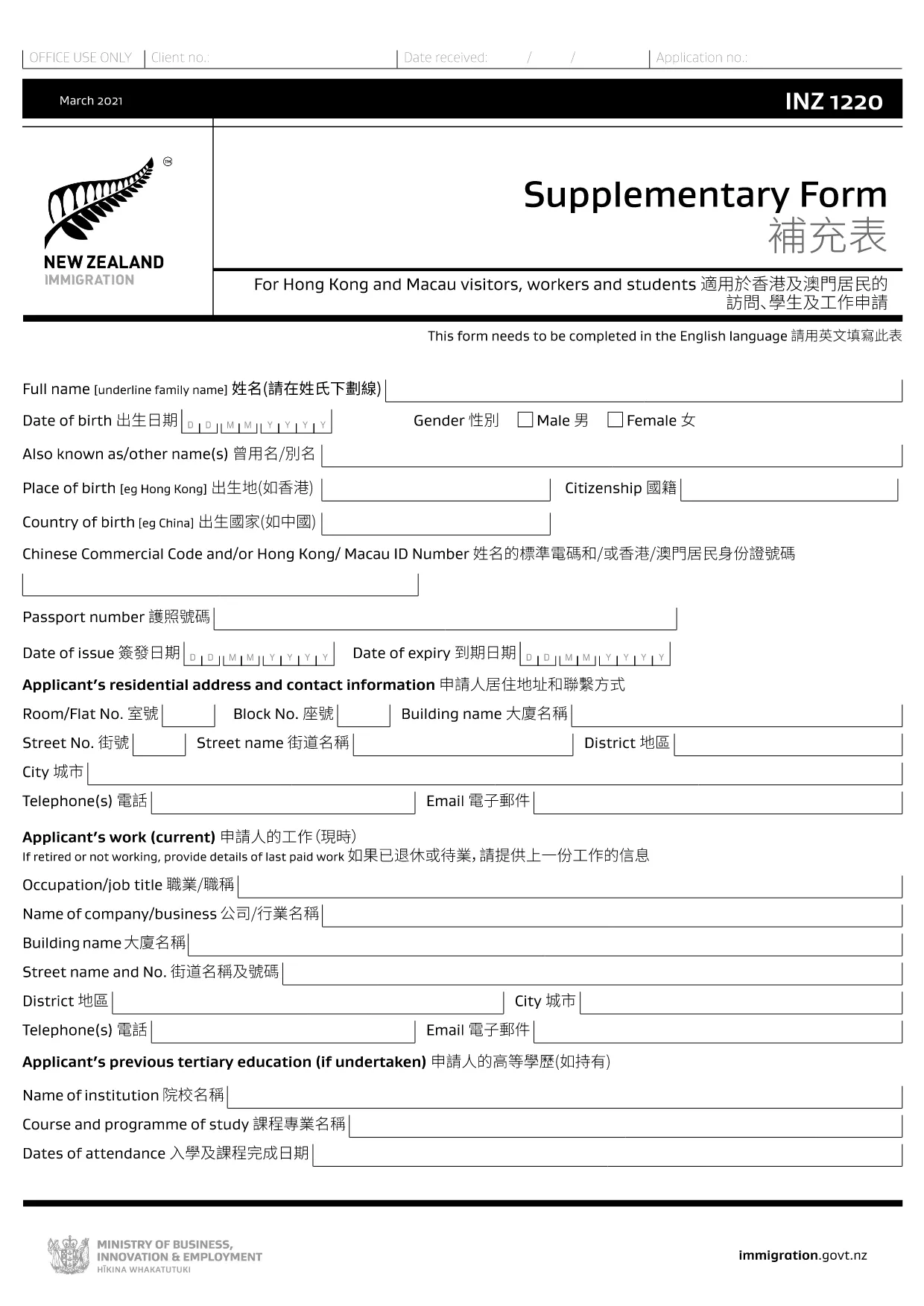
The INZ 1220 Supplementary Form is required by Immigration New Zealand for visitors, workers and students from Hong Kong and Macau who need to provide additional contact details. This fillable PDF lets you complete the form quickly, securely, and without printing.

Our page integrates the Formize PDF Filler app, so you can edit the document directly in your browser. No extra software, no downloads – just click, fill, and submit.

What Is the INZ 1220 Form?

INZ 1220 is a supplementary information sheet that collects the name, address, telephone, and email of a New Zealand contact (friend, family member, or sponsor). It is often requested alongside visa applications to verify local support.

How to Complete the INZ 1220 Online

Follow the simple steps below to fill out the form using Formize:

  • Click the **Fill out this form** button on this page.
  • Wait a few seconds while the Formize PDF Filler loads.
  • Enter the required details in each field – the interface highlights mandatory sections.
  • Review the information for accuracy.
  • Save the completed PDF to your device or download a copy for your records.

Common Mistakes to Avoid

  • Leaving the contact’s phone number incomplete – include country code.
  • Using an outdated email address – Immigration may send important updates.
  • Submitting the form with blank mandatory fields – the filler will flag these before you can save.

Where to Submit the Completed Form

After saving the PDF, attach it to your visa application through the Immigration New Zealand online portal, or email it to the address specified in your application instructions.

FAQs About INZ 1220

Find quick answers to the most common questions below (full FAQ list further down).

FAQ
  • Do I need to print the INZ 1220 form?

    No. Using the Formize PDF Filler you can complete the form entirely online and download the finished PDF.

  • What language is the INZ 1220 form in?

    The official form is in English. If you need a translation, you must provide a certified translation alongside the original.

  • Can I save my progress and finish later?

    Yes. While the Formize app is open, you can click **Save** to download a partially‑filled PDF, then reload it later to continue.

  • Is the contact’s New Zealand address mandatory?

    Yes. Immigration requires a full local address (street, city, postal code) to verify your support network.

  • What if I make a mistake after saving?

    Simply reopen the saved PDF in the Formize filler, correct the error, and save a new version.

  • How many pages is the INZ 1220 form?

    The supplementary form is a single‑page PDF, making it quick to fill and attach.

  • Do I need a digital signature?

    A handwritten signature is required. Print the completed PDF, sign it, then scan or take a clear photo to upload.

  • Where can I find help if I’m stuck?

    The Formize filler includes tooltip help for each field. For further assistance, consult the Immigration New Zealand website.

ᲠᲝᲒᲝᲠ

როგორ შეავსოთ INZ 1220 უფასოდ, ონლაინ 5 მარტივი ნაბიჯებით:

  1. 1
    Open the Fillable Form
    Click the **Fill out this form** button on the page. The Formize PDF Filler app will open in a new tab.
  2. 2
    Load the Form
    Wait a few seconds while the INZ 1220 PDF loads. All fields become editable directly in the browser.
  3. 3
    Enter Your Information
    Type the required details (contact name, address, phone, email). Required fields are marked with an asterisk.
  4. 4
    Review and Save
    Check the entered data for errors, then click **Save** to download the completed PDF to your device.
  5. 5
    Submit with Your Visa Application
    Attach the saved INZ 1220 PDF to your Immigration New Zealand online application or email it as instructed.
PDF შემავსებლის აპლიკაციის ფორმირება
ᲨᲔᲡᲐᲮᲔᲑ

ტურიზმის ფორმები

INZ 1220 არის ტურიზმის ერთ-ერთი ფორმა, რომელიც წარმოადგენს დოკუმენტებს, რომლებსაც იყენებენ ინდივიდები ან ჯგუფები, რომლებიც გეგმავენ მოგზაურობას ტურისტული მიზნებისთვის. ეს ფორმები შეიძლება განსხვავდებოდეს დანიშნულების ქვეყნიდან ან ტურისტული სერვისის პროვაიდერის მიხედვით, მაგრამ ისინი, როგორც წესი, შეიცავს ინფორმაციას მოგზაურის, მისი მარშრუტისა და სხვა შესაბამისი დეტალების შესახებ.

ტურიზმის ზოგიერთი გავრცელებული ფორმა მოიცავს:

მოგზაურობის მარშრუტი: ეს ფორმა ჩამოთვლის მოგზაურის დაგეგმილ აქტივობებს, მათ შორის ფრენების თარიღებს, საათებსა და ადგილებს, საცხოვრებლებს, ტურებს და სხვა აქტივობებს.

ვიზის განაცხადი: ბევრი ქვეყანა მოითხოვს ტურისტებს ვიზის მიღებამდე შესვლამდე. სავიზო განაცხადის ფორმა, როგორც წესი, ითხოვს პერსონალურ ინფორმაციას, მოგზაურობის დეტალებს და დამხმარე დოკუმენტაციას, როგორიცაა პასპორტი, ფოტოსურათი ან ფინანსური ანგარიშგება.

ჯანმრთელობის დეკლარაციის ფორმა: ეს ფორმა გამოიყენება ნებისმიერი სამედიცინო მდგომარეობის ან პოტენციური კონტაქტის შესახებ გადამდები დაავადებებით, როგორიცაა COVID-19. ზოგიერთი ქვეყანა მოგზაურებს შესვლამდე სთხოვს, ჩაატარონ უარყოფითი COVID-19 ტესტი.

სამოგზაურო დაზღვევის ფორმა: ეს ფორმა შეიცავს ინფორმაციას მოგზაურის სამოგზაურო დაზღვევის შესახებ, მათ შორის პოლისის ტიპის, დაფარვის ლიმიტებისა და გადაუდებელი დახმარების შესახებ საკონტაქტო ინფორმაციას.

საბაჟო დეკლარაციის ფორმა: ეს ფორმა მოითხოვს ზოგიერთ ქვეყანას ქვეყანაში შემოტანილი ნებისმიერი ნივთის დეკლარაციისთვის, როგორიცაა საჩუქრები, სუვენირები ან ელექტრონიკა.

საცხოვრებლის დაჯავშნის ფორმა: ეს ფორმა შეიცავს ინფორმაციას მოგზაურის საცხოვრებლის შესახებ, მათ შორის ყოფნის თარიღების, ოთახის ტიპისა და ნებისმიერი სპეციალური მოთხოვნების შესახებ.

ტურისტული ფორმები შეიძლება მოითხოვონ ავიაკომპანიებმა, ტურისტულმა სააგენტოებმა, სასტუმროებმა ან სხვა სამოგზაურო სერვისის პროვაიდერებმა და ისინი ხელმისაწვდომი იყოს ელექტრონული ან ქაღალდის ფორმატში. მნიშვნელოვანია, რომ ყურადღებით განიხილონ და შეავსონ ყველა საჭირო ფორმა, რათა უზრუნველყონ გლუვი და უპრობლემოდ მოგზაურობის გამოცდილება.

ᲛᲐᲮᲐᲡᲘᲐᲗᲔᲑᲚᲔᲑᲘ

PDF შემავსებელი

ონლაინ INZ 1220-ის შევსების უმარტივესი გზა

  • სწრაფად შეავსეთ INZ 1220
    ეძებთ გზას სწრაფად შეავსოთ INZ 1220 ონლაინ? ჩვენი ონლაინ უფასო PDF ფორმის შემავსებლით, თქვენ გეცოდინებათ როგორ შეცვალოთ და შეავსოთ ეს pdf დოკუმენტი ერთ წუთზე ნაკლებ დროში.
  • მარტივი გამოსაყენებელი ონლაინ PDF რედაქტორი
    მოგბეზრდათ PDF ფაილების დაბეჭდვა, რათა მათი რედაქტირება შეძლოთ, ხელახლა სკანირებამდე და უკან გაგზავნამდე? შეცვალეთ PDF დოკუმენტები უფასოდ ონლაინ. გამოიყენეთ ჩვენი ონლაინ pdf რედაქტორი დროისა და ქაღალდის დაზოგვისთვის.
  • შესანიშნავი ხელსაწყოები, ყველა პლატფორმა
    გაინტერესებთ როგორ შეავსოთ INZ 1220 Mac-ზე, ან იქნებ როგორ გამოიყენოთ PDF შემავსებელი უფასოდ? ჩვენი ონლაინ PDF ინსტრუმენტები მუშაობს ყველა პლატფორმაზე.
  • ფაილების უსაფრთხო შენახვა
    დასრულებული „INZ 1220“ ფაილები ინახება დაცულ მონაცემთა ბაზაში, რომელსაც მართავს Amazon Cloud ჰოსტინგი. თქვენ შეგიძლიათ წაშალოთ თქვენი ფაილები ჩვენი სისტემიდან ნებისმიერ დროს. ნებისმიერ შემთხვევაში, ეს ფაილები ავტომატურად იშლება 24 საათის შემდეგ.
  • ჩატი INZ 1220-ით
    ესაუბრეთ „INZ 1220“-ს Chatize-ზე, რომელიც არის PDF წამკითხველის უფასო ასისტენტი. დასვით კითხვები და მიიღეთ პასუხები „INZ 1220“-დან. უბრალოდ დააწკაპუნეთ ღილაკზე ჩატი დოკუმენტთან ზემოთ.

შევსების სესიის წაშლა

წაშალოთ არჩეული შევსების სესია? ამ შემთხვევაში, თქვენი პროგრესი ფორმის შევსებაში დაიკარგება.

რედაქტირების სესიის წაშლა

წაშალოთ არჩეული რედაქტირების სესია? ამ შემთხვევაში, თქვენი პროგრესი ფორმის შექმნასა და რედაქტირებაში დაიკარგება.