hamburger-menu icon
Აირჩიეთ ენა

Form 2231 – Fast Start Direct Deposit (Fillable PDF)

  1. Ენა ინგლისური
  2. ქვეყანა აშშ
  3. აქტივობა Legal Forms
  4. დეპარტამენტი Court
Form 2231 – Fast Start Direct Deposit (Fillable PDF)

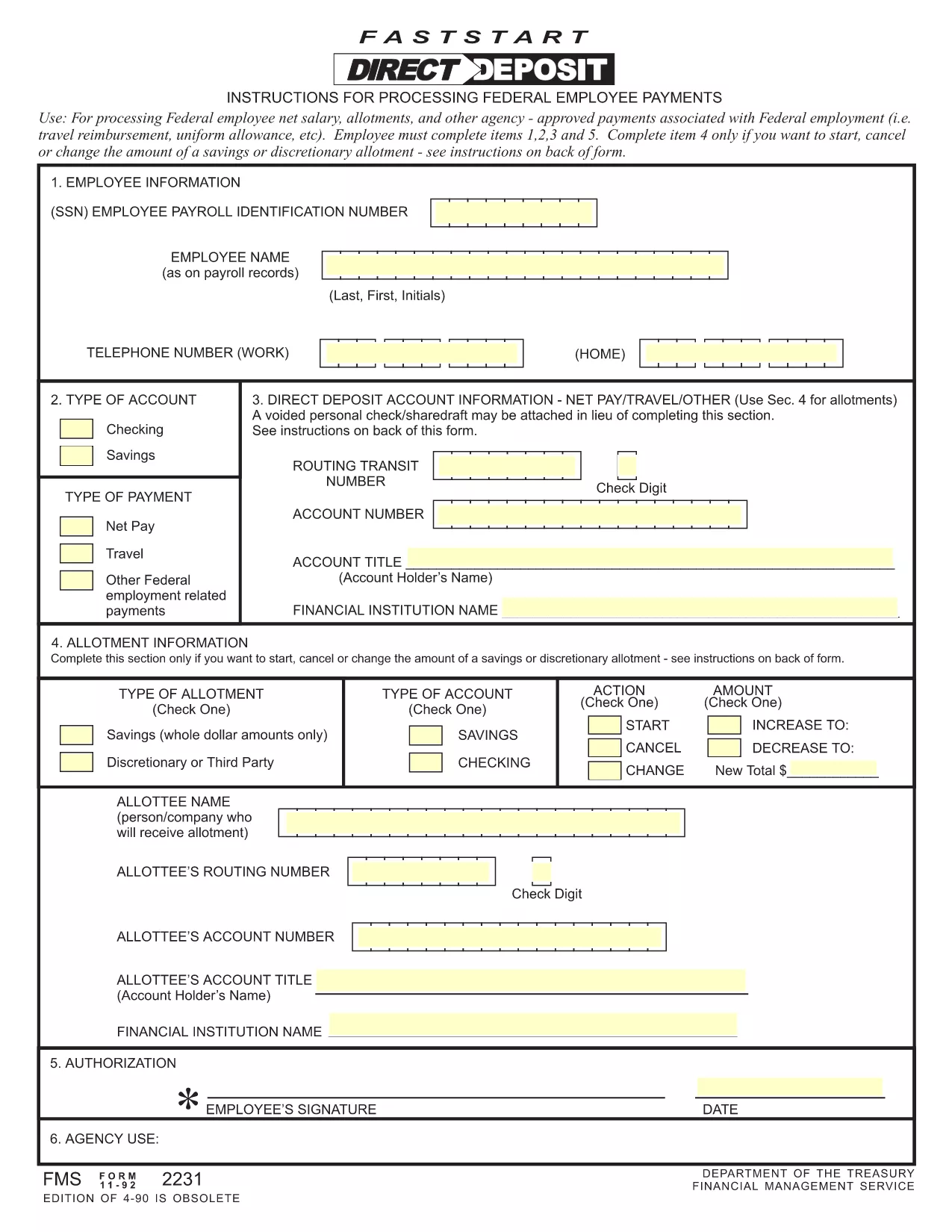
Form 2231, also known as the Fast Start Direct Deposit form, is the standard United States District Court document used to set up electronic payroll or benefit payments. The fillable PDF version lets you complete the form quickly, without printing, scanning, or mailing paper copies.

What Is Form 2231?

This form authorizes the court’s financial office to deposit wages, salaries, or other payments directly into the bank account you provide. It is frequently required for new employees, military personnel, and anyone receiving recurring payments from a federal entity.

Key Sections of the Form

  • Personal Information: Full legal name, Social Security Number, and contact phone.
  • Bank Details: Routing number, account number, and account type (checking or savings).
  • Signature & Date: Your electronic or handwritten signature and the date of completion.

How to Complete Form 2231 Online with Formize

Instead of downloading the PDF to a desktop editor, simply click the Fill out this form button on this page. The Formize PDF Filler app will load in your browser, allowing you to fill, review, and e‑sign the document in a few easy steps.

Common Mistakes to Avoid

  • Entering an incorrect routing number – double‑check with your bank.
  • Leaving the signature line blank – an unsigned form will be rejected.
  • Using an outdated version of the form – always use the latest PDF linked below.

Where to Submit the Completed Form

After you’ve saved or e‑signed the form, submit it according to the instructions provided by your payroll office or the court’s financial department. Most agencies accept a secure email attachment or upload via an online portal.

Ready to get started? Click the button below to open the fillable version instantly.

FAQ
  • Is Form 2231 required for all employees?

    Only employees or beneficiaries who receive direct‑deposit payments from a federal court or agency need to complete Form 2231.

  • Can I use a paper check instead of this form?

    Yes, but using Form 2231 speeds up payment processing and reduces the risk of lost or delayed checks.

  • What banking information is needed?

    You must provide the bank’s routing number, your account number, and indicate whether the account is checking or savings.

  • Is an electronic signature accepted?

    Yes. The ESIGN Act and UETA give electronic signatures the same legal effect as handwritten signatures.

  • How often can I update my direct‑deposit details?

    You can submit a new Form 2231 anytime your bank information changes. Processing usually takes 3‑5 business days.

  • What if I make a mistake after submitting?

    Contact the court’s financial office immediately. They will guide you on whether a corrected form is needed.

  • Is there a fee to use the Formize PDF Filler?

    No. Formize provides the fillable PDF and e‑sign capability for free on this page.

ᲠᲝᲒᲝᲠ

როგორ შეავსოთ form 2231 უფასოდ, ონლაინ 5 მარტივი ნაბიჯებით:

  1. 1
    Open the Fillable Form
    Click the “Fill out this form” button on the page. The Formize PDF Filler app will open in a new browser tab.
  2. 2
    Enter Your Information
    Type your personal and banking details into the highlighted fields. The app saves your entries automatically.
  3. 3
    Add Your Signature
    Use the built‑in signature tool to draw or upload your signature. The signature is legally binding under the ESIGN Act.
  4. 4
    Review and Save
    Check each field for accuracy, then click “Save” to download a completed copy or keep it in the cloud.
  5. 5
    Submit the Form
    Follow the instructions from your payroll office or court to submit the PDF via email, portal upload, or printed copy.
PDF შემავსებლის აპლიკაციის ფორმირება
ᲨᲔᲡᲐᲮᲔᲑ

form 2231 შაბლონი

PDF დოკუმენტის სანახავად და შევსების ფუნქციების ტრადიციული ნაკრებით, ვებ აპლიკაციის უპირატესობებთან და საპასუხო განლაგებასთან ერთად, შეგიძლიათ შეავსოთ form 2231 წუთებში.

ᲛᲐᲮᲐᲡᲘᲐᲗᲔᲑᲚᲔᲑᲘ

PDF შემავსებელი

ონლაინ form 2231-ის შევსების უმარტივესი გზა

  • სწრაფად შეავსეთ form 2231
    ეძებთ გზას სწრაფად შეავსოთ form 2231 ონლაინ? ჩვენი ონლაინ უფასო PDF ფორმის შემავსებლით, თქვენ გეცოდინებათ როგორ შეცვალოთ და შეავსოთ ეს pdf დოკუმენტი ერთ წუთზე ნაკლებ დროში.
  • მარტივი გამოსაყენებელი ონლაინ PDF რედაქტორი
    მოგბეზრდათ PDF ფაილების დაბეჭდვა, რათა მათი რედაქტირება შეძლოთ, ხელახლა სკანირებამდე და უკან გაგზავნამდე? შეცვალეთ PDF დოკუმენტები უფასოდ ონლაინ. გამოიყენეთ ჩვენი ონლაინ pdf რედაქტორი დროისა და ქაღალდის დაზოგვისთვის.
  • შესანიშნავი ხელსაწყოები, ყველა პლატფორმა
    გაინტერესებთ როგორ შეავსოთ form 2231 Mac-ზე, ან იქნებ როგორ გამოიყენოთ PDF შემავსებელი უფასოდ? ჩვენი ონლაინ PDF ინსტრუმენტები მუშაობს ყველა პლატფორმაზე.
  • ფაილების უსაფრთხო შენახვა
    დასრულებული „form 2231“ ფაილები ინახება დაცულ მონაცემთა ბაზაში, რომელსაც მართავს Amazon Cloud ჰოსტინგი. თქვენ შეგიძლიათ წაშალოთ თქვენი ფაილები ჩვენი სისტემიდან ნებისმიერ დროს. ნებისმიერ შემთხვევაში, ეს ფაილები ავტომატურად იშლება 24 საათის შემდეგ.
  • ჩატი form 2231-ით
    ესაუბრეთ „form 2231“-ს Chatize-ზე, რომელიც არის PDF წამკითხველის უფასო ასისტენტი. დასვით კითხვები და მიიღეთ პასუხები „form 2231“-დან. უბრალოდ დააწკაპუნეთ ღილაკზე ჩატი დოკუმენტთან ზემოთ.

შევსების სესიის წაშლა

წაშალოთ არჩეული შევსების სესია? ამ შემთხვევაში, თქვენი პროგრესი ფორმის შევსებაში დაიკარგება.

რედაქტირების სესიის წაშლა

წაშალოთ არჩეული რედაქტირების სესია? ამ შემთხვევაში, თქვენი პროგრესი ფორმის შექმნასა და რედაქტირებაში დაიკარგება.