
hamburger-menu icon
Აირჩიეთ ენა

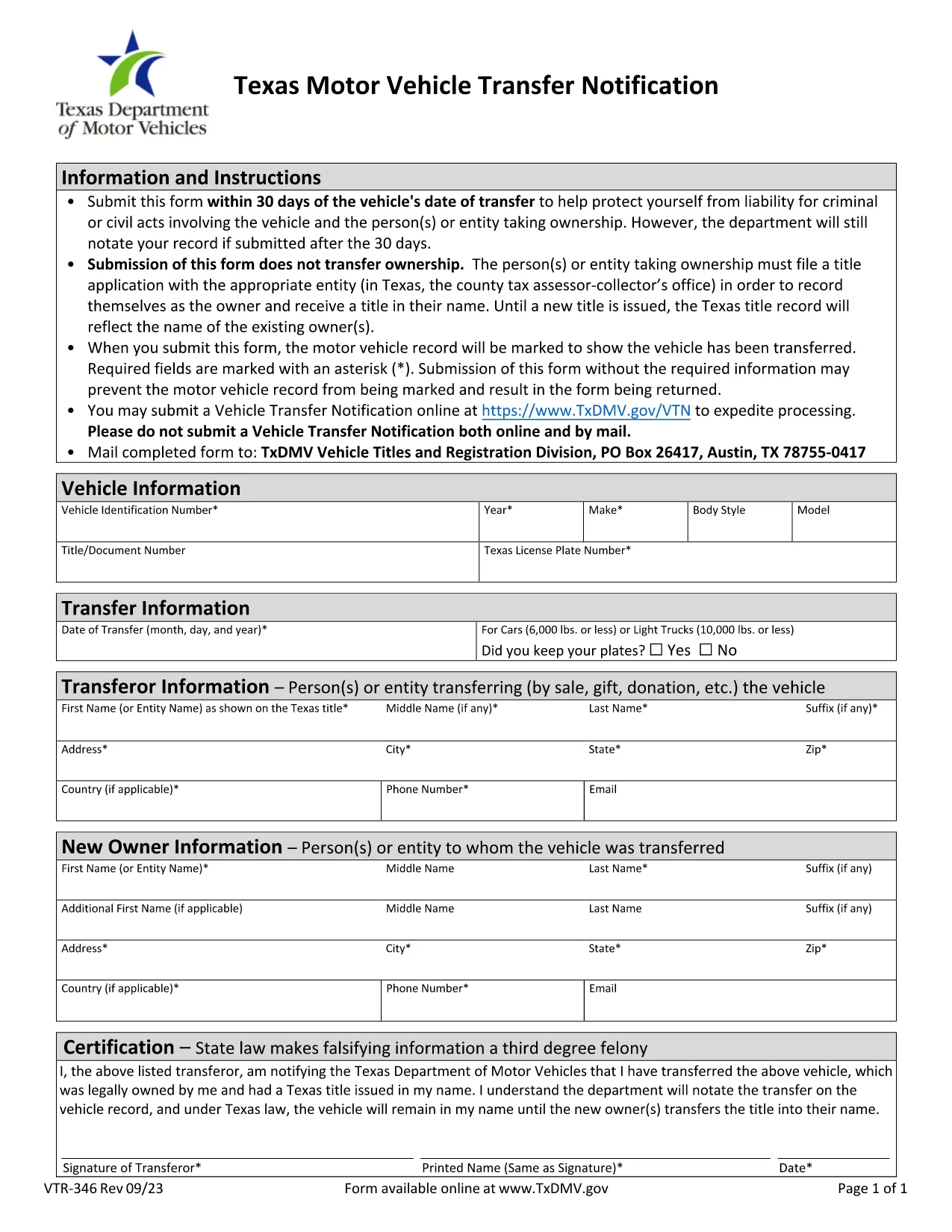
Application Form with Undertaking for Change of Ownership

  1. Ენა ინგლისური
  2. ქვეყანა აშშ
  3. აქტივობა ავტომობილის რეგისტრაცია
  4. დეპარტამენტი Department of Motor Vehicles
Application Form with Undertaking for Change of Ownership

The Application Form with Undertaking for Change of Ownership is the official document required when you transfer the title of a vehicle, boat, or other registered asset to a new owner. This form not only captures the buyer and seller information but also includes an undertaking that protects the seller from future liabilities such as parking tickets or toll violations.

What Is This Form and When Is It Needed?

State motor vehicle departments (DMVs) require this form whenever a title is transferred. It is used for private sales, dealer-to-private sales, and any situation where ownership changes hands. The undertaking clause is essential because it formally releases the seller from responsibility after the transfer is recorded.

How to Complete the Form Online with Formize

Instead of printing, scanning, and mailing a paper copy, you can fill the form directly in your browser using the Formize PDF Filler. The process is fast, secure, and fully compliant with DMV requirements.

Common Mistakes to Avoid

  • Leaving the sale price or odometer reading blank.
  • Not signing the undertaking section.
  • Forgetting to include the VIN (Vehicle Identification Number) in the correct format.
  • Submitting the form without the required proof of identity for both parties.

Where to Submit the Completed Form

After you have filled, reviewed, and signed the form, you can:

  • Upload it through your state’s online DMV portal (if available).
  • Print and hand‑deliver it to your local tax office or DMV.
  • Mail the PDF to the address listed on the form’s instructions.

Using the fillable PDF ensures the data is captured accurately, reducing processing time and avoiding delays in title issuance.

FAQ
  • Do I need to print the form after filling it online?

    No. The Formize PDF Filler lets you complete, sign, and save the form entirely online. Printing is only required if your local DMV asks for a hard copy.

  • What is the undertaking section for?

    The undertaking releases the seller from future liabilities (e.g., tickets, tolls) after the title transfer is recorded.

  • Can I use this form for a vehicle sold out of state?

    Yes, but you must also comply with the receiving state’s registration requirements. The form’s VIN and sale details remain valid nationwide.

  • How long does it take for the DMV to process the transfer?

    Processing times vary by state, but a correctly completed, electronically signed form typically speeds up the process to 5‑10 business days.

  • What documents should I keep after submitting the form?

    Keep a copy of the signed PDF, a receipt of submission (if online), and any proof of identity for both parties. These may be needed for future reference.

  • Is there a fee for filing this form?

    Yes, most states charge a title transfer fee. Check your local DMV’s fee schedule for the exact amount.

ᲠᲝᲒᲝᲠ

როგორ შეავსოთ change of ownership form უფასოდ, ონლაინ 5 მარტივი ნაბიჯებით:

  1. 1
    Click the Fill‑out Button
    On this page, click the "Fill out this form" button to launch the Formize PDF Filler.
  2. 2
    Wait for the Formize PDF Filler to Load
    The fillable PDF will open in a secure browser window. No download or installation is required.
  3. 3
    Enter All Required Information
    Complete buyer and seller details, vehicle information, sale price, odometer reading, and the undertaking clause.
  4. 4
    Review and Electronically Sign
    Double‑check every field, then use the built‑in e‑signature tool to sign the form.
  5. 5
    Save or Submit
    Download the finished PDF for your records or submit it directly to the DMV if the portal supports online upload.
PDF შემავსებლის აპლიკაციის ფორმირება
ᲨᲔᲡᲐᲮᲔᲑ

სატრანსპორტო საშუალების რეგისტრაციის ფორმები

თუ თქვენ ფლობთ ან იჯარით გაქვთ ავტომობილი, მისაბმელი ან ნავი, თქვენ უნდა შეასრულოთ გარკვეული ვალდებულებები, რათა შეინარჩუნოთ თქვენი მანქანა კანონიერად რეგისტრირებული და უსაფრთხო.

change of ownership form არის სატრანსპორტო საშუალების რეგისტრაციის ერთ-ერთი ფორმა, რომელიც წარმოადგენს დოკუმენტებს, რომლებიც გამოიყენება ავტომობილის რეგისტრაციისთვის შესაბამის სახელმწიფო ან პროვინციულ ორგანოში. ეს ფორმები, როგორც წესი, საჭიროა, როდესაც ადამიანი ყიდულობს ახალ ან მეორად სატრანსპორტო საშუალებას, ან როდესაც ისინი გადადიან ახალ შტატში ან პროვინციაში მანქანით.

ავტომობილის რეგისტრაციისთვის საჭირო ზუსტი მოთხოვნები და ფორმები შეიძლება განსხვავდებოდეს მდებარეობის მიხედვით, მაგრამ ზოგადად, პროცესი გულისხმობს ინფორმაციის მიწოდებას ავტომობილის, მფლობელისა და ავტომობილის ნებისმიერი გირავნობის შესახებ.

სარეგისტრაციო ფორმებისა და მოსაკრებლების წარდგენის შემდეგ, სახელმწიფო ან პროვინციული ორგანო ავტომობილის მფლობელს გასცემს სარეგისტრაციო მოწმობას ან სანომრე ნიშანს. ეს რეგისტრაცია საშუალებას აძლევს მანქანას ლეგალურად იმოძრაოს საჯარო გზებსა და მაგისტრალებზე.

ᲛᲐᲮᲐᲡᲘᲐᲗᲔᲑᲚᲔᲑᲘ

PDF შემავსებელი

ონლაინ change of ownership form-ის შევსების უმარტივესი გზა

  • სწრაფად შეავსეთ change of ownership form
    ეძებთ გზას სწრაფად შეავსოთ change of ownership form ონლაინ? ჩვენი ონლაინ უფასო PDF ფორმის შემავსებლით, თქვენ გეცოდინებათ როგორ შეცვალოთ და შეავსოთ ეს pdf დოკუმენტი ერთ წუთზე ნაკლებ დროში.
  • მარტივი გამოსაყენებელი ონლაინ PDF რედაქტორი
    მოგბეზრდათ PDF ფაილების დაბეჭდვა, რათა მათი რედაქტირება შეძლოთ, ხელახლა სკანირებამდე და უკან გაგზავნამდე? შეცვალეთ PDF დოკუმენტები უფასოდ ონლაინ. გამოიყენეთ ჩვენი ონლაინ pdf რედაქტორი დროისა და ქაღალდის დაზოგვისთვის.
  • შესანიშნავი ხელსაწყოები, ყველა პლატფორმა
    გაინტერესებთ როგორ შეავსოთ change of ownership form Mac-ზე, ან იქნებ როგორ გამოიყენოთ PDF შემავსებელი უფასოდ? ჩვენი ონლაინ PDF ინსტრუმენტები მუშაობს ყველა პლატფორმაზე.
  • ფაილების უსაფრთხო შენახვა
    დასრულებული „change of ownership form“ ფაილები ინახება დაცულ მონაცემთა ბაზაში, რომელსაც მართავს Amazon Cloud ჰოსტინგი. თქვენ შეგიძლიათ წაშალოთ თქვენი ფაილები ჩვენი სისტემიდან ნებისმიერ დროს. ნებისმიერ შემთხვევაში, ეს ფაილები ავტომატურად იშლება 24 საათის შემდეგ.
  • ჩატი change of ownership form-ით
    ესაუბრეთ „change of ownership form“-ს Chatize-ზე, რომელიც არის PDF წამკითხველის უფასო ასისტენტი. დასვით კითხვები და მიიღეთ პასუხები „change of ownership form“-დან. უბრალოდ დააწკაპუნეთ ღილაკზე ჩატი დოკუმენტთან ზემოთ.

შევსების სესიის წაშლა

წაშალოთ არჩეული შევსების სესია? ამ შემთხვევაში, თქვენი პროგრესი ფორმის შევსებაში დაიკარგება.

რედაქტირების სესიის წაშლა

წაშალოთ არჩეული რედაქტირების სესია? ამ შემთხვევაში, თქვენი პროგრესი ფორმის შექმნასა და რედაქტირებაში დაიკარგება.