hamburger-menu icon
Აირჩიეთ ენა

Driver Medical Evaluation Form (DS‑326) – Fillable PDF

  1. ქვეყანა აშშ
  2. Ენა ინგლისური
  3. აქტივობა Vehicle Licensing
  4. დეპარტამენტი DMV
Driver Medical Evaluation Form (DS‑326) – Fillable PDF

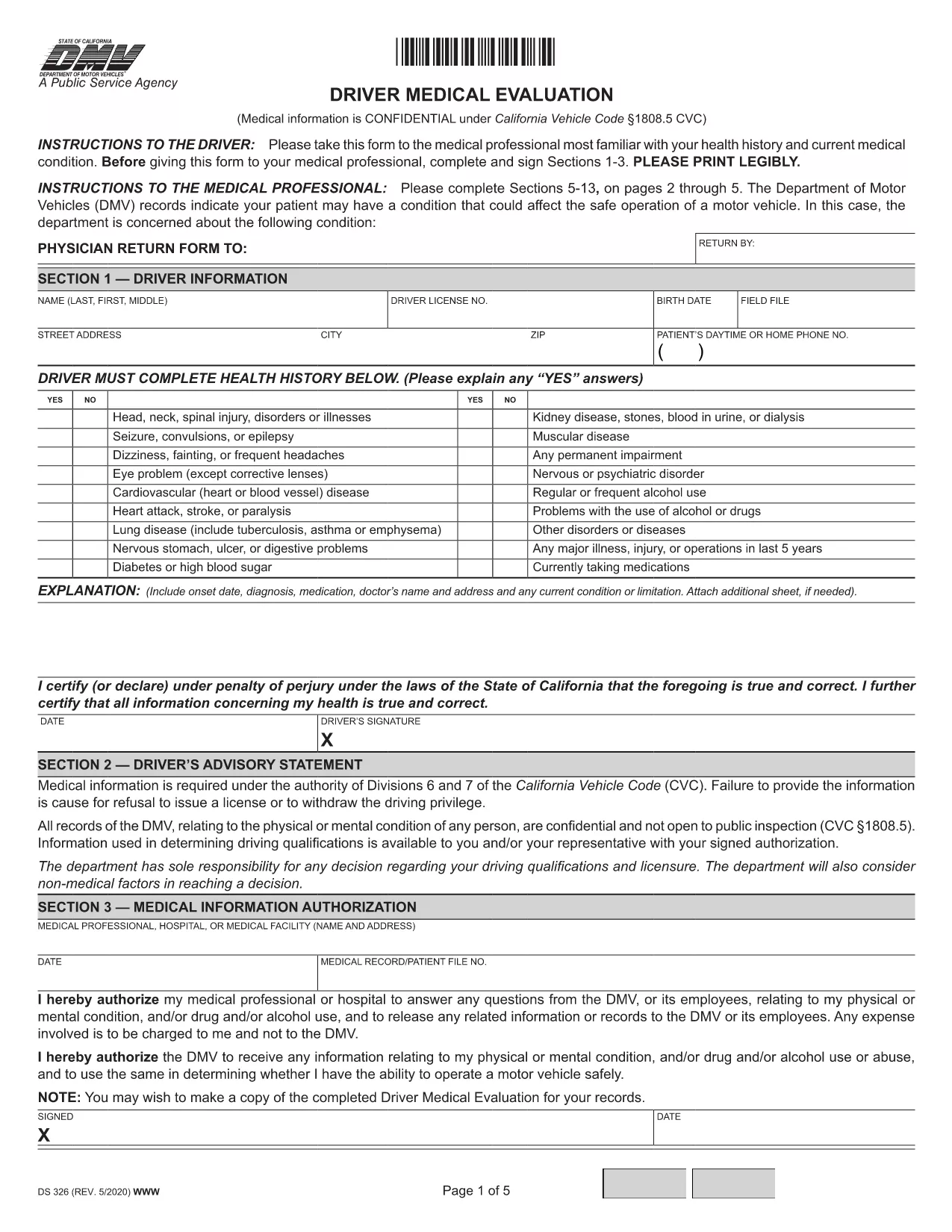
The Driver Medical Evaluation (form DS‑326) is required by the California Department of Motor Vehicles (DMV) for drivers who need to prove medical fitness for a license or permit. This fillable PDF lets you complete the health history, medical information authorization, and physician certification without printing or scanning.

What Is the Driver Medical Evaluation Form?

DS‑326 collects critical data about a driver’s vision, cardiovascular health, neurological conditions, and any medication that may affect safe operation of a vehicle. The DMV uses this information to decide whether to issue, renew, or restrict a driver’s license.

How to Complete the Fillable PDF Online

Instead of downloading the file and opening it in a PDF editor, simply click the "Fill out this form" button on this page. The Formize PDF Filler app will load in your browser, allowing you to type directly into each field, add signatures, and save your progress.

Common Mistakes to Avoid

  • Leaving the health‑history sections blank – every question must be answered, even if the answer is "None".
  • Forgetting the physician’s signature and license number – the form is invalid without a completed certification.
  • Submitting an outdated version – always use the latest DS‑326 PDF provided here.

Where to Submit the Completed Form

After you finish, you can download the completed PDF and mail it to your local DMV office, or upload it through the DMV’s online portal if you have an account. Keep a copy for your records.

Need more help? Review the FAQs below or follow the step‑by‑step guide in the "How to" section.

FAQ
  • Who needs to fill out DS‑326?

    Any driver applying for a commercial license, a medical waiver, or a license renewal where the DMV requires proof of medical fitness must complete DS‑326.

  • Can I fill out the form on a mobile device?

    Yes. The Formize PDF Filler works on smartphones and tablets, but using a larger screen makes data entry easier.

  • What if my physician refuses to sign?

    The DMV requires a qualified medical professional’s certification. If a physician declines, you must find another licensed provider who can evaluate your fitness.

  • How long is the DS‑326 valid?

    The evaluation is typically valid for one year from the date of the physician’s signature, unless the DMV issues a different validity period.

  • Do I need to attach supporting medical records?

    Attach any relevant test results or specialist reports that the physician references in the certification section.

  • Is there a fee to submit the form?

    There is no fee for the DS‑326 itself, but the DMV may charge processing fees for license issuance or renewal.

  • Can I save my progress and finish later?

    Yes. The Formize filler allows you to save a draft locally and reopen it later to complete the remaining fields.

  • What should I do if I make a mistake after submitting?

    Contact your local DMV office promptly. They may require a new, corrected DS‑326 or allow you to submit an amendment form.

ᲠᲝᲒᲝᲠ

როგორ შეავსოთ driver medical evaluation უფასოდ, ონლაინ 5 მარტივი ნაბიჯებით:

  1. 1
    Click the Fill‑out Button
    Press the "Fill out this form" button on the page to launch the Formize PDF Filler.
  2. 2
    Wait for the Filler to Load
    The online filler loads in a few seconds; no download or installation is required.
  3. 3
    Enter All Required Information
    Complete each section—personal details, health history, and physician certification—using your keyboard.
  4. 4
    Add Your Signature
    Use the built‑in signature field to sign electronically; you can also type your name if allowed.
  5. 5
    Save or Submit the Form
    Download the finished PDF for mailing, or upload it directly to the DMV portal if you have an account.
PDF შემავსებლის აპლიკაციის ფორმირება
ᲨᲔᲡᲐᲮᲔᲑ

driver medical evaluation შაბლონი

PDF დოკუმენტის სანახავად და შევსების ფუნქციების ტრადიციული ნაკრებით, ვებ აპლიკაციის უპირატესობებთან და საპასუხო განლაგებასთან ერთად, შეგიძლიათ შეავსოთ driver medical evaluation წუთებში.

ᲛᲐᲮᲐᲡᲘᲐᲗᲔᲑᲚᲔᲑᲘ

PDF შემავსებელი

ონლაინ driver medical evaluation-ის შევსების უმარტივესი გზა

  • სწრაფად შეავსეთ driver medical evaluation
    ეძებთ გზას სწრაფად შეავსოთ driver medical evaluation ონლაინ? ჩვენი ონლაინ უფასო PDF ფორმის შემავსებლით, თქვენ გეცოდინებათ როგორ შეცვალოთ და შეავსოთ ეს pdf დოკუმენტი ერთ წუთზე ნაკლებ დროში.
  • მარტივი გამოსაყენებელი ონლაინ PDF რედაქტორი
    მოგბეზრდათ PDF ფაილების დაბეჭდვა, რათა მათი რედაქტირება შეძლოთ, ხელახლა სკანირებამდე და უკან გაგზავნამდე? შეცვალეთ PDF დოკუმენტები უფასოდ ონლაინ. გამოიყენეთ ჩვენი ონლაინ pdf რედაქტორი დროისა და ქაღალდის დაზოგვისთვის.
  • შესანიშნავი ხელსაწყოები, ყველა პლატფორმა
    გაინტერესებთ როგორ შეავსოთ driver medical evaluation Mac-ზე, ან იქნებ როგორ გამოიყენოთ PDF შემავსებელი უფასოდ? ჩვენი ონლაინ PDF ინსტრუმენტები მუშაობს ყველა პლატფორმაზე.
  • ფაილების უსაფრთხო შენახვა
    დასრულებული „driver medical evaluation“ ფაილები ინახება დაცულ მონაცემთა ბაზაში, რომელსაც მართავს Amazon Cloud ჰოსტინგი. თქვენ შეგიძლიათ წაშალოთ თქვენი ფაილები ჩვენი სისტემიდან ნებისმიერ დროს. ნებისმიერ შემთხვევაში, ეს ფაილები ავტომატურად იშლება 24 საათის შემდეგ.
  • ჩატი driver medical evaluation-ით
    ესაუბრეთ „driver medical evaluation“-ს Chatize-ზე, რომელიც არის PDF წამკითხველის უფასო ასისტენტი. დასვით კითხვები და მიიღეთ პასუხები „driver medical evaluation“-დან. უბრალოდ დააწკაპუნეთ ღილაკზე ჩატი დოკუმენტთან ზემოთ.

შევსების სესიის წაშლა

წაშალოთ არჩეული შევსების სესია? ამ შემთხვევაში, თქვენი პროგრესი ფორმის შევსებაში დაიკარგება.

რედაქტირების სესიის წაშლა

წაშალოთ არჩეული რედაქტირების სესია? ამ შემთხვევაში, თქვენი პროგრესი ფორმის შექმნასა და რედაქტირებაში დაიკარგება.