
hamburger-menu icon
Აირჩიეთ ენა

DL‑329S Gender Designation Request – Fillable PDF

  1. Ენა ინგლისური
  2. ქვეყანა აშშ
  3. აქტივობა Მართვის მოწმობა
  4. სახელმწიფო კალიფორნია
DL‑329S Gender Designation Request – Fillable PDF

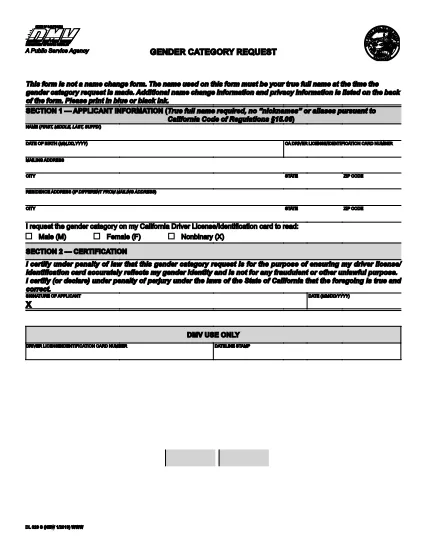
The DL‑329S is the California Department of Motor Vehicles (DMV) form used to request a change to the gender designation on a driver license or identification card. Whether you are updating from male to female, female to male, or adding a non‑binary option, this form is required by the DMV.

What Is the DL‑329S Form?

DL‑329S, officially titled “Gender Designation Request,” captures the applicant’s personal information, current license details, and the new gender marker they wish to use. The form must be signed by the applicant and, in some cases, accompanied by a certified court order.

How to Complete the DL‑329S Online with Formize

Instead of downloading, printing, and scanning, you can fill the form directly in your browser:

  1. Click the "Fill out this form" button on this page.
  2. The Formize PDF Filler app will load the DL‑329S PDF in a secure, editable window.
  3. Enter all required fields – name, driver license number, new gender marker, and signature.
  4. When you’re done, click Save & Download to get a completed PDF you can print or email to the DMV.

Common Mistakes & Tips for a Smooth Submission

  • Leave no blank fields. The DMV rejects any form with empty required sections.
  • Use the exact gender option wording. Choose "Male," "Female," or "Non‑binary" as it appears on the form.
  • Attach a certified court order if your gender change is not based on a physician’s statement (required for non‑binary requests).
  • Sign electronically. Formize allows a typed signature that the DMV accepts.
  • Double‑check your driver license number. A typo will delay processing.

Where to Submit the Completed Form

After filling out and saving the PDF, you have two options:

  • Bring the printed form to any California DMV office and submit it in person.
  • Mail the form to the address on the DMV website along with any required supporting documents.

There is a $28 fee for processing the gender designation change, payable at the DMV.

FAQ
  • Do I need a physician’s letter to change my gender on a California driver license?

    No. Since January 2019, a physician’s letter is no longer required. A certified court order is sufficient for gender marker changes.

  • Can I submit the DL‑329S form online?

    The DMV still requires a paper copy, but you can fill the PDF online with Formize, then print and bring it to the DMV or mail it.

  • What gender options are available on the DL‑329S?

    The form offers "Male," "Female," and "Non‑binary" as selectable gender markers.

  • How long does it take for the DMV to process the gender change?

    Processing typically takes 2‑4 weeks after the DMV receives the completed form and any required supporting documents.

  • Is there a fee to change my gender marker?

    Yes, the DMV charges a $28 fee for processing a gender designation request. The fee is paid at the DMV office.

  • What should I do if I make a mistake on the form?

    If you notice an error before submitting, simply correct it in the Formize editor and re‑download the PDF. If you have already submitted, you will need to fill out a new DL‑329S.

  • Can I use the same DL‑329S form for a name change?

    No. A name change requires a separate form (DL‑44) and a certified court order for the name update.

ᲠᲝᲒᲝᲠ

როგორ შეავსოთ DL‑329S უფასოდ, ონლაინ 4 მარტივი ნაბიჯებით:

  1. 1
    Open the Fillable Form
    Click the "Fill out this form" button on the page. The Formize PDF Filler will open the DL‑329S PDF in an editable view.
  2. 2
    Enter Your Information
    Complete every required field – name, license number, new gender marker, and signature. Use the navigation tabs to move between sections.
  3. 3
    Save and Download
    When all fields are filled, click "Save & Download". A finished PDF will be saved to your device, ready for printing or electronic submission.
  4. 4
    Submit to the DMV
    Print the completed form (if mailing) or bring the printed copy to your local DMV office along with any supporting documents and the $28 fee.
PDF შემავსებლის აპლიკაციის ფორმირება
ᲨᲔᲡᲐᲮᲔᲑ

მართვის მოწმობის განაცხადის ფორმები

უმეტეს ქვეყნებში, გზაზე გასვლამდე მართვის მოწმობის ქონა სავალდებულოა. მართვის მოწმობის აღება მნიშვნელოვანი ეტაპია მათთვის, ვისაც მანქანის მართვა სურს.

DL‑329S არის მართვის მოწმობის განაცხადის ერთ-ერთი ფორმა, რომელიც არის დოკუმენტები, რომლებიც გამოიყენება ინფორმაციის მოსაგროვებლად იმ ადამიანებისგან, რომლებსაც სურთ განაცხადონ მართვის მოწმობის მისაღებად. ის ჩვეულებრივ შეიცავს ველებს განმცხადებლის სახელის, დაბადების თარიღის, პირადობის მოწმობის ნომრის, საკონტაქტო ინფორმაციის, ასევე მათი მართვის მოწმობის ისტორიისა და გამოცდილების შესახებ.

ᲛᲐᲮᲐᲡᲘᲐᲗᲔᲑᲚᲔᲑᲘ

PDF შემავსებელი

ონლაინ DL‑329S-ის შევსების უმარტივესი გზა

  • სწრაფად შეავსეთ DL‑329S
    ეძებთ გზას სწრაფად შეავსოთ DL‑329S ონლაინ? ჩვენი ონლაინ უფასო PDF ფორმის შემავსებლით, თქვენ გეცოდინებათ როგორ შეცვალოთ და შეავსოთ ეს pdf დოკუმენტი ერთ წუთზე ნაკლებ დროში.
  • მარტივი გამოსაყენებელი ონლაინ PDF რედაქტორი
    მოგბეზრდათ PDF ფაილების დაბეჭდვა, რათა მათი რედაქტირება შეძლოთ, ხელახლა სკანირებამდე და უკან გაგზავნამდე? შეცვალეთ PDF დოკუმენტები უფასოდ ონლაინ. გამოიყენეთ ჩვენი ონლაინ pdf რედაქტორი დროისა და ქაღალდის დაზოგვისთვის.
  • შესანიშნავი ხელსაწყოები, ყველა პლატფორმა
    გაინტერესებთ როგორ შეავსოთ DL‑329S Mac-ზე, ან იქნებ როგორ გამოიყენოთ PDF შემავსებელი უფასოდ? ჩვენი ონლაინ PDF ინსტრუმენტები მუშაობს ყველა პლატფორმაზე.
  • ფაილების უსაფრთხო შენახვა
    დასრულებული „DL‑329S“ ფაილები ინახება დაცულ მონაცემთა ბაზაში, რომელსაც მართავს Amazon Cloud ჰოსტინგი. თქვენ შეგიძლიათ წაშალოთ თქვენი ფაილები ჩვენი სისტემიდან ნებისმიერ დროს. ნებისმიერ შემთხვევაში, ეს ფაილები ავტომატურად იშლება 24 საათის შემდეგ.
  • ჩატი DL‑329S-ით
    ესაუბრეთ „DL‑329S“-ს Chatize-ზე, რომელიც არის PDF წამკითხველის უფასო ასისტენტი. დასვით კითხვები და მიიღეთ პასუხები „DL‑329S“-დან. უბრალოდ დააწკაპუნეთ ღილაკზე ჩატი დოკუმენტთან ზემოთ.

შევსების სესიის წაშლა

წაშალოთ არჩეული შევსების სესია? ამ შემთხვევაში, თქვენი პროგრესი ფორმის შევსებაში დაიკარგება.

რედაქტირების სესიის წაშლა

წაშალოთ არჩეული რედაქტირების სესია? ამ შემთხვევაში, თქვენი პროგრესი ფორმის შექმნასა და რედაქტირებაში დაიკარგება.