
hamburger-menu icon
Აირჩიეთ ენა

OL 801 Student License Application – Fillable PDF

  1. Ენა ინგლისური
  2. ქვეყანა აშშ
  3. აქტივობა Მართვის მოწმობა
  4. სახელმწიფო კალიფორნია
OL 801 Student License Application – Fillable PDF

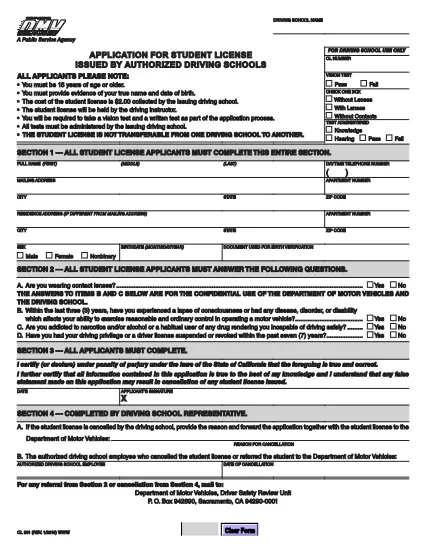
The OL 801 is the California Department of Motor Vehicles (DMV) application used by driving schools and students to obtain a learner’s permit or student driver license. This form must be completed accurately before you can start behind‑the‑wheel training.

Formize makes the process effortless. Instead of printing, scanning, or editing the PDF manually, simply click the Fill out this form button on this page. Our secure PDF filler loads the official DMV document, lets you type directly into each field, and saves a completed copy that you can print or email.

What Is the OL 801 Form?

The OL 801 collects essential information about the student driver, the driving school, and any required endorsements. California law requires a signed, completed form before a student can be issued a provisional license.

How to Complete the OL 801 Online

Follow the step‑by‑step guide below to finish the form in minutes:

  • Click the “Fill out this form” button.
  • Wait for the Formize PDF Filler app to load the official DMV PDF.
  • Enter the requested details – student name, address, school information, and signatures.
  • Review the completed form for accuracy.
  • Download, print, or email the filled PDF directly from the filler.

Common Mistakes to Avoid

  • Leaving any required field blank – the DMV will reject incomplete submissions.
  • Using an outdated version of the form – always use the latest PDF linked below.
  • Incorrectly entering the school’s license number – double‑check with your driving school.
  • Forgetting the student’s signature; an unsigned form is invalid.

Where to Submit Your Completed Form

After filling out the OL 801, you can submit it in one of three ways:

  1. Mail it to the DMV Driver Safety Review Unit, P.O. Box 942890, Sacramento, CA 94290‑0001.
  2. Bring a printed copy to your local DMV office.
  3. Upload a scanned copy through the California DMV online portal (if available).

Download the Official PDF

For reference or offline use, you can also download the original, unfilled PDF directly from the California DMV:

Official OL 801 PDF (2020 version)

FAQ
  • What is the purpose of the OL 801 form?

    The OL 801 is used by California driving schools to apply for a student driver license (learner’s permit) for their students. It verifies the student’s eligibility and records the school’s endorsement.

  • Do I need a printed copy to submit the form?

    Yes. The DMV requires a hard copy with original signatures. You can print the completed PDF from Formize after filling it out online.

  • Can I edit the PDF after I download it?

    Once you download the filled PDF, you can still edit it with any PDF editor, but the Formize filler already lets you complete all fields accurately before download.

  • Is the Formize filler free to use?

    Yes, filling out the OL 801 with Formize’s online PDF filler is completely free and does not require any software installation.

  • How often is the OL 801 form updated?

    The California DMV updates the form as needed. The version linked here (2020) is the current official version; always use the latest PDF from the DMV website.

  • What should I do if I make a mistake while filling out the form?

    If you notice an error before downloading, simply correct it in the Formize filler. If you’ve already printed it, you may need to start a new form or cross out the mistake and initial it, depending on DMV guidelines.

  • Where can I mail the completed OL 801?

    Mail the signed form to: Department of Motor Vehicles, Driver Safety Review Unit, P. O. Box 942890, Sacramento, CA 94290‑0001.

  • Do I need any additional documents with the OL 801?

    Typically you’ll need a copy of the student’s ID, proof of residency, and the driving school’s certification. Check the DMV checklist for your specific situation.

ᲠᲝᲒᲝᲠ

როგორ შეავსოთ OL 801 უფასოდ, ონლაინ 4 მარტივი ნაბიჯებით:

  1. 1
    Click the Fill‑out Button
    Press the “Fill out this form” button on this page to launch the Formize PDF Filler.
  2. 2
    Wait for the Filler to Load
    The app loads the official OL 801 PDF in a secure viewer. This takes only a few seconds.
  3. 3
    Enter All Required Information
    Type directly into each field – student details, school information, and signatures. Use the tab key to move quickly between fields.
  4. 4
    Save, Print, or Email
    When you’re finished, click “Save”. You can download the completed PDF, print it for a hard copy, or email it straight to the DMV.
PDF შემავსებლის აპლიკაციის ფორმირება
ᲨᲔᲡᲐᲮᲔᲑ

მართვის მოწმობის განაცხადის ფორმები

უმეტეს ქვეყნებში, გზაზე გასვლამდე მართვის მოწმობის ქონა სავალდებულოა. მართვის მოწმობის აღება მნიშვნელოვანი ეტაპია მათთვის, ვისაც მანქანის მართვა სურს.

OL 801 არის მართვის მოწმობის განაცხადის ერთ-ერთი ფორმა, რომელიც არის დოკუმენტები, რომლებიც გამოიყენება ინფორმაციის მოსაგროვებლად იმ ადამიანებისგან, რომლებსაც სურთ განაცხადონ მართვის მოწმობის მისაღებად. ის ჩვეულებრივ შეიცავს ველებს განმცხადებლის სახელის, დაბადების თარიღის, პირადობის მოწმობის ნომრის, საკონტაქტო ინფორმაციის, ასევე მათი მართვის მოწმობის ისტორიისა და გამოცდილების შესახებ.

ᲛᲐᲮᲐᲡᲘᲐᲗᲔᲑᲚᲔᲑᲘ

PDF შემავსებელი

ონლაინ OL 801-ის შევსების უმარტივესი გზა

  • სწრაფად შეავსეთ OL 801
    ეძებთ გზას სწრაფად შეავსოთ OL 801 ონლაინ? ჩვენი ონლაინ უფასო PDF ფორმის შემავსებლით, თქვენ გეცოდინებათ როგორ შეცვალოთ და შეავსოთ ეს pdf დოკუმენტი ერთ წუთზე ნაკლებ დროში.
  • მარტივი გამოსაყენებელი ონლაინ PDF რედაქტორი
    მოგბეზრდათ PDF ფაილების დაბეჭდვა, რათა მათი რედაქტირება შეძლოთ, ხელახლა სკანირებამდე და უკან გაგზავნამდე? შეცვალეთ PDF დოკუმენტები უფასოდ ონლაინ. გამოიყენეთ ჩვენი ონლაინ pdf რედაქტორი დროისა და ქაღალდის დაზოგვისთვის.
  • შესანიშნავი ხელსაწყოები, ყველა პლატფორმა
    გაინტერესებთ როგორ შეავსოთ OL 801 Mac-ზე, ან იქნებ როგორ გამოიყენოთ PDF შემავსებელი უფასოდ? ჩვენი ონლაინ PDF ინსტრუმენტები მუშაობს ყველა პლატფორმაზე.
  • ფაილების უსაფრთხო შენახვა
    დასრულებული „OL 801“ ფაილები ინახება დაცულ მონაცემთა ბაზაში, რომელსაც მართავს Amazon Cloud ჰოსტინგი. თქვენ შეგიძლიათ წაშალოთ თქვენი ფაილები ჩვენი სისტემიდან ნებისმიერ დროს. ნებისმიერ შემთხვევაში, ეს ფაილები ავტომატურად იშლება 24 საათის შემდეგ.
  • ჩატი OL 801-ით
    ესაუბრეთ „OL 801“-ს Chatize-ზე, რომელიც არის PDF წამკითხველის უფასო ასისტენტი. დასვით კითხვები და მიიღეთ პასუხები „OL 801“-დან. უბრალოდ დააწკაპუნეთ ღილაკზე ჩატი დოკუმენტთან ზემოთ.

შევსების სესიის წაშლა

წაშალოთ არჩეული შევსების სესია? ამ შემთხვევაში, თქვენი პროგრესი ფორმის შევსებაში დაიკარგება.

რედაქტირების სესიის წაშლა

წაშალოთ არჩეული რედაქტირების სესია? ამ შემთხვევაში, თქვენი პროგრესი ფორმის შექმნასა და რედაქტირებაში დაიკარგება.