
hamburger-menu icon
Აირჩიეთ ენა

Form 4319 – Missouri Driver Condition Report

  1. Ენა ინგლისური
  2. ქვეყანა აშშ
  3. აქტივობა Მართვის მოწმობა
  4. სახელმწიფო მისურის
Form 4319 – Missouri Driver Condition Report

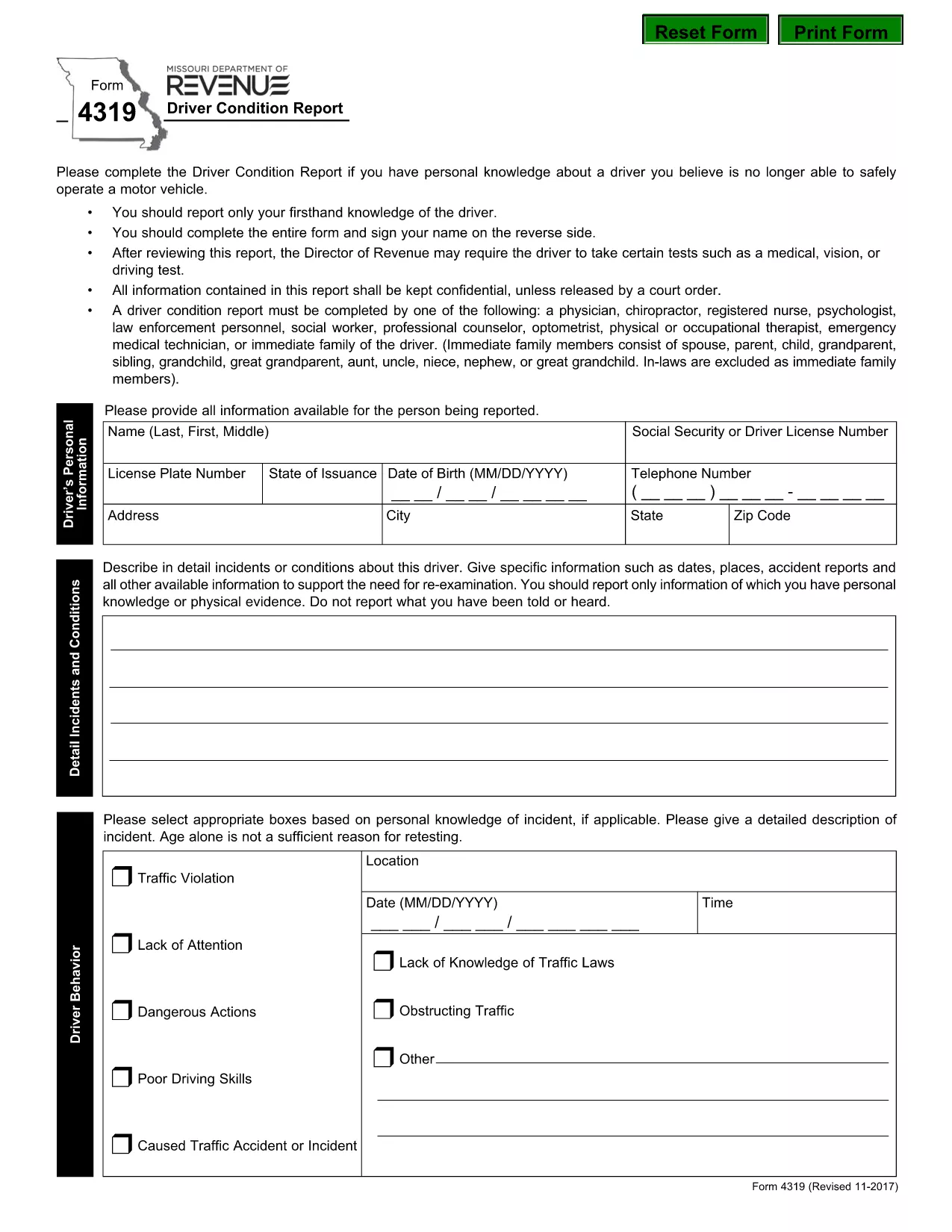
The Missouri Form 4319, also known as the Driver Condition Report, is required when a driver’s medical, vision, or overall condition may affect safe operation of a vehicle. This form is used by the Missouri Department of Revenue to evaluate whether additional testing or restrictions are needed.

What is Form 4319?

Form 4319 collects detailed information about a driver’s health, recent accidents, and any conditions that could impair driving ability. The report is confidential and is only shared with authorized officials or a court order.

How to Fill Out the Driver Condition Report Online

Instead of downloading and editing the PDF manually, simply click the “Fill out this form” button on this page. The Formize PDF Filler app will load in your browser, allowing you to complete the form directly, save your progress, and submit it electronically.

Common Mistakes to Avoid

  • Leaving any required field blank – the filler will highlight missing information before you can submit.
  • Signing on the reverse side of the PDF – use the built‑in signature field in the online filler.
  • Providing outdated medical information – ensure all health details are current.
  • Forgetting to attach supporting documents (e.g., physician’s statement) when required.

Where to Submit the Completed Form

After completing the form, you can:

  • Submit electronically through the Formize platform (recommended).
  • Print and mail the signed form to the Missouri Department of Revenue, Driver Licensing Division.

Keep a copy of the completed PDF for your records.

Download the Fillable PDF

If you prefer to work offline, you can download the official fillable PDF directly from the Missouri Department of Revenue:

Download Form 4319 (PDF)

FAQ
  • What is the purpose of Form 4319?

    Form 4319 is used by the Missouri Department of Revenue to assess a driver’s medical, vision, or other conditions that could affect safe driving.

  • Can I fill out Form 4319 on a mobile device?

    Yes. The Formize PDF Filler works on most smartphones and tablets with a modern browser.

  • Do I need a doctor’s signature on this form?

    If a physician’s statement is required, you must attach a signed statement from your doctor as a separate PDF attachment.

  • How long does it take for the Department of Revenue to process the report?

    Processing times vary, but most reviews are completed within 10‑14 business days after receipt.

  • Is the information on Form 4319 confidential?

    Yes. All information is kept confidential and is only disclosed under a court order or as required by law.

  • What should I do if I make a mistake after submitting?

    Contact the Missouri Department of Revenue’s Driver Licensing Division immediately to request a correction or to submit a revised form.

  • Can I submit the form by email?

    The online Formize submission is the preferred method. If you mail a printed copy, you can also email a scanned version to the department’s designated address.

  • Is there a fee to submit Form 4319?

    No, there is no fee to complete or submit Form 4319.

ᲠᲝᲒᲝᲠ

როგორ შეავსოთ form 4319 უფასოდ, ონლაინ 5 მარტივი ნაბიჯებით:

  1. 1
    Open the Fillable Form
    Click the “Fill out this form” button on the page. The Formize PDF Filler will open in a new tab.
  2. 2
    Enter Your Information
    Complete each field. Required fields are highlighted. Use the drop‑down menus and date pickers for easy entry.
  3. 3
    Add Your Signature
    Click the signature box, type your name, and the filler will create a digital signature.
  4. 4
    Save and Review
    Press the “Save” button to store a copy on your device. Review all entries for accuracy.
  5. 5
    Submit or Download
    Choose “Submit” to send the form directly to the Missouri Department of Revenue, or click “Download” to get a PDF copy for mailing.
PDF შემავსებლის აპლიკაციის ფორმირება
ᲨᲔᲡᲐᲮᲔᲑ

მართვის მოწმობის განაცხადის ფორმები

უმეტეს ქვეყნებში, გზაზე გასვლამდე მართვის მოწმობის ქონა სავალდებულოა. მართვის მოწმობის აღება მნიშვნელოვანი ეტაპია მათთვის, ვისაც მანქანის მართვა სურს.

form 4319 არის მართვის მოწმობის განაცხადის ერთ-ერთი ფორმა, რომელიც არის დოკუმენტები, რომლებიც გამოიყენება ინფორმაციის მოსაგროვებლად იმ ადამიანებისგან, რომლებსაც სურთ განაცხადონ მართვის მოწმობის მისაღებად. ის ჩვეულებრივ შეიცავს ველებს განმცხადებლის სახელის, დაბადების თარიღის, პირადობის მოწმობის ნომრის, საკონტაქტო ინფორმაციის, ასევე მათი მართვის მოწმობის ისტორიისა და გამოცდილების შესახებ.

ᲛᲐᲮᲐᲡᲘᲐᲗᲔᲑᲚᲔᲑᲘ

PDF შემავსებელი

ონლაინ form 4319-ის შევსების უმარტივესი გზა

  • სწრაფად შეავსეთ form 4319
    ეძებთ გზას სწრაფად შეავსოთ form 4319 ონლაინ? ჩვენი ონლაინ უფასო PDF ფორმის შემავსებლით, თქვენ გეცოდინებათ როგორ შეცვალოთ და შეავსოთ ეს pdf დოკუმენტი ერთ წუთზე ნაკლებ დროში.
  • მარტივი გამოსაყენებელი ონლაინ PDF რედაქტორი
    მოგბეზრდათ PDF ფაილების დაბეჭდვა, რათა მათი რედაქტირება შეძლოთ, ხელახლა სკანირებამდე და უკან გაგზავნამდე? შეცვალეთ PDF დოკუმენტები უფასოდ ონლაინ. გამოიყენეთ ჩვენი ონლაინ pdf რედაქტორი დროისა და ქაღალდის დაზოგვისთვის.
  • შესანიშნავი ხელსაწყოები, ყველა პლატფორმა
    გაინტერესებთ როგორ შეავსოთ form 4319 Mac-ზე, ან იქნებ როგორ გამოიყენოთ PDF შემავსებელი უფასოდ? ჩვენი ონლაინ PDF ინსტრუმენტები მუშაობს ყველა პლატფორმაზე.
  • ფაილების უსაფრთხო შენახვა
    დასრულებული „form 4319“ ფაილები ინახება დაცულ მონაცემთა ბაზაში, რომელსაც მართავს Amazon Cloud ჰოსტინგი. თქვენ შეგიძლიათ წაშალოთ თქვენი ფაილები ჩვენი სისტემიდან ნებისმიერ დროს. ნებისმიერ შემთხვევაში, ეს ფაილები ავტომატურად იშლება 24 საათის შემდეგ.
  • ჩატი form 4319-ით
    ესაუბრეთ „form 4319“-ს Chatize-ზე, რომელიც არის PDF წამკითხველის უფასო ასისტენტი. დასვით კითხვები და მიიღეთ პასუხები „form 4319“-დან. უბრალოდ დააწკაპუნეთ ღილაკზე ჩატი დოკუმენტთან ზემოთ.

შევსების სესიის წაშლა

წაშალოთ არჩეული შევსების სესია? ამ შემთხვევაში, თქვენი პროგრესი ფორმის შევსებაში დაიკარგება.

რედაქტირების სესიის წაშლა

წაშალოთ არჩეული რედაქტირების სესია? ამ შემთხვევაში, თქვენი პროგრესი ფორმის შექმნასა და რედაქტირებაში დაიკარგება.