
hamburger-menu icon
Აირჩიეთ ენა

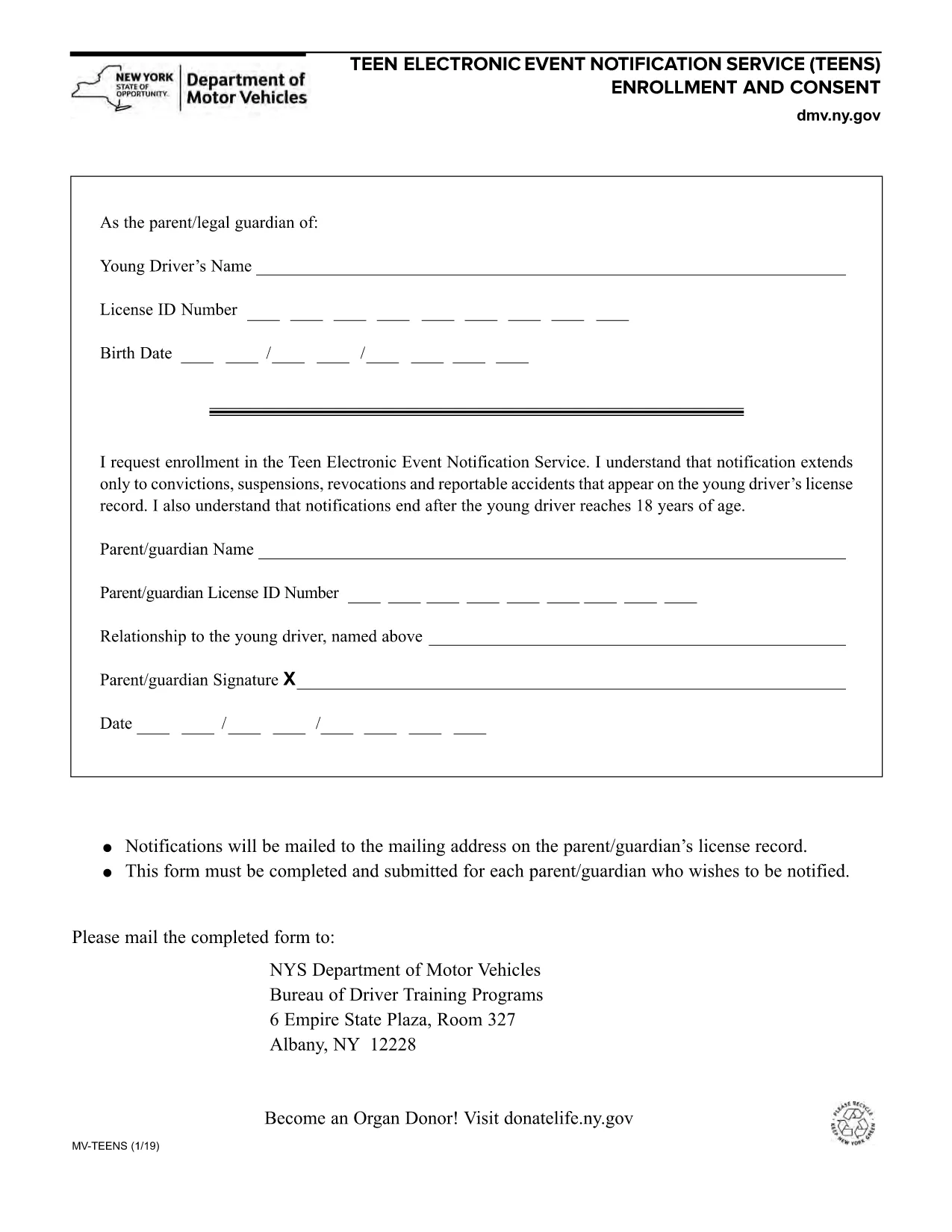
NY DMV MV-TEENS Fillable PDF – Teen Driver Notification Enrollment

  1. Ენა ინგლისური
  2. ქვეყანა აშშ
  3. აქტივობა Მართვის მოწმობა
  4. სახელმწიფო Ნიუ იორკი
NY DMV MV-TEENS Fillable PDF – Teen Driver Notification Enrollment

The MV-TEENS form is the official New York Department of Motor Vehicles (DMV) application for the Teen Electronic Event Notification Service. By enrolling, parents or legal guardians receive electronic alerts for convictions, suspensions, revocations, and reportable accidents that appear on a teen driver’s license record until the driver turns 18.

This fillable PDF is hosted on Formize, allowing you to complete the entire form directly in your browser—no printer, scanner, or PDF editor required. Simply click the “Fill out this form” button, let the Formize PDF Filler load, and start entering the required information.

Below you’ll find step‑by‑step instructions, tips to avoid common errors, and answers to the most frequently asked questions about the MV-TEENS form.

FAQ
  • Who can enroll in the MV-TEENS service?

    A parent or legal guardian of a driver under 18 years old can enroll on the teen’s behalf.

  • Is there a fee to submit the MV-TEENS form?

    No. The MV-TEENS enrollment is free of charge.

  • What types of notifications will I receive?

    You will receive electronic alerts for convictions, suspensions, revocations, and reportable accidents recorded on the teen’s license.

  • How long does the enrollment stay active?

    Notifications stop automatically when the teen driver reaches 18 years of age.

  • Can I edit the form after I’ve submitted it?

    Once submitted, you must complete a new MV-TEENS form to make changes.

  • Do I need a New York State driver’s license to use this form?

    Yes, the form is only for drivers licensed in New York State.

  • What if I don’t have internet access to fill the form online?

    You can download the PDF, print it, fill it out by hand, and mail it to the address listed on the form.

  • How will I receive the notifications?

    Notifications are sent via email to the address you provide on the form.

ᲠᲝᲒᲝᲠ

როგორ შეავსოთ MV-TEENS უფასოდ, ონლაინ 5 მარტივი ნაბიჯებით:

  1. 1
    Open the Fillable Form
    Click the “Fill out this form” button on the page. The Formize PDF Filler app will load in a new window.
  2. 2
    Enter Required Information
    Complete each field: driver’s name, date of birth, license number, parent/guardian contact details, and consent statements.
  3. 3
    Review for Accuracy
    Use the built‑in preview to double‑check all entries. Correct any mistakes before proceeding.
  4. 4
    Submit or Save
    When finished, click “Submit” to generate a completed PDF you can download, email, or print. You may also choose “Save” to keep an editable copy.
  5. 5
    Confirmation
    A confirmation screen will appear with a reference number. Keep this number for future correspondence with the NY DMV.
PDF შემავსებლის აპლიკაციის ფორმირება
ᲨᲔᲡᲐᲮᲔᲑ

მართვის მოწმობის განაცხადის ფორმები

უმეტეს ქვეყნებში, გზაზე გასვლამდე მართვის მოწმობის ქონა სავალდებულოა. მართვის მოწმობის აღება მნიშვნელოვანი ეტაპია მათთვის, ვისაც მანქანის მართვა სურს.

MV-TEENS არის მართვის მოწმობის განაცხადის ერთ-ერთი ფორმა, რომელიც არის დოკუმენტები, რომლებიც გამოიყენება ინფორმაციის მოსაგროვებლად იმ ადამიანებისგან, რომლებსაც სურთ განაცხადონ მართვის მოწმობის მისაღებად. ის ჩვეულებრივ შეიცავს ველებს განმცხადებლის სახელის, დაბადების თარიღის, პირადობის მოწმობის ნომრის, საკონტაქტო ინფორმაციის, ასევე მათი მართვის მოწმობის ისტორიისა და გამოცდილების შესახებ.

ᲛᲐᲮᲐᲡᲘᲐᲗᲔᲑᲚᲔᲑᲘ

PDF შემავსებელი

ონლაინ MV-TEENS-ის შევსების უმარტივესი გზა

  • სწრაფად შეავსეთ MV-TEENS
    ეძებთ გზას სწრაფად შეავსოთ MV-TEENS ონლაინ? ჩვენი ონლაინ უფასო PDF ფორმის შემავსებლით, თქვენ გეცოდინებათ როგორ შეცვალოთ და შეავსოთ ეს pdf დოკუმენტი ერთ წუთზე ნაკლებ დროში.
  • მარტივი გამოსაყენებელი ონლაინ PDF რედაქტორი
    მოგბეზრდათ PDF ფაილების დაბეჭდვა, რათა მათი რედაქტირება შეძლოთ, ხელახლა სკანირებამდე და უკან გაგზავნამდე? შეცვალეთ PDF დოკუმენტები უფასოდ ონლაინ. გამოიყენეთ ჩვენი ონლაინ pdf რედაქტორი დროისა და ქაღალდის დაზოგვისთვის.
  • შესანიშნავი ხელსაწყოები, ყველა პლატფორმა
    გაინტერესებთ როგორ შეავსოთ MV-TEENS Mac-ზე, ან იქნებ როგორ გამოიყენოთ PDF შემავსებელი უფასოდ? ჩვენი ონლაინ PDF ინსტრუმენტები მუშაობს ყველა პლატფორმაზე.
  • ფაილების უსაფრთხო შენახვა
    დასრულებული „MV-TEENS“ ფაილები ინახება დაცულ მონაცემთა ბაზაში, რომელსაც მართავს Amazon Cloud ჰოსტინგი. თქვენ შეგიძლიათ წაშალოთ თქვენი ფაილები ჩვენი სისტემიდან ნებისმიერ დროს. ნებისმიერ შემთხვევაში, ეს ფაილები ავტომატურად იშლება 24 საათის შემდეგ.
  • ჩატი MV-TEENS-ით
    ესაუბრეთ „MV-TEENS“-ს Chatize-ზე, რომელიც არის PDF წამკითხველის უფასო ასისტენტი. დასვით კითხვები და მიიღეთ პასუხები „MV-TEENS“-დან. უბრალოდ დააწკაპუნეთ ღილაკზე ჩატი დოკუმენტთან ზემოთ.

შევსების სესიის წაშლა

წაშალოთ არჩეული შევსების სესია? ამ შემთხვევაში, თქვენი პროგრესი ფორმის შევსებაში დაიკარგება.

რედაქტირების სესიის წაშლა

წაშალოთ არჩეული რედაქტირების სესია? ამ შემთხვევაში, თქვენი პროგრესი ფორმის შექმნასა და რედაქტირებაში დაიკარგება.