
hamburger-menu icon
Აირჩიეთ ენა

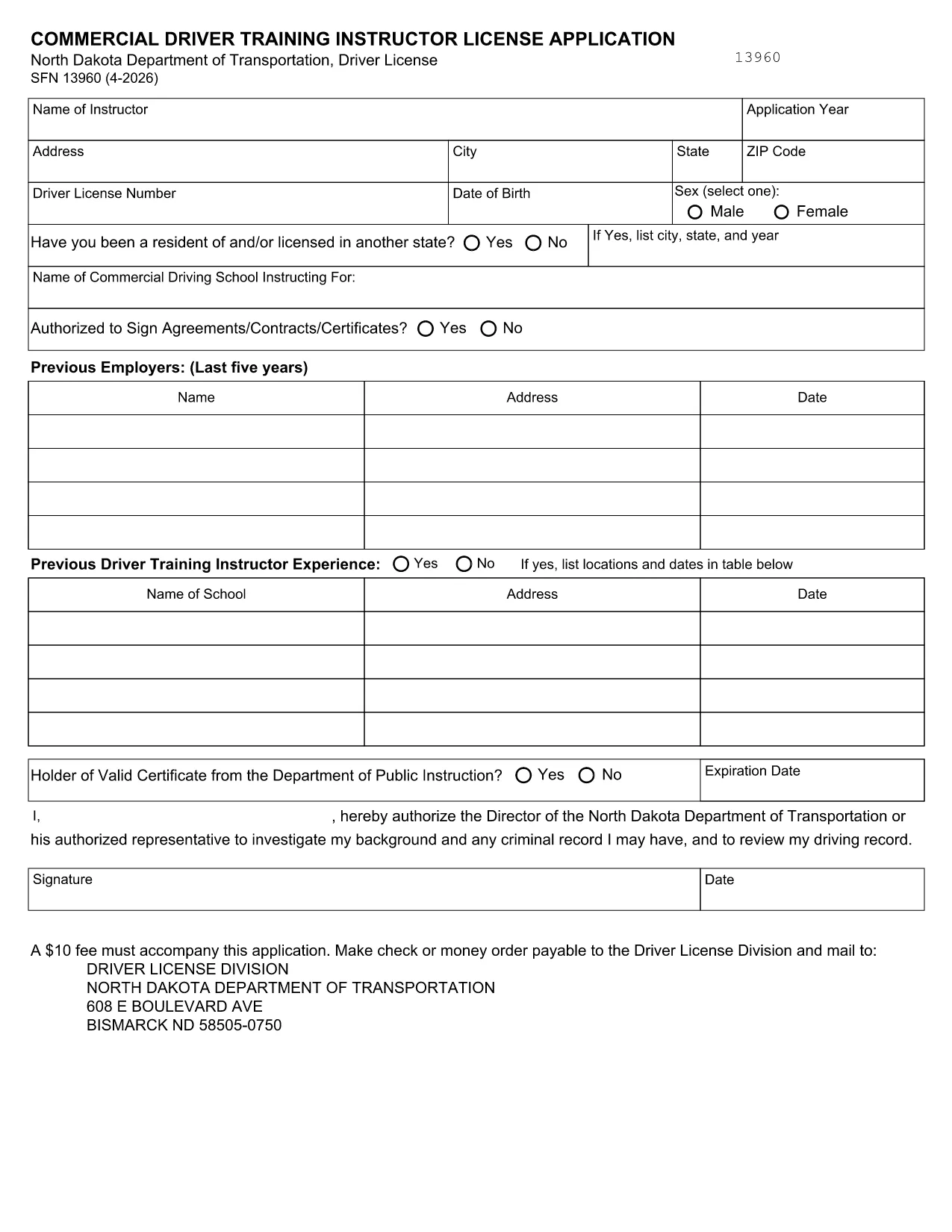
SFN 13960 Fillable PDF – Commercial Driver Training Instructor License

  1. Ენა ინგლისური
  2. ქვეყანა აშშ
  3. აქტივობა Მართვის მოწმობა
  4. სახელმწიფო ჩრდილოეთ დაკოტა
SFN 13960 Fillable PDF – Commercial Driver Training Instructor License

What Is Form SFN 13960?

Form SFN 13960 is the North Dakota Department of Transportation’s application for a Commercial Driver Training Instructor License. The form is required for anyone who wants to teach commercial‑driver‑training courses in North Dakota.

Why Use a Fillable PDF?

A fillable PDF lets you type directly into the document, eliminates handwritten errors, and speeds up submission. With Formize’s online PDF Filler you can complete the form in any web browser, sign electronically, and download a clean copy ready for filing.

How to Complete SFN 13960 Online

Instead of downloading the PDF and opening a desktop editor, simply click the “Fill out this form” button on this page. The Formize PDF Filler app will load, presenting the exact fields from the official SFN 13960. Fill each field, add your electronic signature, and hit **Submit** or **Download** when finished.

Common Mistakes to Avoid

  • Missing signatures: The form requires both the applicant’s and the employer’s signatures. Use the electronic signature tool.
  • Incorrect license numbers: Double‑check your commercial driver’s license (CDL) number before submitting.
  • Skipping required attachments: If you have certifications or proof of training, attach them as separate PDF files.
  • Using the wrong version: The link on this page always points to the latest ND DOT version (2024‑2026).

Where to Find Help

If you have questions about any field, consult the North Dakota DOT’s official instructions PDF. For technical assistance with the Formize filler, use the built‑in help tooltip on each field.

FAQ
  • Do I need to print the form after filling it online?

    No. The Formize filler creates a fully completed PDF that you can save, print for your records, or submit electronically if accepted.

  • What version of SFN 13960 is this?

    The PDF linked here is the current 2024‑2026 version published by the North Dakota Department of Transportation.

  • Can I use a mobile device to fill out the form?

    Yes. The Formize PDF Filler works on smartphones and tablets as long as you have a modern web browser.

  • Is there a fee to use Formize’s filler?

    Formize offers a free basic filler for government forms like SFN 13960. No payment is required to complete or download the form.

  • What should I do if a field is unclear?

    Hover over the help icon next to the field for a brief description, or refer to the official instructions linked in the “Where to Find Help” section.

  • How do I add supporting documents?

    Use the “Attach File” button inside the filler to upload PDFs such as certifications or proof of training.

  • Can I save my progress and return later?

    Yes. Click the “Save Draft” button to download a partially completed PDF that you can reopen in Formize later.

ᲠᲝᲒᲝᲠ

როგორ შეავსოთ SFN 13960 უფასოდ, ონლაინ 3 მარტივი ნაბიჯებით:

  1. 1
    Open the Fillable Form
    Click the “Fill out this form” button on the page. The Formize PDF Filler will launch in your browser.
  2. 2
    Enter Your Information
    Type into each highlighted field, upload any required attachments, and use the signature tool for both applicant and employer signatures.
  3. 3
    Save or Submit
    When all fields are complete, click **Download** to save a copy for your records or **Submit** to send it directly to the North Dakota DOT if they accept electronic submissions.
PDF შემავსებლის აპლიკაციის ფორმირება
ᲨᲔᲡᲐᲮᲔᲑ

მართვის მოწმობის განაცხადის ფორმები

უმეტეს ქვეყნებში, გზაზე გასვლამდე მართვის მოწმობის ქონა სავალდებულოა. მართვის მოწმობის აღება მნიშვნელოვანი ეტაპია მათთვის, ვისაც მანქანის მართვა სურს.

SFN 13960 არის მართვის მოწმობის განაცხადის ერთ-ერთი ფორმა, რომელიც არის დოკუმენტები, რომლებიც გამოიყენება ინფორმაციის მოსაგროვებლად იმ ადამიანებისგან, რომლებსაც სურთ განაცხადონ მართვის მოწმობის მისაღებად. ის ჩვეულებრივ შეიცავს ველებს განმცხადებლის სახელის, დაბადების თარიღის, პირადობის მოწმობის ნომრის, საკონტაქტო ინფორმაციის, ასევე მათი მართვის მოწმობის ისტორიისა და გამოცდილების შესახებ.

ᲛᲐᲮᲐᲡᲘᲐᲗᲔᲑᲚᲔᲑᲘ

PDF შემავსებელი

ონლაინ SFN 13960-ის შევსების უმარტივესი გზა

  • სწრაფად შეავსეთ SFN 13960
    ეძებთ გზას სწრაფად შეავსოთ SFN 13960 ონლაინ? ჩვენი ონლაინ უფასო PDF ფორმის შემავსებლით, თქვენ გეცოდინებათ როგორ შეცვალოთ და შეავსოთ ეს pdf დოკუმენტი ერთ წუთზე ნაკლებ დროში.
  • მარტივი გამოსაყენებელი ონლაინ PDF რედაქტორი
    მოგბეზრდათ PDF ფაილების დაბეჭდვა, რათა მათი რედაქტირება შეძლოთ, ხელახლა სკანირებამდე და უკან გაგზავნამდე? შეცვალეთ PDF დოკუმენტები უფასოდ ონლაინ. გამოიყენეთ ჩვენი ონლაინ pdf რედაქტორი დროისა და ქაღალდის დაზოგვისთვის.
  • შესანიშნავი ხელსაწყოები, ყველა პლატფორმა
    გაინტერესებთ როგორ შეავსოთ SFN 13960 Mac-ზე, ან იქნებ როგორ გამოიყენოთ PDF შემავსებელი უფასოდ? ჩვენი ონლაინ PDF ინსტრუმენტები მუშაობს ყველა პლატფორმაზე.
  • ფაილების უსაფრთხო შენახვა
    დასრულებული „SFN 13960“ ფაილები ინახება დაცულ მონაცემთა ბაზაში, რომელსაც მართავს Amazon Cloud ჰოსტინგი. თქვენ შეგიძლიათ წაშალოთ თქვენი ფაილები ჩვენი სისტემიდან ნებისმიერ დროს. ნებისმიერ შემთხვევაში, ეს ფაილები ავტომატურად იშლება 24 საათის შემდეგ.
  • ჩატი SFN 13960-ით
    ესაუბრეთ „SFN 13960“-ს Chatize-ზე, რომელიც არის PDF წამკითხველის უფასო ასისტენტი. დასვით კითხვები და მიიღეთ პასუხები „SFN 13960“-დან. უბრალოდ დააწკაპუნეთ ღილაკზე ჩატი დოკუმენტთან ზემოთ.

შევსების სესიის წაშლა

წაშალოთ არჩეული შევსების სესია? ამ შემთხვევაში, თქვენი პროგრესი ფორმის შევსებაში დაიკარგება.

რედაქტირების სესიის წაშლა

წაშალოთ არჩეული რედაქტირების სესია? ამ შემთხვევაში, თქვენი პროგრესი ფორმის შექმნასა და რედაქტირებაში დაიკარგება.