
hamburger-menu icon
Აირჩიეთ ენა

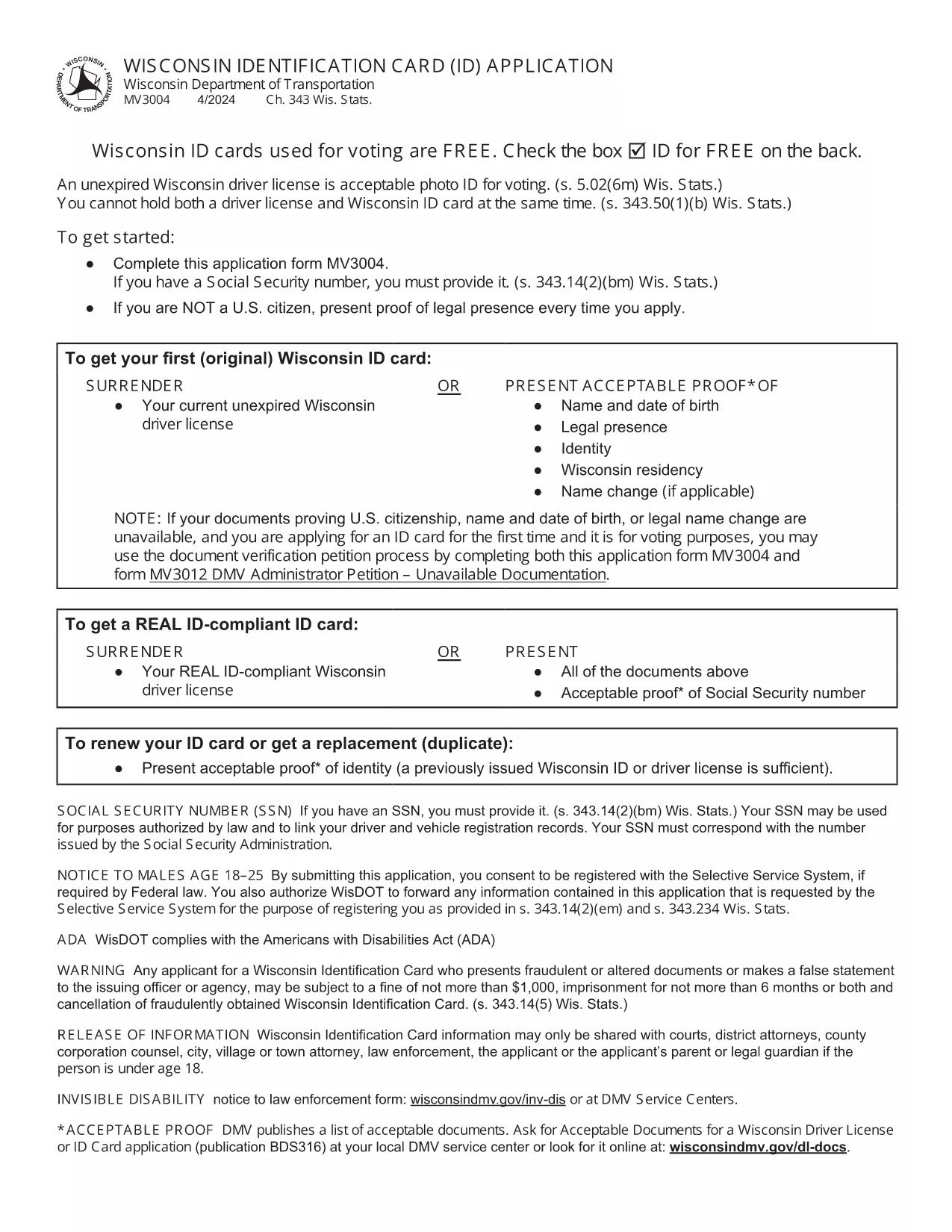
Wisconsin Identification Card Application (Form MV3004) – Fillable PDF

  1. Ენა ინგლისური
  2. ქვეყანა აშშ
  3. აქტივობა Მართვის მოწმობა
  4. სახელმწიფო ვისკონსინი
Wisconsin Identification Card Application (Form MV3004) – Fillable PDF

Form MV3004 is the official Wisconsin Identification Card (ID) application issued by the Wisconsin Department of Transportation (DOT). Whether you need an ID for voting, travel, or everyday identification, this fillable PDF lets you complete the entire request from the comfort of your home.

What Is Form MV3004?

The MV3004 form collects personal details, proof‑of‑citizenship documents, and a photo consent statement. It is required for first‑time applicants, name changes, or renewals when a new photo is needed.

How to Complete the MV3004 Online

Instead of downloading and editing the PDF manually, simply click the "Fill out this form" button on this page. The Formize PDF Filler app will load directly in your browser, allowing you to type, select, and sign without any extra software.

  • Step 1: Click the button and wait for the Formize PDF Filler to appear.
  • Step 2: Enter your name, address, date of birth, and other required information.
  • Step 3: Upload scanned copies of your citizenship and name‑change documents.
  • Step 4: Review the completed form for accuracy.
  • Step 5: Submit the form electronically or print it for mailing.

Common Mistakes to Avoid

  • Leaving any required field blank – the online filler will highlight missing data.
  • Uploading blurry or non‑PDF supporting documents – use clear, high‑resolution scans.
  • Signing with a stylus that does not create a vector signature – use the built‑in signature tool.
  • Mismatching the name on your ID with the name on supporting documents – ensure exact spelling.

Where to Submit Your Completed Form

After you finish, you have two options:

  • Electronic submission: Save the completed PDF and email it to your local DMV office (check the Wisconsin DOT contact page for the correct address).
  • Mail submission: Print the form, attach your original documents or certified copies, and mail everything to the address listed on the form.

Processing typically takes 7‑10 business days. Keep a copy of the submitted PDF for your records.

FAQ
  • Who needs to fill out Form MV3004?

    Anyone applying for a Wisconsin state identification card for the first time, changing their legal name, or needing a new photo on an existing ID.

  • Can I submit the form online?

    Yes. After completing the fillable PDF, you can email the file to your local DMV office. Check the Wisconsin DOT website for the correct email address.

  • What documents must I attach?

    Proof of U.S. citizenship (e.g., birth certificate or passport), a legal name‑change document if applicable, and a recent head‑shot photo if a new picture is required.

  • How long does processing take?

    Standard processing is 7‑10 business days after the DMV receives a complete application and supporting documents.

  • Is there a fee for the Wisconsin ID card?

    Yes. As of 2026, the fee is $30 for a standard ID card. Check the latest fee schedule on the Wisconsin DOT website.

  • What if I make a mistake on the form?

    If you notice an error after submission, contact your local DMV office immediately. In most cases, you can submit a corrected form without paying an additional fee.

  • Do I need a notarized signature?

    No. The electronic signature created in the Formize PDF Filler is accepted for the MV3004 application.

  • Can I use a mobile device to fill out MV3004?

    Yes. The Formize PDF Filler works on modern smartphones and tablets, but a larger screen makes it easier to review scanned documents.

ᲠᲝᲒᲝᲠ

როგორ შეავსოთ MV3004 უფასოდ, ონლაინ 5 მარტივი ნაბიჯებით:

  1. 1
    Open the Fillable Form
    Click the "Fill out this form" button on the page. The Formize PDF Filler loads instantly in your browser.
  2. 2
    Enter Your Information
    Type your personal details into each field. Use the dropdown menus for state, gender, and document types.
  3. 3
    Upload Supporting Documents
    Attach clear PDF or JPEG scans of your citizenship proof, name‑change documents, and a recent photo if required.
  4. 4
    Review and Sign
    Double‑check every entry, then use the built‑in signature tool to add your electronic signature.
  5. 5
    Submit or Print
    Save the completed PDF. You can either email it directly to your local DMV office or print it for postal submission.
PDF შემავსებლის აპლიკაციის ფორმირება
ᲨᲔᲡᲐᲮᲔᲑ

მართვის მოწმობის განაცხადის ფორმები

MV3004 არის მართვის მოწმობის ერთ-ერთი ფორმა, რომელიც არის დოკუმენტები, რომლებიც გამოიყენება მართვის მოწმობის მისაღებად ან მართვის მოწმობასთან დაკავშირებული სხვადასხვა სერვისების მოთხოვნის მიზნით. ეს ფორმები, როგორც წესი, მოწოდებულია დეპარტამენტის ან სააგენტოს მიერ, რომელიც პასუხისმგებელია მართვის მოწმობების გაცემაზე კონკრეტულ იურისდიქციაში, როგორიცაა საავტომობილო მანქანების დეპარტამენტი (DMV) შეერთებულ შტატებში.

მართვის მოწმობის საერთო ფორმები მოიცავს:

მძღოლის მოწმობის განაცხადი: ეს ფორმა გამოიყენება ახალი მართვის მოწმობის მისაღებად ან არსებულის გასაახლებლად. როგორც წესი, ის მოითხოვს პერსონალურ ინფორმაციას, როგორიცაა სახელი, მისამართი, დაბადების თარიღი და სოციალური დაცვის ნომერი.

საიდენტიფიკაციო დოკუმენტები: ზოგიერთი იურისდიქცია მოითხოვს კონკრეტულ საიდენტიფიკაციო დოკუმენტებს განმცხადებლის ვინაობისა და საცხოვრებელი ადგილის დასადასტურებლად. ეს შეიძლება შეიცავდეს ფორმებს, როგორიცაა დაბადების მოწმობა, პასპორტი ან სოციალური დაცვის ბარათი.

მხედველობის გამოკვლევა: მართვის მოწმობის მრავალი განაცხადი მოითხოვს მხედველობის შემოწმების ფორმას, სადაც ავტორიზებული სამედიცინო პროფესიონალი ან თვალის მოვლის სპეციალისტი ადასტურებს, რომ განმცხადებელი აკმაყოფილებს მართვის მინიმალურ მხედველობის მოთხოვნებს.

მძღოლის განათლების ფორმები: ზოგიერთ შემთხვევაში, პირებს შეიძლება დასჭირდეთ მძღოლის განათლების კურსის გავლის დამადასტურებელი საბუთი, როგორიცაა მძღოლის განათლების დამთავრების სერთიფიკატი ან ინსტრუქტორის მიერ ხელმოწერილი ფორმა.

სამედიცინო შეფასება: ზოგიერთმა სამედიცინო მდგომარეობამ შეიძლება მოითხოვოს დამატებითი ფორმების შევსება ჯანდაცვის პროფესიონალის მიერ. ეს ფორმები ამოწმებს განმცხადებლის ფიზიკურ და გონებრივ მზადყოფნას მანქანის მართვისთვის.

მისამართის შეცვლის ფორმა: თუ მართვის მოწმობის მფლობელი გადადის ახალ მისამართზე, მას შეიძლება დასჭირდეს მისამართის შეცვლის ფორმის შევსება მართვის მოწმობის ინფორმაციის გასაახლებლად.

მართვის მოწმობის ფორმები შეგიძლიათ მიიღოთ ადგილობრივი DMV ოფისიდან ან ჩამოტვირთოთ მათი ვებსაიტიდან. მნიშვნელოვანია, რომ ყურადღებით შეავსოთ და წარადგინოთ საჭირო ფორმები ნებისმიერ დამხმარე დოკუმენტთან ერთად, რათა უზრუნველყოთ განაცხადის ან მომსახურების პროცესის შეუფერხებლად.

ᲛᲐᲮᲐᲡᲘᲐᲗᲔᲑᲚᲔᲑᲘ

PDF შემავსებელი

ონლაინ MV3004-ის შევსების უმარტივესი გზა

  • სწრაფად შეავსეთ MV3004
    ეძებთ გზას სწრაფად შეავსოთ MV3004 ონლაინ? ჩვენი ონლაინ უფასო PDF ფორმის შემავსებლით, თქვენ გეცოდინებათ როგორ შეცვალოთ და შეავსოთ ეს pdf დოკუმენტი ერთ წუთზე ნაკლებ დროში.
  • მარტივი გამოსაყენებელი ონლაინ PDF რედაქტორი
    მოგბეზრდათ PDF ფაილების დაბეჭდვა, რათა მათი რედაქტირება შეძლოთ, ხელახლა სკანირებამდე და უკან გაგზავნამდე? შეცვალეთ PDF დოკუმენტები უფასოდ ონლაინ. გამოიყენეთ ჩვენი ონლაინ pdf რედაქტორი დროისა და ქაღალდის დაზოგვისთვის.
  • შესანიშნავი ხელსაწყოები, ყველა პლატფორმა
    გაინტერესებთ როგორ შეავსოთ MV3004 Mac-ზე, ან იქნებ როგორ გამოიყენოთ PDF შემავსებელი უფასოდ? ჩვენი ონლაინ PDF ინსტრუმენტები მუშაობს ყველა პლატფორმაზე.
  • ფაილების უსაფრთხო შენახვა
    დასრულებული „MV3004“ ფაილები ინახება დაცულ მონაცემთა ბაზაში, რომელსაც მართავს Amazon Cloud ჰოსტინგი. თქვენ შეგიძლიათ წაშალოთ თქვენი ფაილები ჩვენი სისტემიდან ნებისმიერ დროს. ნებისმიერ შემთხვევაში, ეს ფაილები ავტომატურად იშლება 24 საათის შემდეგ.
  • ჩატი MV3004-ით
    ესაუბრეთ „MV3004“-ს Chatize-ზე, რომელიც არის PDF წამკითხველის უფასო ასისტენტი. დასვით კითხვები და მიიღეთ პასუხები „MV3004“-დან. უბრალოდ დააწკაპუნეთ ღილაკზე ჩატი დოკუმენტთან ზემოთ.

შევსების სესიის წაშლა

წაშალოთ არჩეული შევსების სესია? ამ შემთხვევაში, თქვენი პროგრესი ფორმის შევსებაში დაიკარგება.

რედაქტირების სესიის წაშლა

წაშალოთ არჩეული რედაქტირების სესია? ამ შემთხვევაში, თქვენი პროგრესი ფორმის შექმნასა და რედაქტირებაში დაიკარგება.