hamburger-menu icon
Აირჩიეთ ენა

Parent‑Teen Safe‑Driving Agreement (Fillable PDF)

  1. Ენა ინგლისური
  2. ქვეყანა აშშ
  3. აქტივობა Driving Safety
  4. დეპარტამენტი Health
Parent‑Teen Safe‑Driving Agreement (Fillable PDF)

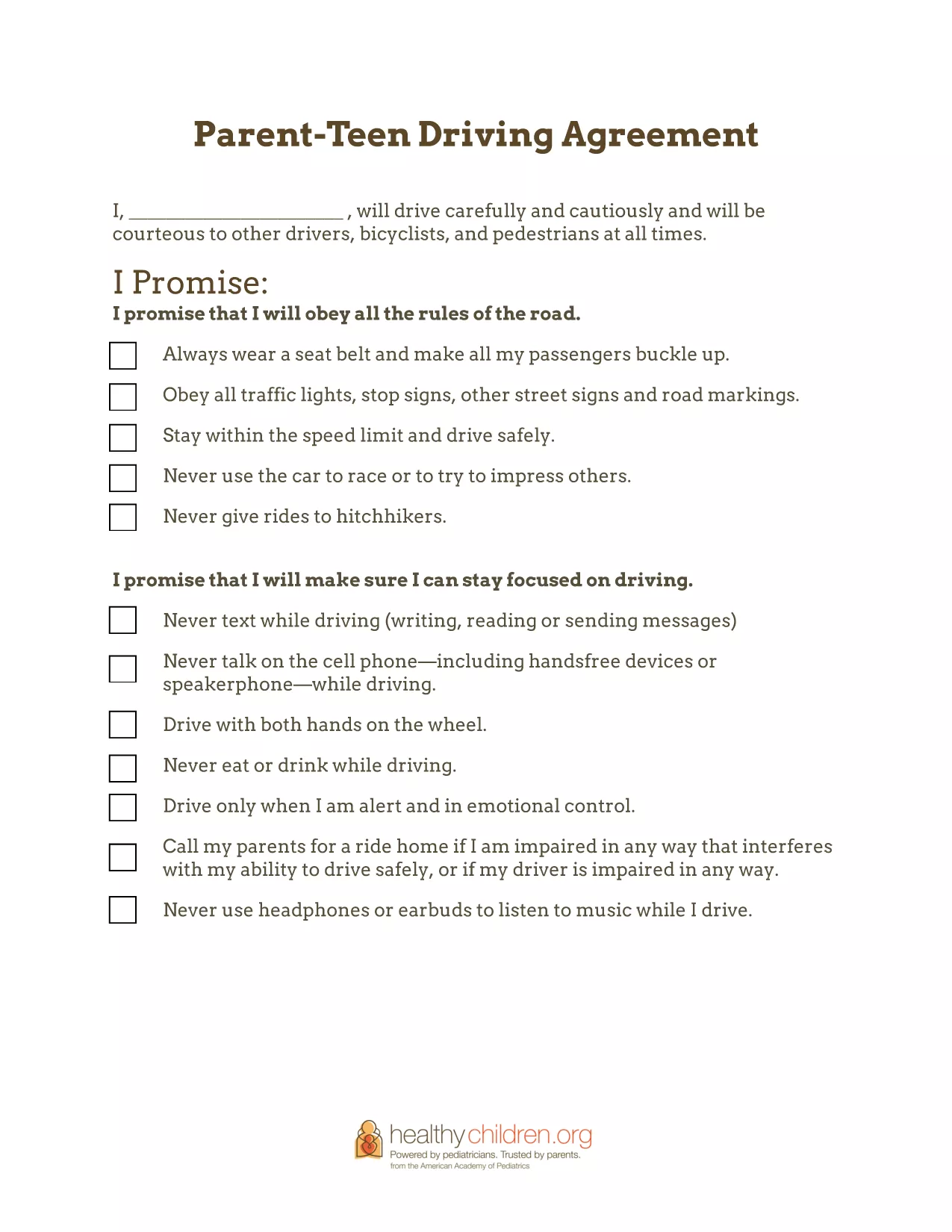
Getting your teenager behind the wheel is a major milestone, but it also brings new responsibilities for both parents and teens. The Parent‑Teen Safe‑Driving Agreement gives families a clear, written contract that outlines expectations, limits, and consequences for safe driving.

Why a Safe‑Driving Agreement Matters

Studies show that teens who sign a written driving contract are less likely to text while driving, exceed speed limits, or drive under the influence. A signed agreement creates accountability, opens ongoing dialogue, and helps parents monitor progress as driving skills improve.

Key Sections of the Agreement

  • Driver Pledge: A teen‑signed promise to obey traffic laws, avoid distractions, and stay sober.
  • Parental Rules: Curfew times, passenger limits, and restrictions on high‑risk driving conditions.
  • Financial Contributions: How the teen will share costs for gas, insurance, and maintenance.
  • Penalties: Clear consequences for breaking the agreement, such as loss of driving privileges.

How to Fill Out the Form Online

Instead of downloading and editing the PDF in a separate program, simply click the Fill out this form button on this page. The Formize PDF Filler app will load the fillable fields directly in your browser. Follow the on‑screen prompts, save your changes, and download a completed copy when you’re done.

Tips for Enforcing the Rules

  • Review the agreement together every month and adjust rules as driving experience grows.
  • Keep a printed copy in the car so both driver and passengers can see the expectations.
  • Use a shared calendar or app to track curfew compliance and mileage.

Common Mistakes to Avoid

  • Leaving sections blank – every field should be completed to avoid ambiguity.
  • Skipping the teen’s signature – the pledge is only binding when the teen signs.
  • Setting unrealistic penalties that the teen cannot meet.

Download the fillable PDF below, complete it online, and start the conversation that keeps your teen safe on the road.

FAQ
  • Is the Parent‑Teen Safe‑Driving Agreement legally binding?

    The agreement is not a legal contract, but it creates a clear, written understanding between parent and teen that can be enforced within the family.

  • Can I customize the agreement for my state’s driving laws?

    Yes. The fillable PDF lets you edit any section, so you can add state‑specific curfew times, passenger limits, or other local regulations.

  • Do I need a PDF editor to fill out the form?

    No. Use the Formize PDF Filler on this page – it works in any modern browser without additional software.

  • How often should we revisit the agreement?

    We recommend reviewing the agreement monthly for the first six months, then every six months or after any major driving milestone.

  • What if my teen breaks the rules?

    The agreement includes a “Penalties” section. Discuss the consequence, enforce it consistently, and then reset expectations together.

  • Can I share the completed agreement with my insurance company?

    Yes. A signed copy can be uploaded to your insurer to demonstrate responsible driving practices and may help lower premiums.

ᲠᲝᲒᲝᲠ

როგორ შეავსოთ parent teen driving agreement უფასოდ, ონლაინ 5 მარტივი ნაბიჯებით:

  1. 1
    Open the Fillable Form
    Click the “Fill out this form” button on this page. The Formize PDF Filler app will open in a new tab.
  2. 2
    Enter the Required Information
    Type directly into each field—parent details, teen details, rules, and penalties. Use the tab key to move quickly between sections.
  3. 3
    Save and Review
    When all fields are completed, click the “Save” button. Review the agreement with your teen to ensure every point is clear.
  4. 4
    Sign the Agreement
    Both parent and teen can add a digital signature using the built‑in signature tool, then click “Apply”.
  5. 5
    Download or Print
    After signing, click “Download PDF” to save a copy or “Print” to place a hard copy in the car.
PDF შემავსებლის აპლიკაციის ფორმირება
ᲨᲔᲡᲐᲮᲔᲑ

parent teen driving agreement შაბლონი

PDF დოკუმენტის სანახავად და შევსების ფუნქციების ტრადიციული ნაკრებით, ვებ აპლიკაციის უპირატესობებთან და საპასუხო განლაგებასთან ერთად, შეგიძლიათ შეავსოთ parent teen driving agreement წუთებში.

ᲛᲐᲮᲐᲡᲘᲐᲗᲔᲑᲚᲔᲑᲘ

PDF შემავსებელი

ონლაინ parent teen driving agreement-ის შევსების უმარტივესი გზა

  • სწრაფად შეავსეთ parent teen driving agreement
    ეძებთ გზას სწრაფად შეავსოთ parent teen driving agreement ონლაინ? ჩვენი ონლაინ უფასო PDF ფორმის შემავსებლით, თქვენ გეცოდინებათ როგორ შეცვალოთ და შეავსოთ ეს pdf დოკუმენტი ერთ წუთზე ნაკლებ დროში.
  • მარტივი გამოსაყენებელი ონლაინ PDF რედაქტორი
    მოგბეზრდათ PDF ფაილების დაბეჭდვა, რათა მათი რედაქტირება შეძლოთ, ხელახლა სკანირებამდე და უკან გაგზავნამდე? შეცვალეთ PDF დოკუმენტები უფასოდ ონლაინ. გამოიყენეთ ჩვენი ონლაინ pdf რედაქტორი დროისა და ქაღალდის დაზოგვისთვის.
  • შესანიშნავი ხელსაწყოები, ყველა პლატფორმა
    გაინტერესებთ როგორ შეავსოთ parent teen driving agreement Mac-ზე, ან იქნებ როგორ გამოიყენოთ PDF შემავსებელი უფასოდ? ჩვენი ონლაინ PDF ინსტრუმენტები მუშაობს ყველა პლატფორმაზე.
  • ფაილების უსაფრთხო შენახვა
    დასრულებული „parent teen driving agreement“ ფაილები ინახება დაცულ მონაცემთა ბაზაში, რომელსაც მართავს Amazon Cloud ჰოსტინგი. თქვენ შეგიძლიათ წაშალოთ თქვენი ფაილები ჩვენი სისტემიდან ნებისმიერ დროს. ნებისმიერ შემთხვევაში, ეს ფაილები ავტომატურად იშლება 24 საათის შემდეგ.
  • ჩატი parent teen driving agreement-ით
    ესაუბრეთ „parent teen driving agreement“-ს Chatize-ზე, რომელიც არის PDF წამკითხველის უფასო ასისტენტი. დასვით კითხვები და მიიღეთ პასუხები „parent teen driving agreement“-დან. უბრალოდ დააწკაპუნეთ ღილაკზე ჩატი დოკუმენტთან ზემოთ.

შევსების სესიის წაშლა

წაშალოთ არჩეული შევსების სესია? ამ შემთხვევაში, თქვენი პროგრესი ფორმის შევსებაში დაიკარგება.

რედაქტირების სესიის წაშლა

წაშალოთ არჩეული რედაქტირების სესია? ამ შემთხვევაში, თქვენი პროგრესი ფორმის შექმნასა და რედაქტირებაში დაიკარგება.