hamburger-menu icon
Აირჩიეთ ენა

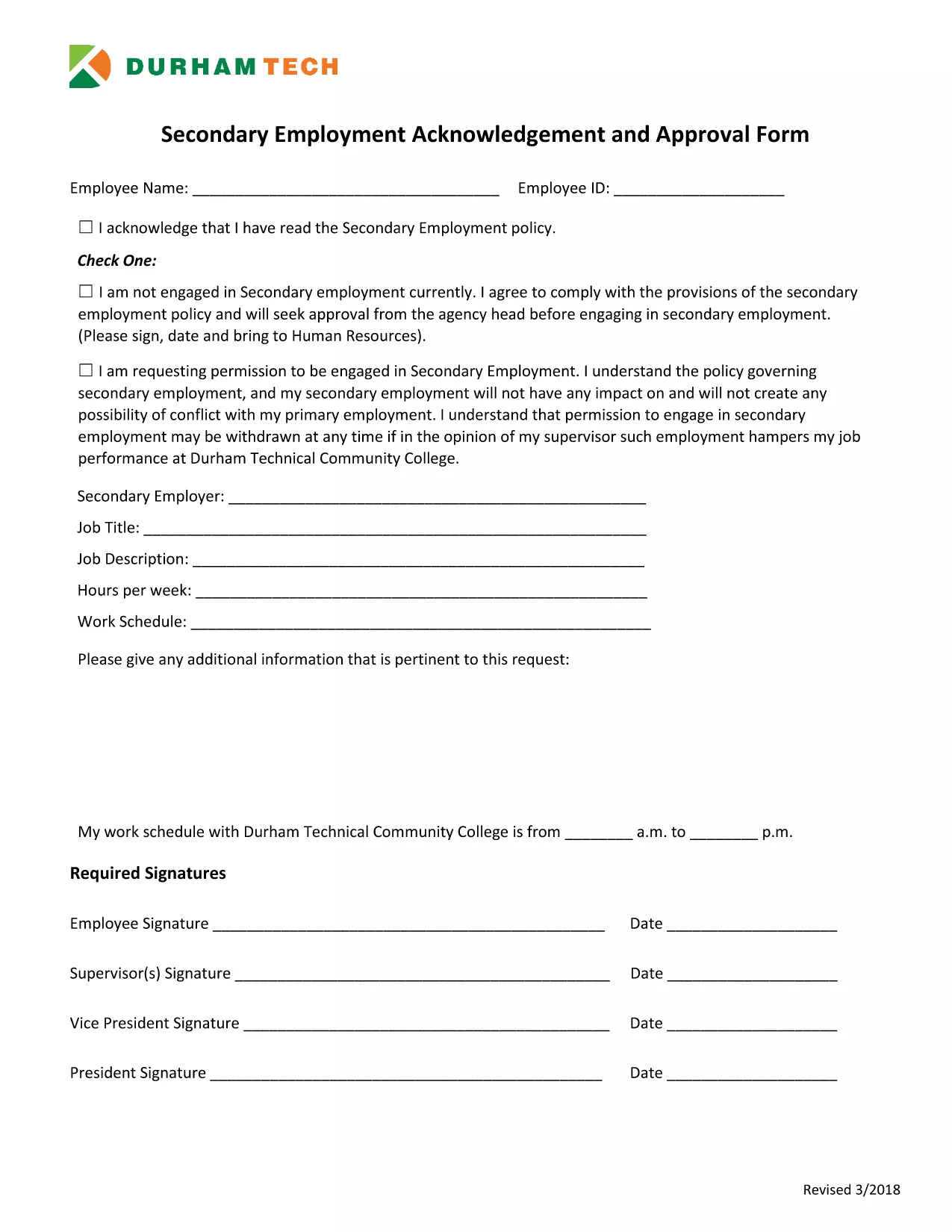
Secondary Employment Declaration – Resident Fillable PDF

  1. Ენა ინგლისური
  2. ქვეყანა აშშ
  3. აქტივობა Employment Compliance
  4. დეპარტამენტი Human Resources
Secondary Employment Declaration – Resident Fillable PDF

Employers often require a Secondary Employment Declaration to ensure that any outside work does not create a conflict of interest or violate company policy. This fillable PDF is designed for residents who hold a primary position and want to disclose any additional employment.

Why You Need a Secondary Employment Declaration

  • Maintains transparency with your employer.
  • Protects you from potential policy violations.
  • Helps HR track outside income for tax and compliance purposes.

How to Complete the Form Online

Using Formize’s built‑in PDF filler, you can complete the declaration without downloading a separate editor. Just click the button below, fill each field, and save.

Common Mistakes to Avoid

  • Leaving required fields blank – the form will not submit.
  • Providing vague job descriptions – be specific about duties and hours.
  • Submitting an outdated version – always use the latest PDF (linked below).

Submission Guidelines & What Happens Next

After saving the completed PDF, email it to your HR department or upload it through your internal portal. Keep a copy for your records. HR will review the declaration and confirm whether the secondary job is permissible.

Download the Secondary Employment Request Form (PDF)

FAQ
  • Do I need to sign the secondary employment declaration electronically?

    Yes. The Formize filler includes a digital signature field. Just type your name in the signature box and it will be accepted as an electronic signature.

  • Can I edit the form after I download it?

    You can reopen the saved PDF in the Formize filler to make changes, but it’s best to complete all fields before the first download.

  • What if my secondary job changes after I submit the form?

    Submit an updated declaration using the same fillable PDF. Notify HR as soon as any details (hours, compensation, duties) change.

  • Is the secondary employment declaration required for part‑time work?

    Yes. Any paid activity outside your primary employment, including part‑time or freelance work, must be disclosed.

  • Will my personal information be shared with anyone outside my company?

    No. The form is stored securely on Formize’s encrypted servers and only shared with your HR department when you submit it.

  • What happens if I don’t submit the declaration?

    Failure to disclose secondary employment can result in disciplinary action, including possible termination, because it may violate company policy.

ᲠᲝᲒᲝᲠ

როგორ შეავსოთ secondary employment declaration უფასოდ, ონლაინ 5 მარტივი ნაბიჯებით:

  1. 1
    Open the Fillable Form
    Click the "Fill out this form" button on the page. The Formize PDF Filler app will load instantly in your browser.
  2. 2
    Review Each Section
    Read the instructions at the top of each page and make sure you understand what information is required.
  3. 3
    Enter Your Information
    Type directly into the PDF fields – name, employee ID, details of the secondary job, hours, and compensation.
  4. 4
    Save and Download
    When all fields are completed, click "Save". The filled PDF will be downloaded to your computer.
  5. 5
    Submit to HR
    Email the saved PDF to your HR contact or upload it to the company portal as instructed.
PDF შემავსებლის აპლიკაციის ფორმირება
ᲨᲔᲡᲐᲮᲔᲑ

secondary employment declaration შაბლონი

PDF დოკუმენტის სანახავად და შევსების ფუნქციების ტრადიციული ნაკრებით, ვებ აპლიკაციის უპირატესობებთან და საპასუხო განლაგებასთან ერთად, შეგიძლიათ შეავსოთ secondary employment declaration წუთებში.

ᲛᲐᲮᲐᲡᲘᲐᲗᲔᲑᲚᲔᲑᲘ

PDF შემავსებელი

ონლაინ secondary employment declaration-ის შევსების უმარტივესი გზა

  • სწრაფად შეავსეთ secondary employment declaration
    ეძებთ გზას სწრაფად შეავსოთ secondary employment declaration ონლაინ? ჩვენი ონლაინ უფასო PDF ფორმის შემავსებლით, თქვენ გეცოდინებათ როგორ შეცვალოთ და შეავსოთ ეს pdf დოკუმენტი ერთ წუთზე ნაკლებ დროში.
  • მარტივი გამოსაყენებელი ონლაინ PDF რედაქტორი
    მოგბეზრდათ PDF ფაილების დაბეჭდვა, რათა მათი რედაქტირება შეძლოთ, ხელახლა სკანირებამდე და უკან გაგზავნამდე? შეცვალეთ PDF დოკუმენტები უფასოდ ონლაინ. გამოიყენეთ ჩვენი ონლაინ pdf რედაქტორი დროისა და ქაღალდის დაზოგვისთვის.
  • შესანიშნავი ხელსაწყოები, ყველა პლატფორმა
    გაინტერესებთ როგორ შეავსოთ secondary employment declaration Mac-ზე, ან იქნებ როგორ გამოიყენოთ PDF შემავსებელი უფასოდ? ჩვენი ონლაინ PDF ინსტრუმენტები მუშაობს ყველა პლატფორმაზე.
  • ფაილების უსაფრთხო შენახვა
    დასრულებული „secondary employment declaration“ ფაილები ინახება დაცულ მონაცემთა ბაზაში, რომელსაც მართავს Amazon Cloud ჰოსტინგი. თქვენ შეგიძლიათ წაშალოთ თქვენი ფაილები ჩვენი სისტემიდან ნებისმიერ დროს. ნებისმიერ შემთხვევაში, ეს ფაილები ავტომატურად იშლება 24 საათის შემდეგ.
  • ჩატი secondary employment declaration-ით
    ესაუბრეთ „secondary employment declaration“-ს Chatize-ზე, რომელიც არის PDF წამკითხველის უფასო ასისტენტი. დასვით კითხვები და მიიღეთ პასუხები „secondary employment declaration“-დან. უბრალოდ დააწკაპუნეთ ღილაკზე ჩატი დოკუმენტთან ზემოთ.

შევსების სესიის წაშლა

წაშალოთ არჩეული შევსების სესია? ამ შემთხვევაში, თქვენი პროგრესი ფორმის შევსებაში დაიკარგება.

რედაქტირების სესიის წაშლა

წაშალოთ არჩეული რედაქტირების სესია? ამ შემთხვევაში, თქვენი პროგრესი ფორმის შექმნასა და რედაქტირებაში დაიკარგება.