
hamburger-menu icon
Აირჩიეთ ენა

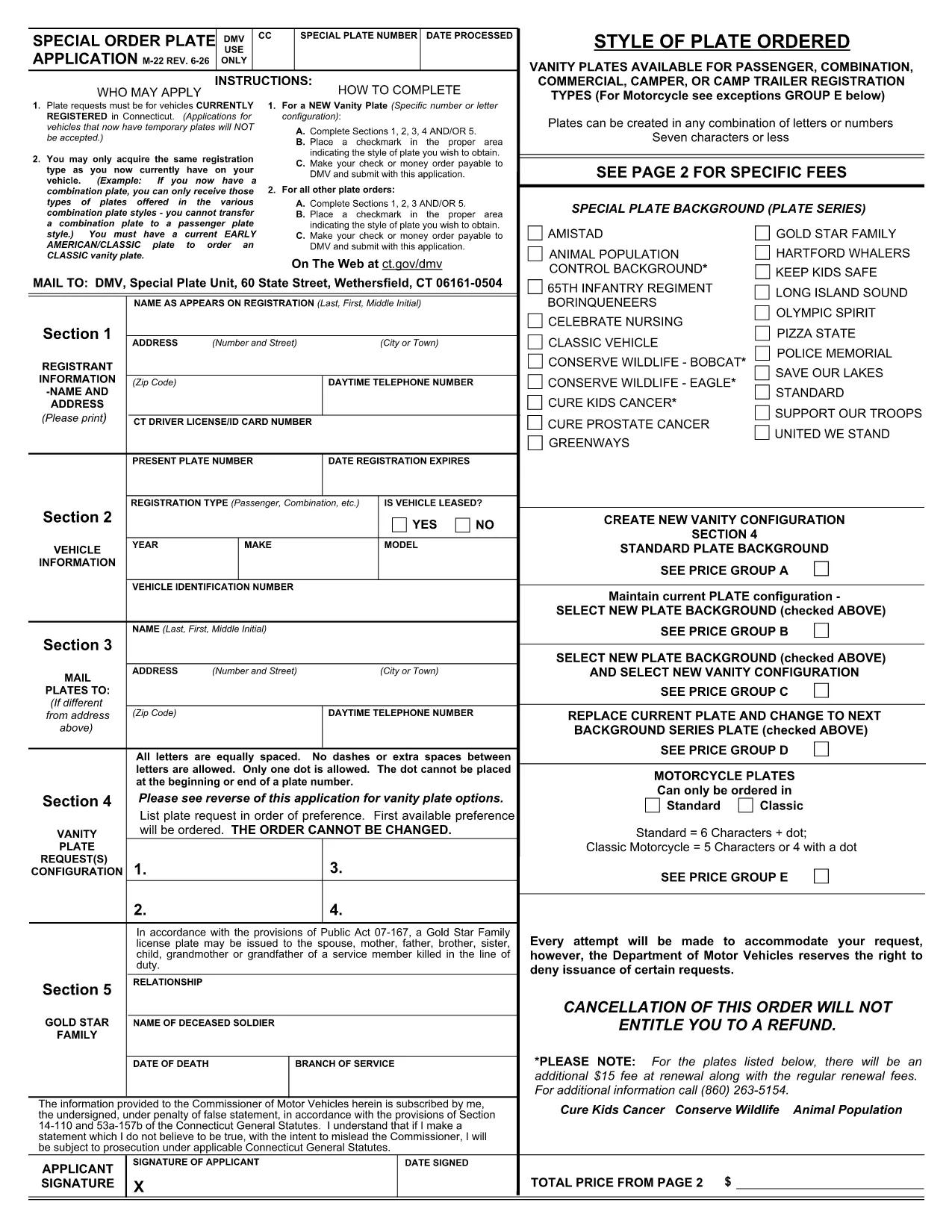
Connecticut Form M22 – Fillable PDF for Special Order License Plates

  1. ქვეყანა აშშ
  2. Ენა ინგლისური
  3. აქტივობა Გადასახადები
  4. დეპარტამენტი IRS
Connecticut Form M22 – Fillable PDF for Special Order License Plates

The Connecticut Form M22 (also called the "Special Order Plate Application") is the official document you need to request personalized or specialty license plates in CT. Instead of printing, scanning, and mailing a paper copy, you can fill the form directly in your browser using Formize’s secure PDF Filler.

What Is Form M22?

Form M22 is issued by the Connecticut Department of Motor Vehicles (DMV) and is used for:

  • Vanity plates for passenger vehicles, trucks, campers, and trailers.
  • Specialty plates that feature custom designs or charitable causes.
  • Any plate request that deviates from the standard state‑issued designs.

The form collects vehicle information, personal details, and the exact plate configuration you desire.

How to Complete the M22 Form Online

Follow these simple steps to fill out the form without ever leaving the page:

  • Click the "Fill out this form" button below the description.
  • Our Formize PDF Filler will load the official M22 PDF instantly.
  • Enter your name, address, vehicle identification number (VIN), and select the plate style you want.
  • Review each section for accuracy, then sign electronically using your mouse or touchscreen.
  • When you’re done, download the completed PDF or submit it directly to the CT DMV as instructed.

Common Mistakes to Avoid

  • Incorrect VIN or plate number – double‑check the VIN on your registration.
  • Leaving required fields blank – the form will not submit if mandatory sections are empty.
  • Using prohibited characters or messages on the plate – review CT DMV guidelines before typing your custom text.
  • Forgetting to attach supporting documents (title, proof of ownership) when you mail the form.

Where to Submit Your Completed Form

After you save the filled PDF, you have two options:

  1. Mail the form with payment to the address listed on the last page of the PDF.
  2. Visit a local Connecticut DMV office and present the printed form.

Electronic submission is not yet accepted for M22, so a printed copy is required for final delivery.

Download the Official Fillable PDF

Click the button below to open the fillable Connecticut Form M22 in the Formize PDF Filler. No additional software is needed.

Fill out this form

FAQ
  • Is Form M22 available as a fillable PDF?

    Yes. The Connecticut DMV provides a fillable PDF that can be completed online using Formize’s PDF Filler.

  • Can I submit the M22 form electronically?

    Electronic submission is not accepted for M22. After filling it out, you must print the form and mail it or bring it to a DMV office.

  • What payment methods are accepted with the M22 application?

    The form requires a check or money order payable to the Connecticut DMV. Credit cards are not accepted on the paper form.

  • How long does it take to process a special order plate request?

    Processing typically takes 4–6 weeks after the DMV receives the completed M22 form and payment.

  • Do I need any additional documents with the M22 form?

    Include a copy of the vehicle title or registration and a valid photo ID. Some specialty plates may require proof of eligibility.

  • Can I change my plate request after submitting the M22 form?

    Changes are not allowed once the form is submitted. You must withdraw the request and submit a new M22 form.

  • Is there a fee for using Formize’s PDF Filler?

    No. Formize provides the filler for free; you only pay the DMV’s plate and processing fees.

ᲠᲝᲒᲝᲠ

როგორ შეავსოთ Connecticut M22 PDF უფასოდ, ონლაინ 4 მარტივი ნაბიჯებით:

  1. 1
    Open the Fillable Form
    Click the "Fill out this form" button above. The Formize PDF Filler loads the official M22 PDF directly in your browser.
  2. 2
    Enter Your Information
    Fill in each required field—personal details, vehicle information, and the desired plate style. The form auto‑saves as you type.
  3. 3
    Add Your Electronic Signature
    Use your mouse, trackpad, or touchscreen to sign the form. The signature is legally binding for the CT DMV.
  4. 4
    Save or Print the Completed PDF
    When all sections are complete, click "Download" to save a copy or print the form for mailing to the DMV.
PDF შემავსებლის აპლიკაციის ფორმირება
ᲨᲔᲡᲐᲮᲔᲑ

ფედერალური საგადასახადო ფორმები

Connecticut M22 PDF არის ერთ-ერთი ფედერალური საგადასახადო ფორმა, რომელიც წარმოადგენს დოკუმენტებს, რომლებიც გამოიყენება ფედერალური საშემოსავლო გადასახადის შესახებ ანგარიშგებისა და შესატანად აშშ-ს შიდა შემოსავლების სამსახურში (IRS). ამ ფორმებს იყენებენ ფიზიკური პირები, ბიზნესები და ორგანიზაციები თავიანთი შემოსავლის, გამოქვითვების და სხვა შესაბამისი ინფორმაციის მოსახსენებლად, რომელიც აუცილებელია მათი ფედერალური საგადასახადო ვალდებულების გამოსათვლელად.

ყველაზე ხშირად გამოყენებული ფედერალური საგადასახადო ფორმა არის ფორმა 1040, რომელიც გამოიყენება ინდივიდუალური გადასახადის გადამხდელების მიერ პირადი საშემოსავლო გადასახადის დასაფიქსირებლად. სხვა ხშირად გამოყენებული ფორმები მოიცავს ფორმა 1065 პარტნიორობისთვის, ფორმა 1120 კორპორაციებისთვის და ფორმა 990 გადასახადებისგან გათავისუფლებული ორგანიზაციებისთვის.

ფედერალური საგადასახადო ფორმები, როგორც წესი, მოითხოვს გადასახადის გადამხდელებს აცნობონ შემოსავლის სხვადასხვა წყაროს, როგორიცაა ხელფასები, ხელფასები და რჩევები, ასევე შემოსავალი ინვესტიციებიდან, ქონების გაქირავებით და სხვა წყაროებიდან. ფორმები ასევე საშუალებას აძლევს გადასახადის გადამხდელებს მოითხოვონ გამოქვითვები და კრედიტები სხვადასხვა ხარჯებისთვის, როგორიცაა საქველმოქმედო შენატანები, იპოთეკური პროცენტი და ჯანდაცვის ხარჯები.

მნიშვნელოვანია ფედერალური საგადასახადო ფორმების ზუსტად და დროულად წარდგენა, რადგან ამის შეუსრულებლობამ შეიძლება გამოიწვიოს ჯარიმები და საპროცენტო გადასახადი IRS-ისგან.

ᲛᲐᲮᲐᲡᲘᲐᲗᲔᲑᲚᲔᲑᲘ

PDF შემავსებელი

ონლაინ Connecticut M22 PDF-ის შევსების უმარტივესი გზა

  • სწრაფად შეავსეთ Connecticut M22 PDF
    ეძებთ გზას სწრაფად შეავსოთ Connecticut M22 PDF ონლაინ? ჩვენი ონლაინ უფასო PDF ფორმის შემავსებლით, თქვენ გეცოდინებათ როგორ შეცვალოთ და შეავსოთ ეს pdf დოკუმენტი ერთ წუთზე ნაკლებ დროში.
  • მარტივი გამოსაყენებელი ონლაინ PDF რედაქტორი
    მოგბეზრდათ PDF ფაილების დაბეჭდვა, რათა მათი რედაქტირება შეძლოთ, ხელახლა სკანირებამდე და უკან გაგზავნამდე? შეცვალეთ PDF დოკუმენტები უფასოდ ონლაინ. გამოიყენეთ ჩვენი ონლაინ pdf რედაქტორი დროისა და ქაღალდის დაზოგვისთვის.
  • შესანიშნავი ხელსაწყოები, ყველა პლატფორმა
    გაინტერესებთ როგორ შეავსოთ Connecticut M22 PDF Mac-ზე, ან იქნებ როგორ გამოიყენოთ PDF შემავსებელი უფასოდ? ჩვენი ონლაინ PDF ინსტრუმენტები მუშაობს ყველა პლატფორმაზე.
  • ფაილების უსაფრთხო შენახვა
    დასრულებული „Connecticut M22 PDF“ ფაილები ინახება დაცულ მონაცემთა ბაზაში, რომელსაც მართავს Amazon Cloud ჰოსტინგი. თქვენ შეგიძლიათ წაშალოთ თქვენი ფაილები ჩვენი სისტემიდან ნებისმიერ დროს. ნებისმიერ შემთხვევაში, ეს ფაილები ავტომატურად იშლება 24 საათის შემდეგ.
  • ჩატი Connecticut M22 PDF-ით
    ესაუბრეთ „Connecticut M22 PDF“-ს Chatize-ზე, რომელიც არის PDF წამკითხველის უფასო ასისტენტი. დასვით კითხვები და მიიღეთ პასუხები „Connecticut M22 PDF“-დან. უბრალოდ დააწკაპუნეთ ღილაკზე ჩატი დოკუმენტთან ზემოთ.

შევსების სესიის წაშლა

წაშალოთ არჩეული შევსების სესია? ამ შემთხვევაში, თქვენი პროგრესი ფორმის შევსებაში დაიკარგება.

რედაქტირების სესიის წაშლა

წაშალოთ არჩეული რედაქტირების სესია? ამ შემთხვევაში, თქვენი პროგრესი ფორმის შექმნასა და რედაქტირებაში დაიკარგება.