hamburger-menu icon
Აირჩიეთ ენა

Application Form Kaise Likhen – Complete Guide & Fillable PDF

  1. Ენა ინგლისური
  2. ქვეყანა აშშ
  3. აქტივობა Employment
  4. დეპარტამენტი Labor Department
Application Form Kaise Likhen – Complete Guide & Fillable PDF

Writing an application form ("application form kaise likhen") can feel overwhelming, especially when you need a professional layout and the ability to edit it later. Using a fillable PDF eliminates the guesswork – you get a ready‑made template, clear fields, and the option to save or print instantly.

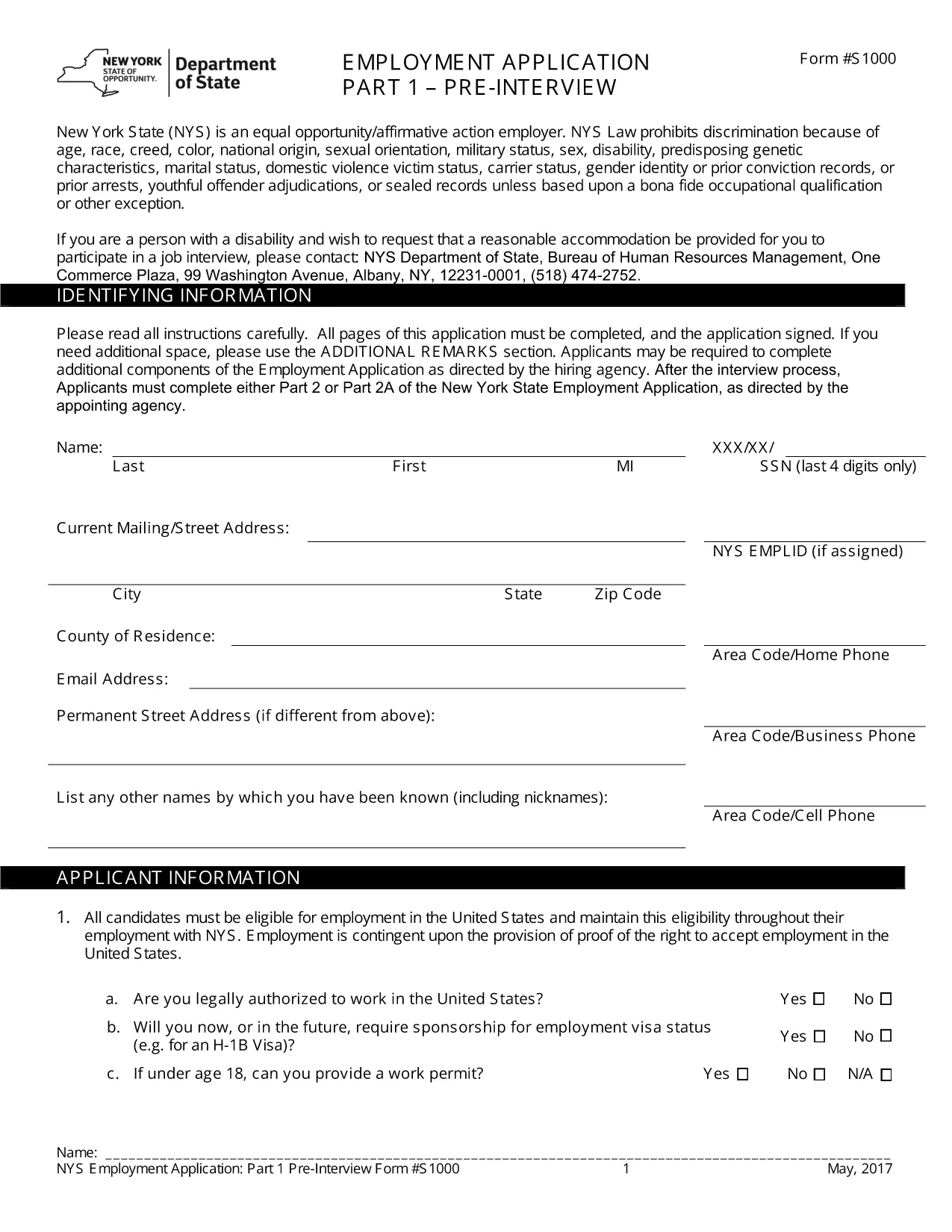
The PDF we provide is a standard Employment Application Form used across many U.S. companies. Although the form is in English, the same structure works for any type of application you need to create – job, scholarship, or government request. Follow the instructions below to complete it online, without downloading a separate editor.

Why a Fillable PDF Makes Writing Application Forms Easy

Pre‑designed layout: All required sections (personal details, work history, references) are already organized.

Editable fields: Click any box, type your answer, and move on. No printing, scanning, or re‑typing.

e‑Signature support: Add a legally binding signature directly in the browser.

Step‑by‑Step: Fill Out the Application Form Online

Use the Formize PDF Filler that appears when you click the button below. No extra software is needed.

Common Mistakes & Tips for a Perfect Application

1. Skipping required fields – The form highlights empty mandatory sections in red.

2. Typos in names or dates – Double‑check spelling before saving.

3. Incorrect contact information – Verify phone numbers and email addresses; employers often use these to contact you.

By following these tips, your application will look polished and professional, increasing your chances of success.

FAQ
  • Do I need to download any software to fill the form?

    No. The Formize PDF Filler runs completely in your web browser, so you can fill the form on any device.

  • Can I save the form and finish it later?

    Yes. Use the "Save" button to download a copy of the partially completed PDF and reopen it later in Formize.

  • Is the form suitable for Hindi applications?

    The template is in English, but you can type Hindi text using any standard keyboard or input method.

  • What if I make a mistake after submitting?

    Contact the organization that received your form. Most accept a corrected PDF if you explain the error.

  • Is my personal data safe while using Formize?

    Formize uses SSL encryption and does not store your data after the session ends, ensuring privacy and security.

ᲠᲝᲒᲝᲠ

როგორ შეავსოთ application form kaise likhen უფასოდ, ონლაინ 4 მარტივი ნაბიჯებით:

  1. 1
    Open the Fillable Form
    Click the "Fill out this form" button on the page. The Formize PDF Filler will load in a new tab.
  2. 2
    Enter Your Information
    Tap each field, type your details (name, address, work history, etc.), and use the Tab key to move to the next section.
  3. 3
    Add Your e‑Signature
    When you reach the signature box, select "Add Signature" and draw or type your name.
  4. 4
    Review & Save
    Click "Review" to ensure all required fields are completed, then choose "Save" to download a copy or "Submit" to share.
PDF შემავსებლის აპლიკაციის ფორმირება
ᲨᲔᲡᲐᲮᲔᲑ

application form kaise likhen შაბლონი

PDF დოკუმენტის სანახავად და შევსების ფუნქციების ტრადიციული ნაკრებით, ვებ აპლიკაციის უპირატესობებთან და საპასუხო განლაგებასთან ერთად, შეგიძლიათ შეავსოთ application form kaise likhen წუთებში.

ᲛᲐᲮᲐᲡᲘᲐᲗᲔᲑᲚᲔᲑᲘ

PDF შემავსებელი

ონლაინ application form kaise likhen-ის შევსების უმარტივესი გზა

  • სწრაფად შეავსეთ application form kaise likhen
    ეძებთ გზას სწრაფად შეავსოთ application form kaise likhen ონლაინ? ჩვენი ონლაინ უფასო PDF ფორმის შემავსებლით, თქვენ გეცოდინებათ როგორ შეცვალოთ და შეავსოთ ეს pdf დოკუმენტი ერთ წუთზე ნაკლებ დროში.
  • მარტივი გამოსაყენებელი ონლაინ PDF რედაქტორი
    მოგბეზრდათ PDF ფაილების დაბეჭდვა, რათა მათი რედაქტირება შეძლოთ, ხელახლა სკანირებამდე და უკან გაგზავნამდე? შეცვალეთ PDF დოკუმენტები უფასოდ ონლაინ. გამოიყენეთ ჩვენი ონლაინ pdf რედაქტორი დროისა და ქაღალდის დაზოგვისთვის.
  • შესანიშნავი ხელსაწყოები, ყველა პლატფორმა
    გაინტერესებთ როგორ შეავსოთ application form kaise likhen Mac-ზე, ან იქნებ როგორ გამოიყენოთ PDF შემავსებელი უფასოდ? ჩვენი ონლაინ PDF ინსტრუმენტები მუშაობს ყველა პლატფორმაზე.
  • ფაილების უსაფრთხო შენახვა
    დასრულებული „application form kaise likhen“ ფაილები ინახება დაცულ მონაცემთა ბაზაში, რომელსაც მართავს Amazon Cloud ჰოსტინგი. თქვენ შეგიძლიათ წაშალოთ თქვენი ფაილები ჩვენი სისტემიდან ნებისმიერ დროს. ნებისმიერ შემთხვევაში, ეს ფაილები ავტომატურად იშლება 24 საათის შემდეგ.
  • ჩატი application form kaise likhen-ით
    ესაუბრეთ „application form kaise likhen“-ს Chatize-ზე, რომელიც არის PDF წამკითხველის უფასო ასისტენტი. დასვით კითხვები და მიიღეთ პასუხები „application form kaise likhen“-დან. უბრალოდ დააწკაპუნეთ ღილაკზე ჩატი დოკუმენტთან ზემოთ.

შევსების სესიის წაშლა

წაშალოთ არჩეული შევსების სესია? ამ შემთხვევაში, თქვენი პროგრესი ფორმის შევსებაში დაიკარგება.

რედაქტირების სესიის წაშლა

წაშალოთ არჩეული რედაქტირების სესია? ამ შემთხვევაში, თქვენი პროგრესი ფორმის შექმნასა და რედაქტირებაში დაიკარგება.