hamburger-menu icon
Აირჩიეთ ენა

Limited Power of Attorney – Free Fillable PDF Form

  1. Ენა ინგლისური
  2. ქვეყანა აშშ
  3. აქტივობა Legal Documents
  4. დეპარტამენტი Legal Services
Limited Power of Attorney – Free Fillable PDF Form

What Is a Limited Power of Attorney?

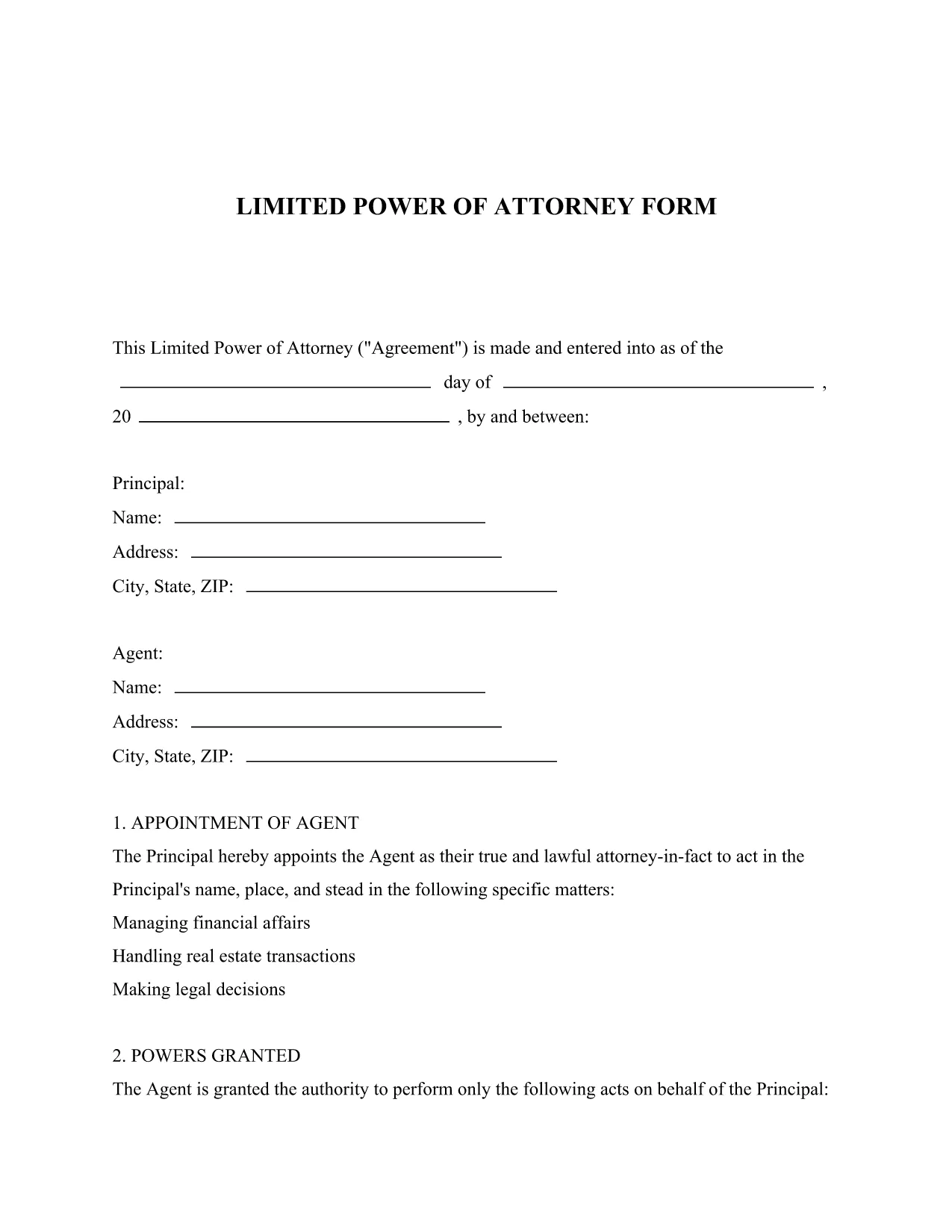
A Limited Power of Attorney (LPOA) is a legal document that grants a trusted person (the Attorney‑in‑Fact) the authority to act on your behalf for a specific purpose or a limited period of time. Unlike a general power of attorney, the powers are narrowly defined, making it ideal for transactions such as selling a vehicle, handling a bank account, or signing a single contract.

Key Sections of the Form

The downloadable PDF includes the following essential sections:

  • Principal Information: Your name, address, and contact details.
  • Attorney‑in‑Fact Details: The person you are authorizing.
  • Scope of Authority: Exact powers you are granting (e.g., "to sell my car VIN 1234").
  • Effective Dates: When the authority starts and ends.
  • Signature & Notarization: Space for your signature and, if required, a notary seal.

How to Fill Out the Form Online

Instead of downloading the PDF and opening it in a separate editor, simply click the "Fill out this form" button on this page. The Formize PDF Filler app will load automatically, letting you complete every field directly in your browser.

Common Mistakes to Avoid

  • Leaving any required field blank – the filler will highlight missing information.
  • Using vague language in the "Scope of Authority" section; be as specific as possible.
  • Forgetting to notarize when your state law requires it.
  • Signing the form before all information is entered; wait until the final review screen.

Download and Save Your Completed Form

After you finish, click "Save & Download" to get a secure, PDF‑filled copy. Store it in a safe place or print it for notarization.

FAQ
  • What is the difference between a limited and a general power of attorney?

    A limited power of attorney grants authority for a specific task or time frame, while a general power of attorney gives broad authority over all of your affairs.

  • Do I need a notary for a Limited Power of Attorney?

    Requirements vary by state. Many states require notarization for the form to be legally binding; check your local regulations.

  • Can I edit the form after I download it?

    Yes. After filling it out with Formize, you can download the completed PDF, make additional edits with any PDF editor, and re‑upload if needed.

  • Is the Formize PDF Filler secure?

    Absolutely. All data is processed over encrypted connections, and no information is stored on our servers after you download the finished document.

  • How long is the limited power of attorney valid?

    The form lets you set an explicit start and end date. If you leave the end date blank, the authority remains until revoked in writing.

  • Can I revoke the limited power of attorney later?

    Yes. You can revoke it at any time by creating a written revocation notice and informing the attorney‑in‑fact and any third parties.

ᲠᲝᲒᲝᲠ

როგორ შეავსოთ limited power of attorney უფასოდ, ონლაინ 5 მარტივი ნაბიჯებით:

  1. 1
    Open the Fillable Form
    Click the "Fill out this form" button on the page. The Formize PDF Filler app loads instantly in your browser.
  2. 2
    Enter Your Information
    Complete each highlighted field – principal details, attorney‑in‑fact name, and the specific powers you are granting.
  3. 3
    Review & Validate
    Use the built‑in validation to ensure all required fields are filled and the scope description is clear.
  4. 4
    Add Signature & Notarization
    If a notarization is required, print the completed PDF, have it notarized, then re‑upload the signed copy.
  5. 5
    Save & Download
    Click "Save & Download" to receive a fully‑filled PDF that you can store digitally or print for official use.
PDF შემავსებლის აპლიკაციის ფორმირება
ᲨᲔᲡᲐᲮᲔᲑ

limited power of attorney შაბლონი

PDF დოკუმენტის სანახავად და შევსების ფუნქციების ტრადიციული ნაკრებით, ვებ აპლიკაციის უპირატესობებთან და საპასუხო განლაგებასთან ერთად, შეგიძლიათ შეავსოთ limited power of attorney წუთებში.

ᲛᲐᲮᲐᲡᲘᲐᲗᲔᲑᲚᲔᲑᲘ

PDF შემავსებელი

ონლაინ limited power of attorney-ის შევსების უმარტივესი გზა

  • სწრაფად შეავსეთ limited power of attorney
    ეძებთ გზას სწრაფად შეავსოთ limited power of attorney ონლაინ? ჩვენი ონლაინ უფასო PDF ფორმის შემავსებლით, თქვენ გეცოდინებათ როგორ შეცვალოთ და შეავსოთ ეს pdf დოკუმენტი ერთ წუთზე ნაკლებ დროში.
  • მარტივი გამოსაყენებელი ონლაინ PDF რედაქტორი
    მოგბეზრდათ PDF ფაილების დაბეჭდვა, რათა მათი რედაქტირება შეძლოთ, ხელახლა სკანირებამდე და უკან გაგზავნამდე? შეცვალეთ PDF დოკუმენტები უფასოდ ონლაინ. გამოიყენეთ ჩვენი ონლაინ pdf რედაქტორი დროისა და ქაღალდის დაზოგვისთვის.
  • შესანიშნავი ხელსაწყოები, ყველა პლატფორმა
    გაინტერესებთ როგორ შეავსოთ limited power of attorney Mac-ზე, ან იქნებ როგორ გამოიყენოთ PDF შემავსებელი უფასოდ? ჩვენი ონლაინ PDF ინსტრუმენტები მუშაობს ყველა პლატფორმაზე.
  • ფაილების უსაფრთხო შენახვა
    დასრულებული „limited power of attorney“ ფაილები ინახება დაცულ მონაცემთა ბაზაში, რომელსაც მართავს Amazon Cloud ჰოსტინგი. თქვენ შეგიძლიათ წაშალოთ თქვენი ფაილები ჩვენი სისტემიდან ნებისმიერ დროს. ნებისმიერ შემთხვევაში, ეს ფაილები ავტომატურად იშლება 24 საათის შემდეგ.
  • ჩატი limited power of attorney-ით
    ესაუბრეთ „limited power of attorney“-ს Chatize-ზე, რომელიც არის PDF წამკითხველის უფასო ასისტენტი. დასვით კითხვები და მიიღეთ პასუხები „limited power of attorney“-დან. უბრალოდ დააწკაპუნეთ ღილაკზე ჩატი დოკუმენტთან ზემოთ.

შევსების სესიის წაშლა

წაშალოთ არჩეული შევსების სესია? ამ შემთხვევაში, თქვენი პროგრესი ფორმის შევსებაში დაიკარგება.

რედაქტირების სესიის წაშლა

წაშალოთ არჩეული რედაქტირების სესია? ამ შემთხვევაში, თქვენი პროგრესი ფორმის შექმნასა და რედაქტირებაში დაიკარგება.