hamburger-menu icon
Აირჩიეთ ენა

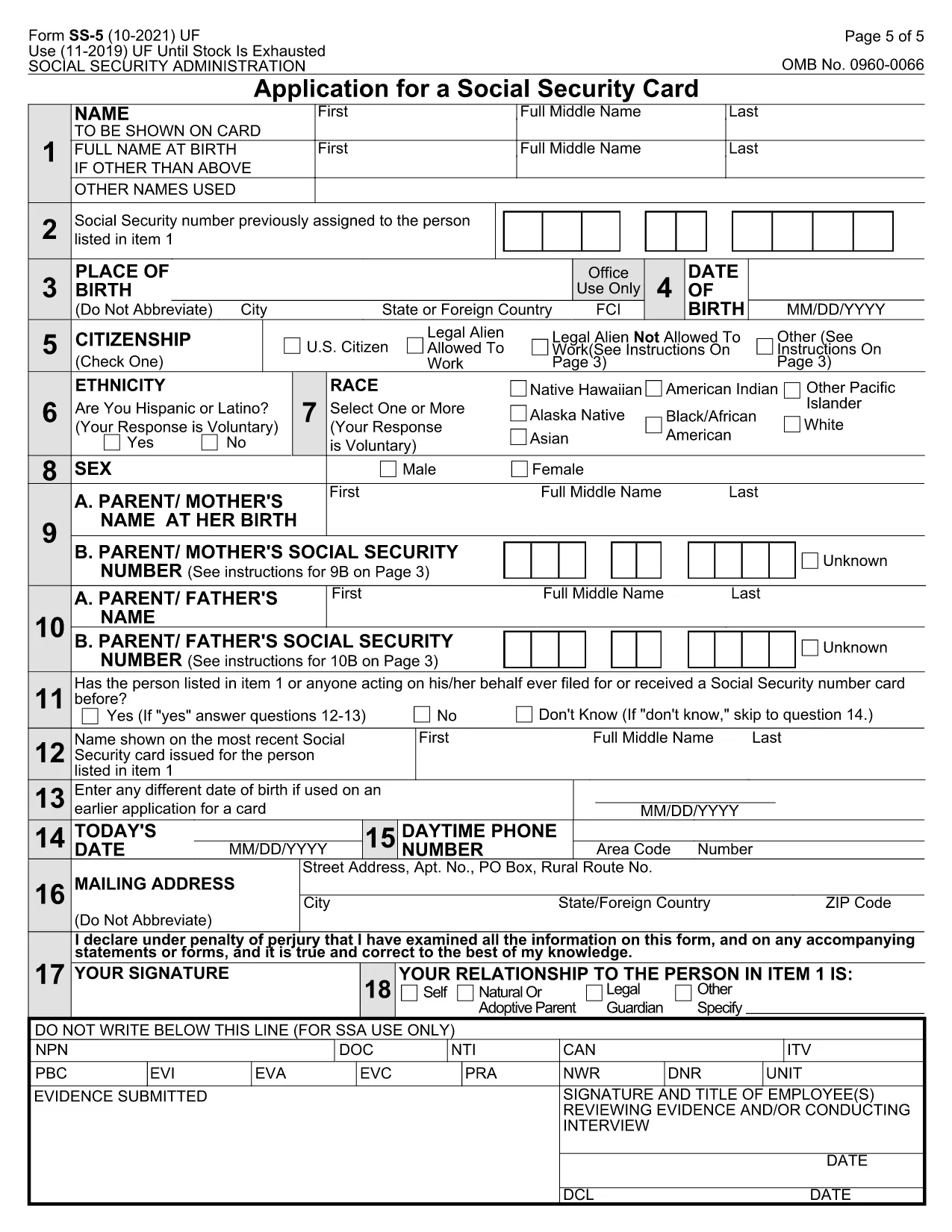
Social Security Card Application (Form SS‑5) – Fillable PDF

  1. Ენა ინგლისური
  2. ქვეყანა აშშ
  3. აქტივობა Identification
  4. დეპარტამენტი Social Security Administration
Social Security Card Application (Form SS‑5) – Fillable PDF

The Social Security Card application (Form SS‑5) is the official document used by the Social Security Administration (SSA) to issue a new or replacement Social Security number (SSN) card. Our fillable PDF lets you complete the form online, save time, and avoid printing errors.

Whether you are applying for your first SSN, correcting personal information, or requesting a replacement card, the SS‑5 form covers all scenarios. The PDF is fully interactive – you can type directly into the fields, add digital signatures, and submit the completed file to your local SSA office.

What Is the SS‑5 Form?

The SS‑5, also known as the "Application for a Social Security Card," collects basic identity information such as name, date of birth, citizenship status, and supporting documentation. It is required for U.S. citizens, permanent residents, and certain non‑citizens who are authorized to work in the United States.

How to Complete the Social Security Card Application

Follow these simple steps to fill out the form using the Formize PDF Filler:

  • Click the "Fill out this form" button on the page.
  • Wait a few seconds while the Formize PDF Filler app loads.
  • Enter your information in each highlighted field. Use the dropdowns for citizenship status and gender.
  • Upload scanned copies of the required documents (e.g., birth certificate, passport, or work permit).
  • Review the completed form, then click Save & Download to get a PDF you can print or email to your SSA office.

Common Mistakes to Avoid

  • Leaving fields blank: Every box marked with an asterisk (*) is mandatory.
  • Using illegible handwriting: The fillable PDF eliminates this risk.
  • Submitting the wrong type of ID: Check the SSA's accepted documents list before uploading.
  • Forgetting the signature: The digital signature field must be completed; otherwise the form will be rejected.

Where to Submit Your Application

After you have saved the completed PDF, you can:

  • Mail it to your local Social Security office with the original documents.
  • Bring the printed form and documents in person.
  • Use the SSA's online portal (if you have a mySocialSecurity account) to upload the PDF.

Download the Fillable PDF

Click the button below to open the interactive SS‑5 form in the Formize PDF Filler. No additional software is required.

FAQ
  • What is the SS‑5 form used for?

    The SS‑5 is the official Application for a Social Security Card. It is required to obtain a new SSN, replace a lost card, or update personal information.

  • Can I fill out the SS‑5 form online?

    Yes. Our fillable PDF works in the browser via the Formize PDF Filler, so you can complete the form without printing.

  • What documents do I need to attach?

    You must provide a proof of identity (e.g., passport or driver’s license) and, if applicable, proof of citizenship or lawful immigration status.

  • Do I need to sign the form digitally?

    A digital signature is accepted for the online version. If you print the form, you must sign it with a pen.

  • How long does it take to receive my Social Security card?

    After the SSA receives a complete application, cards are typically mailed within 10‑14 business days.

  • Is there a fee to apply for a Social Security card?

    No. The Social Security Administration does not charge a fee for a new or replacement card.

  • Can I change my name on the SS‑5 form?

    Yes. Fill out the name change section and provide a marriage certificate or court order as proof.

  • What if I make a mistake after submitting?

    Contact your local SSA office. They can advise whether a corrected form is needed.

ᲠᲝᲒᲝᲠ

როგორ შეავსოთ Social Security Card application უფასოდ, ონლაინ 5 მარტივი ნაბიჯებით:

  1. 1
    Open the Fillable Form
    Click the "Fill out this form" button on the page. The Formize PDF Filler app will load automatically.
  2. 2
    Enter Your Information
    Type your personal details into each highlighted field. Use the dropdown menus for citizenship status and gender.
  3. 3
    Attach Required Documents
    Upload scanned copies of your birth certificate, passport, or other accepted ID directly into the document.
  4. 4
    Review and Sign
    Double‑check all entries, then add your digital signature in the signature field.
  5. 5
    Save & Submit
    Click "Save & Download" to get a completed PDF. Print it or upload it to the SSA as instructed.
PDF შემავსებლის აპლიკაციის ფორმირება
ᲨᲔᲡᲐᲮᲔᲑ

Social Security Card application შაბლონი

PDF დოკუმენტის სანახავად და შევსების ფუნქციების ტრადიციული ნაკრებით, ვებ აპლიკაციის უპირატესობებთან და საპასუხო განლაგებასთან ერთად, შეგიძლიათ შეავსოთ Social Security Card application წუთებში.

ᲛᲐᲮᲐᲡᲘᲐᲗᲔᲑᲚᲔᲑᲘ

PDF შემავსებელი

ონლაინ Social Security Card application-ის შევსების უმარტივესი გზა

  • სწრაფად შეავსეთ Social Security Card application
    ეძებთ გზას სწრაფად შეავსოთ Social Security Card application ონლაინ? ჩვენი ონლაინ უფასო PDF ფორმის შემავსებლით, თქვენ გეცოდინებათ როგორ შეცვალოთ და შეავსოთ ეს pdf დოკუმენტი ერთ წუთზე ნაკლებ დროში.
  • მარტივი გამოსაყენებელი ონლაინ PDF რედაქტორი
    მოგბეზრდათ PDF ფაილების დაბეჭდვა, რათა მათი რედაქტირება შეძლოთ, ხელახლა სკანირებამდე და უკან გაგზავნამდე? შეცვალეთ PDF დოკუმენტები უფასოდ ონლაინ. გამოიყენეთ ჩვენი ონლაინ pdf რედაქტორი დროისა და ქაღალდის დაზოგვისთვის.
  • შესანიშნავი ხელსაწყოები, ყველა პლატფორმა
    გაინტერესებთ როგორ შეავსოთ Social Security Card application Mac-ზე, ან იქნებ როგორ გამოიყენოთ PDF შემავსებელი უფასოდ? ჩვენი ონლაინ PDF ინსტრუმენტები მუშაობს ყველა პლატფორმაზე.
  • ფაილების უსაფრთხო შენახვა
    დასრულებული „Social Security Card application“ ფაილები ინახება დაცულ მონაცემთა ბაზაში, რომელსაც მართავს Amazon Cloud ჰოსტინგი. თქვენ შეგიძლიათ წაშალოთ თქვენი ფაილები ჩვენი სისტემიდან ნებისმიერ დროს. ნებისმიერ შემთხვევაში, ეს ფაილები ავტომატურად იშლება 24 საათის შემდეგ.
  • ჩატი Social Security Card application-ით
    ესაუბრეთ „Social Security Card application“-ს Chatize-ზე, რომელიც არის PDF წამკითხველის უფასო ასისტენტი. დასვით კითხვები და მიიღეთ პასუხები „Social Security Card application“-დან. უბრალოდ დააწკაპუნეთ ღილაკზე ჩატი დოკუმენტთან ზემოთ.

შევსების სესიის წაშლა

წაშალოთ არჩეული შევსების სესია? ამ შემთხვევაში, თქვენი პროგრესი ფორმის შევსებაში დაიკარგება.

რედაქტირების სესიის წაშლა

წაშალოთ არჩეული რედაქტირების სესია? ამ შემთხვევაში, თქვენი პროგრესი ფორმის შექმნასა და რედაქტირებაში დაიკარგება.