
hamburger-menu icon
Აირჩიეთ ენა

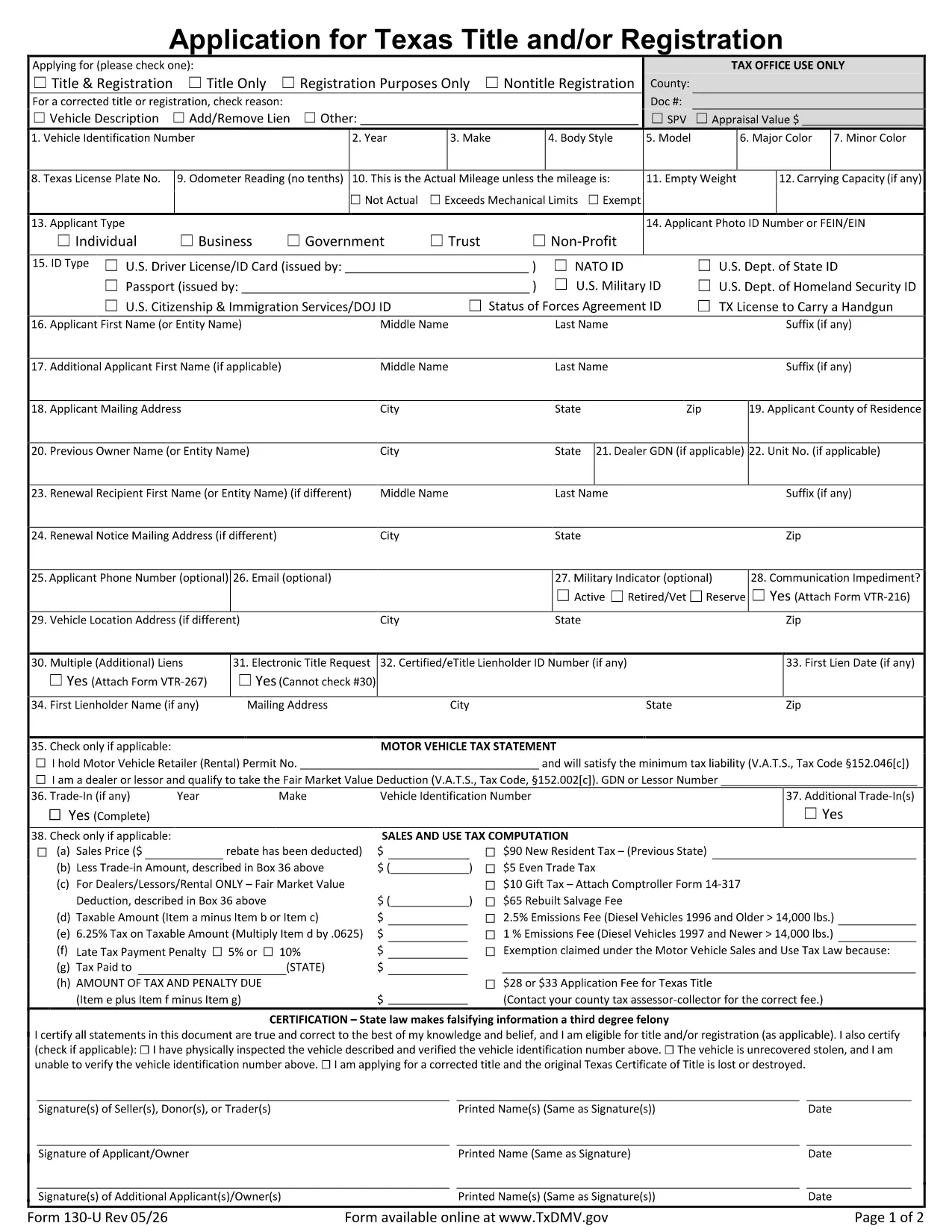
Application for Texas Title and Registration (Form 130‑U)

  1. Ენა ინგლისური
  2. ქვეყანა აშშ
  3. დეპარტამენტი Texas Department of Motor Vehicles
  4. აქტივობა ავტომობილის რეგისტრაცია
Application for Texas Title and Registration (Form 130‑U)

The Texas Application for Title and Registration (Form 130‑U) is the official document you need to obtain a new title, transfer ownership, or register a vehicle in Texas. Instead of printing, printing, and hand‑writing, you can now fill the form online with Formize’s free PDF filler – fast, secure, and completely digital.

Why Use the Fillable PDF Form

Our fillable version retains the exact layout required by the Texas Department of Motor Vehicles (TxDMV) while allowing you to type directly into each field. Benefits include:

  • Eliminate messy handwriting and illegible entries.
  • Save time – the form loads instantly in your browser.
  • Automatic field validation reduces errors.
  • Easy saving and printing for submission.

Step‑by‑Step Guide to Complete the Form

Follow the simple steps below to finish your application in minutes.

  • Step 1: Click the "Fill out this form" button on the page.
  • Step 2: Wait for the Formize PDF Filler app to load (usually a few seconds).
  • Step 3: Enter your personal, vehicle, and ownership details in the highlighted fields.
  • Step 4: Review the completed form for accuracy.
  • Step 5: Download the finished PDF or print it directly for submission.

Common Mistakes to Avoid

Even with a digital form, a few errors can delay processing:

  • Leaving the VIN or Odometer reading blank.
  • Providing an outdated address – the TxDMV requires a current mailing address.
  • Forgetting to attach required signatures.
  • Using the wrong form version; always use Form 130‑U for title and registration.

Where to Submit Your Application

After completing the form, you can submit it in one of three ways:

  • Mail it to your county tax assessor‑collector’s office.
  • Bring the printed form to a local TxDMV regional office.
  • Some counties accept scanned PDFs via email – check with your local office.

Frequently Asked Questions

Answers to the most common questions are listed below (see the FAQ section for more details).

FAQ
  • What is Form 130‑U used for?

    Form 130‑U is the official Texas application to obtain a new title, transfer ownership, or register a vehicle with the TxDMV.

  • Can I submit the form electronically?

    Most counties require a printed copy, but some accept a scanned PDF via email. Check with your local tax assessor‑collector.

  • Do I need a notary for this form?

    A notary is not required for Form 130‑U unless your county specifically requests it.

  • How long does it take to process the application?

    Processing times vary by county, typically 7‑14 business days after the form is received.

  • What fees are associated with the title application?

    Fees depend on vehicle type, age, and county; they are payable to the tax assessor‑collector at the time of submission.

  • Is the fillable PDF compatible with mobile devices?

    Yes, Formize’s PDF filler works on most modern smartphones and tablets.

  • What should I do if I make a mistake after saving?

    Open the saved PDF in Formize again, edit the incorrect fields, and re‑save the document.

  • Do I need to attach any additional documents?

    Typically you must include proof of ownership (e.g., bill of sale) and a valid photo ID.

ᲠᲝᲒᲝᲠ

როგორ შეავსოთ Texas title application უფასოდ, ონლაინ 4 მარტივი ნაბიჯებით:

  1. 1
    Click the Fill Button
    Press the "Fill out this form" button on the page to launch Formize’s PDF filler.
  2. 2
    Wait for the Filler to Load
    The Formize PDF Filler app loads in a few seconds – you’ll see a toolbar and editable fields.
  3. 3
    Enter Your Information
    Type directly into each highlighted field: owner details, vehicle information, and signatures.
  4. 4
    Review and Save
    Double‑check all entries, then click "Save" to download the completed PDF or print it for submission.
PDF შემავსებლის აპლიკაციის ფორმირება
ᲨᲔᲡᲐᲮᲔᲑ

სატრანსპორტო საშუალების რეგისტრაციის ფორმები

თუ თქვენ ფლობთ ან იჯარით გაქვთ ავტომობილი, მისაბმელი ან ნავი, თქვენ უნდა შეასრულოთ გარკვეული ვალდებულებები, რათა შეინარჩუნოთ თქვენი მანქანა კანონიერად რეგისტრირებული და უსაფრთხო.

Texas title application არის სატრანსპორტო საშუალების რეგისტრაციის ერთ-ერთი ფორმა, რომელიც წარმოადგენს დოკუმენტებს, რომლებიც გამოიყენება ავტომობილის რეგისტრაციისთვის შესაბამის სახელმწიფო ან პროვინციულ ორგანოში. ეს ფორმები, როგორც წესი, საჭიროა, როდესაც ადამიანი ყიდულობს ახალ ან მეორად სატრანსპორტო საშუალებას, ან როდესაც ისინი გადადიან ახალ შტატში ან პროვინციაში მანქანით.

ავტომობილის რეგისტრაციისთვის საჭირო ზუსტი მოთხოვნები და ფორმები შეიძლება განსხვავდებოდეს მდებარეობის მიხედვით, მაგრამ ზოგადად, პროცესი გულისხმობს ინფორმაციის მიწოდებას ავტომობილის, მფლობელისა და ავტომობილის ნებისმიერი გირავნობის შესახებ.

სარეგისტრაციო ფორმებისა და მოსაკრებლების წარდგენის შემდეგ, სახელმწიფო ან პროვინციული ორგანო ავტომობილის მფლობელს გასცემს სარეგისტრაციო მოწმობას ან სანომრე ნიშანს. ეს რეგისტრაცია საშუალებას აძლევს მანქანას ლეგალურად იმოძრაოს საჯარო გზებსა და მაგისტრალებზე.

ᲛᲐᲮᲐᲡᲘᲐᲗᲔᲑᲚᲔᲑᲘ

PDF შემავსებელი

ონლაინ Texas title application-ის შევსების უმარტივესი გზა

  • სწრაფად შეავსეთ Texas title application
    ეძებთ გზას სწრაფად შეავსოთ Texas title application ონლაინ? ჩვენი ონლაინ უფასო PDF ფორმის შემავსებლით, თქვენ გეცოდინებათ როგორ შეცვალოთ და შეავსოთ ეს pdf დოკუმენტი ერთ წუთზე ნაკლებ დროში.
  • მარტივი გამოსაყენებელი ონლაინ PDF რედაქტორი
    მოგბეზრდათ PDF ფაილების დაბეჭდვა, რათა მათი რედაქტირება შეძლოთ, ხელახლა სკანირებამდე და უკან გაგზავნამდე? შეცვალეთ PDF დოკუმენტები უფასოდ ონლაინ. გამოიყენეთ ჩვენი ონლაინ pdf რედაქტორი დროისა და ქაღალდის დაზოგვისთვის.
  • შესანიშნავი ხელსაწყოები, ყველა პლატფორმა
    გაინტერესებთ როგორ შეავსოთ Texas title application Mac-ზე, ან იქნებ როგორ გამოიყენოთ PDF შემავსებელი უფასოდ? ჩვენი ონლაინ PDF ინსტრუმენტები მუშაობს ყველა პლატფორმაზე.
  • ფაილების უსაფრთხო შენახვა
    დასრულებული „Texas title application“ ფაილები ინახება დაცულ მონაცემთა ბაზაში, რომელსაც მართავს Amazon Cloud ჰოსტინგი. თქვენ შეგიძლიათ წაშალოთ თქვენი ფაილები ჩვენი სისტემიდან ნებისმიერ დროს. ნებისმიერ შემთხვევაში, ეს ფაილები ავტომატურად იშლება 24 საათის შემდეგ.
  • ჩატი Texas title application-ით
    ესაუბრეთ „Texas title application“-ს Chatize-ზე, რომელიც არის PDF წამკითხველის უფასო ასისტენტი. დასვით კითხვები და მიიღეთ პასუხები „Texas title application“-დან. უბრალოდ დააწკაპუნეთ ღილაკზე ჩატი დოკუმენტთან ზემოთ.

შევსების სესიის წაშლა

წაშალოთ არჩეული შევსების სესია? ამ შემთხვევაში, თქვენი პროგრესი ფორმის შევსებაში დაიკარგება.

რედაქტირების სესიის წაშლა

წაშალოთ არჩეული რედაქტირების სესია? ამ შემთხვევაში, თქვენი პროგრესი ფორმის შექმნასა და რედაქტირებაში დაიკარგება.