hamburger-menu icon
Აირჩიეთ ენა

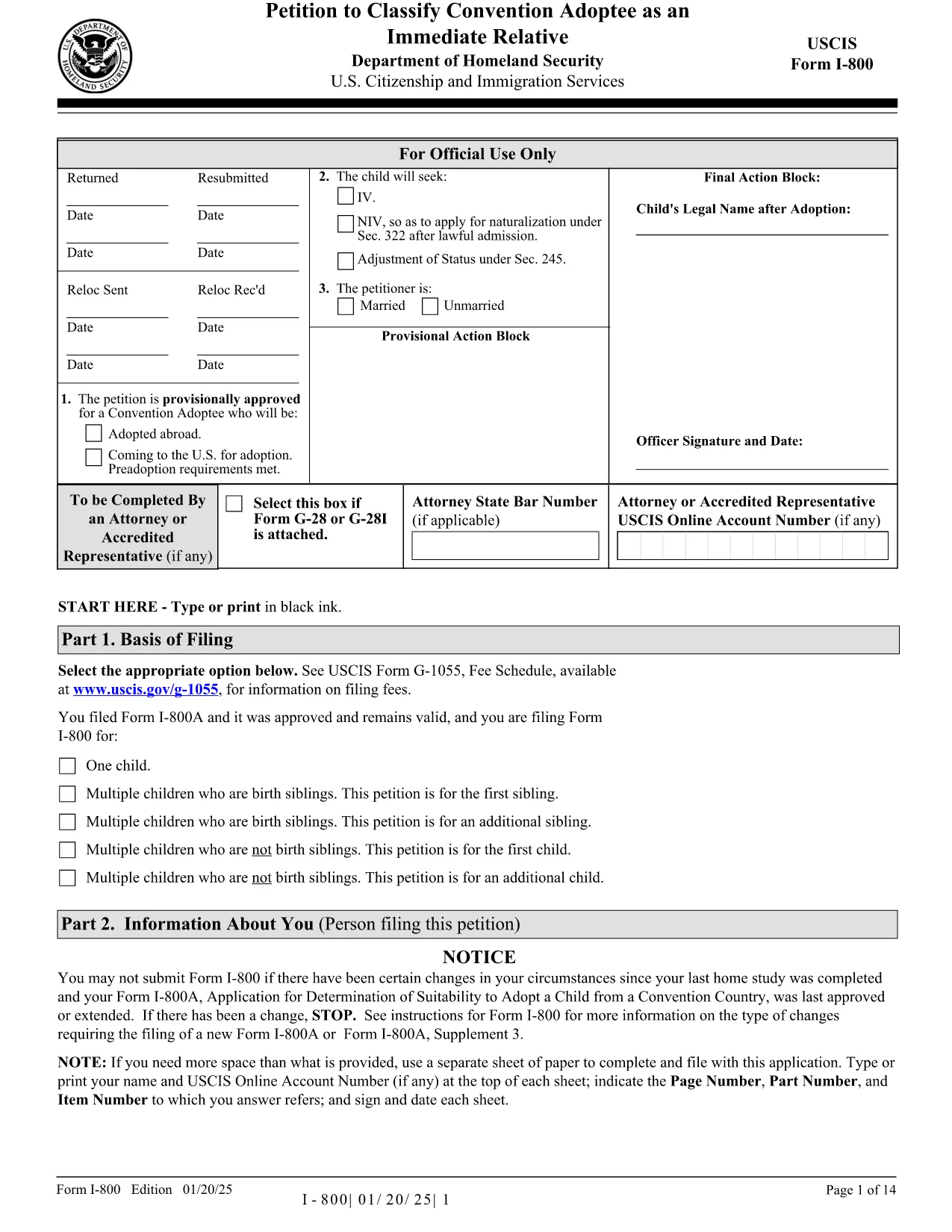
Form I-800 – Petition to Classify a Convention Adoptee

  1. ქვეყანა აშშ
  2. Ენა ინგლისური
  3. დეპარტამენტი აშშ-ის მოქალაქეობისა და იმიგრაციის სერვისები
Form I-800 – Petition to Classify a Convention Adoptee

The Form I-800 (Petition to Classify Convention Adoptee as an Immediate Relative) is used by U.S. citizen prospective adoptive parents to finalize the immigration process for a child adopted from a Hague Convention country. This page provides the official fillable PDF, step‑by‑step instructions, and tips to ensure a smooth filing.

What is Form I-800?

Form I-800 is filed after you have an approved Form I-800A (Application for Determination of Suitability to Adopt a Child from a Convention Country). It requests the U.S. Citizenship and Immigration Services (USCIS) to recognize the child as an immediate relative, allowing the child to obtain an immigrant visa.

Eligibility & Required Documents

  • U.S. citizen petitioner (adoptive parent) – must be at least 21 years old.
  • Approved Form I-800A approval notice.
  • Proof of the child’s habitually residing in a Convention country.
  • Article 16 report, adoption agency statements, and post‑placement plans (if applicable).
  • Form I-864 (Affidavit of Support) or I-864EZ.
  • Any required medical examinations, translations, and certifications.

How to Complete the Fillable Form Online

Instead of downloading the PDF and editing it with a separate editor, simply click the "Fill out this form" button on this page. The Formize PDF Filler app will load the fillable version instantly. Follow the on‑screen prompts, save your progress, and download the completed PDF ready for submission.

Common Mistakes to Avoid

  • Using pages from different edition dates – all pages must match the edition date shown at the bottom of the form.
  • Leaving required fields blank (e.g., Part 2 – Information About You).
  • Submitting original documents unless specifically requested.
  • Failing to attach English translations for foreign‑language documents.
  • Paying the filing fee with a personal check – USCIS now requires electronic payment methods.

Where to File & Pay the Fee

Mail the completed Form I-800 and supporting evidence to the USCIS Adoption Lockbox (Dallas, TX). Payment can be made with a credit/debit card using Form G‑1450, or via ACH with Form G‑1650. Check the latest fee schedule on the USCIS website before filing.

Ready to start? Click the button below to open the fillable version and begin your adoption petition today.

FAQ
  • Do I need an approved Form I-800A before filing Form I-800?

    Yes. USCIS requires an approved Form I-800A before you can submit Form I-800.

  • Can I file Form I-800 online?

    Form I-800 itself must be submitted as a PDF by mail, but you can fill it out online using the Formize fillable version.

  • What is the current filing fee for Form I-800?

    Check the USCIS Fee Schedule for the most up‑to‑date amount. Payment must be made electronically (credit/debit card or ACH).

  • How long does USCIS take to process Form I-800?

    Processing times vary; typically 6‑12 months. You can check real‑time estimates on the USCIS case status page.

  • What should I do if I receive a Request for Evidence (RFE)?

    Respond promptly with the requested documents, following the RFE deadline. Include the RFE notice number on all correspondence.

  • Can I submit original documents with my Form I-800?

    Only submit originals if USCIS specifically asks for them. Otherwise, provide clear photocopies and certified translations.

  • Is there a way to track my mailed Form I-800?

    Yes. Use a traceable mailing service (USPS Certified Mail, FedEx, UPS) and keep the receipt for your records.

  • What if the child is adopted from a non‑Convention country?

    Form I-800 is only for Convention adoptees. For non‑Convention cases, you must file Form I-600 or I-600A.

ᲠᲝᲒᲝᲠ

როგორ შეავსოთ Form I-800 უფასოდ, ონლაინ 5 მარტივი ნაბიჯებით:

  1. 1
    Open the Fillable Form
    Click the "Fill out this form" button on the page. The Formize PDF Filler app loads the official Form I-800 instantly.
  2. 2
    Enter Your Information
    Complete each section, following the on‑screen prompts. Required fields are highlighted in red.
  3. 3
    Save and Review
    Use the "Save" button to store your progress. Review all entries for accuracy before finalizing.
  4. 4
    Download the Completed PDF
    When all fields are filled, click "Download" to get a PDF ready for mailing to USCIS.
  5. 5
    Submit to USCIS
    Mail the downloaded Form I-800 with supporting documents and the correct filing fee to the USCIS Adoption Lockbox.
PDF შემავსებლის აპლიკაციის ფორმირება
ᲨᲔᲡᲐᲮᲔᲑ

Form I-800 შაბლონი

PDF დოკუმენტის სანახავად და შევსების ფუნქციების ტრადიციული ნაკრებით, ვებ აპლიკაციის უპირატესობებთან და საპასუხო განლაგებასთან ერთად, შეგიძლიათ შეავსოთ Form I-800 წუთებში.

ᲛᲐᲮᲐᲡᲘᲐᲗᲔᲑᲚᲔᲑᲘ

PDF შემავსებელი

ონლაინ Form I-800-ის შევსების უმარტივესი გზა

  • სწრაფად შეავსეთ Form I-800
    ეძებთ გზას სწრაფად შეავსოთ Form I-800 ონლაინ? ჩვენი ონლაინ უფასო PDF ფორმის შემავსებლით, თქვენ გეცოდინებათ როგორ შეცვალოთ და შეავსოთ ეს pdf დოკუმენტი ერთ წუთზე ნაკლებ დროში.
  • მარტივი გამოსაყენებელი ონლაინ PDF რედაქტორი
    მოგბეზრდათ PDF ფაილების დაბეჭდვა, რათა მათი რედაქტირება შეძლოთ, ხელახლა სკანირებამდე და უკან გაგზავნამდე? შეცვალეთ PDF დოკუმენტები უფასოდ ონლაინ. გამოიყენეთ ჩვენი ონლაინ pdf რედაქტორი დროისა და ქაღალდის დაზოგვისთვის.
  • შესანიშნავი ხელსაწყოები, ყველა პლატფორმა
    გაინტერესებთ როგორ შეავსოთ Form I-800 Mac-ზე, ან იქნებ როგორ გამოიყენოთ PDF შემავსებელი უფასოდ? ჩვენი ონლაინ PDF ინსტრუმენტები მუშაობს ყველა პლატფორმაზე.
  • ფაილების უსაფრთხო შენახვა
    დასრულებული „Form I-800“ ფაილები ინახება დაცულ მონაცემთა ბაზაში, რომელსაც მართავს Amazon Cloud ჰოსტინგი. თქვენ შეგიძლიათ წაშალოთ თქვენი ფაილები ჩვენი სისტემიდან ნებისმიერ დროს. ნებისმიერ შემთხვევაში, ეს ფაილები ავტომატურად იშლება 24 საათის შემდეგ.
  • ჩატი Form I-800-ით
    ესაუბრეთ „Form I-800“-ს Chatize-ზე, რომელიც არის PDF წამკითხველის უფასო ასისტენტი. დასვით კითხვები და მიიღეთ პასუხები „Form I-800“-დან. უბრალოდ დააწკაპუნეთ ღილაკზე ჩატი დოკუმენტთან ზემოთ.

შევსების სესიის წაშლა

წაშალოთ არჩეული შევსების სესია? ამ შემთხვევაში, თქვენი პროგრესი ფორმის შევსებაში დაიკარგება.

რედაქტირების სესიის წაშლა

წაშალოთ არჩეული რედაქტირების სესია? ამ შემთხვევაში, თქვენი პროგრესი ფორმის შექმნასა და რედაქტირებაში დაიკარგება.