hamburger-menu icon
Აირჩიეთ ენა

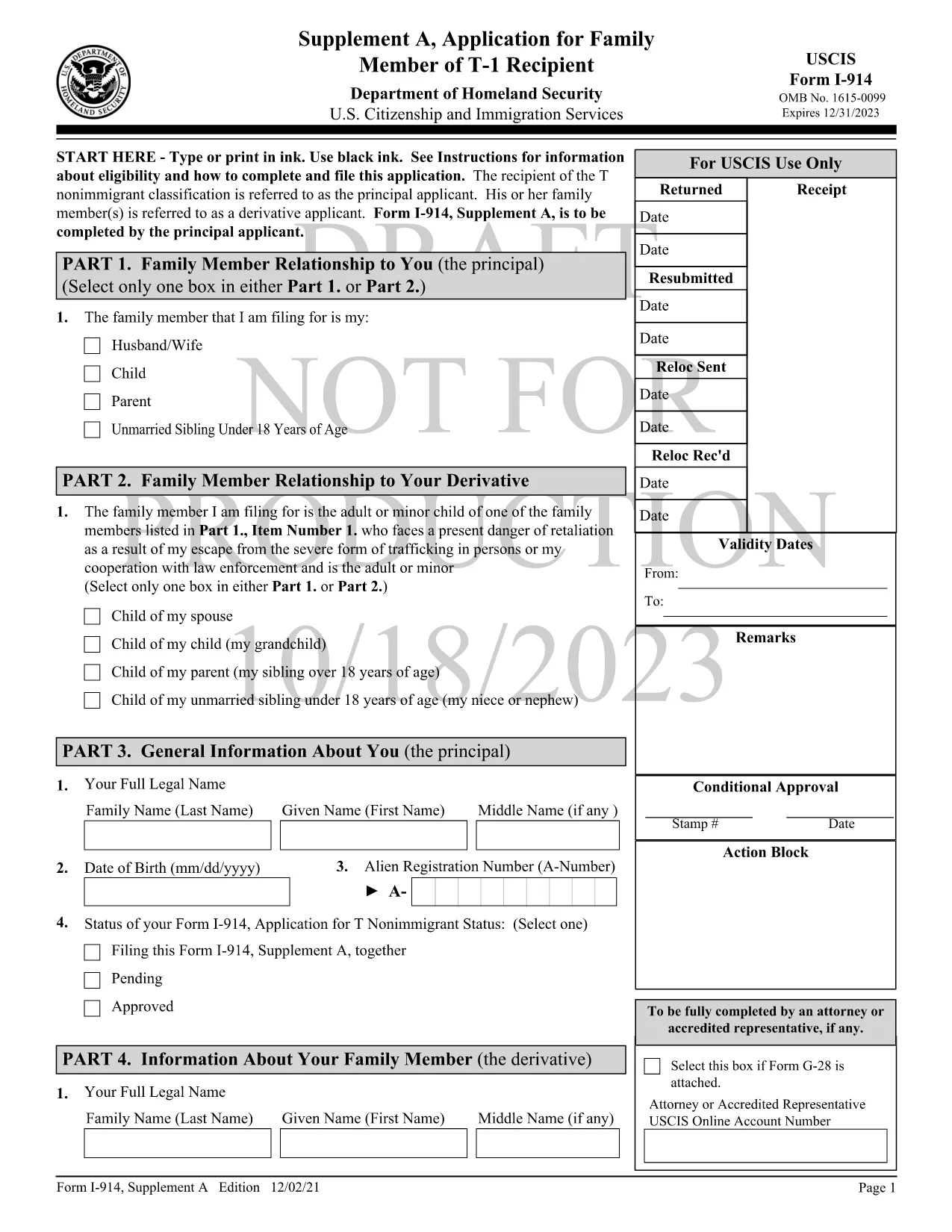
Form I-914 Supplement A – Fillable PDF for T‑Visa Family Members

  1. ქვეყანა აშშ
  2. Ენა ინგლისური
  3. დეპარტამენტი აშშ-ის მოქალაქეობისა და იმიგრაციის სერვისები
Form I-914 Supplement A – Fillable PDF for T‑Visa Family Members

Form I-914 Supplement A is the official USCIS application used by qualifying family members of a principal T‑1 nonimmigrant to request derivative T‑visa status. This supplement accompanies the main I-914, Application for T Nonimmigrant Status and must be completed accurately to avoid delays.

What Is Form I-914 Supplement A?

The supplement collects detailed information about the relationship between the principal T‑visa holder and the derivative applicant, as well as proof of eligibility. It is a fillable PDF that can be completed online, printed, and mailed to the appropriate USCIS lockbox.

Key Eligibility Requirements

  • The principal applicant must already have an approved I-914 (T‑1) petition.
  • Derivatives include spouses, children, parents, and unmarried siblings under 18, provided they meet the definition of a “family member” under 8 CFR 274a.12(c).
  • The family member must be physically present in the United States, American Samoa, the Northern Mariana Islands, or at a port of entry.
  • Evidence of the qualifying relationship (marriage certificate, birth certificate, etc.) must be submitted with the form.

How to Complete the Fillable PDF with Formize

Instead of downloading the PDF and using a separate editor, follow these simple steps to fill it out directly on Formize:

  1. Click the "Fill out this form" button on this page.
  2. Wait a few seconds while the Formize PDF Filler app loads the I-914 Supplement A template.
  3. Enter your information in each field using black ink‑style typing. The app automatically saves your progress.
  4. Review the completed form for any missing or incorrect entries.
  5. When you’re satisfied, download the finished PDF or print it directly for mailing.

Common Mistakes to Avoid

  • Leaving fields blank: Every field marked with an asterisk (*) is required.
  • Using the wrong edition: Ensure the PDF you are filling matches the edition date shown on the bottom of each page (currently 01/20/25).
  • Mismatched signatures: The signature on Supplement A must be the derivative applicant’s, not the principal’s.
  • Incorrect document attachments: Attach only the documents listed in the instructions and label them clearly.

Where to Submit the Completed Form

After printing and signing, mail the form to the USCIS lockbox that corresponds to your residence. Refer to the USCIS I-914 filing locations page for the correct address.

Using Formize’s fillable version reduces the risk of errors, speeds up processing, and keeps your data secure.

FAQ
  • Who can file Form I-914 Supplement A?

    Spouses, children, parents, and unmarried siblings under 18 of a principal T‑1 applicant who meet USCIS eligibility criteria can file Supplement A.

  • Do I need to submit the main I-914 with Supplement A?

    Yes. Supplement A is filed together with the principal applicant’s approved I-914 petition and any required supporting evidence.

  • Can I submit the form electronically?

    USCIS currently requires a printed, signed copy for mailing. The fillable PDF helps you complete the form accurately before printing.

  • What happens if I make a mistake on the form?

    USCIS may issue a Request for Evidence (RFE) or reject the filing, causing delays. Use the Formize filler to reduce errors.

  • How long does USCIS take to process Supplement A?

    Processing times vary by service center but typically range from 2 to 6 months after receipt of a complete application.

  • Do I need to include a filing fee with Supplement A?

    Supplement A itself does not have a separate fee, but the principal I-914 filing fee applies. Check the USCIS fee schedule for the latest amounts.

  • Can I use a PDF editor instead of Formize?

    You can, but Formize’s fillable version ensures proper field alignment and reduces the chance of formatting errors that cause rejections.

ᲠᲝᲒᲝᲠ

როგორ შეავსოთ I-914 Supplement A უფასოდ, ონლაინ 5 მარტივი ნაბიჯებით:

  1. 1
    Open the Fillable Form
    Click the "Fill out this form" button on the page to launch the Formize PDF Filler.
  2. 2
    Load the Template
    Wait a few seconds while the I-914 Supplement A template loads in the browser.
  3. 3
    Enter Your Information
    Type your answers into each field. The app saves your progress automatically.
  4. 4
    Review and Sign
    Check every required field for completeness, then add your electronic signature if allowed, or print to sign.
  5. 5
    Download or Print
    Download the completed PDF for your records or print it to mail to the USCIS lockbox.
PDF შემავსებლის აპლიკაციის ფორმირება
ᲨᲔᲡᲐᲮᲔᲑ

I-914 Supplement A შაბლონი

PDF დოკუმენტის სანახავად და შევსების ფუნქციების ტრადიციული ნაკრებით, ვებ აპლიკაციის უპირატესობებთან და საპასუხო განლაგებასთან ერთად, შეგიძლიათ შეავსოთ I-914 Supplement A წუთებში.

ᲛᲐᲮᲐᲡᲘᲐᲗᲔᲑᲚᲔᲑᲘ

PDF შემავსებელი

ონლაინ I-914 Supplement A-ის შევსების უმარტივესი გზა

  • სწრაფად შეავსეთ I-914 Supplement A
    ეძებთ გზას სწრაფად შეავსოთ I-914 Supplement A ონლაინ? ჩვენი ონლაინ უფასო PDF ფორმის შემავსებლით, თქვენ გეცოდინებათ როგორ შეცვალოთ და შეავსოთ ეს pdf დოკუმენტი ერთ წუთზე ნაკლებ დროში.
  • მარტივი გამოსაყენებელი ონლაინ PDF რედაქტორი
    მოგბეზრდათ PDF ფაილების დაბეჭდვა, რათა მათი რედაქტირება შეძლოთ, ხელახლა სკანირებამდე და უკან გაგზავნამდე? შეცვალეთ PDF დოკუმენტები უფასოდ ონლაინ. გამოიყენეთ ჩვენი ონლაინ pdf რედაქტორი დროისა და ქაღალდის დაზოგვისთვის.
  • შესანიშნავი ხელსაწყოები, ყველა პლატფორმა
    გაინტერესებთ როგორ შეავსოთ I-914 Supplement A Mac-ზე, ან იქნებ როგორ გამოიყენოთ PDF შემავსებელი უფასოდ? ჩვენი ონლაინ PDF ინსტრუმენტები მუშაობს ყველა პლატფორმაზე.
  • ფაილების უსაფრთხო შენახვა
    დასრულებული „I-914 Supplement A“ ფაილები ინახება დაცულ მონაცემთა ბაზაში, რომელსაც მართავს Amazon Cloud ჰოსტინგი. თქვენ შეგიძლიათ წაშალოთ თქვენი ფაილები ჩვენი სისტემიდან ნებისმიერ დროს. ნებისმიერ შემთხვევაში, ეს ფაილები ავტომატურად იშლება 24 საათის შემდეგ.
  • ჩატი I-914 Supplement A-ით
    ესაუბრეთ „I-914 Supplement A“-ს Chatize-ზე, რომელიც არის PDF წამკითხველის უფასო ასისტენტი. დასვით კითხვები და მიიღეთ პასუხები „I-914 Supplement A“-დან. უბრალოდ დააწკაპუნეთ ღილაკზე ჩატი დოკუმენტთან ზემოთ.

შევსების სესიის წაშლა

წაშალოთ არჩეული შევსების სესია? ამ შემთხვევაში, თქვენი პროგრესი ფორმის შევსებაში დაიკარგება.

რედაქტირების სესიის წაშლა

წაშალოთ არჩეული რედაქტირების სესია? ამ შემთხვევაში, თქვენი პროგრესი ფორმის შექმნასა და რედაქტირებაში დაიკარგება.