
hamburger-menu icon
Აირჩიეთ ენა

Alabama Motor Vehicle Power of Attorney (Form MVT‑5‑13)

  1. Ენა ინგლისური
  2. ქვეყანა აშშ
  3. აქტივობა ავტომობილის რეგისტრაცია
  4. სახელმწიფო ალაბამა
Alabama Motor Vehicle Power of Attorney (Form MVT‑5‑13)

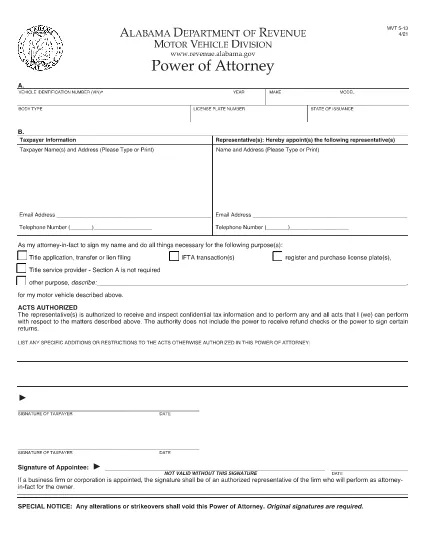
The Alabama Motor Vehicle Power of Attorney (Form MVT‑5‑13) lets a vehicle owner authorize another person—called the appointee or attorney‑in‑fact—to perform specific vehicle‑related tasks such as registration, title transfer, or sale. This form is required whenever the owner cannot be present at the Alabama Department of Revenue or a local licensing office.

What Is Form MVT‑5‑13?

Form MVT‑5‑13 is a short, state‑approved document that grants limited authority to a trusted representative. It is used for:

  • Transferring a vehicle title
  • Registering or renewing a vehicle
  • Submitting a bill of sale
  • Handling lien releases
The form must be signed by both the vehicle owner (taxpayer) and the appointed representative.

How to Fill the MVT‑5‑13 Online

Instead of downloading the PDF and editing it in a separate program, simply click the "Fill out this form" button on this page. The Formize PDF Filler app will load instantly, allowing you to complete every field directly in your browser.

Signing Requirements & Notarization

Alabama law requires:

  • Both the owner and the representative to sign and date the form.
  • A notary public is not mandatory, but a notarized signature adds credibility and is often requested by the licensing office.
If you choose notarization, bring a valid ID and the completed form to a notary.

Common Mistakes to Avoid

  • Leaving sections blank: Every field marked with an asterisk (*) is required.
  • Incorrect VIN: Double‑check the Vehicle Identification Number; a single digit error can delay processing.
  • Mismatched signatures: The signatures on the PDF must match the printed names exactly.
  • Using an expired form: Ensure you are using the latest version (the link below is the current 2021 revision).

Where to Submit the Completed Form

After filling and signing, you can:

  • Bring the printed form to any Alabama Department of Revenue office.
  • Mail it to the appropriate Vehicle Licensing Office.
  • Upload a scanned copy through the online portal if the agency permits electronic submissions.
Having a clean, correctly completed Form MVT‑5‑13 speeds up title transfers and registration renewals.

Download the official PDF version of Form MVT‑5‑13 for reference or offline use.

FAQ
  • Who can be appointed as an attorney‑in‑fact on Form MVT‑5‑13?

    Any adult individual you trust – a family member, friend, attorney, or title‑service representative – can be appointed, as long as they are willing to sign the form.

  • Is notarization required for the MVT‑5‑13?

    Alabama law does not require notarization, but many licensing offices prefer or require a notarized signature for added security.

  • Can I use the same Form MVT‑5‑13 for multiple vehicles?

    No. Each vehicle requires its own completed Form MVT‑5‑13 with the specific VIN, make, model, and year.

  • How long is the power of attorney valid?

    The form remains effective until the vehicle transaction is completed, or until you submit a written revocation to the Department of Revenue.

  • What should I do if I make a mistake after signing?

    Correct the error by crossing out the mistake, initialing the change, and having both the owner and representative sign again. For major errors, submit a new Form MVT‑5‑13.

  • Can I submit the form electronically?

    Some county offices accept scanned copies via their online portals. Check with your local licensing office for electronic submission policies.

  • Do I need to provide additional documents with the POA?

    Typically you’ll need the vehicle’s current title, a valid photo ID for both parties, and any applicable fees for the transaction you’re performing.

  • Is there a fee to download the PDF?

    No. The PDF is provided free of charge; you only pay any notary or filing fees required by the Department of Revenue.

ᲠᲝᲒᲝᲠ

როგორ შეავსოთ MVT-5-13 უფასოდ, ონლაინ 5 მარტივი ნაბიჯებით:

  1. 1
    Click the Fill Button
    Press the “Fill out this form” button on the page. The Formize PDF Filler app loads instantly in your browser.
  2. 2
    Enter All Required Information
    Complete each field – vehicle details, owner information, and representative details. Required fields are marked with an asterisk (*).
  3. 3
    Review and Sign
    Double‑check the entered data, then use the built‑in signature tool to sign as the owner and as the appointee.
  4. 4
    Download or Email the Completed Form
    When you’re satisfied, click “Save & Download” to get a copy, or choose “Email” to send the filled PDF directly to the licensing office.
  5. 5
    Print and Notarize (if needed)
    Print the saved PDF, bring it to a notary public for notarization if your local office requires it, then submit the final document.
PDF შემავსებლის აპლიკაციის ფორმირება
ᲨᲔᲡᲐᲮᲔᲑ

სატრანსპორტო საშუალების რეგისტრაციის ფორმები

MVT-5-13 არის სატრანსპორტო საშუალების რეგისტრაციის ერთ-ერთი ფორმა, რომელიც არის დოკუმენტები, რომლებიც გამოიყენება ავტომობილის დასარეგისტრირებლად შესაბამის სახელმწიფო ორგანოში, როგორც წესი, ავტომობილების დეპარტამენტში (DMV) ან ეკვივალენტურ სააგენტოში. ეს ფორმები საჭიროა, როდესაც ადამიანი ყიდულობს ახალ ან მეორად სატრანსპორტო საშუალებას, გადასცემს ავტომობილის საკუთრებას ან გადადის ახალ იურისდიქციაში ავტომობილით.

ავტომობილის რეგისტრაციის სპეციფიკური ფორმები შეიძლება განსხვავდებოდეს იურისდიქციის მიხედვით, მაგრამ ისინი ჩვეულებრივ მოითხოვს შემდეგ ინფორმაციას:

სატრანსპორტო საშუალების ინფორმაცია: ეს მოიცავს დეტალებს მანქანის შესახებ, როგორიცაა მარკა, მოდელი, წელი, მანქანის საიდენტიფიკაციო ნომერი (VIN) და ოდომეტრის ჩვენება.

მფლობელის ინფორმაცია: ფორმა მოითხოვს ინფორმაციას მანქანის მფლობელის შესახებ, მათ შორის, მათი სახელი, მისამართი, საკონტაქტო ინფორმაცია და მართვის მოწმობის ნომერი.

მფლობელობის დამადასტურებელი საბუთი: გარემოებებიდან გამომდინარე, შეიძლება საჭირო გახდეს საკუთრების დამადასტურებელი საბუთი, როგორიცაა საკუთრების მოწმობა, გაყიდვის ბილეთი ან მწარმოებლის წარმოშობის სერტიფიკატი (ახალი მანქანებისთვის).

დაზღვევის ინფორმაცია: როგორც წესი, საჭიროა ავტომობილის დაზღვევის მოქმედი დაფარვის დამადასტურებელი საბუთი. ეს შეიძლება მოიცავდეს სადაზღვევო პოლისის ნომრის, დაფარვის თარიღების და სადაზღვევო კომპანიის დეტალების მიწოდებას.

საკომისიოების გადახდა: ავტომობილის რეგისტრაცია მოიცავს სხვადასხვა საფასურის გადახდას, როგორიცაა რეგისტრაციის მოსაკრებლები, გადასახადები და, შესაძლოა, იურისდიქციისთვის სპეციფიკური სხვა გადასახადები.

ამ ძირითადი მოთხოვნების გარდა, ზოგიერთ იურისდიქციას შეიძლება ჰქონდეს დამატებითი ფორმები ან დოკუმენტაციის მოთხოვნები. მაგალითად, ემისიების ტესტის შედეგები, უსაფრთხოების ინსპექტირება ან საცხოვრებელი ადგილის დამადასტურებელი საბუთი შესაძლოა საჭირო გახდეს გარკვეულ ადგილებში.

მანქანის რეგისტრაციის ფორმების შევსების და წარდგენის შემდეგ, სამთავრობო ორგანო გასცემს სარეგისტრაციო მოწმობას, სანომრე ნიშნებს და სარეგისტრაციო სტიკერებს. ეს დოკუმენტები მიუთითებს, რომ მანქანა კანონიერად არის რეგისტრირებული და უფლებამოსილია იმოძრაოს საჯარო გზებზე.

მნიშვნელოვანია აღინიშნოს, რომ ავტომობილის რეგისტრაციის მოთხოვნები შეიძლება მნიშვნელოვნად განსხვავდებოდეს იურისდიქციის მიხედვით. ამიტომ, რეკომენდირებულია მიმართოთ ადგილობრივ DMV-ს ან ეკვივალენტურ სააგენტოს კონკრეტული ფორმებისა და პროცედურების შესახებ, რომლებიც გამოიყენება თქვენს მდებარეობაზე.

ᲛᲐᲮᲐᲡᲘᲐᲗᲔᲑᲚᲔᲑᲘ

PDF შემავსებელი

ონლაინ MVT-5-13-ის შევსების უმარტივესი გზა

  • სწრაფად შეავსეთ MVT-5-13
    ეძებთ გზას სწრაფად შეავსოთ MVT-5-13 ონლაინ? ჩვენი ონლაინ უფასო PDF ფორმის შემავსებლით, თქვენ გეცოდინებათ როგორ შეცვალოთ და შეავსოთ ეს pdf დოკუმენტი ერთ წუთზე ნაკლებ დროში.
  • მარტივი გამოსაყენებელი ონლაინ PDF რედაქტორი
    მოგბეზრდათ PDF ფაილების დაბეჭდვა, რათა მათი რედაქტირება შეძლოთ, ხელახლა სკანირებამდე და უკან გაგზავნამდე? შეცვალეთ PDF დოკუმენტები უფასოდ ონლაინ. გამოიყენეთ ჩვენი ონლაინ pdf რედაქტორი დროისა და ქაღალდის დაზოგვისთვის.
  • შესანიშნავი ხელსაწყოები, ყველა პლატფორმა
    გაინტერესებთ როგორ შეავსოთ MVT-5-13 Mac-ზე, ან იქნებ როგორ გამოიყენოთ PDF შემავსებელი უფასოდ? ჩვენი ონლაინ PDF ინსტრუმენტები მუშაობს ყველა პლატფორმაზე.
  • ფაილების უსაფრთხო შენახვა
    დასრულებული „MVT-5-13“ ფაილები ინახება დაცულ მონაცემთა ბაზაში, რომელსაც მართავს Amazon Cloud ჰოსტინგი. თქვენ შეგიძლიათ წაშალოთ თქვენი ფაილები ჩვენი სისტემიდან ნებისმიერ დროს. ნებისმიერ შემთხვევაში, ეს ფაილები ავტომატურად იშლება 24 საათის შემდეგ.
  • ჩატი MVT-5-13-ით
    ესაუბრეთ „MVT-5-13“-ს Chatize-ზე, რომელიც არის PDF წამკითხველის უფასო ასისტენტი. დასვით კითხვები და მიიღეთ პასუხები „MVT-5-13“-დან. უბრალოდ დააწკაპუნეთ ღილაკზე ჩატი დოკუმენტთან ზემოთ.

შევსების სესიის წაშლა

წაშალოთ არჩეული შევსების სესია? ამ შემთხვევაში, თქვენი პროგრესი ფორმის შევსებაში დაიკარგება.

რედაქტირების სესიის წაშლა

წაშალოთ არჩეული რედაქტირების სესია? ამ შემთხვევაში, თქვენი პროგრესი ფორმის შექმნასა და რედაქტირებაში დაიკარგება.